That is the correct behavior. I checked my style and transparency was set to "nicer". Also I can confirm that hiding the rest of model affects back edges.
Thank you.
Oops, your profile's looking a bit empty! To help us tailor your experience, please fill in key details like your SketchUp version, skill level, operating system, and more. Update and save your info on your profile page today!
Urasik Extensions | Lots of new extensions to check out Learn More
 Offline
Posts
-
RE: Sketchup X-Ray / Back Edges bug
-
RE: Sketchup X-Ray / Back Edges bug
Here is the model. I can't understand what is happening and why.
Please check if it's happening to you too.
-
Sketchup X-Ray / Back Edges bug
I noticed that "Back Edges" visual style is not supported inside components/groups. I think this can be considered a bug, because its corespondent: X-Ray, can be used in any circumstance. See attached images.
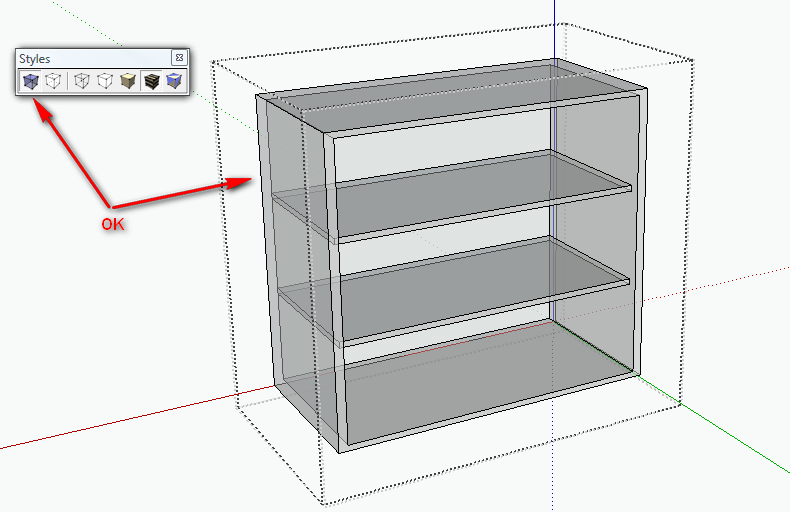
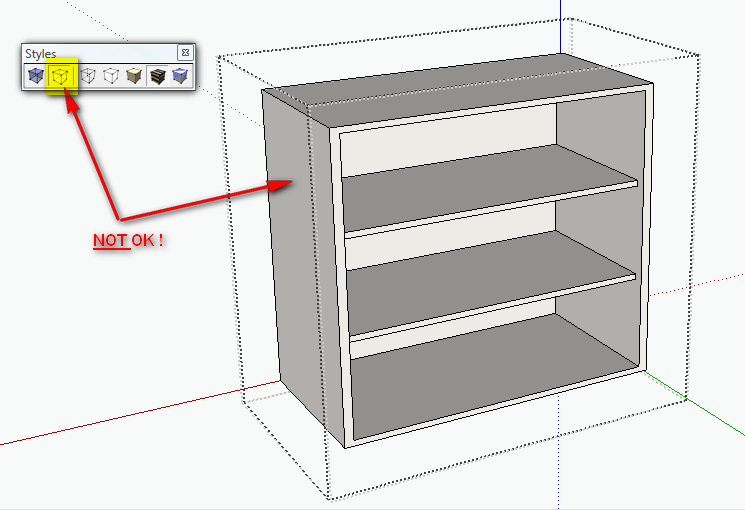
-
RE: Thea - Shadow catcher tutorial
@solo said:
faster to open hdri's and show thumbs than both irfanview and xnview.
Indeed, XnViev is a little slow, especially with large HDRIs (and most of them are pretty large).
-
RE: [Plugin][$] FredoScale - v3.6a - 01 Apr 24
In this post http://forums.sketchucation.com/viewtopic.php?f=323&t=17948&start=615#p349363 the target point for scaling was outside active model, so I was thinking that is the problem.
Now, in this model, the target is inside active BUT, the axis are not aligned with default. You will see the edges colored by Axis, because I oriented them in accordance with the model, but are not aligned with "Word UCS"(don't know if this is the correct naming; it's a reminiscence from AutoCAD )
)Could this help you to try fixing it?
Thank you.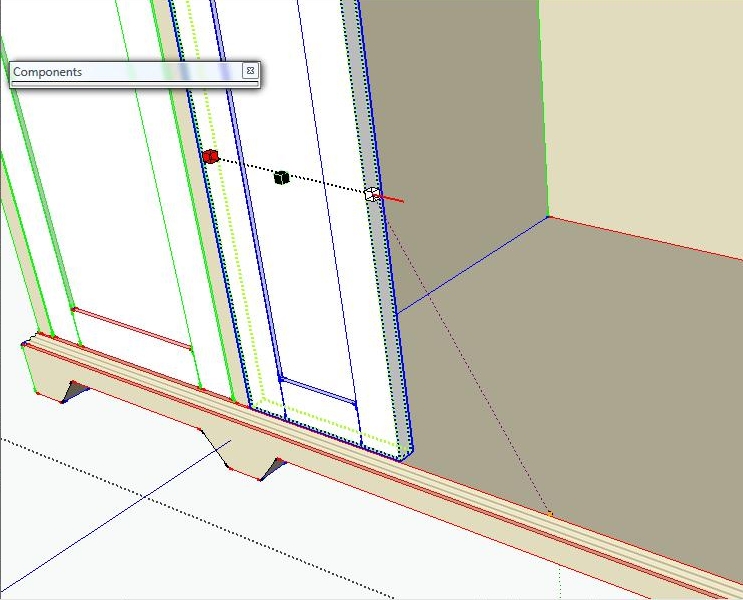
-
RE: Thea - Shadow catcher tutorial
@solo said:
Adam, I installed an app a while ago but cannot seem to find it online, I remember it was free and works well.
Here is a screengrab of the info box.
The link is dead

It also creates thumbnails.
The link is here: http://ict.debevec.org/~debevec/FiatLux/hdrview/
But I also use XnView -
RE: Update Low Poly SU cars
@solo said:
Quick Thea render, Raw render. no photoshop

How you did the composition, if is raw render?
 The shadows on ground are very accurate.
Are you so kind to write some steps?
Thank you. -
RE: SketchUp 8 full of visual bugs :( !!
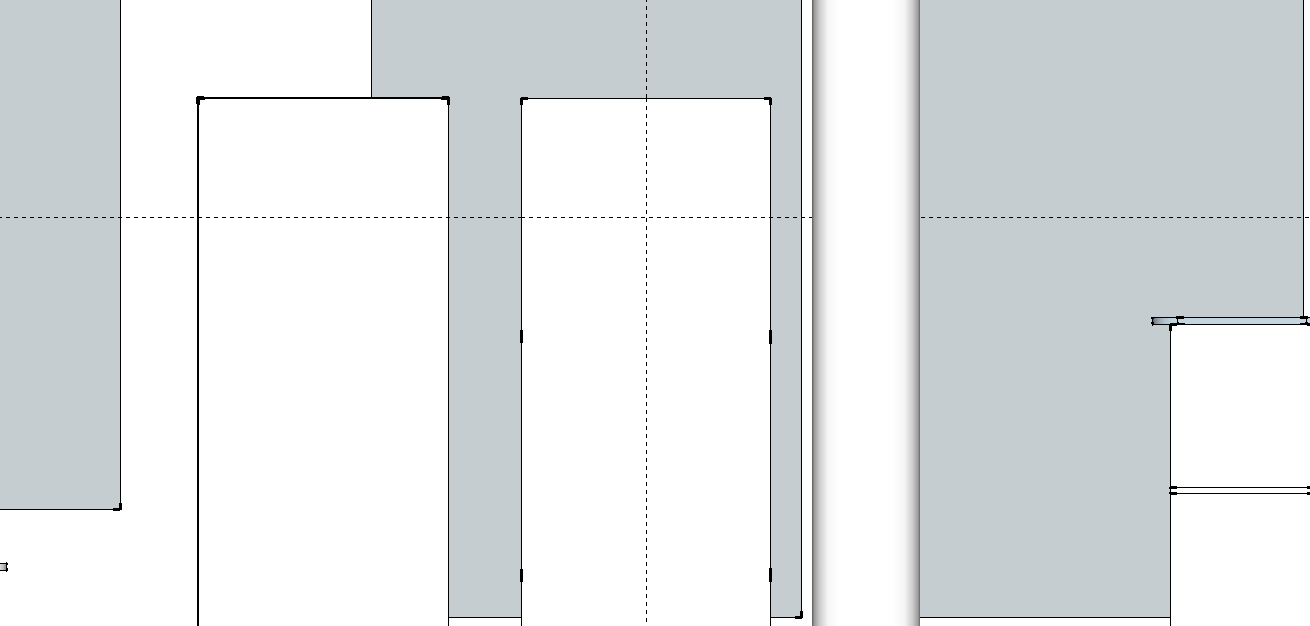
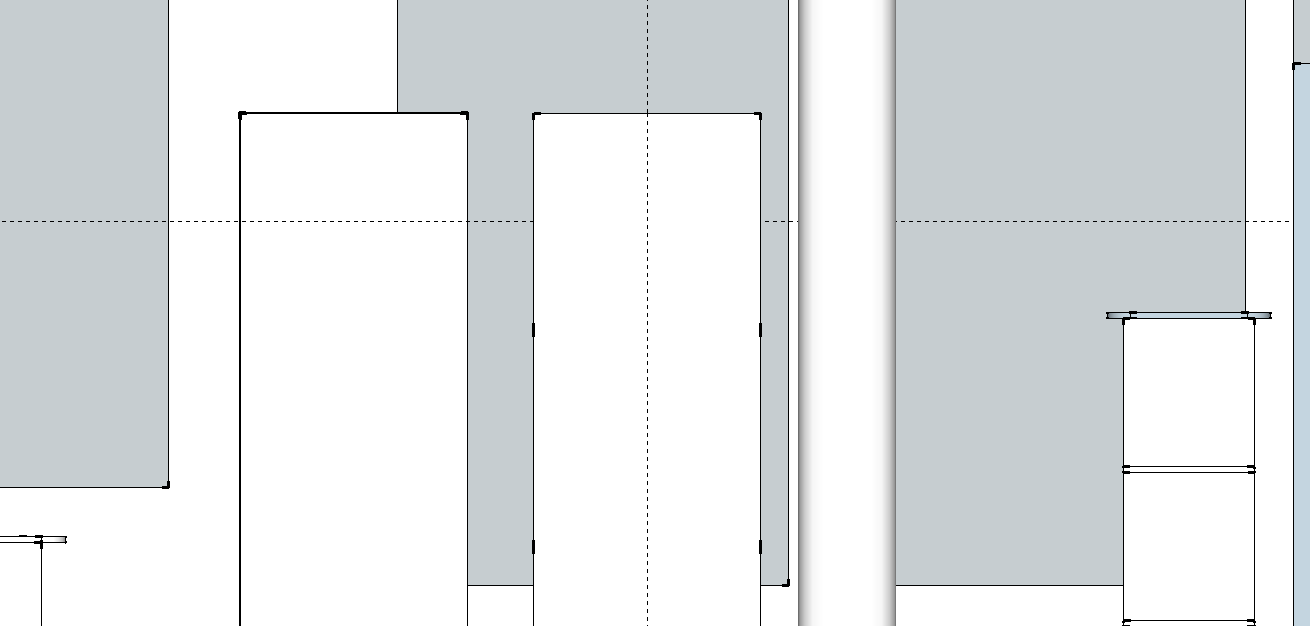
Here is a model where insertion points are in visible area (I made the guides from that face's edges).
Just zooming affects the visibility of the guidelines.
This need a fix I'm just hoping that somebody from Google's staff sees this and takes action.
-
RE: [Plugin][$] FredoScale - v3.6a - 01 Apr 24
@unknownuser said:
This may be normal. I did not invest enough time in this, so it is not bullet proof. It may be even work in some views and not in another one.
FredoSome time ago I played with projections and seems to not be too hard (like inference lock), is this somehow different? Is it any hope that this feature will be improved? It would be really nice.
Thanks -
RE: [Plugin][$] FredoScale - v3.6a - 01 Apr 24
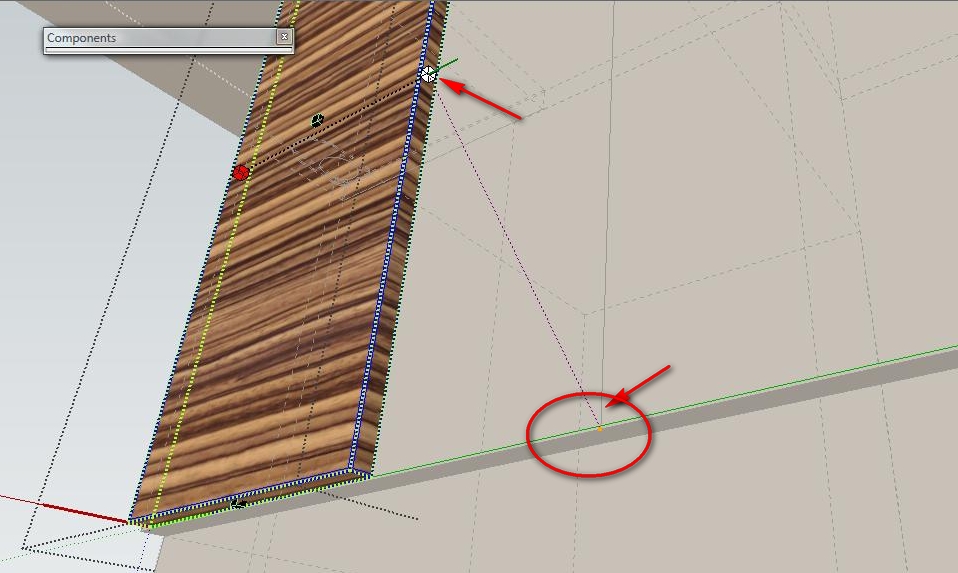
Is it a bug, or I do something wrong?
The inference for scaling don't work in certain situations. Please see the image. Is not the first time when it happens.
I tried to scale the door, to meet a line which was drawn in a group outside door component. The door scaled arbitrary.Thank you very much.
-
SketchUp 8 full of visual bugs :( !!
I'm very unhappy with this... and I doubt that will be resolved, as since SU6, each version was worse on this chapter.
First of all, I want to mention that I have a nVidia9500GT with latest drivers.Then I'll start:
- often guidelines disappear when too close of them . And this is very (un)helpful, as I need to snap a object in GUIDES INTERSECTION !!
- sometimes selection acts strangely, as selects entities from behind wanted face/edge. This is solved (for the moment) if I change the OpenGL settings. This doesn't happen often, but is noticed.
- leader text !! - can't select text, can't see it in exported images, even is View-Based. To be able to select the text, I have to rotate the model in such manner that some part of it to be on empty space. And that's not always possible. it depends on model.
And the bugs are more... I'm mystified by how Google guys make newer versions of SU and with each added feature, they mess up something that worked in the past. I'm scared about SU9 ...
 how bad will it be?
LATER EDIT - I forgot to attach the images
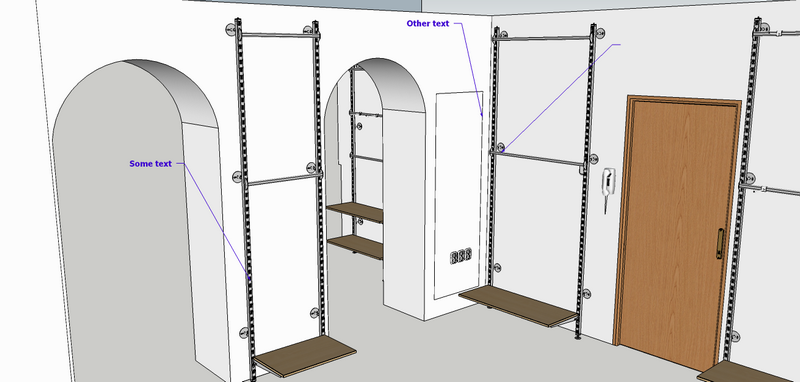
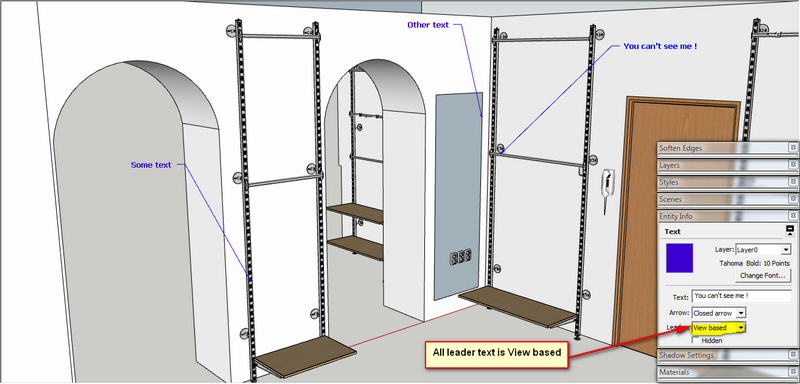
- often guidelines disappear when too close of them
-
RE: [Plugin] Custom Toolbars Plugin
any update for this plugin in the near future?
Thank you very much. -
RE: [Plugin][$] FredoScale - v3.6a - 01 Apr 24
@unknownuser said:
Not sure I understand.
In the check for update dialog box, the middle column ("info") is precisely the link to the Forum page.Do you get it?
Best is maybe to post a picture of the dialog box.
Thanks
Fredo
Thanks for pointing it to me. I only hovered on left column. I guess my I expected the entire line to be a link
So, when I saw that nothing happens, I never thought to try the underlined Info text. -
RE: [Plugin][$] FredoScale - v3.6a - 01 Apr 24
Could you modify the Update-Check window? For now it just highlights with red the outdated plugins. It would be useful to link to plugin's forum page.
Thank you. -
RE: Cassette
What you have on it? An audio-tutorial?

Indeed, awesome Why the tape has some stripes on it? (it can be seen in second wireframe image)
 -
RE: [Plugin] [$] Artisan (1.2.3) - Feb 28, 2014
@unknownuser said:
Firstly, here's a link to the Quick card...
http://artisan4sketchup.com/downloads/docs/Artisan%20Quick%20Reference.pdfHave you revised the settings to change the 'Create Proxy from group'? Are Subsurf Materials toggled to off?
Are you seeing a dialogue box popup when you subdivide a group. This allows you to set the iterations and to toggle auto-update.
Yes, thank you. I revised the settings, I watched again the tutorials, and it turned out that everything I done right. Maybe the problem is that on that file I ran before SDS and something made Artisan to not work properly. When I figured that, I exploded the group and started again. Some error alerts could help...
Thanks for answering.
-
RE: [Plugin] [$] Artisan (1.2.3) - Feb 28, 2014
Is it Artisan Forum still supported? I posted a question several days ago and no reply yet.
Also, I want to ask a question about how to use it. If I want the classic SDS behaviour, with Proxy and Subsurface, I need to run subdivide on a group first, then go inside that group, right? But when I run dubdivide on group, I can't choose how many iterations and as an example, in this moment, my SketchUp is not responding... and is doing this for more than 10 minutes yet... a little too much. If it tries to iterate 2 or 3 steps for starting, is a bullshit, because I don't want this. All I need is to have that two elements and continue editing the proxy.
There are many improvements since SDS, but still a lot of functions were taken away and replaced with something worse.
It would be awesome that this aspects to be revised.The plugin is not intuitive at all
I can use it, because I learned how to use it in the first place, and I used SDS before. But, for a newcomer is hard. It doesn't communicate with the user, one have to be sure to KNOW and remember everything from tutorials, because the plugin doesn't tell much. I'm sure that most time was spent on good functionality and I apreciate that a lot, but the interface and interaction with the user is equally important.Thank you.
-
RE: [Plugin][$] Tools On Surface - v2.6a - 01 Apr 24
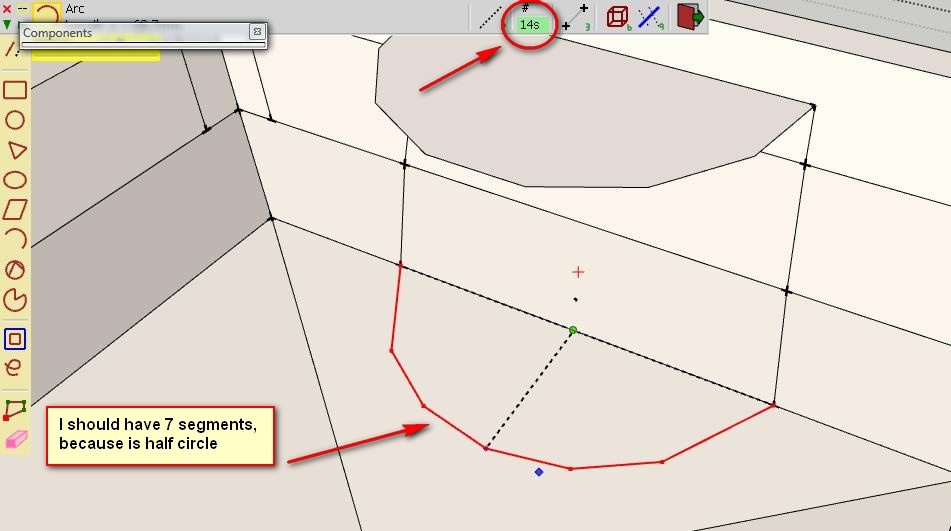
I have a problem with Arc tool. The number of segments is set fo 360degrees, so for half circle, I should have half number of segments.
I needed an arc with 7 seg, so I set 14seg/360. Instead I got a 6seg arc. See the image. is this any bug, or you wanted the tool to behave this way?
Thank you.
-
[REQ] Drop zero after dimension comma
I have no idea if there is a special expression for this in English. I'll try to explain what I'm thinking of:
On a dimension line, if the value is round (eg: 1500.0m) and precision is set to 0.0, would be possible to remove the zero after the comma? And to show decimals only if the value requires it (15.0 -> 15; 15.3 -> 15.3)Thanks for taking it into consideration.
-
RE: [Plugin][$] FredoScale - v3.6a - 01 Apr 24
@unknownuser said:
- There is no new scaling icon
This post mislead me http://forums.sketchucation.com/viewtopic.php?f=323&t=17948&p=344976#p343978 In the image are two scaling icons on toolbar
@unknownuser said:
- you need first to orientate the scaling box. Just click on the long edge of your component.
Fredo
Strange, I haven't done that before... is it a new feature? Also it is possible that I never was into position to stretch rotated components
Thanks for the tip. What about components that don't have edges collinear with axis orientation, how do we orientate the scaling box then?