sketchucation logo sketchucation
    • Login
    1. Home
    2. derei
    3. Posts
    Oops, your profile's looking a bit empty! To help us tailor your experience, please fill in key details like your SketchUp version, skill level, operating system, and more. Update and save your info on your profile page today!
    πŸ”Œ Smart Spline | Fluid way to handle splines for furniture design and complex structures. Download
    Offline
    • Profile
    • Following 0
    • Followers 0
    • Topics 147
    • Posts 828
    • Groups 1

    Posts

    Recent Best Controversial
    • RE: [Plugin] DXF_export v0.0.4 (2011-10-28)

      I'm very happy that I could help ! πŸ˜„ Indeed, I'm very interested in the development of this script, I'll be glad to test the next releases.
      For now, it doesn't bother me if it doesn't export faces, because for milling purposes, all I need are contours, arcs, circles, correct orientation and Layers (name, color).
      Indeed, respecting components (and groups, but not necessary), it would be a great thing! But take care to not process each instance of a Component Definition, because that would be redundant. Also, as I mentioned in the earlier post, if the content of each component would be saved as separate file in a chosen directory, would be awesome β˜€

      πŸ‘

      posted in Plugins
      dereiD
      derei
    • RE: [Plugin] DXF_export v0.0.4 (2011-10-28)

      Thanks a lot for this plugin!

      I tested it and it seems to have some bugs as follows:

      -it explodes everything in model.
      -it doesn't export faces.
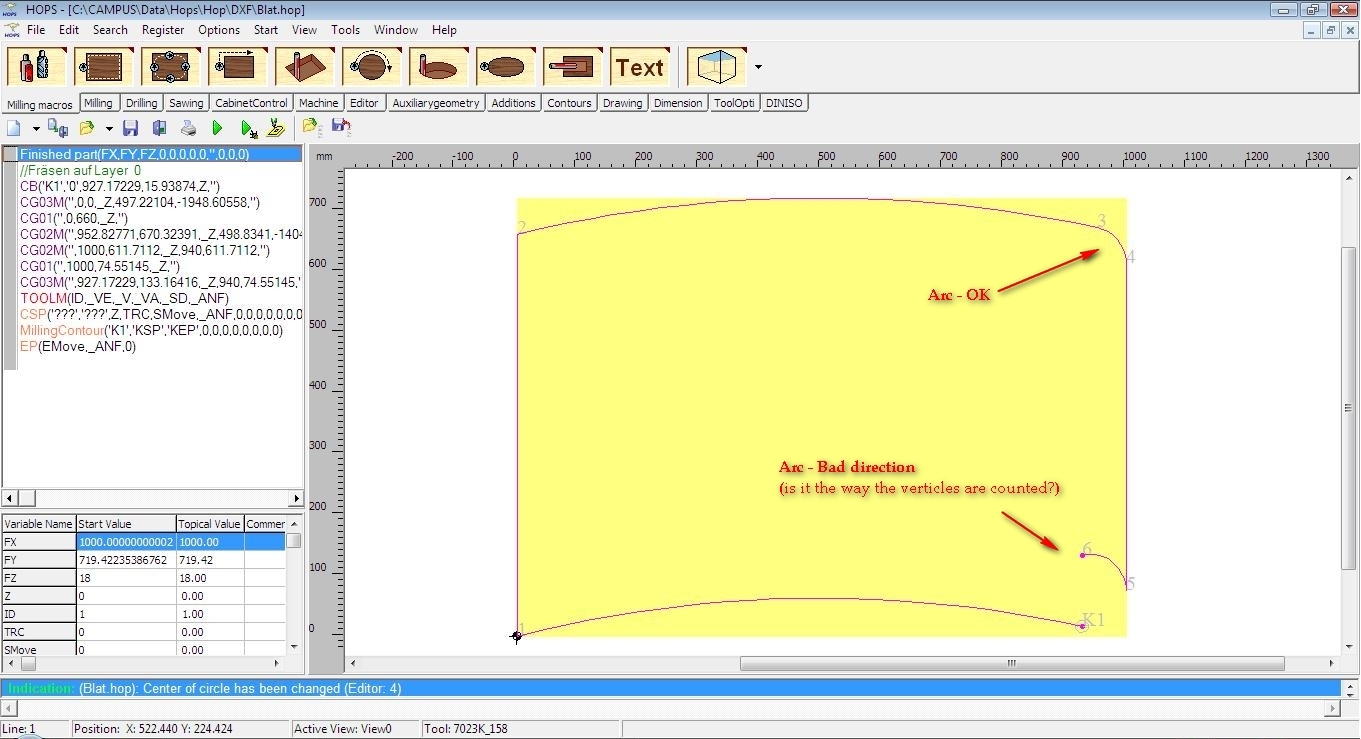
      -some arcs are oriented wrongfully. - funny fact is that the built-in SU8-PRO exporter does the same.
      -it behaves differently if everything in model is selected, or if nothing is selected.

      -what DXF version does it export? (most milling software need DXF2000)

      I also need DXF for CNC milling. I posted some request here: http://forums.sketchucation.com/viewtopic.php?f=323&t=40311&p=357180&hilit=batch+dxf#p356582 . Maybe your plugin can be tweaked to batch export each Component Definition(/group?) in a different file, on same folder, using Definition's name?

      Beloy you have:
      -resulted (exploded) SKP file
      -DXF from ALL SELECTED
      -DXF from NONE SELECTED (it asked to export entire model)
      -Image from NC HOPS (software for CNC Milling) which shows the wrongfully oriented arc.


      Sektchup2dxf.skp


      Selected ALL.dxf


      Nothing Selected.dxf


      HOPS_dxf.jpg

      posted in Plugins
      dereiD
      derei
    • RE: Joint Push Pull Classic (Old version) - v2.2a - 26 Apr 17

      @mitcorb said:

      Could it be that the faces were pulled internally because of the direction of your pull and the inference engine trying to snap to a vertex? I don't know, just asking.

      I'm not sure what you are asking...but if is what I think it is, it should be valid only for small distances and only for mouse movement. Or, I moved the mouse to avoid snapping and I input a value in VCB.

      posted in Plugins
      dereiD
      derei
    • RE: Joint Push Pull Classic (Old version) - v2.2a - 26 Apr 17

      Is it JPP polygon-limited ?
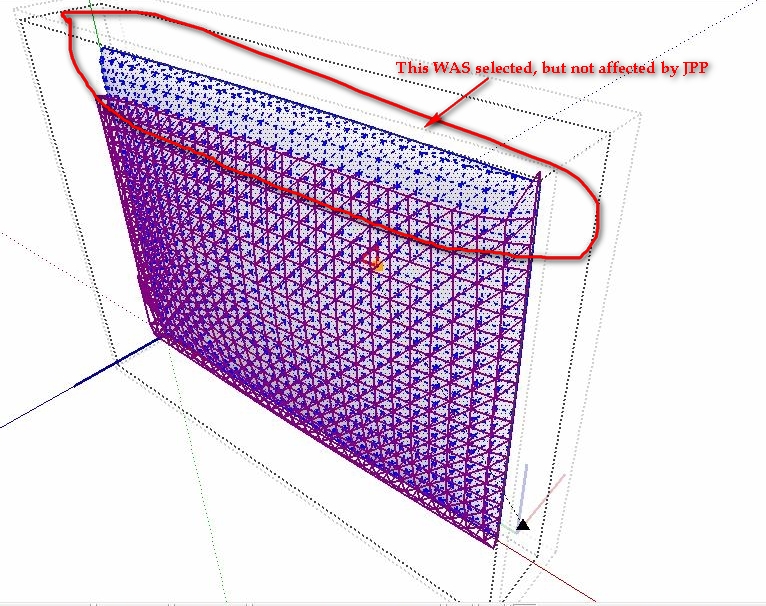
      I have a curved face and I wanted to add thickness to it. Unfortunately, JPP only affected a part of entire mesh.
      See below.


      JPP.jpg

      posted in Plugins
      dereiD
      derei
    • RE: New plugin found at ferrari architecture

      Can anyone post a step-by-step tutorial about how to use this plugin? I tried to use it, but failed. The help button send me to their website's homepage.

      What I did:

      1. selected 4 edges loop (no face inside)
      2. the menu has opened and I input a Inflating Force of 5
        here I get an error in RubyConsole:
      Error; #<FloatDomainError; NaN>
      (eval);286;in `ceil'
      (eval);286;in `create_cartesian_mesh'
      (eval);250;in `create_mesh'
      (eval);887;in `ferrariSketch_menu_select'
      C;/PROGRA~2/Google/GOOGLE~2/Plugins/FerrariSketch/FerrariSketchmenus.rb;11
      
      
      1. selected the edges again and pressed Calculate
        here I get another error:
      Error; #<NoMethodError; undefined method `length' for nil;NilClass>
      (eval);649;in `simulate'
      (eval);1016;in `ferrariSketch_menu_run'
      C;/PROGRA~2/Google/GOOGLE~2/Plugins/FerrariSketch/FerrariSketchmenus.rb;23
      (eval);286;in `call'
      (eval);286
      
      1. NOTHING CREATED

      What I do wrong ?

      posted in Plugins
      dereiD
      derei
    • RE: [Plugin] Component Edit Window v1.3 12072011

      It doesn't work for me 😞
      I tried to use it, but I get this error in console:

      Error: #<NoMethodError: undefined methoddefinition' for #Sketchup::Group:0xe7a4c58>
      C:/Program Files (x86)/Google/Google SketchUp 8/Plugins/component_edit_window_v1.0.rb:61:in atelier_edit_instance' C:/Program Files (x86)/Google/Google SketchUp 8/Plugins/component_edit_window_v1.0.rb:60:in each'
      C:/Program Files (x86)/Google/Google SketchUp 8/Plugins/component_edit_window_v1.0.rb:60:in atelier_edit_instance' C:/Program Files (x86)/Google/Google SketchUp 8/Plugins/component_edit_window_v1.0.rb:124 (eval):3:in call'
      (eval):3:in call' (eval):1:in get_New_Commands'
      C:/Program Files (x86)/Google/Google SketchUp 8/Plugins/component_edit_window_v1.0.rb:61:in call' C:/Program Files (x86)/Google/Google SketchUp 8/Plugins/component_edit_window_v1.0.rb:61

      posted in Plugins
      dereiD
      derei
    • RE: Question about colors...

      Thanks Pilou. Who would be more qualified than you ? πŸ˜„ You just LOVE Colors ! I was always been amazed by your colorful works.
      Indeed, after that graphic, the ratio would be this:
      R: 1.00
      G: 1.25
      B: 0.75

      posted in Corner Bar
      dereiD
      derei
    • Question about colors...

      I have a question to address, I knew this someday, but I forgot and I couldn't find an answer yet. Maybe I'll find it here.

      What I know is this: for the human eye to perceive two colors (eg: red and green) at same intensity, is necessary that red color to be brighter.

      My question is what is the ratio between red/green/blue so, the eye to see them at same intensity ?

      posted in Corner Bar
      dereiD
      derei
    • RE: Importing SVG

      Any fix on that in the meantime?
      Thanks.

      posted in Plugins
      dereiD
      derei
    • RE: [Plugin] CleanUp

      @thomthom said:

      The way CleanUp traverses the model it's tricky to know what is part of a locked group or not. But I'll put it down for investigation.

      You can use ruby to check if is locked or not
      http://code.google.com/apis/sketchup/docs/ourdoc/group.html#locked?
      http://code.google.com/apis/sketchup/docs/ourdoc/componentinstance.html#locked?

      posted in Plugins
      dereiD
      derei
    • RE: [Plugin] QuadFaceTools

      @thomthom said:

      When you go to Window > Preferences > Extensions you can find the version from there.
      I'll add an About menu to the next version.

      If you want to add it only for version, you can add version in toolbar name.

      posted in Plugins
      dereiD
      derei
    • RE: [Plugin] QuadFaceTools

      I wasn't aware that you released a fixed version. I don't know how to check the version (it doesn't appear in toolbar's name, or anywhere else). So I reinstalled the plugin, with one I downloaded now and it works just fine.

      Thank you very much.

      posted in Plugins
      dereiD
      derei
    • RE: [Plugin] QuadFaceTools

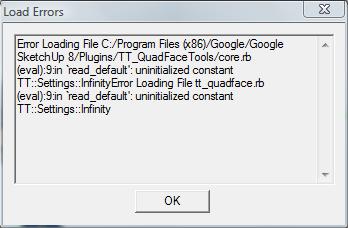
      Hello thomthom, do you have any answer related to the error I mentioned here http://forums.sketchucation.com/viewtopic.php?f=323&t=39442&start=75#p358895 ? Now it happens every time I start SU. I don't know why at first happened only on second instance.

      posted in Plugins
      dereiD
      derei
    • RE: [Plugin] FollowMe and keep (v0.04 update 20090210)

      I'm trying to run FAK on a face + path but it doesn't o anything.
      Can anyone point me where I'm wrong? I tried with a simpler shape (arc + rectangle) and it worked. Is it something wrong with this particular model?

      Model attached. Thank you.


      no_FAK.skp

      posted in Plugins
      dereiD
      derei
    • RE: Need texture like stone in the image, thank you.

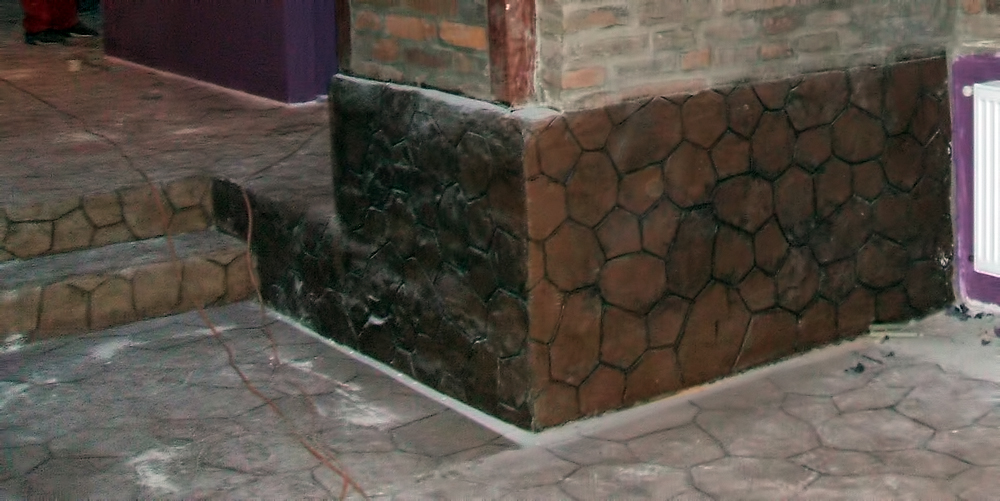
      For who will need such a texture in the future and no better one will be available, I ended up making one. Is not very good, but is the best I could do.
      Here it is:
      Textura piatra_C.jpg

      posted in SketchUp Components
      dereiD
      derei
    • RE: [Plugin] QuadFaceTools

      @thomthom said:

      Does that happen every time?
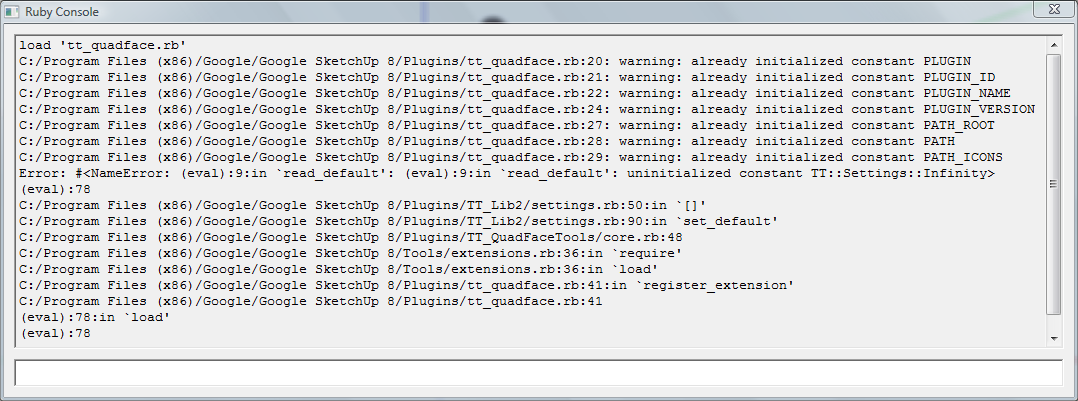
      After you've gotten such an error, what do you get if you open the Ruby Console and type load 'tt_quadface.rb'?

      It does every time.
      If I load it from console, it happens this:
      QuadFace_reload.png

      posted in Plugins
      dereiD
      derei
    • RE: [Plugin] QuadFaceTools

      Hello, I noticed a error when opening a a second SU instance (if I have one already opened and I want a second one), you can see it here.
      Thank you.


      QuadFace_error.png

      posted in Plugins
      dereiD
      derei
    • Need texture like stone in the image, thank you.

      Anyone has any stone texture like in image? I would appreciate if you will share it with me.

      thank you.
      stone.jpg

      posted in SketchUp Components sketchup
      dereiD
      derei
    • RE: Rezidual EndPoints on welded edges - bug or normal ?

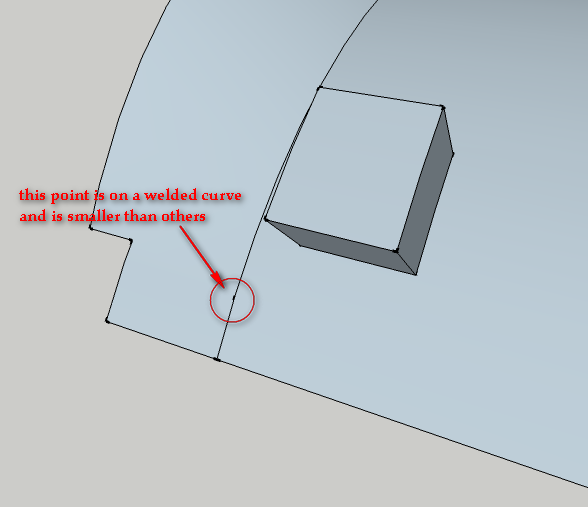
      Here is a sample model and a image showing the problem
      Ceiling.png


      Ceiling.skp

      posted in SketchUp Bug Reporting
      dereiD
      derei
    • Rezidual EndPoints on welded edges - bug or normal ?

      I often see some kind of nodes, smaller than End Points, on welded edges or arcs obtained by drawing an arc over a exploded set of edges. The line gets selected all, but somewhere on it I can see those small marks, as the lone would break in that pont...
      Is it a bug, am I doing something wrong ?

      Thanks.

      posted in SketchUp Bug Reporting sketchup
      dereiD
      derei
    • 1 / 1