Thanks. Exchanged the Medium for the Small today, just using the basic Intuous Pen and Touch version. Not sure if it will make its way into the SU workflow, but when I don't have a deadline I'll be looking at adding it into the mix.
Oops, your profile's looking a bit empty! To help us tailor your experience, please fill in key details like your SketchUp version, skill level, operating system, and more. Update and save your info on your profile page today!
Sketchucation Tools 5.0.7 | Licensing improvements and bug fixes Learn More
 Offline
Posts
-
RE: Paging all Wacom Users
-
RE: 3d Connexion SpaceNavigator Workflow
Thanks for the replies. This is great. I'm working with the SN in the left hand, mouse in the right. Still thinking about Wacom... but I need to swap the medium tablet for the small. Too much hand movement for SketchUp... pretty coo for drawing and sketching though.
-
Visualizer
Is it still around?

Hopefully its just a lapse in paying for their certificate...
I was hoping to try it out to do some watercolor / line work images for a house I'm working on. -
Paging all Wacom Users
Like my other recent post about the SpaceNavigator, I'm curious about your workflow.
Damned thing is going to require some patience.I just got the Intuous Pen and Touch Medium... would spring for the Pro medium, but its huge. Maybe a Pro small? I'm a mobile kind of guy.
Was hoping to make the SpaceNavigator and the Wacom my new drawing system... but damned.
What settings is everyone using for pressure, mouse height, key mapping, etc.
-
3d Connexion SpaceNavigator Workflow
Who uses one?
What is your workflow? Are you programming the radial menus (slow, in my testing)...
Or are you reaching for the keyboard? -
RE: Views Toolbar Grey Out
i don't run any of those.. but the problem seems to have gone away. i disabled Fredo scale and a few other plugins that I don't need on a daily basis and it seems to have corrected itself. will reply back if i find things get wonky again.
-
RE: Views Toolbar Grey Out
@dave r said:
I don't think the SCF plugin manager will check plugins that weren't installed by it. So perhaps you do have an ancient copy of something. The advice on installing plugins has been to only install fresh and not from an older version of SU or from an old archive. This really start with SU2014.
yup
been there and done that.
had 2015 on the old machine.
migrated everything over and then updated to the latest update when I got the ping from the SU updater.something wonky going on.
working fine on the 17" MacBook that I'm typing this from... -
RE: Views Toolbar Grey Out
@box said:
Do you have any very old versions of plugins, something you may have copied from another version because you couldn't find a newer one?
Something like a toolbar manager or a launcher.
It's straining my memory of which plugins tended to cause it. It was something to do with plugins creating too many menu items for SU's memory so it dropped some out to make space.
Much like when I learnt how to brew my own beer I forgot how to drive.The sketchUcation manager says I'm up to date... so, not sure whats going on. Will go through and double check. I brought everything over with a Time Machine migration. Only thing I had to do was update my license information... then I updated SU and started working.
I read somewhere that Fredo's tools might have been a cause (way back when...) - I don't use them everyday so I disabled them but have not worked enough this evening to see if it is fixed.
-
Views Toolbar Grey Out
My Views toolbar is going grey. And occasionally some of the right click menu items are going grey.
(select toys went earlier today)
Close / Reopen SKP seems to work. Not sure what is causing this.
MBPRetina, 2014
SketchUp Pro 2015, just updated yesterday when I migrated from old laptop to new. -
RE: SU and LO CPU vs GPU usage (for documents in LO)
I opted for the 15" MacBook Pro and am very happy thus far. A complex remodel project that I'm doing construction docs for is moving along without stressing the new machine like it did my old one (I have them sitting side by side...)
Not the ideal workhorse for some folks - but as I'm mobile its a good choice for me.
I've been using the activity monitor - I can see CPU load but not GPU load, but can check that the discreet card is in play whenever I have this file open.
Will do some comparisons on a series of shadow studies I did earlier in the year to see how it handles that.
-
SU and LO CPU vs GPU usage (for documents in LO)
How much work in SU and LO is done by the GPU vs. the CPU?
I read that LO 2015 can now take advantage of the GPU when rendering certain types of graphics (vector, I believe).
I also understand that SU uses the CPU for most drawing - until textures and shadows come into play (shadows are something I rarely use in day to day work, but occasionally I do studies for clients).I do use hidden line in SU a lot to peak inside geometry to understand whats happening inside the structure.
My workflow is 60% SU, 30% LO, and a mix of video and photo output (never photo realistic rendering).
On my machine LO is a slow beast whenever I get into a complex model for construction documents. Recently I have been having to setup my pages as raster, and then I come back and set them to hybrid or vector depending on what I need for output.
I'm working on a late 2011 MacBook Pro 17" 2.4g i7 processor, 16g ram, AMD Radeon HD 6770M
I'm in the market for a new computer, been eyeing the new iMac Retina if I want a desktop, or the 15" MacBookPro. Wondering if I should I weight the build towards the better processor or the GPU (not a choice on the laptop, but I have options on the iMac?
Does it matter? Or maybe I'm just playing with dated hardware... and anything will be an improvement.
-
RE: PDF to Layout?
On a Mac just import the PDF.
I sometimes clip out just the bits I want.Be careful with scale, if that is critical to your work.
I haven't found the PDF>DXF or DWG converters to work very well if there is alot of text, hatching, leaders or dimensions.
-
RE: Label from Component Attributes
Thanks for the link to the script. What is a RAR file?
-
RE: Label from Component Attributes
OK, so I can get this to work if I use the CONCATENTATE fucnction - but if I edit the component and push pull it does not update the field unless I force a component Redraw from the menu.
Any other way to do this?
-
Label from Component Attributes
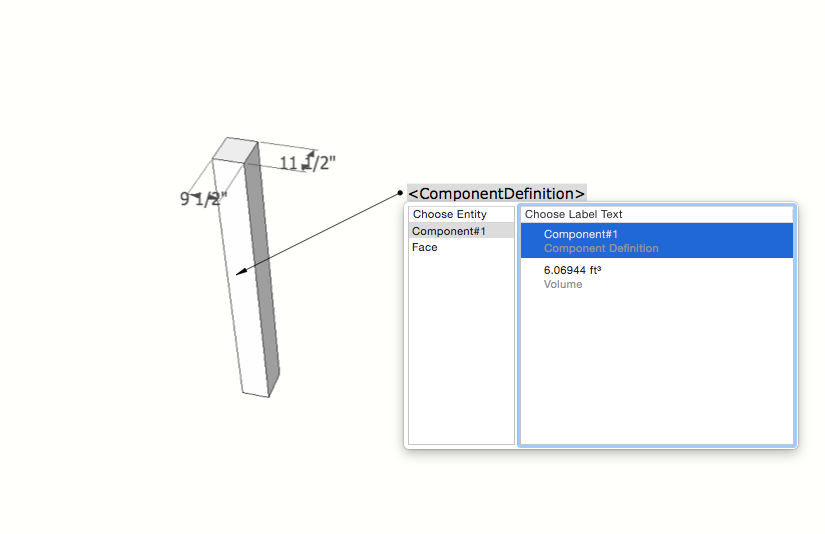
Is there a way to build a text label (custom attribute) from component attributes?
I'd like to create a component that had a 'TimberSize' label as a custom attribute.
This attribute would be 'LenX'x'LenY' - it would report back 8x10 or 7.5x9.5 or 2x4.
Note that I don't care if the 'x' is another character.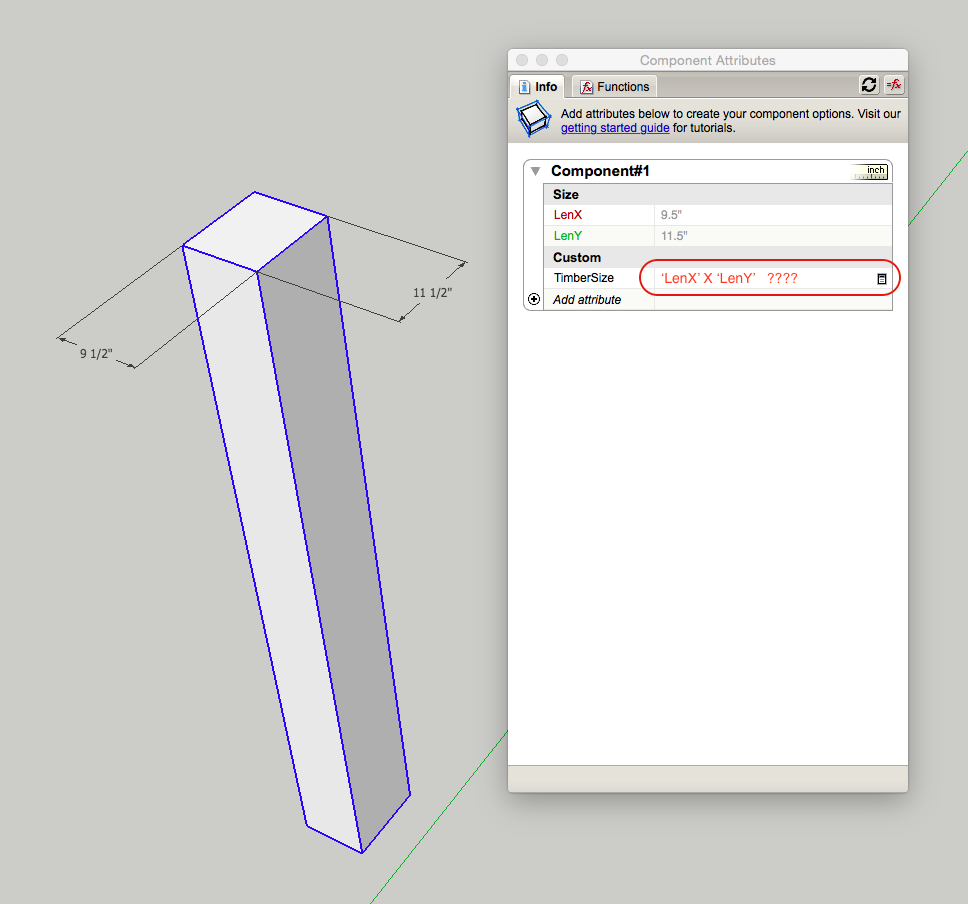
I could then make use of the LayOut leader tool to speed up my labeling of timber / framing components.
-
RE: Modeling Techniques for proper construction drawings
Those are nice details João!
I like showing both flat, 2d section cuts as well as 3d views of how things come together.
-
RE: Modeling Techniques for proper construction drawings
@pbacot said:
Mike,
Are you taking those sections off the building model or recreating altogether. Are they essentially 2d drawings or from 3d ( building model or 3d mockup just for the detail)?Peter
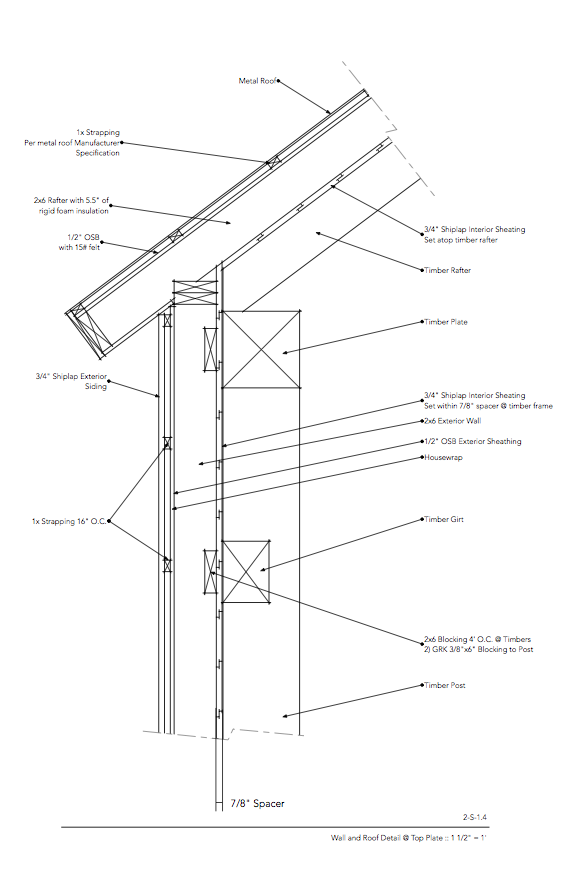
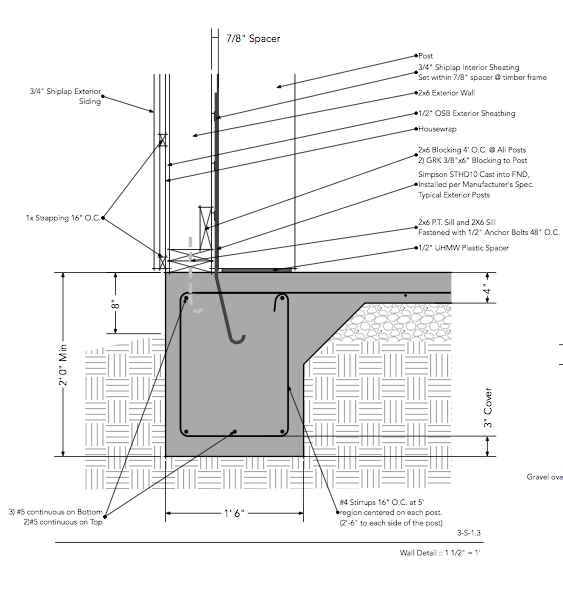
Both, depends on the job. They are usually always 3d, where I copy / paste select parts out into a new drawing to develop the details. And I've been doing some of the stuff in LO - like the rebar / etc. Just faster sometimes.
Typically my LO files have 2-3 models referenced. I usually have a model that I pull apart to show structural details (to keep the original model used to develop sections / plans un touched), then one for walls / plans / etc. - then one where I might pull specific sections out.
-
RE: Modeling Techniques for proper construction drawings
@mk11 said:
@bmike said:
I model and assume framing dimensions for my main plans / sections.
I detail wall sections as appropriate in a separate SKP and bring that in to show how it all fits together.I did 1 set of drawings where I modeled every I joist, stud, etc... turned into a fun exercise - but total overkill for most buildings.
I thought about that too. Works if you're doing no outsulation and siding. Problem is if you have fairly thick wall assemblies, it throws of setbacks, gross sf calculations etc. etc. Nice details btw.
Thanks...
When I've done that I've just modeled everything beyond the framing as a single mass. Cut into the details and you can get specific... -
RE: Modeling Techniques for proper construction drawings
I model and assume framing dimensions for my main plans / sections.
I detail wall sections as appropriate in a separate SKP and bring that in to show how it all fits together.I did 1 set of drawings where I modeled every I joist, stud, etc... turned into a fun exercise - but total overkill for most buildings.