sketchucation logo sketchucation
    • Login
    1. Home
    2. bjornkn
    3. Posts
    Oops, your profile's looking a bit empty! To help us tailor your experience, please fill in key details like your SketchUp version, skill level, operating system, and more. Update and save your info on your profile page today!
    ⚠️ Important | Libfredo 15.6b introduces important bugfixes for Fredo's Extensions Update
    B
    Offline
    • Profile
    • Following 0
    • Followers 0
    • Topics 12
    • Posts 350
    • Groups 1

    Posts

    Recent Best Controversial
    • RE: Organic modeling from photos?

      @unknownuser said:

      No no, it's a real 3D file x,y,z, format export OBJ

      Yes, but the x and z are probably in an evenly spaced grid, one per pixel, if there's one vertex (face) per pixel. Then you can't have more than one vertex per xz position (assuming y is the depth), and you will get no details at the top and bottom. That is just like a DEM, where you have a xy grid where each pixel/face will have an altitude z value, making it impossible to get overhangs etc, and with very little, and streaked, details on very steep walls/slopes.

      posted in Organic Modelling
      B
      bjornkn
    • RE: Organic modeling from photos?

      Well, they look pretty flat to me πŸ˜‰

      I believe it doesn't really work with 3D coordinates, but more like 2 1/2D?
      According to the info it makes a mesh with 1pixel = 1 face, and then adds depth info to that pixel. WHich means that a 6Mpx image will make a 6Mpoly mesh (or even 12 million triangles?)
      Making 6 of those around the object (what about from above and below?) and trying to use SU to weld those 6x6 million faces (36 millions!) together won't be a fun job πŸ˜‰
      It looks like it could work fine for making normal and bump maps though πŸ˜„

      posted in Organic Modelling
      B
      bjornkn
    • RE: Organic modeling from photos?

      @unknownuser said:

      @unknownuser said:

      and only makes a textured 3D relief.

      Yes but as it's a 3d file, just make the turn of your object πŸ˜‰
      So maybe 12 photos and past the result πŸ˜‰

      Let's see an example? πŸ˜‰

      posted in Organic Modelling
      B
      bjornkn
    • RE: Organic modeling from photos?

      Kites (aka KAP) are nice if there's wind and you're not close to people/buildings/trees/power lines.
      Balloons, blimps, RC helis etc are nice if there are no wind, people/buildings etc
      Poles are nice if you want closeups from lower altitudes than possible with a kite, and works fine anywhere, regardless of wind, people/buildings etc.
      Besides, it requires a lot less rigging/setup and is a lot cheaper πŸ˜„
      A sturdy telescopic 7m pole may cost you $100?

      BTW, PhotoSculpt seems to have a very limited use for modeling, as it can only use 2 photos, and only makes a textured 3D relief.

      posted in Organic Modelling
      B
      bjornkn
    • RE: Organic modeling from photos?

      Photosketch looks nice, but it is advertised as a tool for creating lowpoly buildings inside SketchUp.
      Just like SU's own PhotoMatch, but with some automation, like undistorted photos, point clouds and higher precision?

      What dense point clouds does is using brute force, just like when using DEMs for generating landscapes. You really often need millions of polys to get a well defined model with crisp details/creases. It often ends up looking like a metaball/blob object.
      The beauty/power of PhotoScan is that it gives you the tools to model from photos fully controlled, and even make very dense automatically surface-fitted meshes like with point clouds, if that's what you want.
      And it can be used with any object, buildings, complex/concave organic forms, terrain - even with glass and shiny objects (which never works with point cloud mesh generators).
      I really doubt that any of the point cloud generators would have any chance to make an automatic model of something like this sharp edged, complicated/overlapping stainless steel sculpture?


      Volare.jpg

      posted in Organic Modelling
      B
      bjornkn
    • RE: Lost ACAD User

      Every edge in SU have a midpoint that can be used for snapping/inferencing.
      But if you meant the midpoint between 2 non-connected points I don't think there are any other ways than to draw a temporary line between them and snap to the midpoint. Or use some construction lines?

      Mirror can also be done by move/copy and scale with -1.0, or by using one of the Flip commands.

      In the beginning with SU I always tried to fix and use the imported Acad files.
      But now I never use them directly, because it is often much more work fixing all the problems than to start from scratch. I just make sure that any dwg/dxfs are grouped and put on layers, and then use them for inferencing/snapping.
      But then I never made those Acad files myself, so when you have more control on how they are made you might have more luck?

      posted in Newbie Forum
      B
      bjornkn
    • RE: Organic modeling from photos?

      @aerilius said:

      I would like to have drone for taking aerial photos of the original subject of my first post πŸ˜‰

      You could get a long way with a camera pole too πŸ˜„

      Out of curiosity - is that rock model on GE now? If it is - where is it exactly?
      Looks like a very strange formation.

      And did you try PhotoScan too?

      posted in Organic Modelling
      B
      bjornkn
    • RE: Organic modeling from photos?

      I have no idea how well that Lightcraft toolset works, but according to the info in that link it is a set of Maya plugins, making it useless if you don't own Maya (which I don't).
      I have used such photogrammetry software for many years, PhotoModeler and ImageModeler, and now also Tgi3Ds PhotoScan (with plugin for SketchUp), and I can tell you that with PhotoScan making such a model should be much easier/better than with those two other tools.
      There are also some free "3D scanners" available, but AFAIK they all produce huge, dense point clouds, which wouldn't be very useful for SU/GE work.
      With PhotoScan you can control exactly how much detail you want in the geometry and how much detail you leave up to the textures (applied right inside SU with PhotoMatch tools).

      Some of the photos you posted are croppped, which is not good for any photogrammetry software..

      -- I noticed that the thread is old, so the "case may be closed" already?

      posted in Organic Modelling
      B
      bjornkn
    • RE: Interesting Furniture

      What a brilliant idea πŸ˜„

      posted in Corner Bar
      B
      bjornkn
    • RE: PVC Piping system

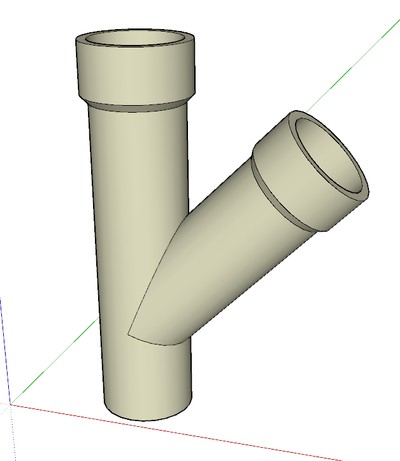
      Looks nice Dave, but I wouldn't think that kind of Y is available for sale?
      A One -> Two Y, or upside down Y ?
      AFAIK a plumbing Y is usually like this. Probably cheaper to make too?


      Clipboard-2.jpg

      posted in Newbie Forum
      B
      bjornkn
    • RE: Any advice on this complicated shape?

      I'm surprised that nobody have pointed at your bacwards faces yet πŸ˜‰
      You should try to kkep all those blue faces (back sides) facing backwards (Reverse face(s) in context menu)

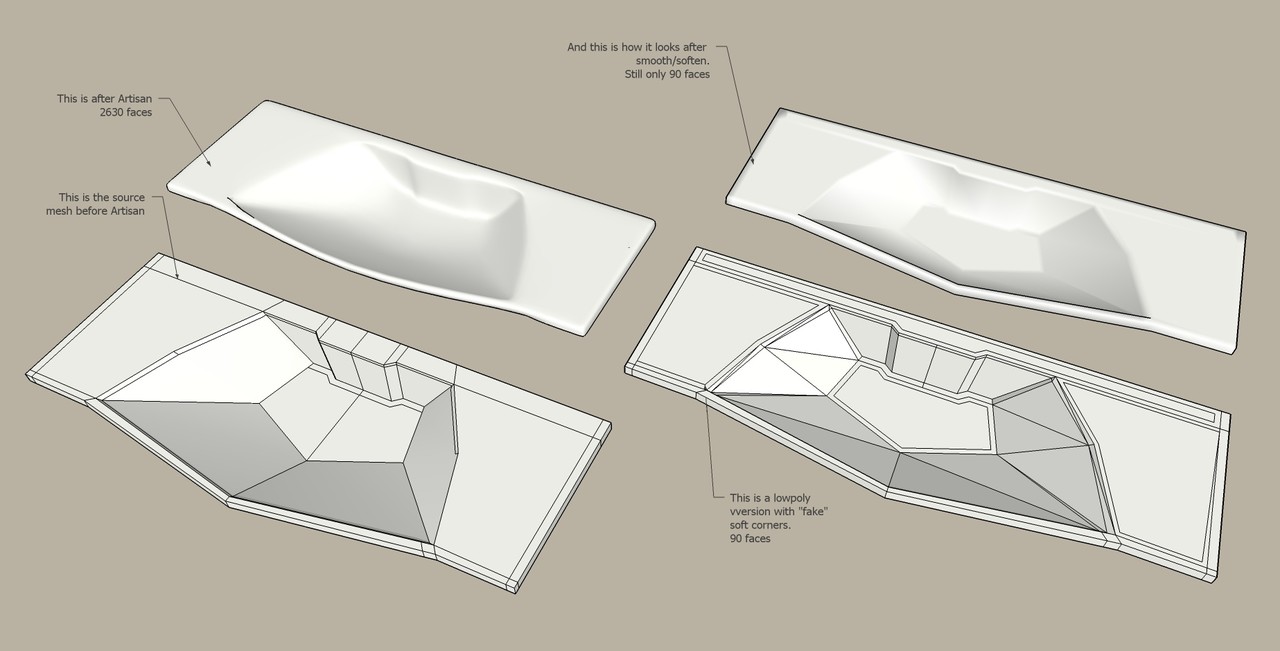
      Here are two possible ways to model such wash basins, one highpoly with Artisan, and one lowpoly (only 90 faces here).
      In both cases you model a coarse, blocky version.
      For the low poly version I'm using an old trick to get soft edges. Instead of smoothing the edge with a bevel or rounded edge I just add a coplanar edge on both sides of the edge, using COntour (if possible). The corner may still be 90 degrees, but with heavy smoothing (more than 90 degrees) it still may look very soft at a distance.
      The bottom of the basin has an inset contour that is too close, which makes it look more flat than it should?

      Curviloft from Fredo and TIGs Extrude Edges tools would also be good tools for this wash basin. And so would Amorph from Tgi3D.


      washbasins.jpg

      posted in SketchUp Discussions
      B
      bjornkn
    • RE: Newbie desperately need help to keep her job

      Sounds like a bleak future πŸ˜‰
      You could always download fully working trial versions of both Artisan (15 days?) and tgi3D/Amorph/PhotoScan (30 days), make the sofa and impress him so much that he opens his wallet πŸ˜‰
      It is not impossible to make it without plugins, but it would be a lot more difficult and time consuming.

      posted in Woodworking
      B
      bjornkn
    • RE: Better Renders

      @adamb said:

      LightWave Subdivision surfaces are a different thing entirely. They are fundamentally a modelling primitive (with a nice limit surface), whereas Displacement shaders are about rendering your model.
      Yes, LWs subdivision surfaces makes subdivided polys, which the render engine handles as any other polys. The point is that while other renderers may displace vertices that are really "not there", LW (and some others?) will not. It will only displace vertices that are either in the model, or generated by the SubD engine on-the-fly. IOW it will not displace every pixel in the texture, but every vertex in the mesh. It is still very useful for many things though.

      posted in Extensions & Applications Discussions
      B
      bjornkn
    • RE: Better Renders

      @adamb said:

      @unknownuser said:

      Displacement map (typically grey-scale) actually modifies the mesh (moves the vertices about).

      Well thats not quite how it works.

      That depends on who you're asking πŸ˜‰
      Some engines can do microfacet/subpoly displacements, and some can not.
      The render engine in LightWave will only displace real vertices (or subD'd), while other renderers (like vRay?)can make a lot more detailed displacement than the mesh density, and thus be used for making 3D grass etc.

      posted in Extensions & Applications Discussions
      B
      bjornkn
    • RE: Most annoying SU behavior

      Re selection sets:
      You could always save/update all your scenes without any layer visibility stored.
      Then you make a few scenes with only the Layer visibility stored,
      like L-All, L-NoPlans, L-NoModel and so on.
      I do this all the time, as it saves a lot of time and frustrations when working on big projects with lots of layers, versions of dwg-imports etc.

      posted in SketchUp Feature Requests
      B
      bjornkn
    • RE: Model this: Snoopy

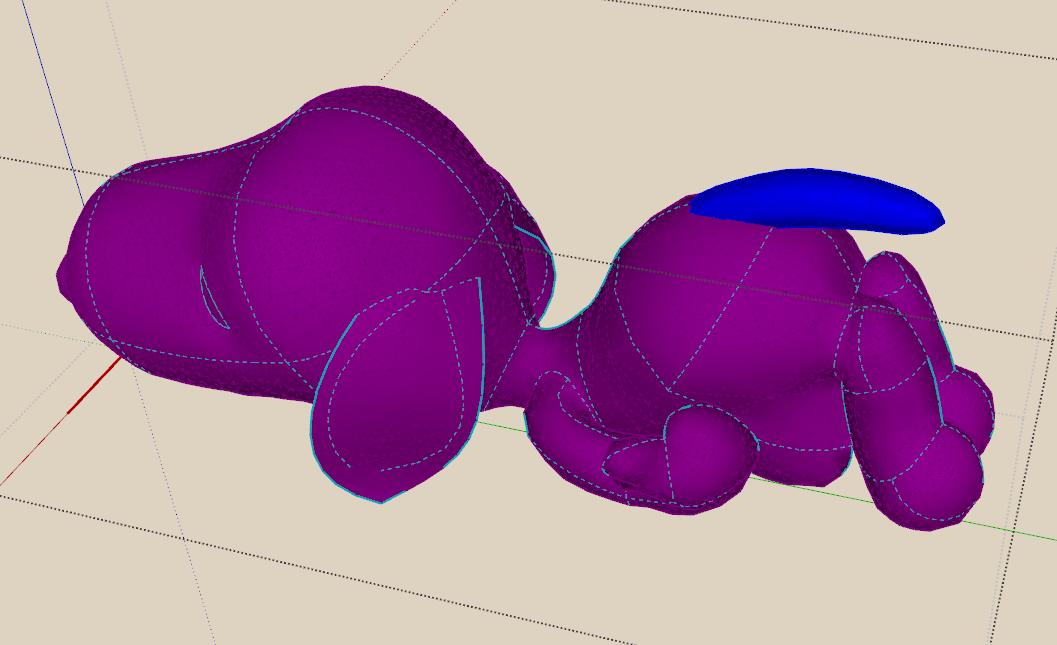
      Here's a less chaotic looking dump of the curves used.


      Clipboard-39.jpg

      posted in Organic Modelling
      B
      bjornkn
    • RE: Model this: Snoopy

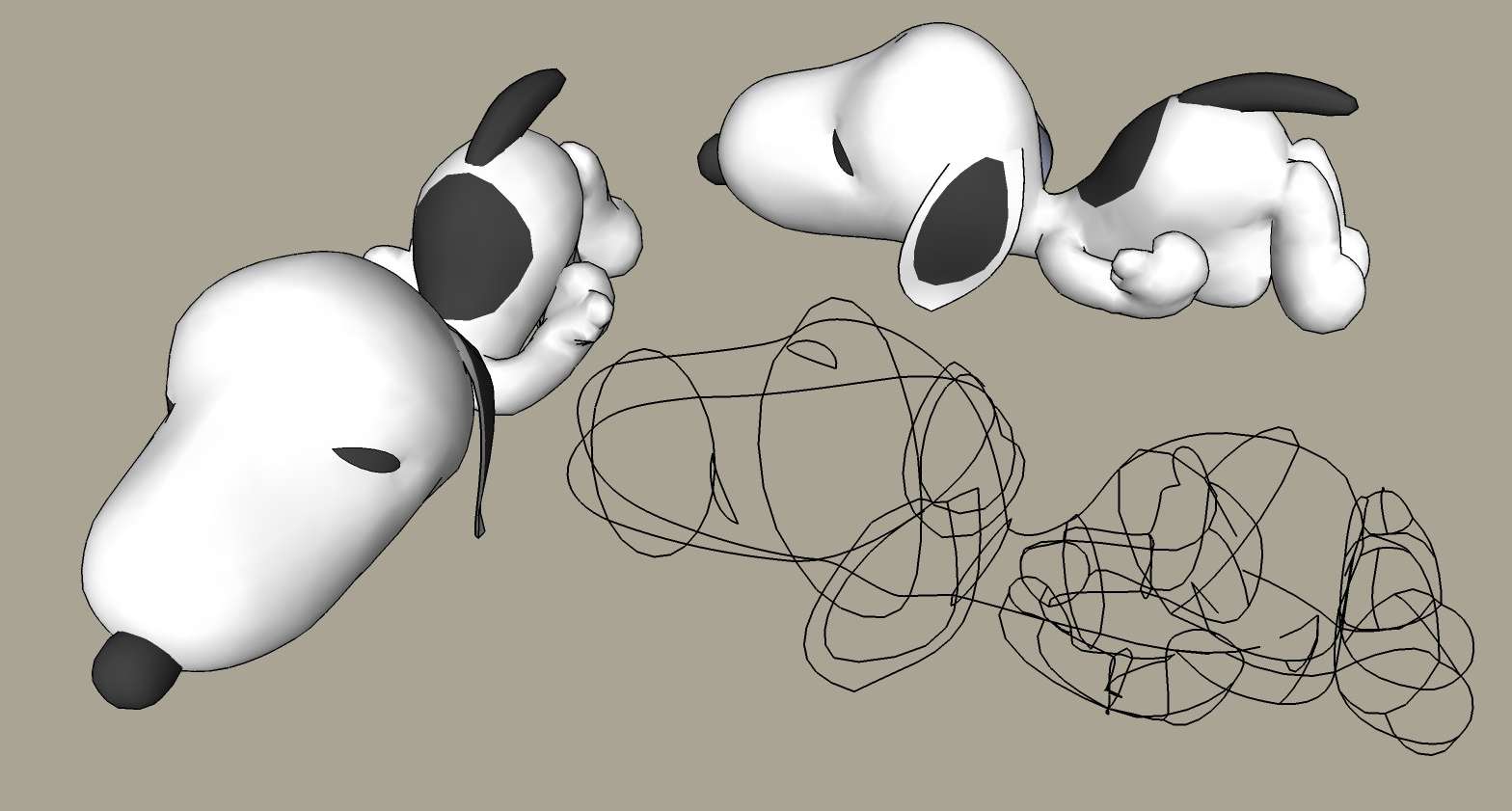
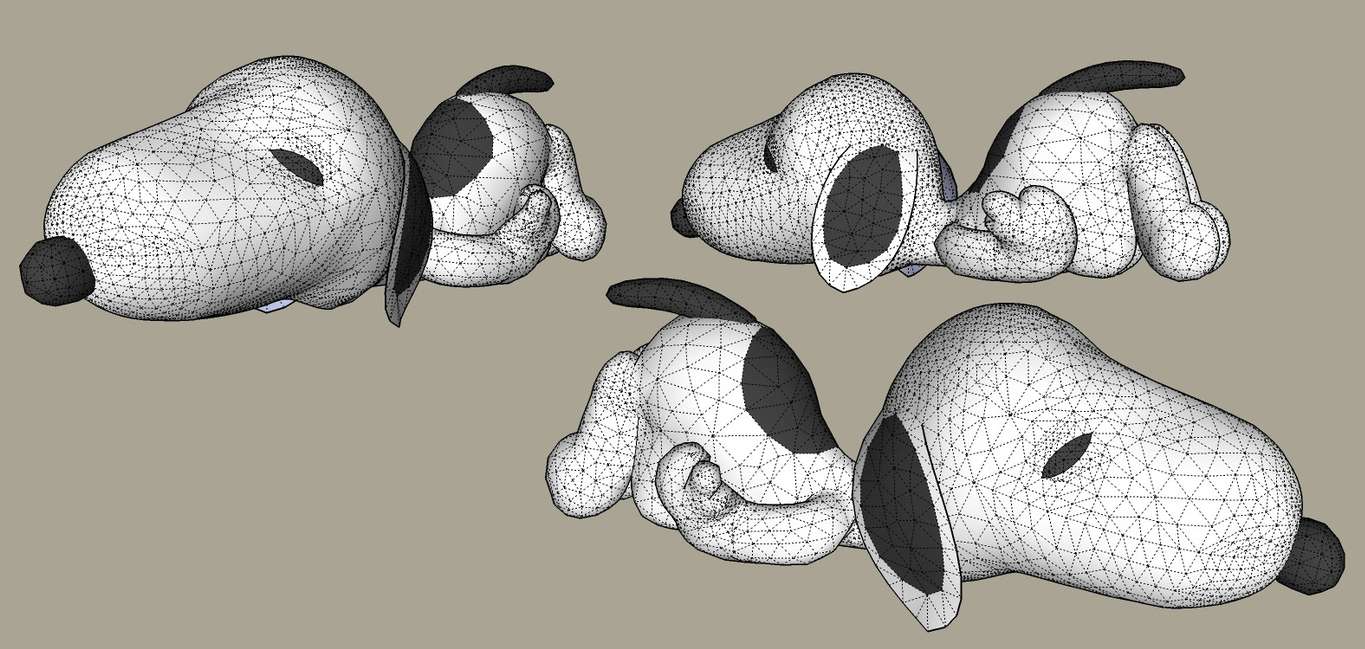
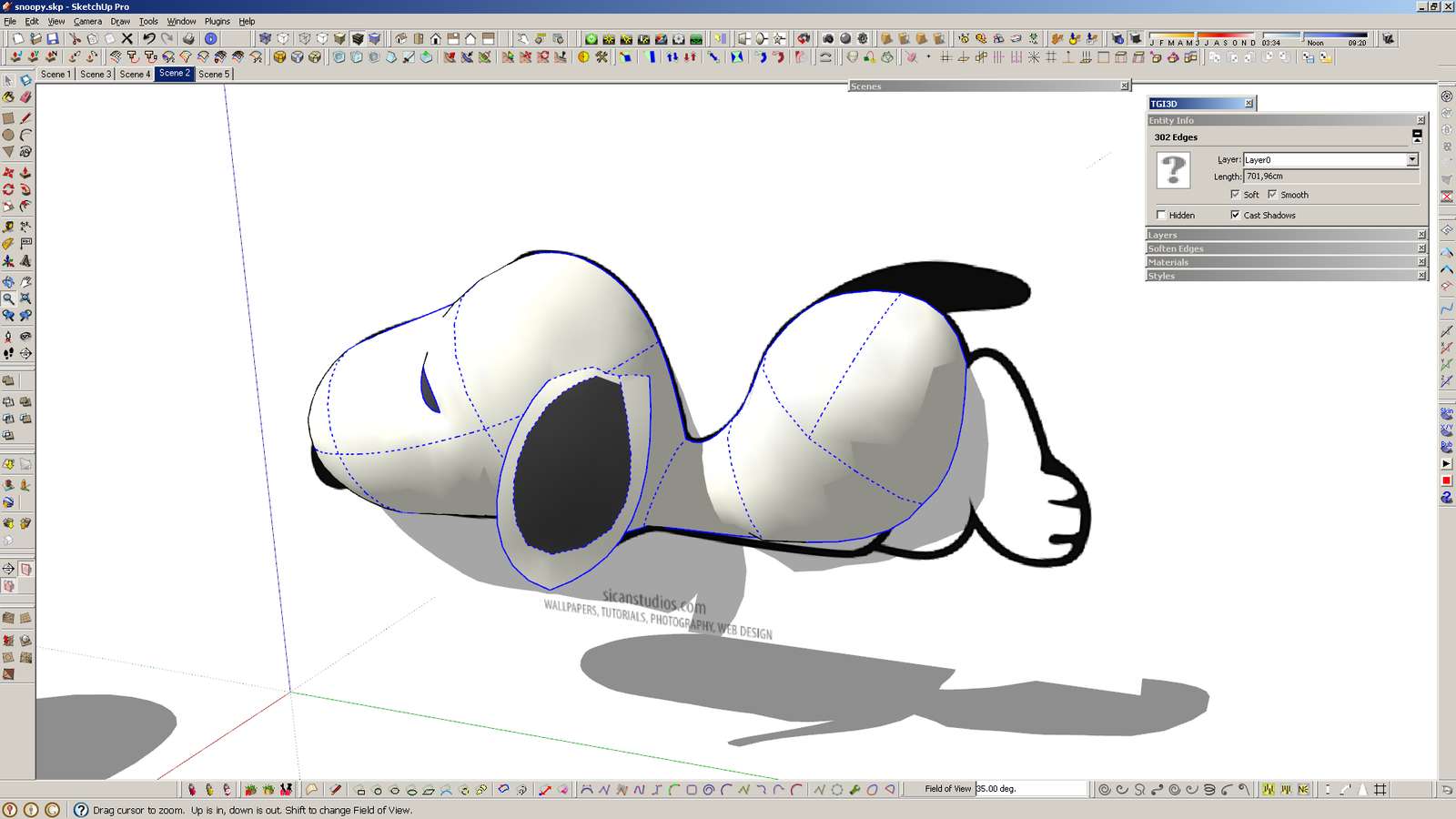
      And here's my Snoopy.
      I'm afraid only the tail and nose were made in Artisan - the rest in tgi3D/Amorph.
      My first cartoon/figure ever in SU, so it did take a while.


      With Bezier control curves shown


      Wires - not quite low-poly

      posted in Organic Modelling
      B
      bjornkn
    • RE: Show Me Your SketchUp

      And here's mine - single screen.
      It has never been so crowded before, because I have used very few plugins in the past. Now I'm trying out a lot of them, and probably I'll remove those that I don't use. And I'll probably move that right side single bar to the left side and make it a 3-col? I use shortcuts for everything, including show/hide dialogs/panels, so it's quick to get a clean screen.


      Clipboard-37.jpg

      posted in SketchUp Discussions
      B
      bjornkn
    • RE: Animation of park with artificial beach.

      Those Roman Sponza soldiers would be a great inspiration I believe πŸ˜‰ ?
      Funny how they applied the same brisk MoCap (silly Python) walk to everyone πŸ˜‰
      Have you tried MakeHuman?
      I think Lumion would be much nicer if it allowed some slight random variations (also speed) to their figure motions.
      It's like with trees - if you need a forest of birch trees it just isn't good enough to copy the same birch a few hundred times. Trees in Lumion looks pretty good though πŸ˜„

      posted in Gallery
      B
      bjornkn
    • RE: Stair Balustrade

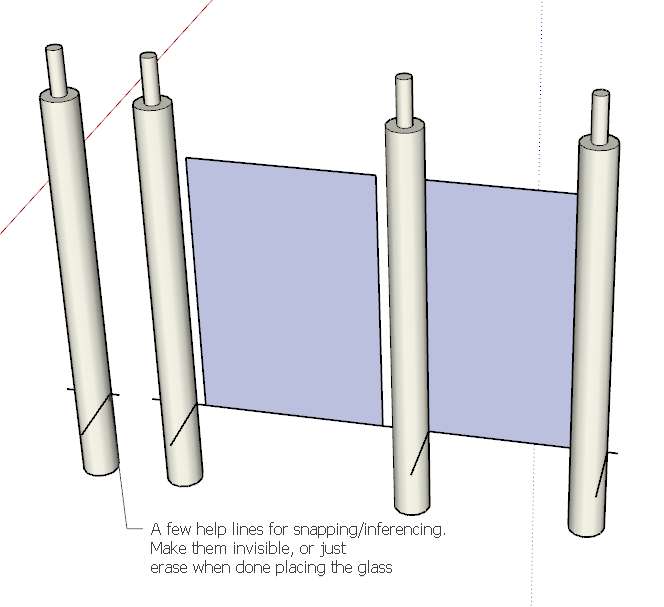
      Here's one way to use help lines when placing elements like glass at the right height and distance.Clipboard-36.jpg

      posted in Newbie Forum
      B
      bjornkn
    • 1
    • 2
    • 10
    • 11
    • 12
    • 13
    • 14
    • 17
    • 18
    • 12 / 18