sketchucation logo sketchucation
    • Login
    1. Home
    2. bjornkn
    3. Posts
    Oops, your profile's looking a bit empty! To help us tailor your experience, please fill in key details like your SketchUp version, skill level, operating system, and more. Update and save your info on your profile page today!
    ⚠️ Important | Libfredo 15.6b introduces important bugfixes for Fredo's Extensions Update
    B
    Offline
    • Profile
    • Following 0
    • Followers 0
    • Topics 12
    • Posts 350
    • Groups 1

    Posts

    Recent Best Controversial
    • RE: Animation of park with artificial beach.

      Very nice work πŸ˜„
      The best Lumion clip I've seen so far, I think.
      I'm not wild about Lumion, but it apparently works pretty good for such large projects.
      What strikes me with Lumion is that it always seems to be set in USA/Europe, there's always water with lots of waves/ripples, even on small creeks and ponds, all people are caucasian/white and they all cast a dark AO shade around them in addition to the shadow from the sun. Seems to be a bit limited library of people etc?

      BTW, I spent a couple of days in Guayaquil in -80 on my way from Quito to Peru (wonderful train trip down from Quito!).
      I remember it as very hot and humid, but then after coming directly there from a few weeks in the mountains any place at the sea level would have felt hot and humid I guess? πŸ˜‰

      posted in Gallery
      B
      bjornkn
    • RE: [Plugin] Repeat Copy UPDATED 2-24-2010

      Looks useful πŸ˜„
      Will it allow you to scale/rotate randomly on individual axes?
      For placing non-faceme trees it would be very useful to be able to set different rotation values for red/green/blue axes.
      And for scale it would be nice to have a master min/max scale setting as well as individual (smaller) red/green/blue variations min/max values?

      posted in Plugins
      B
      bjornkn
    • RE: How can i model this feather

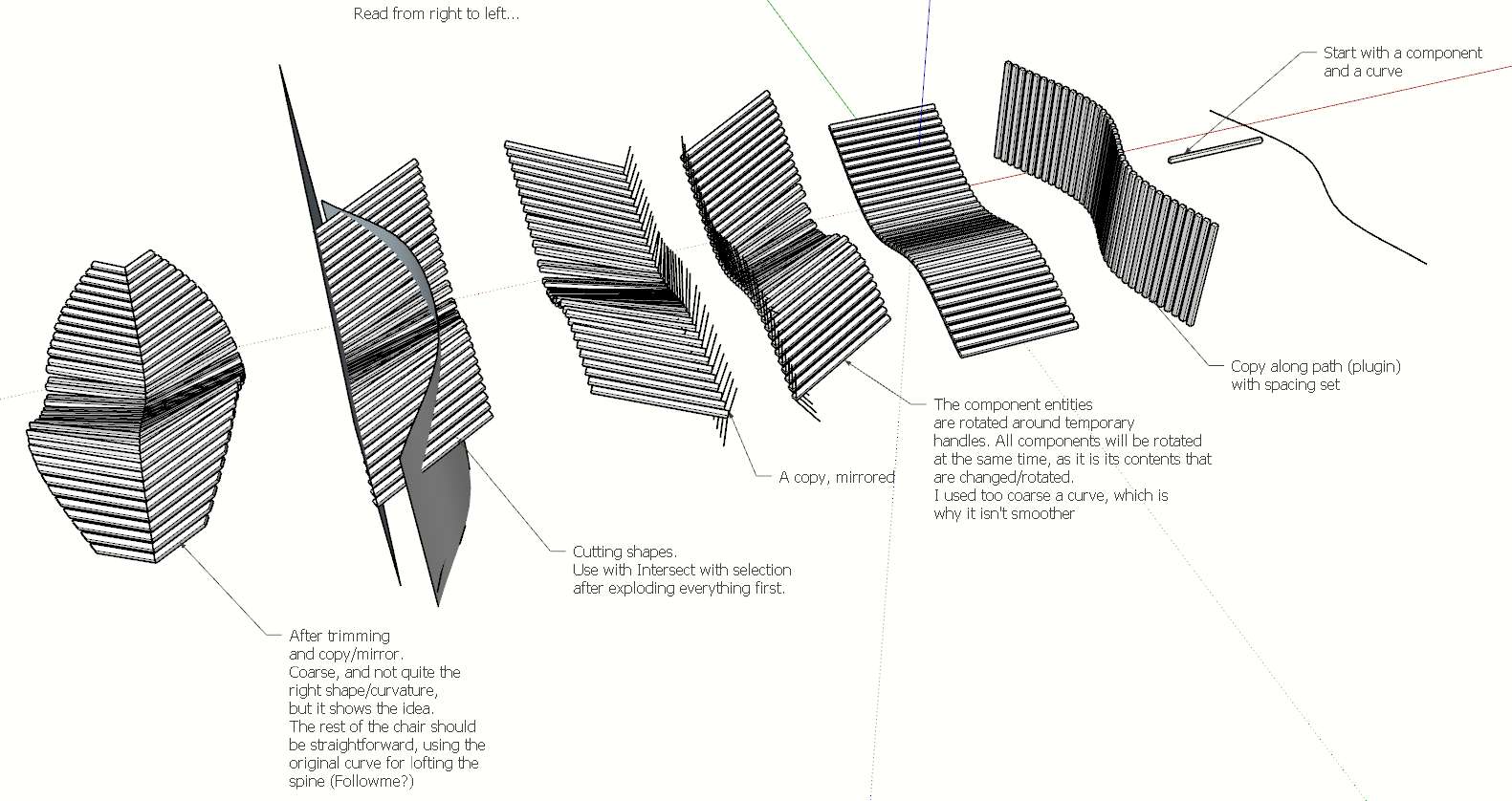
      Here's a quick tut showing one way to do it.
      Didn't pay too much attention to the elegant shape of it - but it shows the concept.


      Clipboard-34.jpg

      posted in SketchUp Tutorials
      B
      bjornkn
    • RE: Ptex??

      @solo said:

      lol, Mari at $2000.00, cool app but not needed in my workflow.

      Guess I should have checked the price before mentioning it πŸ˜‰
      Re 3D-coat - the price has increased a lot since I bought it a few years ago for $80, but so has the power of it. I think it's time for an upgrade soon πŸ˜„
      I have never used it much because I've made mostly archviz, but it talks nicely with LW - and AFAIK it loads/saves Collada too. And there is a 30-day fully functional trial..

      posted in Developers' Forum
      B
      bjornkn
    • RE: Ptex??

      It's well worth the rpice πŸ˜„
      The options at http://ptex.us/ , like C4D, Houdini, Mudbox etc won't be any cheaper for sure πŸ˜‰
      Maybe MARI ?

      posted in Developers' Forum
      B
      bjornkn
    • RE: Ptex??

      @solo said:

      What about stand alone, like the way we can export a texture for editing and save it and the changes transfer to SU, can we not do the same for a component or mesh to Ptex?

      Yes you can, with 3D-coat. You paint with the Ptex texels in 3D-Coat and then export as UV mapped/baked object to import into SU. http://3d-coat.com/
      Ptex only supports quads btw, afaik, which probably could be solved by the auto-retopology tools in 3D-coat v3.5 (I only have v2).

      posted in Developers' Forum
      B
      bjornkn
    • RE: Question plugin rectangular subdivision

      Looks pretty flat to me?

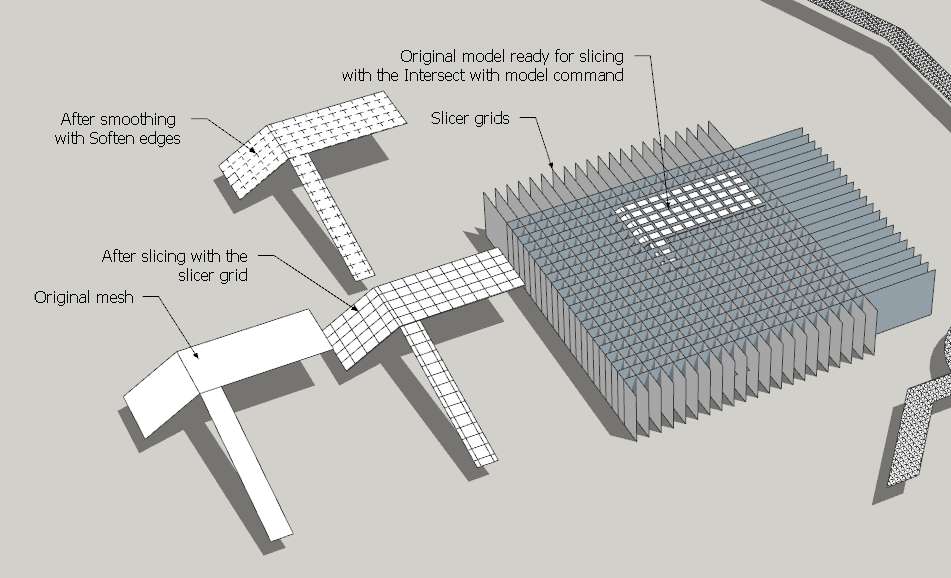
      Anyway, here is a method that can be used with any slope, and even verticals.
      Just rotate slicer grids as necessary, if you need the grid perpendicular to a face.
      And add another slicer array at 45 degrees (snap it to a corner) if you need the diagonals.
      It's actually often faster than the Move/Copy/Erase method πŸ˜„


      Clipboard-33.jpg

      posted in Plugins
      B
      bjornkn
    • RE: Ptex??

      I wouldn't think that adding Ptex into SU would be possible - at least not without a lot of compromises?

      OTOH you should be able to use Ptex in 3D-Coat and get your models into SU afterwards?
      http://www.youtube.com/watch?v=4137te68FP4

      posted in Developers' Forum
      B
      bjornkn
    • RE: Question plugin rectangular subdivision

      Or just use the Move/copy tool?
      Select left edge,
      Move tool with Ctrl down and drag the edge over to the right one and type the number of divisions, like "8/".
      The same the other way, selecting the lower edge and move/copy upwards with divisions.
      Or use "8*" instead if you need to have each square a specific size.
      If you need the diagonals you just a diagonal line and uses the Move/Copy tool with that one too.
      Erase all unneeded edges.
      It will take you 15 secs? It would probably take longer just to find the plugin on the menu and fill in the settings? πŸ˜‰
      Sometimes we forget that SU does have a powerful toolset by itself, and that we don't need a plugin for everything?

      posted in Plugins
      B
      bjornkn
    • RE: From SU to papermodel - Thickness of paper issues.

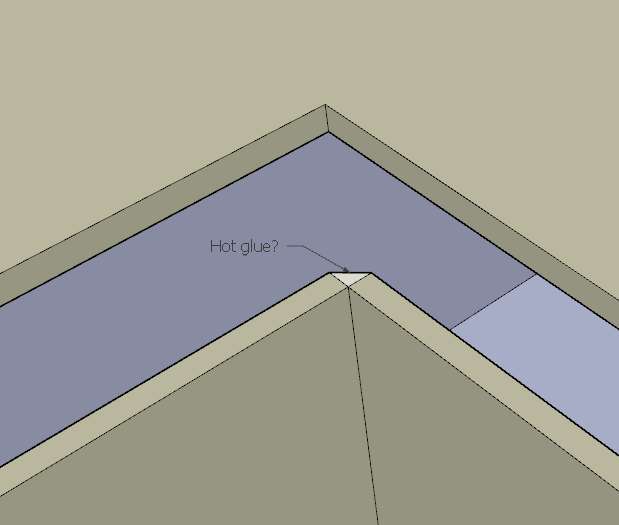
      Yes, I suppose you should extend some faces with such inside corners, if you want to keep it as nice as possible on the inside too. But if you're using a hot glue gun, and the inside isn't that important (or visible) I would've just used it non-extended.Clipboard-32.jpg
      Or if the laser can make "bends" (or you use a knife/tool), ie not cut all the way through the cardboard, you could just bend the corner?

      You will probably encounter some problem areas, but to avoid confusion and messing up it would help a lot to keep some rules. Like: "do all trims on faces on the red axis" and "do all extensions on faces on the green axis"?
      And "never let a wall span more than one floor" and "group each floor"?

      As you had already grouped each single element I just moved and rotated them manually. But using Flattery or Unfold would probably work well too.
      Once you get some routine, and follow your rules, it isn't that big a deal to get this right I think.

      Lykke til!

      posted in SketchUp Discussions
      B
      bjornkn
    • RE: From SU to papermodel - Thickness of paper issues.

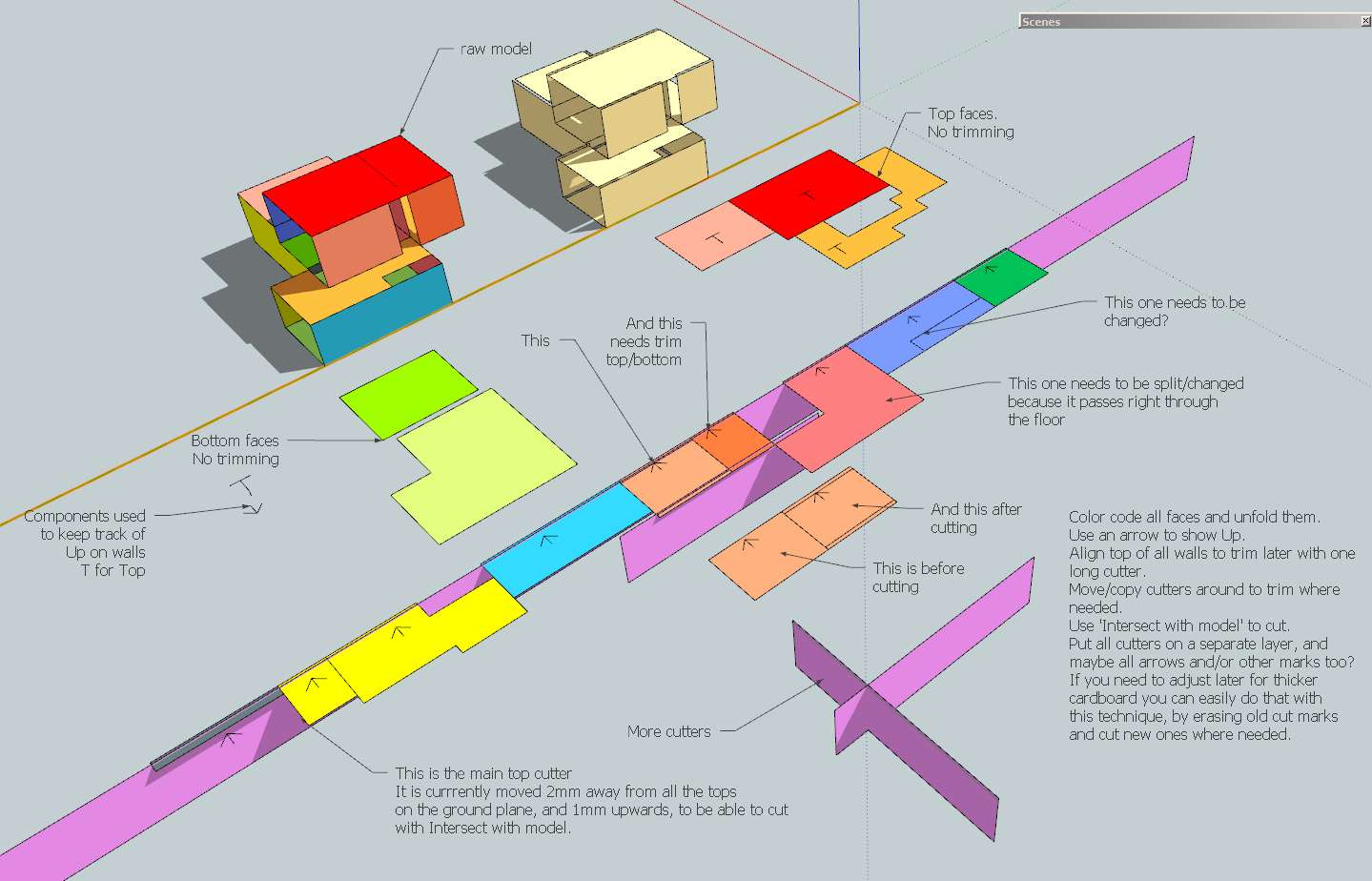
      This is how I would do itcardboards.jpg


      model_raw_adjustedX.skp

      posted in SketchUp Discussions
      B
      bjornkn
    • RE: Is this a (shadow) bug?

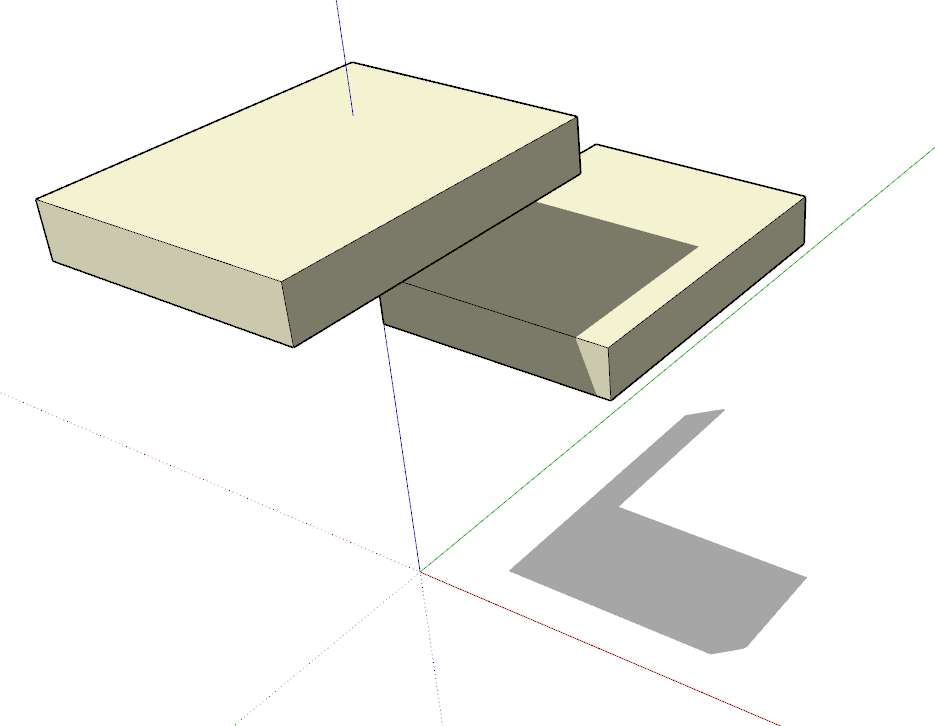
      Is this the way you think it should look then?Clipboard-30.jpg
      That's how I understand what you're explaining, but IMO that looks very wrong.

      posted in SketchUp Discussions
      B
      bjornkn
    • RE: Is this a (shadow) bug?

      @unknownuser said:

      Guys, please have a look at this video which hopefully better illustrates the issue for me: http://coennaninck.com/shadowissue.zip

      Yes, it is not realistic, but in real life you can't tell an object to not cast (or catch) shadows.
      How would you like it to work then?
      Do you think it should cast a "white" shadow where the lower object is obscuring the light/shadow?
      Could you make an image that shows how you think it should look?

      posted in SketchUp Discussions
      B
      bjornkn
    • RE: From SU to papermodel - Thickness of paper issues.

      No. You just make the normal solid model as usual, with no thickness.
      Then after you have it unfolded you do the trimming where needed.

      posted in SketchUp Discussions
      B
      bjornkn
    • RE: From SU to papermodel - Thickness of paper issues.

      Well, my example wasn't the SU model, but a model of the finished cardboard version, with exaggerated thickness πŸ˜‰

      posted in SketchUp Discussions
      B
      bjornkn
    • Is this a (shadow) bug?

      If the lower group is set to receive, but not casts shadows, isn't this the way it should look like?

      posted in SketchUp Discussions sketchup
      B
      bjornkn
    • RE: Displacement from SU to rendering aplication tutorial

      Looks good πŸ˜„
      How about a view where both sides of the corner are visible?
      What exactly is the point if it isn't the results?

      posted in SketchUp Tutorials
      B
      bjornkn
    • RE: Displacement from SU to rendering aplication tutorial

      Where is the displacement there? I can't see any.
      The Thea render disappears so quickly that you can't see anything at all. The camera angle isn't showing much of the left side neither.

      posted in SketchUp Tutorials
      B
      bjornkn
    • RE: From SU to papermodel - Thickness of paper issues.

      The problem with these trimmed methods is that if you need to use thicker/thinner cardboard, balsa, foamboard or whatever, you'll have to redo your plans.
      With mitered corners you can use the same plan with any thickness of materials.

      posted in SketchUp Discussions
      B
      bjornkn
    • RE: From SU to papermodel - Thickness of paper issues.

      You don't need any plugins, and I don't think there are any anyway.
      What you need is a plan - and stick to it.
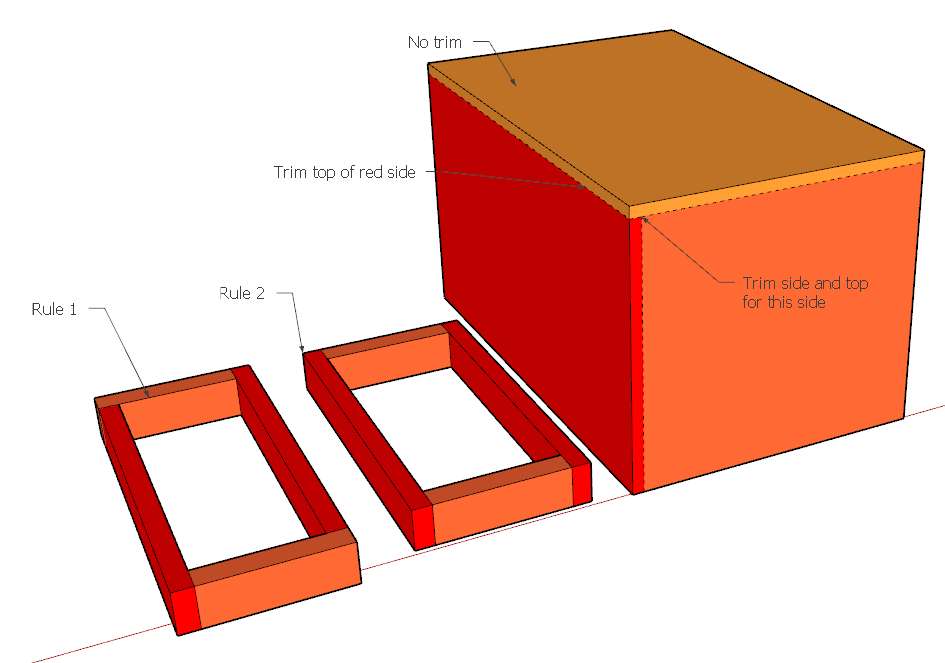
      This is how I would trim a corner on a cube.
      trimmings.jpg
      Some rules?:
      Never trim a top face (looks ugly too)

      1. Always trim left side (if needed)?
        or 2. Always trim both sides (if needed)?
        With Rule 2 it may be easier to avoid sheared models?
        The image shows rule 1 though.
      posted in SketchUp Discussions
      B
      bjornkn
    • 1 / 1