sketchucation logo sketchucation
    • Login
    1. Home
    2. agamemnus
    3. Posts
    Oops, your profile's looking a bit empty! To help us tailor your experience, please fill in key details like your SketchUp version, skill level, operating system, and more. Update and save your info on your profile page today!
    ⚠️ Important | Libfredo 15.8b introduces important bugfixes for Fredo's Extensions Update
    A
    Offline
    • Profile
    • Following 0
    • Followers 0
    • Topics 39
    • Posts 228
    • Groups 1

    Posts

    Recent Best Controversial
    • RE: Any way to get rid of z/x/y line locking yet?

      @takesh h said:

      Hi agamemnus,

      When you draw such a line, how do you know where exactly your destination point is?
      There must be some entities waiting already at the destination for referencing, or you should know the distance and the angle to the destination point beforehand, I presume.

      The angle is very close to 90, and Sketchup gets confused on what to do. It thinks I want to put the end-point on the edge of a line (the 90 degree angle), instead of at the crossing point (not 90 degrees). See the attachment for an illustration.

      @unknownuser said:

      Unless you are drawing such lines in every other minutes, you can change axis temporarily by right-clicking the axis and "place" or "move"?
      After drawing the line, you can happily go back to the original axis by "reset". (I think you know the trick already, maybe feeling too cumbersome about it?)

      I don't know what you mean here.

      A picture of the problem:
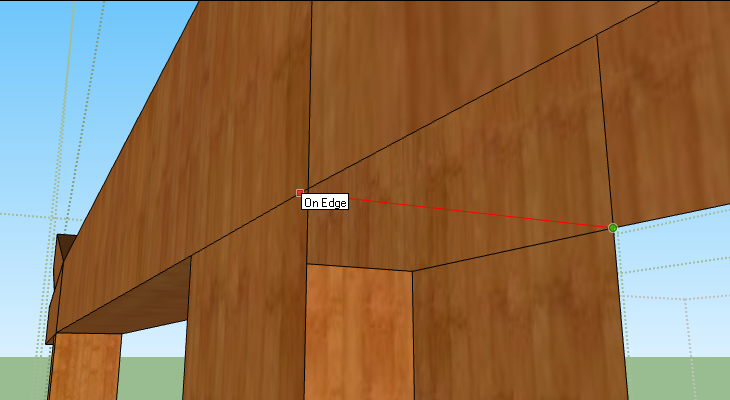

      examp.png

      posted in SketchUp Feature Requests
      A
      agamemnus
    • RE: Using Different Axes

      @unknownuser said:

      i think if people actually thought that through then it wouldn't be such a common request..

      you wouldn't be able to draw anything without inferencing.

      Sometimes, people (myself included) don't want some of the inferencing, or want inferencing based on different angles; that's the point of this thread, I think.

      posted in SketchUp Feature Requests
      A
      agamemnus
    • RE: Using Different Axes

      I agree. I have always wanted to turn off the various inferencing options and maybe add my own. Why the Sketchup devs don't make such a simple to implement feature after so many years is a mystery to me. I guess they think everything' hunky-dory?

      posted in SketchUp Feature Requests
      A
      agamemnus
    • Any way to get rid of z/x/y line locking yet?

      Ugh.

      I think there are plain line plugins somewhere, but I don't really want to use a plugin for such a simple thing as a line... I find I am getting really hard-to-find problems when the line I want to draw is close to horizontal/vertical.. I want to draw THAT line, not the horizontal/vertical line... sometimes I draw the wrong line because Sketchup "infers" I want to draw the horizontal/vertical line. Ages later I figure out that there is a problem and I have to redo half the model.

      Anyway, if anyone can give me a plain line plugin (without red/green/blue direction inference), please do.

      posted in SketchUp Feature Requests sketchup
      A
      agamemnus
    • RE: OBJ file manipulator = ?

      Thanks!

      facedesk

      posted in Extensions & Applications Discussions
      A
      agamemnus
    • OBJ file manipulator = ?

      Hi guys,

      I am exporting my Sketchup models into .OBJ and .MTL files. I don't have any way to manipulate where the associated textures are stored, and what their filename is. For instance: sometimes, I want to use one texture for two different models, but Sketchup imports them into separate directories.

      Does anyone know of a good program that lets me manipulate this header info? Thanks!

      posted in Extensions & Applications Discussions extensions
      A
      agamemnus
    • RE: Clear rotation gui --?

      @mitcorb said:

      I sort of understand your point about the Sega video game reference, but what I told you was partly from my search for official instructions and partly from discovery about orbiting and rotating--sort of developing a working knowledge. But this technique is a more "close to the hand" technique deliberately designed into the Sketchup application.

      Did that make any sense?

      Yes, but it would have worked better if there was some sort of info box or something similar that popped up which gave me the keyboard-only features for the particular function I was using.

      posted in Plugins
      A
      agamemnus
    • RE: Fredo's Round Corners Plugin runs very slow

      I am not sure it is a Mac issue. I think the geometry of what you are rounding may greatly affect this. When rounding a slice of ancient Roman bread I made (delicious!), until I had made some geometry changes, the script would run just so long that it basically crashed the program for half an hour.

      posted in Plugins
      A
      agamemnus
    • RE: Clear rotation gui --?

      @mitcorb said:

      And as you know you can hold down the Shift key to lock its orientation and place the rotate protractor on say a particular vertex or edge or face whether it is a particular color or black.

      Thanks. I forget all those hard to find keyboard commands.. Also: Interesting tip about rotating towards the sky, but all that machination just seems like some sort of secret combo in a Sega video game instead of a legitimate method. πŸ˜‰

      @chris fullmer said:

      What do you mean you can't get the right protractor to show up? The correct color?

      Yes.

      thomthom:
      That's not the one I am referring to, but I'll check what wikii made. I don't like that the gizmos rotate with the object, though.

      posted in Plugins
      A
      agamemnus
    • Clear rotation gui --?

      Hi,

      I generally have a lot of trouble rotating things in Sketchup -- a really basic thing -- I can't get the right protractor to show up, and if I do it's .. sketchy .. keeps changing protractors. The Boundingbox plugin does help, but it's not ideal.

      Am I alone in my troubles..? 😒

      Today, I saw a rotation screen for a plugin that looked like a compass. I can't find it anymore... It would be great if someone could make a stand-alone thing. Not exactly sure how it worked, but I figure something like three draggable bands with markers, each controlling one axis could work...? πŸ’­

      posted in Plugins
      A
      agamemnus
    • RE: [Plugin] Lines to tubes

      I tried this, but the tubes don't get "welded" / smoothed at edges:
      http://img109.imageshack.us/i/tubes.png/

      Is there a plugin that does this?

      Edit: Ok, never mind.. I used BZ tools to convert my loop to a bezier curve (edit 2: polyline is better, actually, for this...), and then applied this plugin. It's all welded now! πŸ˜„

      posted in Plugins
      A
      agamemnus
    • RE: Skinner-er or texture-er?

      That's great to hear thomthom. No rush... πŸ˜‰

      posted in Plugins
      A
      agamemnus
    • Bounding box as a zoom constraint?

      One thing that has been very annoying to me when making Sketchup models is accidentally zooming into the distance when working on a detail of a piece of a model.

      I'm wondering if there is any plugin that restricts the zoom; ideally, for instance, I'd like an invisible limit at some multiplier of the bounding box of an object.

      Also, could anyone say if has there been any improvement of this behavior in Sketchup 8?

      posted in Plugins
      A
      agamemnus
    • Skinner-er or texture-er?

      Hi,

      I don't really know what the correct name for this is, but I am looking for a utility or plugin that will help me map textures to surfaces correctly. For instance, mapping the texturing of wood to a ship would require some sort of way to describe that the ship is composed of planks wrapped horizontally around the ship...

      I've seen plugins that do cylindrical and I think spherical wraps, but that's it. Does anyone have any ideas on where to start?

      posted in Plugins
      A
      agamemnus
    • RE: Guess What, You Don’t Own That Software You Bought

      Interesting. My take...

      The ruling is invalid because the Supreme Court definition of license and the 9th Circuit Court definition of license varies. The 9th circuit says that you cannot "own" a license, but only can create a contract for it.

      The 9th Circuit cannot overturn a Supreme Court decision. The meaning of "license" in this case is actually the right to have a copy or copies of the software installed. In the case of the Supreme Court ruling, they did not consider that a boilerplate license could be essentially the same thing as a book copy, therefore not specifically prohibiting their ruling to apply to boilerplate licenses.

      Theoretically, first sale doctrine should apply to both to books and to licenses of software, because they are both copies.

      Let's take the alternative approach and consider that a book company provided a license to a library with a book-press in the basement to produce and sell 100 books, with the provision that the library cannot resell the books if it wants to. Would this be a legal provision? My sources (the Supreme Court) says "no".

      posted in Corner Bar
      A
      agamemnus
    • RE: Google is Listening!

      Peep

      I want a way to selectively disable inferencing -- a checkbox list for which inferences should be on or off.

      Not having that option is a major bummer for me.

      posted in SketchUp Discussions
      A
      agamemnus
    • stick to plugin?

      Ok.... I'm half sure there's a plugin for this already...

      I have a bag model, and I made the bottom half of it into grouping. What I want to do is to stretch the bottom of the bag while keeping the top edges glued together.

      I can make the same effect by exploding the bottom, then stretching it while the bottom is still selected, and then re-grouping the bottom... but I was wondering whether there was something more elegant?

      Edit: a problem with the "manual" approach is that for some reason the texture positioning and scaling is completely lost; the preferable event is for the texture to stay the same, inch for inch.

      posted in Plugins
      A
      agamemnus
    • RE: [Plugin] Superglue

      I (think) I always wanted something like this; downloading it now! πŸ˜„

      posted in Plugins
      A
      agamemnus
    • RE: [Plugin] Draw Boundingbox

      Very useful for my game -- to center models or stretch them appropriately utilizing the length/width/height ratios. Thank you.

      posted in Plugins
      A
      agamemnus
    • RE: Grow precision bug or fault by me???

      Your measurement isn't correct. Your measurement doesn't start at the bottom of the second-to-last pillar. It is still .42m.

      posted in Plugins
      A
      agamemnus
    • 1
    • 2
    • 5
    • 6
    • 7
    • 8
    • 9
    • 10
    • 11
    • 12
    • 7 / 12