sketchucation logo sketchucation
    • Login
    1. Home
    2. agamemnus
    3. Posts
    Oops, your profile's looking a bit empty! To help us tailor your experience, please fill in key details like your SketchUp version, skill level, operating system, and more. Update and save your info on your profile page today!
    ⚠️ Important | Libfredo 15.8b introduces important bugfixes for Fredo's Extensions Update
    A
    Offline
    • Profile
    • Following 0
    • Followers 0
    • Topics 39
    • Posts 228
    • Groups 1

    Posts

    Recent Best Controversial
    • Script request -- drop to touch

      Sometimes, I can't find an anchor point. I want to position objects such that their lines touch, not anchor points. For instance, consider a square positioned just to the left and top of a triangle with a right angle on the bottom-right. Say I want to position the square so that it just touches the diagonal line of the triangle. To do it in Sketchup manually I need to group the square, draw a line from the square to the triangle, position the square on the intersection point of the line and the triangle, then delete the line. With more complex positionings it gets very tricky and difficult. I would love a way to do this with a Ruby script.

      I'm thinking simple here-- just specify Z+/-, X+/- or Y+/- as well as the two objects (groups) in question and then the script would move one group to the other group so that their closest lines or planes juuuust touch. A script that can take X/Y/Z angles would be even better.

      posted in Developers' Forum
      A
      agamemnus
    • RE: [Plugin] Simple Loft alpha 0.1b -- UPDATED May-15-09

      @chris fullmer said:

      Hi, the script does not work with closed loops. Sorry about that.

      And think how much more annoying it would have been to connect those shapes if the script didn't exist at all πŸ˜„

      Chris

      I did try to split up the loops but I couldn't get an even split... I had to do it manually!!

      Actually, I think I could possibly use a different tool but I am not sure what it would be exactly. I had two circles. The bottom and smaller circle already had a quarter sphere inverted and oval in shape that I would later attach to it. The top circle would be attached to a flat surface. The object is to have a smooth transition between the two.

      What I did is made a Bezier curve from one segment (on the big circle) to another (on the small circle) (with a perpendicular slant to the blue axis).. there were 24 segments, so I cut out a quarter from the circles. I copied the curve 5 times, then changed the angle and resized so that each curve start/end matched the smaller (and lower) /bigger (and higher) circle. Then it was just a matter of exploding the Bezier curves and drawing lines between them, forming rectangles of various inclines. I then copied this thing 4 times and hid the line segments with smoothing.

      Your tool is pretty good but there is no way to specify exactly what type of curve I want... that would be troublesome for anything but a symmetrical spherical or oval shape, though!

      I have a suspicious feeling I could have just used the follow-me tool and then stretched the result, though. πŸ˜†

      posted in Plugins
      A
      agamemnus
    • RE: [Plugin] Simple Loft alpha 0.1b -- UPDATED May-15-09

      I'm trying to use this tool to create a valley curve-- a cross between a bell and an oval. I am having a problem using this tool with closed loops. =(

      I did it manually but it was annoying.

      posted in Plugins
      A
      agamemnus
    • RE: Rotation interface with Ruby extension -- possible?

      @chris fullmer said:

      I would imagine that it is possible. Are you interested in learning Ruby? This is a great place to learn it.

      Chris

      I did a little Ruby tutorial a few years ago, but it kept crashing on me at a certain point. So I guess I know the reeeaal basics. (ooooooor.. could quickly remember them if I seem em again!) πŸ˜†

      If you could give me some ideas (like methods, functions, etc.) of how I can make this thing work with a Ruby plugin, that'd be great.

      posted in Developers' Forum
      A
      agamemnus
    • RE: Rotation interface with Ruby extension -- possible?

      @thomthom said:

      This seem similar to what you get when you select an group/component, activate the move tool and grab hold of the little red crosses that appear on the bounding box.

      Or might I be misunderstanding?

      Thanks,
      I didn't quite know about that until now. Still, those crosses get really small sometimes and hard to activate.

      @gaieus said:

      Hi Agamemnus,

      Many modelling (or rendering) applications use such "Gizmo's" but as far as I've been able to tell so far, this is because they are much less easy to handle than SU. Thom's suggestion is one easy replace of this need but the Rotate tool is so intuitive and easy to use even for much more complex rotations (not only around just 3 axes or a certain rotation point) that IMO it would be a step back instead of enhancing modelling experience.

      Well, I guess instead of "a straight line" as I said, then you could just use the group bounding box as a reference...

      What does the RPTools rotation tool look like in action? I'm sure it's not like the the Spore rotation tool.

      Anyway, does anyone know if it's even possible to use this sort of interface design (3D 3-ring scaled to the group box and view and colored according to certain mouse movements--eg: a copy or something very similar to Spore's controls) in Sketchup with Ruby?

      posted in Developers' Forum
      A
      agamemnus
    • Rotation interface with Ruby extension -- possible?

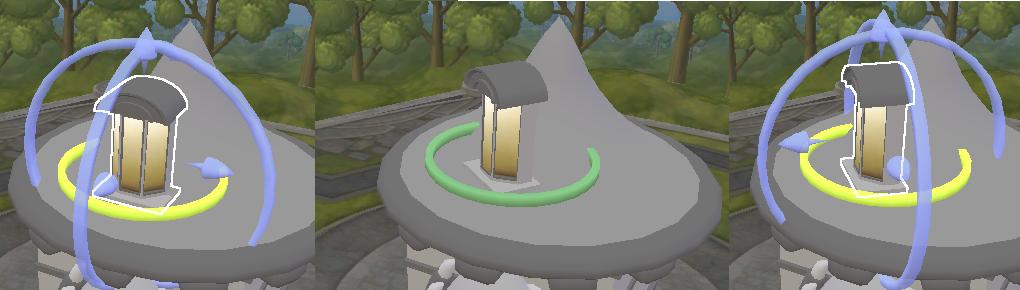
      I made this suggestion a few weeks ago in the google sketchup suggestions forums. I would like to post it here and ask if such a thing is possible in Ruby interface--if so, perhaps someone could take it on if they are interested.


      sporerings.jpg

      Here are a few cropped screenshots of how the rotation works in Spore. In the first picture, I press and hold TAB and then mouse over the rotation ring -- it glows yellow. Then I press and hold it, optionally releasing TAB -- it turns green as in the second picture. Then I simply move the mouse left or right (OR up or down) to rotate the object along that axis. After I'm done, I unpress the mouse. If I had released tab while rotating, the rotation ring can be seen again as in the third picture. Otherwise, the rotation ringvanishes.

      (The little arrows are kind of like interactive Sketchup dynamic object value controls -- forward to increase, backwards to decrease... sometimes they resize, sometimes they do other stuff like increase/ decrease a window's border size)

      In Sketchup, I propose that one would be able to either use the default X/Y/Z 3-ring, which would be the size of the maximum object limits and centered on the object center (invoking it via a button or a user-defined key), or use a 3-ring defined by a straight line (again via a button or a user-defined key).

      posted in Developers' Forum
      A
      agamemnus
    • RE: [Plugin] Skin.rb

      Is there any way to skin connected lines with this? For instance, I have several "curved" triangular faces. In each case, all three sides are curves. I have to manually skin each of these triangles and it takes a while. 😞

      posted in Plugins
      A
      agamemnus
    • RE: [Plugin] Skin.rb

      I've also been unable to use this plugin in SU7 with anything other than 22.

      posted in Plugins
      A
      agamemnus
    • 1
    • 2
    • 8
    • 9
    • 10
    • 11
    • 12
    • 12 / 12