sketchucation logo sketchucation
    • Login
    Oops, your profile's looking a bit empty! To help us tailor your experience, please fill in key details like your SketchUp version, skill level, operating system, and more. Update and save your info on your profile page today!
    ⚠️ Important | Libfredo 15.6b introduces important bugfixes for Fredo's Extensions Update

    Rayscaper New Releases

    Scheduled Pinned Locked Moved Extensions & Applications Discussions
    rayscaperrender
    294 Posts 9 Posters 18.8k Views 10 Watching
    Loading More Posts
    • Oldest to Newest
    • Newest to Oldest
    • Most Votes
    Reply
    • Reply as topic
    Log in to reply
    This topic has been deleted. Only users with topic management privileges can see it.
    • K Offline
      Krass
      last edited by

      are you both talking about Twilight render ?

      Krass

      P 1 Reply Last reply Reply Quote 0
      • P Online
        pixelcruncher Extension Creator @Krass
        last edited by

        @Krass said in Rayscaper New Releases:

        are you both talking about Twilight render ?

        Yes, @majid and @Mike-Amos are talking about Twilight render. But I'm not too familiar with it myself. But it seems to have a couple of dearly missed features?

        I'm the developer of Rayscaper: https://rayscaper.com/ - Fast and easy rendering for SketchUp.

        1 Reply Last reply Reply Quote 0
        • K Offline
          Krass
          last edited by Krass

          Twilight render was great, but Rayscaper is marvelous compared to it.
          I can give you the last version of Twilight

          Krass

          1 Reply Last reply Reply Quote 0
          • Mike AmosM Offline
            Mike Amos
            last edited by

            Yep, trying to get to grips with the actual process or getting them back into the wild.

            Absentia mortis praesentiam vitae probat, vita autem est argumentum constantiae.

            1 Reply Last reply Reply Quote 0
            • S Offline
              sashapepperspray @sashapepperspray
              last edited by

              I think I figured something out about the blue material bug, I can make it happen in any file if I use the "edit texture in external editor" in the sketchup material editor, It shows up as blue.
              (Another thing I noticed, is that If i edit a material in sketchup, it does not automatically update the material in rayscaper.)

              1 Reply Last reply Reply Quote 1
              • P Online
                pixelcruncher Extension Creator
                last edited by

                I think I figured something out about the blue material bug, I can make it happen in any file if I use the "edit texture in external editor" in the sketchup material editor, It shows up as blue.

                That's a good clue. I think it also has to do with SketchUp's colorized textures only. But I haven't looked at that part in depth.

                (Another thing I noticed, is that If i edit a material in sketchup, it does not automatically update the material in rayscaper.)

                This is by design; You should press the reload button in the Rayscaper material editor. I could add an "auto-sync" option to do this automatically. Rayscaper has a richer set of material capabilities than SketchUp. I assumed you want to edit the materials in Rayscaper, and that it would be counterproductive to override them from SketchUp repeatedly. Maybe that's not a reasonable workflow assumption.

                I'm the developer of Rayscaper: https://rayscaper.com/ - Fast and easy rendering for SketchUp.

                1 Reply Last reply Reply Quote 1
                • S Offline
                  sashapepperspray
                  last edited by

                  okay, thanks (a feature request- maybe you can make a seperate reload button for the regular texture, for the metalness, roughness, and normal maps, so If I edit the regular texture in sketchup but want to keep the metallness changes in rayscaper I can do that.)

                  1 Reply Last reply Reply Quote 0
                  • K Offline
                    Krass
                    last edited by Krass

                    Hi,
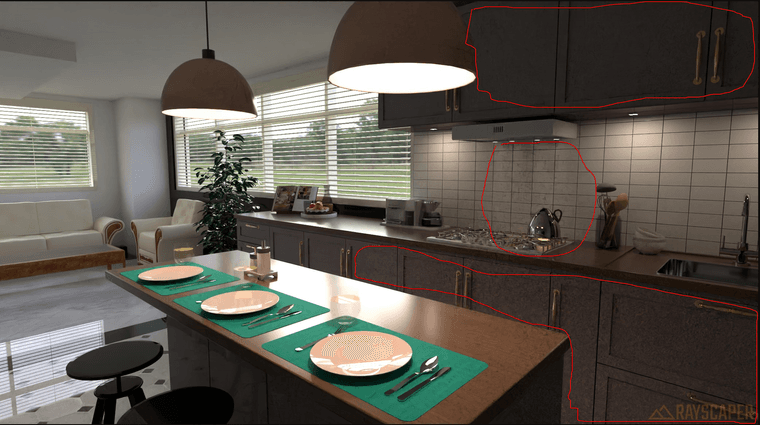
                    when I display a SketchUp scene in RS, the hidden tags within that scene are still visible.

                    And there's still this problem with certain groups containing other groups and components that don't display unless everything inside is exploded. And I can't always explode everything, as I have variations to make in subsequent steps.
                    And i no graphic card
                    2a4ec1e5-7631-4eed-9aae-79afd0dfff54-image.png

                    Krass

                    P 1 Reply Last reply Reply Quote 0
                    • P Online
                      pixelcruncher Extension Creator
                      last edited by

                      Hey, Rayscaper users!

                      Rayscaper 0.9.79 Beta is available. You can get it via:

                      • The SketchUcation store.
                      • Direct download: link.

                      I recommend upgrading to the latest version.

                      What Changed?

                      • Add log export feature. You can now export Rayscaper logs directly from the application menu, making it easier to
                        share diagnostic information when reporting issues. You can access it via the SketchUp menu bar:
                        Extensions > Rayscaper > Export Logs for Support.
                      • Add a reset button for the post-processing tab. Quickly restore default post-processing settings with a single click.

                      b42c4c60-2166-471b-808b-252b2781cc8c-image.png

                      Help Me Build the Community 👍

                      If you like Rayscaper, please share your renders (final or work-in-progress, it doesn't matter)! This is motivating and helps me showcase its capabilities
                      to new users.

                      Follow me on https://x.com/rayscaper3d.

                      Happy Rendering!
                      Thomas

                      I'm the developer of Rayscaper: https://rayscaper.com/ - Fast and easy rendering for SketchUp.

                      1 Reply Last reply Reply Quote 0
                      • P Online
                        pixelcruncher Extension Creator @Krass
                        last edited by

                        @Krass

                        when I display a SketchUp scene in RS, the hidden tags within that scene are still visible.

                        Do you mind sharing the scene via e-mail?

                        And there's still this problem with certain groups containing other groups and components that don't display unless everything inside is exploded. And I can't always explode everything, as I have variations to make in subsequent steps.

                        Same here, a scene with screenshots of the components would help a lot.

                        And i no graphic card

                        Can you check with the latest version I just released? Also check if that version brings the icons back. I think this has to do with your broken installation.

                        Regards,
                        Thomas

                        I'm the developer of Rayscaper: https://rayscaper.com/ - Fast and easy rendering for SketchUp.

                        P 1 Reply Last reply Reply Quote 0
                        • K Offline
                          Krass
                          last edited by

                          Hi,
                          anyway, it's fixed, the latest version installed correctly.

                          As for objects on hidden tags, it's still the same; objects on hidden tags in the SU viewport are displayed in the Rayscaper render.

                          Krass

                          1 Reply Last reply Reply Quote 0
                          • K Offline
                            Krass
                            last edited by

                            I finally understand how to use the denoiser. You might initially think that a low-resolution render will be calculated faster... But actually, when the denoiser is applied during rendering, especially when the render resolution is high, the denoising is very clean.
                            It might seem obvious to you, but it took me a while to figure it out. So I leave the denoiser at full power and immediately set the render size to 2k or higher.

                            Krass

                            1 Reply Last reply Reply Quote 0
                            • K Offline
                              Krass
                              last edited by

                              Thomas, you asked me why I apply an upscale layer after a ray-scaping render. For scenes with windows, I have to do two renders, like a photographer: a light one for the room's exposure and a dark one to replace the "blown-out," overexposed parts of the window. D5 Render doesn't have this problem because its renders aren't truly photographic; they're a kind of pseudo-pathtracing.

                              Krass

                              1 Reply Last reply Reply Quote 0
                              • K Offline
                                Krass
                                last edited by Krass

                                On this page I show a comparison slider between the original rendering and the changes that Magnific Upscale adds

                                Link Preview Image
                                Comparatif rayscaper/magnific upscale – jskup

                                Avant Après

                                favicon

                                jskup (jskup.fr)

                                Of course, we then have to go back through Photoshop to correct the errors that the upscaling process generates.

                                Krass

                                1 Reply Last reply Reply Quote 0
                                • P Online
                                  pixelcruncher Extension Creator @pixelcruncher
                                  last edited by

                                  Just to confirm, your GPU is working again and your icons are back?

                                  As for objects on hidden tags, it's still the same; objects on hidden tags in the SU viewport are displayed in the Rayscaper render.

                                  Thanks for reporting. I could find a scene to reproduce it. Seems to happen only for components/groups nested within other groups. I will have a look at this bug.

                                  I finally understand how to use the denoiser. You might initially think that a low-resolution render will be calculated faster... But actually, when the denoiser is applied during rendering, especially when the render resolution is high, the denoising is very clean.

                                  It might seem obvious to you, but it took me a while to figure it out. So I leave the denoiser at full power and immediately set the render size to 2k or higher.

                                  I should document that better. The denoiser works on the full resolution image. And it works now as a post-processing step, so enable/disable won't impact the rendering.

                                  Thomas, you asked me why I apply an upscale layer after a ray-scaping render. For scenes with windows, I have to do two renders, like a photographer: a light one for the room's exposure and a dark one to replace the "blown-out," overexposed parts of the window. D5 Render doesn't have this problem because its renders aren't truly photographic; they're a kind of pseudo-pathtracing.

                                  That's a clever trick, thanks for sharing. Does this mean the tone-mapping operations you are getting in the post-processing step aren't sufficient for you? Should there be more options to provide a better image from the get-go?

                                  Regards,
                                  Thomas

                                  I'm the developer of Rayscaper: https://rayscaper.com/ - Fast and easy rendering for SketchUp.

                                  1 Reply Last reply Reply Quote 0
                                  • P Online
                                    pixelcruncher Extension Creator
                                    last edited by

                                    And there's still this problem with certain groups containing other groups and components that don't display unless everything inside is exploded. And I can't always explode everything, as I have variations to make in subsequent steps.

                                    @Krass - Do you mind sending me a scene where this happens? I would like to investigate.

                                    I'm the developer of Rayscaper: https://rayscaper.com/ - Fast and easy rendering for SketchUp.

                                    1 Reply Last reply Reply Quote 0
                                    • 1
                                    • 2
                                    • 5
                                    • 6
                                    • 7
                                    • 8
                                    • 9
                                    • 14
                                    • 15
                                    • 7 / 15
                                    • First post
                                      Last post
                                    Buy SketchPlus
                                    Buy SUbD
                                    Buy WrapR
                                    Buy eBook
                                    Buy Modelur
                                    Buy Vertex Tools
                                    Buy SketchCuisine
                                    Buy FormFonts

                                    Advertisement