Oops, your profile's looking a bit empty! To help us tailor your experience, please fill in key details like your SketchUp version, skill level, operating system, and more. Update and save your info on your profile page today!
Urasik Extensions | Lots of new extensions to check out Learn More
 Offline
Posts
-
RE: Best animation process
-
Best animation process
Hi guys, just wondering what your preferred plugin / process for animating SU models? I'm keen to start producing some flyovers / walkthroughs for an upcoming job.
The standard export out of SU is not bad but wanted to consider a more accurate way to do it. Just did a search and found Whaat's 'Smoothstep Animation'plugin and i notice its quite old. Anyone still using it?
Thanks in advance.

-
RE: Best Furniture(Kitchen/Bathroom/Shelving) Cabinet plugin?
@rich o brien said:
If it is custom designs then GarryK's Cabinet Maker

GKWare Cab Maker, kitchen, vanity closets etc. | SketchUcation
3D SketchUp Community for Design and Engineering Professionals.
(sketchucation.com)
Is a good place to start
Agreed!
-
RE: Double-Cut - Cut through double-sided walls
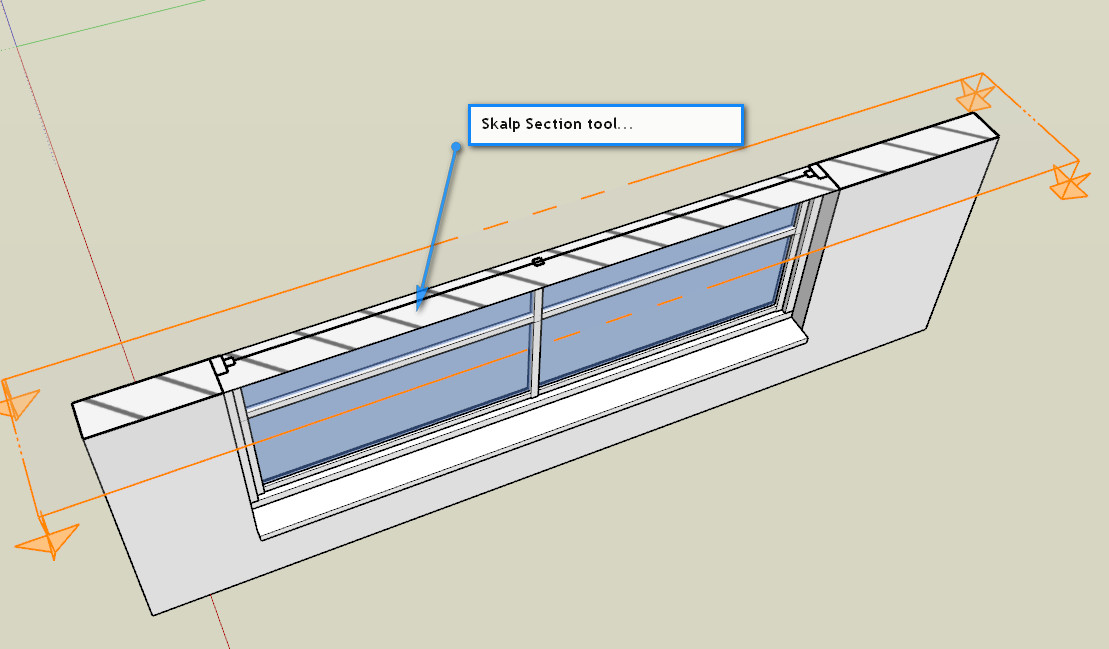
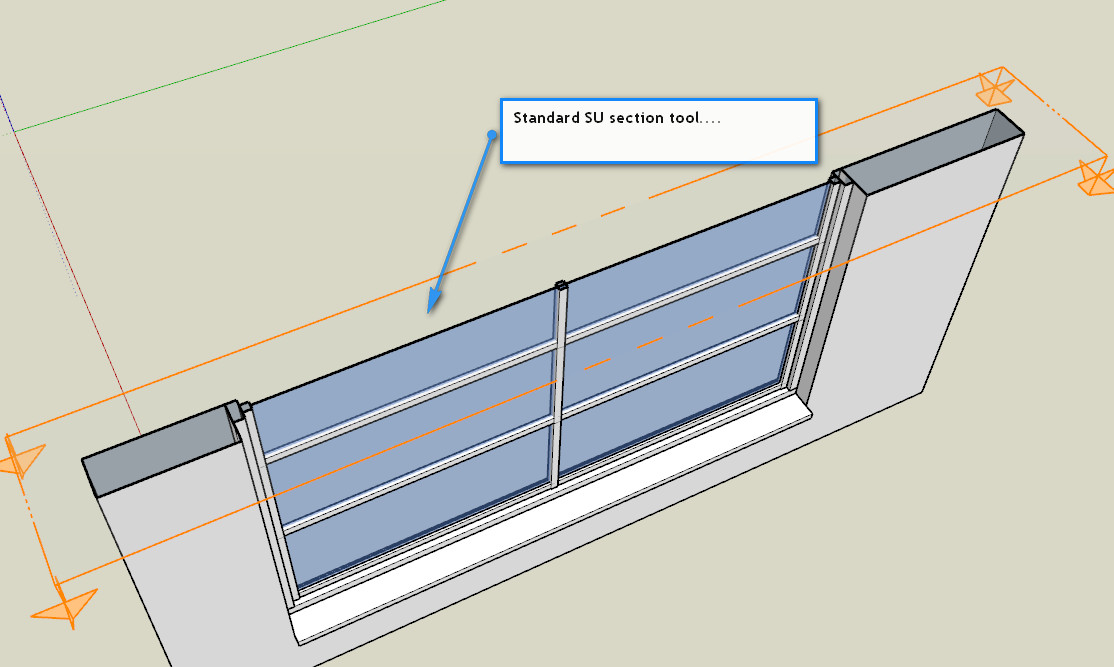
Whether its a solid or not surely the skalp tool should be able to work similar to the SU native tool??
-
RE: [Plugin] Skalp for SketchUp v2.0 (live section plugin)
Hi guys, can you chime in on this post please?
Seems to be something weird happening with cutting through a wall with an opening inserted into it.
http://sketchucation.com/forums/viewtopic.php?f=80%26amp;t=67424%26amp;p=618441#p618441
-
RE: Double-Cut - Cut through double-sided walls
Cool plugin, Dale!! Something that has been on the request list for soooo.... long!!
Just thought I'd make everyone aware that are using Skalp that it won't cut around openings as the standard SU section cut tool does. Not sure why; I'll ask the question of the Skalp team and see what they say.
-
RE: Layout Dimensions turning red...
Thanks guys, something I obviously missed with upgrading to 2017....
Yes, that don't print read but couldn't work out why some were red and some weren't.
@bmike, pey I have a DIMS layer and that's the workflow to adopt. Cheers to you all. -
RE: [Plugin] GKWare Cabinet Maker
Hi Garry, was Cabinet Maker dynamic at some stage???
I'm sure I could open and close doors and drawers somtime ago?
-
Layout Dimensions turning red...
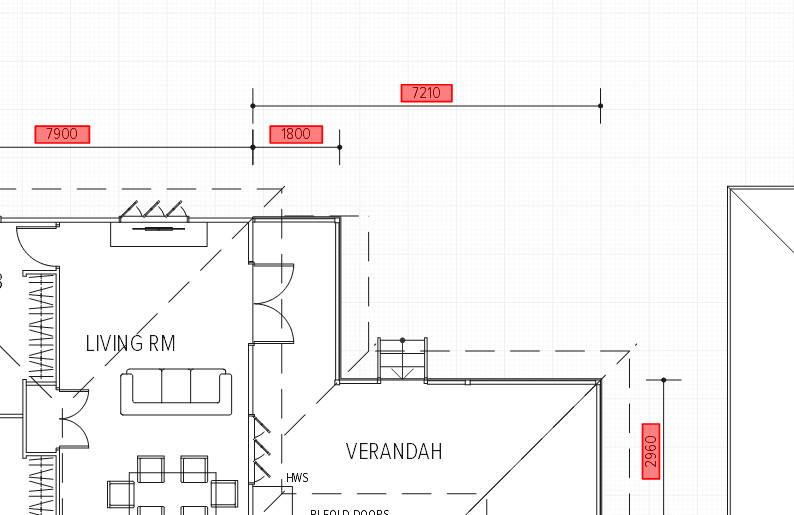
Hi fellas, are any of you experiencing this with LO2017?
I noticed it first when updating from 2016 to the latest version when opening an old file. clicking on the dimension text doesn't show text as having a fill or profile at all....
-
RE: Importing SU colours into LO
Here's the LO file for any of you who want to use it.... thanks for all your input, guys.
-
RE: Importing SU colours into LO
Just revisiting this thread; when converting colours to vector and exploding down to base elements, any colours with opacity levels altered will come in as full colour.
-
RE: Importing SU colours into LO
@baz said:
Try exploding the 'Vector' model in LO and ungroup until you just have the colour swatches.
Does that get you what you want?[attachment=0:x9yzousc]<!-- ia0 -->colour swatch test.JPG<!-- ia0 -->[/attachment:x9yzousc]
That is what I was trying to do, Baz. Cheers!! Didn't think to convert to vector first....
Thanks to you, Dave and JQL for your input as well. Really appreciate it.
-
RE: Importing SU colours into LO
Thanks juju, what I'm asking is there a way to bring in SU colours into LO. exporting the SU file to LO and making a scrapbook file doesn't make any difference... even if you explode the file.
-
Importing SU colours into LO
Ok, maybe another D'oh! moment here....
I've created a colour sampler of pastels in SU based on this image:
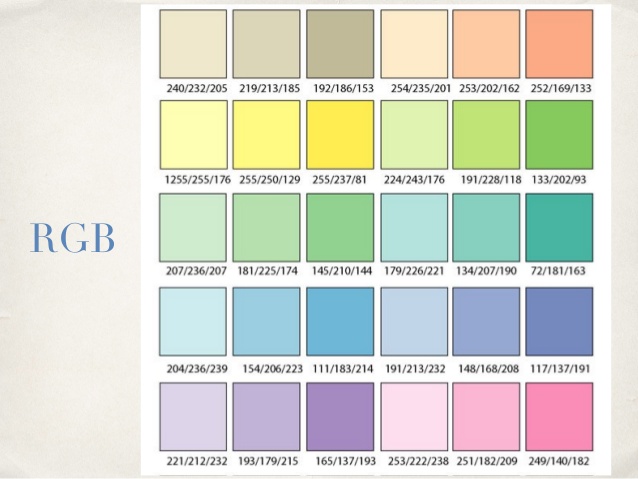
and want to use it in LO as well.
I thought I'd be able to import the model and explode it to get colour values but NOOOO!!!!
Does anyone knowhow to other than setting it up manually in LO?
-
RE: SubD examples and models
Very cool, Box..... I need to spend some time playing around with SubD!!
-
RE: [Plugin] GKWare Cabinet Maker
@pfnt said:
Just wanted to show the first complete kitchen I've rendered with podium using the CabMaker plug-in in SketchUp Pro. Garry has been extremely attentive and responsive to all of my needs during the process of learning how the plug-in operates as well as making changes and upgrades to specific items needed to make this plug-in the best kitchen cabinet builder.
Thank you Garry for a job well done and better yet for creating such a robust and scalable plug-in for SketchUp.
Good work, mate but that fella with the wine seems to short to be drinking!!

-
RE: Issue Inferencing along the Green Axis...
And just tried a new model with nothing in it....
Can't find the red axis.
-
RE: Issue Inferencing along the Green Axis...
Ok, done it again.
This time it didn't work on the RED or BLUE axis.... Note I was within a component moving other components around. I also tried to orbit around to various locations to trick it a bit but I just couldn't find those two axises...
The only way is to add guidelines which then works.