sketchucation logo sketchucation
    • Login
    1. Home
    2. utiler
    3. Posts
    Oops, your profile's looking a bit empty! To help us tailor your experience, please fill in key details like your SketchUp version, skill level, operating system, and more. Update and save your info on your profile page today!
    Urasik Extensions | Lots of new extensions to check out Learn More
    Offline
    • Profile
    • Following 0
    • Followers 0
    • Topics 222
    • Posts 2,425
    • Groups 2

    Posts

    Recent Best Controversial
    • MAC???

      So,

      Who is on MAC and why?

      I have seen references at this place and the old one that burnt down about PC v MAC.
      I am on PC and have been forever. I like the idea MAC, maybe just curious, but would like to explore my options....

      So i'd like to know what pushes your buttons MAC users!!!Cheers,

      utiler

      posted in Hardware
      utilerU
      utiler
    • RE: MAC???

      Nice art Lisa, how'd you do it??

      I agree with your comments about the toad.......

      utiler

      posted in Hardware
      utilerU
      utiler
    • MAC???

      Hey Mike, i recall reading a little while back you changed or were thinking about changing over to MAC.... [i see a reference to MAC above.] if you did, why did you and how do you like the change? i have always been curious about MAC but never really spent the time to compare..... would you mind sharing a little insight into your experiences.....

      Cheers,

      utiler

      posted in Hardware
      utilerU
      utiler
    • RE: Layers vs. Components/Outliner

      Hang on... I just thought of something.....
      can we "hide" a component or group in a scene and have it visable in another even if it was on layer0? If not why not? Wouldn't that help? A simple script to right-click, select "hide in current scene only" would do the trick......
      A

      posted in Newbie Forum
      utilerU
      utiler
    • RE: Ruby script - set current layer

      Thanks Todd, much appreciated. just what i was after....

      posted in Plugins
      utilerU
      utiler
    • Ruby script - set current layer

      Hey guys,
      Just wondering if someone has come up with a ruby to 'set current layer?

      Function: to change layers by selecting an entity.

      would like to set a hot key for it so i can toggle layers quicker than through the layer manager. besides, I don't really have to know what the layer name is I just want to set the layer current based on an entity. eg: import dwg file, need to amend say a window, SET CURRENT LAYER, pick the window which sets the layer that the window is on current, then go ahead and start drawing....

      Anyone?

      Thanks,

      posted in Plugins
      utilerU
      utiler
    • RE: SU as design tool

      @unknownuser said:

      Nice one Edson!
      And as others have said, native SU is hard to beat for displaying design intent.
      Stu

      Stu, What's with the frog?

      Andrew

      posted in Gallery
      utilerU
      utiler
    • RE: Naming Layers [Architectural use generally...]

      It is interesting that this thread has been viewed 126 times and yet only two responents; obviously not as important as i thought it would be.....

      posted in SketchUp Discussions
      utilerU
      utiler
    • RE: Naming Layers [Architectural use generally...]

      Hi Edson, I thought there was a similar thread also, but I recall it was more to do with office file management than working from within SU.....

      Couldn't recall what the subject was, although I have tried searching!!!

      Cheers,
      Andrew

      posted in SketchUp Discussions
      utilerU
      utiler
    • Naming Layers [Architectural use generally...]

      Hey people, Just thought I'd see what your thoughts are on this Subject.

      Seeing Layers in SU are used the way they are, I have set up a useful Layer naming structure that works for me.... I'd be interested in your fedback and if you have found a better way....
      Generally, as I am involved in the Architectural industry so I set Layers as if i were constructing a building; Site first, foundations, floor, walls... you get the picture.

      Something like this:

      Layer0 [of course!!]
      00A-Site
      00B-Contours
      00C-Site Features [Driveways, people, trees, etc]
      01A-Foundations
      01B-Floor
      01C-Walls-Ext
      01C-Walls-Int... and so on.

      As you can see, file structure will be will be organised numerically them alphabetically so I find it is easy to scan the layer set and select the layer I want. Say I am looking for a 'Roof' layer I always know it will be after "Floor", "Walls", "Windows", "Doors", etc....

      See the attached dummy file and open the layer Dialgue for a list of preset layers. Obviously second storey would prefix 02 instead of 01....

      Your feedback is much appreciated. I am always interested in how to minimise computer tasking while modelling, especially using a program like SU which often feels like an extension to my hand....

      Andrew

      layers sets.skp

      posted in SketchUp Discussions sketchup
      utilerU
      utiler
    • RE: Changing Axes - should selection window rotate too???

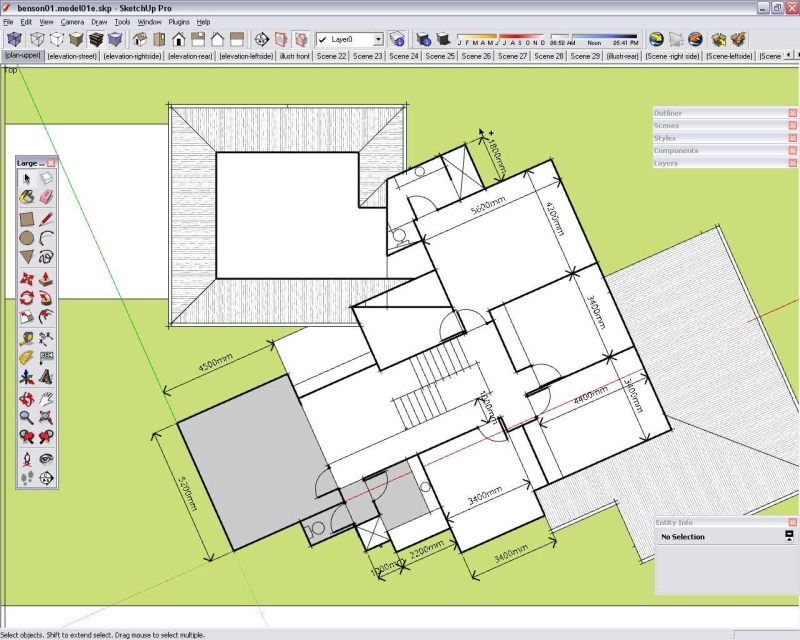
      Thanks for responses guys, sorry if I confused you, Jackson...
      [see attached image].

      If I want to select the colored room of the plan then i feel it would help to have the selection window rotated. As does all orthogonal draw functions when you rotate axes.....

      As for just orbiting around the plan; when I need to select geometry in a plane it is obviously easy to convert to parrallel projection and it is here that orbiting won't help. When you want to view an absolute plan of the model in PP, SketchUp always defaults to the original axes settings, not the altered axes....Maybe if this was introduced into future releases it would solve the issue...

      give it a try and you'll see what i mean.

      Thanks again, Cheers,


      B00000001.jpg

      posted in SketchUp Discussions
      utilerU
      utiler
    • Changing Axes - should selection window rotate too???

      Hey people,
      What do you think about this: when you change axes, should the selection window change with it? I find that when I do change axes, it is difficult to select objects in a bounding box as if it was square to the selection window....

      Am I just pedantic or would it help?

      Maybe a Wishlist thing...

      A

      posted in SketchUp Discussions sketchup
      utilerU
      utiler
    • RE: Cut out component problem ...

      Hi Guys, I have attached a file of what i was trying to achieve. Thanks to you all, I managed to work it out!!

      I wanted to build a 'stick' model of a building but have the abilitiy to show doors / windows in plan even though only a single plane model. As you can appreciate, if a door or window is cut through it will appear as a continuous line thickness unless manipulated.
      I have nested door swing components and the glass in the windows as a component so i can turn them off in plan view so i get a good contrast between the section cut settings and the profile line below.
      Then in 3D view turn the glass back on and turn off door swings.....you dig?

      Thanks again, much appreciated.

      A


      componentscomponentscomponents.skp

      posted in SketchUp Discussions
      utilerU
      utiler
    • RE: Cut out component problem ...

      THanks again Susan, I have learnt more about Components in the past 24hours than i have in 4 years......

      I will post en expamle of what i want to achieve now i knwo how to do it.

      All the best.

      posted in SketchUp Discussions
      utilerU
      utiler
    • RE: Cut out component problem ...

      Thanks to you both for your input, It is much appreciated. I was about to 'intersect the model' with my forehead!!!
      Yes the intention is for the door to be open and the door swing [nested component] is on another layer so i can toggle for plan viewing or model viewing. The reason for wanting the door open is so that when i cut a section at say just below door head height, i can show walls as a thicker line than the door opening....

      Two things I will try, creating the component on a Face [Thanks Susan] and away from an edge.....

      Actually, just thinking about it, would it be best to make the inserton point the top corner of the door rather than the botom seeing the bottom corner is going to rest on the edge?

      Thanks again to you both, you have saved my forehead from bruising....

      A

      posted in SketchUp Discussions
      utilerU
      utiler
    • RE: Cut out component problem ...

      Thanks Crojack, do you think it may be because i have not created a face on the cutline? generally with a window a face is created and made opaque.....

      pretty frustrated with this one.....

      A

      posted in SketchUp Discussions
      utilerU
      utiler
    • RE: Cut out component problem ...

      Just the thread I was looking for....I am having the same issue.

      See attached files. One is a component of a basic door profile. Tthe other is a model with the component inserted...

      You will see that the component has not cut the face.

      I spent some time last night having a look through SU for dummies, Help section and Bonnie's SU5 book and it seems self-explainatory...

      A few questions as to why i am having problems:
      have i set the cutting plane correctly in the component?
      Have i set the orienent face corectly?I have even opened up a standard SU door and it appears that the door is created in the horizontal. does the door have to lay flat and check orienent face when making the component?

      Totally confused with what should be a simple outcome.
      Cheers,
      Andrew


      C-door900L.skp


      component test....skp

      posted in SketchUp Discussions
      utilerU
      utiler
    • RE: Regarding Lurkers...

      Nice swfsta, you got balls!!

      The word "lurker" has a slightly negative connotation; hence some possible negative feeling from "single digit" people...

      But then again, i was a 'single digiter' myself when i started, infact; everbody was!!!

      be back later,
      Andrew
      Veteran Lurker...

      posted in Corner Bar
      utilerU
      utiler
    • RE: [Plugin] SceneRename

      Ditto all the above, Todd.

      Cheers mate!!
      Andrew

      posted in Plugins
      utilerU
      utiler
    • RE: [Plugin] Roof.rb v2.0

      Thanks TIG, i am not supprised your head hurt from the maths!!! I am no Ruby guru but i assume it could be confusing.....

      How you explained it is pretty much as simple as it gets!!

      Cheers,

      Andrew

      posted in Plugins
      utilerU
      utiler
    • 1
    • 2
    • 118
    • 119
    • 120
    • 121
    • 122
    • 121 / 122