sketchucation logo sketchucation
    • Login
    1. Home
    2. schaferron1
    3. Posts
    Oops, your profile's looking a bit empty! To help us tailor your experience, please fill in key details like your SketchUp version, skill level, operating system, and more. Update and save your info on your profile page today!
    ⚠️ Important | Libfredo 15.8b introduces important bugfixes for Fredo's Extensions Update
    S
    Offline
    • Profile
    • Following 0
    • Followers 0
    • Topics 21
    • Posts 55
    • Groups 1

    Posts

    Recent Best Controversial
    • Make layer visible or invisible in all scenes

      I had an extension called, "turn on tag in all scenes" enabled in sketchup.

      It would ask me if I wanted to have a tag to be visible or invisible in all scenes. It was not working properly so I deleted it. But now I cannot find the extension. It is great. It allows you to make a layer visible or invisible in all of your scenes.

      I know about the extension "auto invisible layer" it allows you to create a new layer and it doesn't turn on in all of your existing layers.

      Have you heard of this extension? Where I can find it again?

      posted in SketchUp Discussions
      S
      schaferron1
    • RE: Auto Text

      I'm not quite sure what you mean by "Please complete your forum profile." I added more info.

      posted in LayOut Discussions
      S
      schaferron1
    • RE: Auto Text

      How to label sheets in groups. I have civil, (C1-?) architectural, (A1-?) Landscape (L1-?) Also, how to set the font and size for an autotext - I am using Layout 23.1.341

      posted in LayOut Discussions
      S
      schaferron1
    • RE: DIAMETER/RADIUS DIMENSIONS in LAYOUT

      @devbac2019 said:

      PLEASE UPGRADE TO STANDARD DIMENSION AS AUTOCAD DIMENSION, UPGRADE OSNAP MORE ACCURATED ON OBJECT LINE 😎 😎 😎 😎 😎

      I would like to use an AutoCAD like radius dimension in sketchup Layout. Are you suggesting there is a plug in or extension to help Layout create radius dimensions?

      Thanks,

      Ron

      posted in LayOut Discussions
      S
      schaferron1
    • Fredo jointpushpull

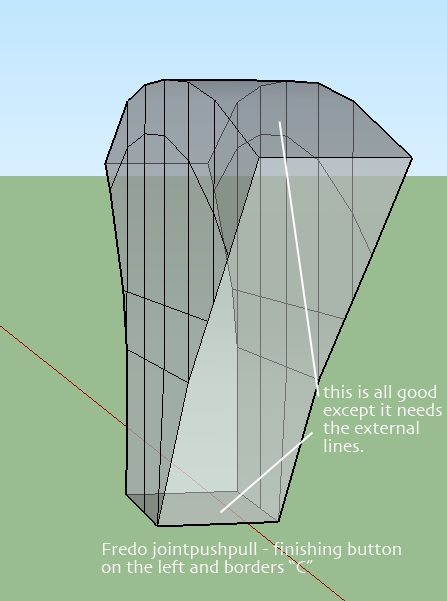
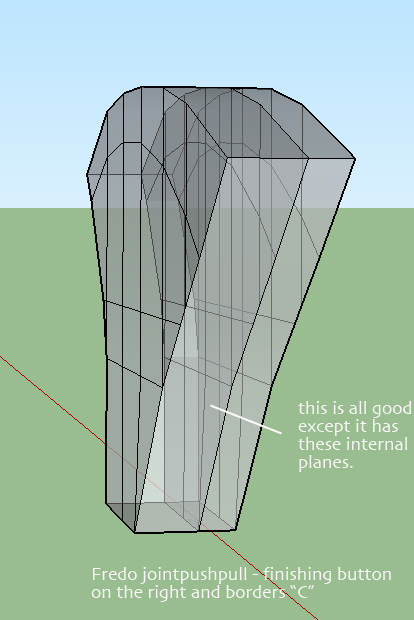
      I am getting a strange result from Fredo jointpushpull. I need the "J" button to extrude multiple faces to a certain distance, then re-extrude same face, create a perimeter division line on the object but to not create interior faces. See attached images. Any help?

      thanks,

      Ron


      Fredo jtpshpll 1.jpg


      Fredo jtpshpll 2.jpg

      posted in Extensions & Applications Discussions extensions
      S
      schaferron1
    • RE: Graphic parts list for modern house

      components to a grid does work, but this really isn't exactly what I need. thanks though!

      Maybe a list version would work. Any suggestions for something that will list all components and give amounts of each component in model?

      Thanks,

      R

      posted in SketchUp Discussions
      S
      schaferron1
    • Graphic parts list for modern house

      I have created a model of my modern small house using components. (floor truss, roof truss, plywood decking, steel connectors, 4 x 4 posts, 6'8" x 12' 0" sliding door units, etc.) I would like to create a graphic list of all of the components showing sizes, and quantities.

      I have generated a report using sketchup Pro 2014. Works well. In excel there may be a way to add components to a sum, but it seems overly cumbersome. I'm sure a program like pluspec might be able to achieve this but I would like to create this list using Sketchup 2014.

      Any suggestions?

      Thanks,

      Ron

      posted in SketchUp Discussions sketchup
      S
      schaferron1
    • RE: Layout hybrid selection? How to do it in LO 13?

      thanks Dave!

      posted in LayOut Discussions
      S
      schaferron1
    • Layout hybrid selection? How to do it in LO 13?

      Hi, I can't seem to find the button to make a window in my layout page into a hybrid view. It seems in the past I would just right click? Also, if I select export to dwg, I do not get anything.

      Thanks,

      Ron πŸ˜„

      posted in LayOut Discussions layout
      S
      schaferron1
    • RE: Re: [Plugin] Flatten to Plane v1.2 20101023

      have installed this plugin through sketchucation plugin store, says installed, does not show up in tools, plugins anywhere. I have restarted sketchup 2013 3 times.

      Thanks! πŸ˜„

      R

      posted in Plugins
      S
      schaferron1
    • RE: Solidsolver

      Thanks Dave! all good

      posted in SketchUp Discussions
      S
      schaferron1
    • Solidsolver

      downloaded solidsolver by TIG

      Where do I place the file? I do not have a plugins folder with 2013 or do I? Where would it be? This extension is not available through extensions warehouse.

      posted in SketchUp Discussions sketchup
      S
      schaferron1
    • XMLDRSpawner.bin

      This program is starting when I try to open sketchup 2013 mac. Sketchup will not open. I have downloaded and installed the maintenance release 2. Previously, I was able to hold down the command key and sketchup would open. Now it will not. Any suggestions? I have checked my Library/preferences/ No files as listed in help in this folder to delete..

      thanks,

      Ron

      posted in SketchUp Discussions sketchup
      S
      schaferron1
    • RE: Need white background hidden line for layout

      Thanks Dave!

      Ron

      posted in Newbie Forum
      S
      schaferron1
    • Need white background hidden line for layout

      Hi, I am creating a plan view of my project using the face style hidden line. I am getting a colored background in the view. I would like to have black lines + white background. I think it has to do with styles, but can't figure it out.

      Thanks for your help!

      Ron

      posted in Newbie Forum sketchup
      S
      schaferron1
    • Calculate floor area in multi level building in groups

      I am working on a large scale mixed use project with multiple parcels with multiple bldgs w multi floors. I am looking for a way to use the area calculate right click tool to select a nested grouped object (a building of multiple floors) and get the floor area. I tried placing a named material on the top surface of each extruded box (floors of the grouped model) and I was not able to get a calculation of the material in the group. If I select each surface with the material I am able to get the area but not within a nested group.

      Thanks!

      Ron

      posted in SketchUp Discussions sketchup
      S
      schaferron1
    • Layout - replace sketchup file with another sketchup file

      I have an existing layout file connected to a sketchup file that is outdated. I would like to attach my most recent sketchup model to this layout file. In document setup there are these options: update - relink - unlink - edit - goto - purge. I have tried unlink and the linked file remains in the page views. I have selected goto and it just open the selected sketchup file in sketchup. I have selected edit and it again opens the sketchup file. I'm sure there is an easy way to do this, I just haven't been able to find it.

      thanks,

      Ron

      posted in LayOut Discussions layout
      S
      schaferron1
    • RE: Sectioncutface

      Thanks everybody for your input and also thanks for helping me, a real "newbee" with Layout and SU.

      TIG, thanks for making the sectioncutface plugin and allowing us to download it for free.

      I am a bit of a cry baby sometimes, especially when a process doesn't work immediately. So, sorry about that. I believe in SU + LO and Google. I think this platform will get stronger and stronger.

      Ron

      Gaieus, your sections are beautiful.

      posted in Newbie Forum
      S
      schaferron1
    • RE: Sectioncutface

      Chris, thanks for your help and comments. Sectioncutface is probably a good plugin, but I personally do not have the time to wait for the process to complete. Once TIG has updated it, maybe I will try it again.

      Thanks,

      R

      posted in Newbie Forum
      S
      schaferron1
    • RE: Sectioncutface

      Just a simple house plan of 1200 sq ft. - had to force quit, it never worked.

      Thanks,

      Ron

      posted in Newbie Forum
      S
      schaferron1
    • 1
    • 2
    • 3
    • 2 / 3