Thanks Rob, nice tip!
Oops, your profile's looking a bit empty! To help us tailor your experience, please fill in key details like your SketchUp version, skill level, operating system, and more. Update and save your info on your profile page today!
Check out Febhouse | New extensions for Shadow Analysis in SketchUp Download
 P
Offline
P
Offline
Posts
-
RE: Decal mapping in V-Ray
Thanks Andybot...that's where I was afraid of...mmm...It's a solution, but don't you see shadows when you render close-ups?
-
Decal mapping in V-Ray
Dear Sketch-Uppers,
SketchUp is my favorite modelling tool for years now and I'll definitely stick to it. But rendering I do with C4d, which is great as well, but exporting from SketchUp to C4d cost me to much time before I get everything right(phong angles etc etc).
Therefore I was wondering if I can better use Vray over C4d? I've checked some tutorials and installed the demo, but I really miss the possibility of decal mapping and stacked material mapping. I know that you can use alpha channels, but then the applied object becomes transparent and I lose the overview in Sketchup(it becomes a mess). In C4d I can apply different materials and they are "stacked" on the object. For instance, a wooden wall, and sticked on it there are separate materials containing different textures. For me, as an exhibition designer, this is most essential!! Isn't this possible in VRay? Should I stick to C4d? Please advice! Thanks! -
RE: SketchUp 2015 Wishlist
If Trimble take us, users, seriously...they make complex object handling faster....much much much faster....
-
RE: V5 Beta MOI 3D on MAC / PC April 2022 !
Man...I didn't know MOI....I've been playing around with it and this is what SketchUp should have been....
-
RE: Amd or Intel
...Thanks for all the replies! I guess I'll stick to my Intel!
-
Amd or Intel
Hi S'uppers!
Does anyone know whether an AMD processor is much faster than an Intel when it's used for SketchUp? This because of the fact that SU rely on one core, the processor speed should be as high as possible. Any experience?
-
RE: [Plugin] MoveAlong - v1.2b - 07 Jul 14
Hahaha! Okay! I'll wait patiently for a brilliant moment!
 !
! -
RE: [Plugin] MoveAlong - v1.2b - 07 Jul 14
Thanks Fredo....it's a pity...But thanks nevertheless!
-
RE: [Plugin] MoveAlong - v1.2b - 07 Jul 14
Hi Pilou,
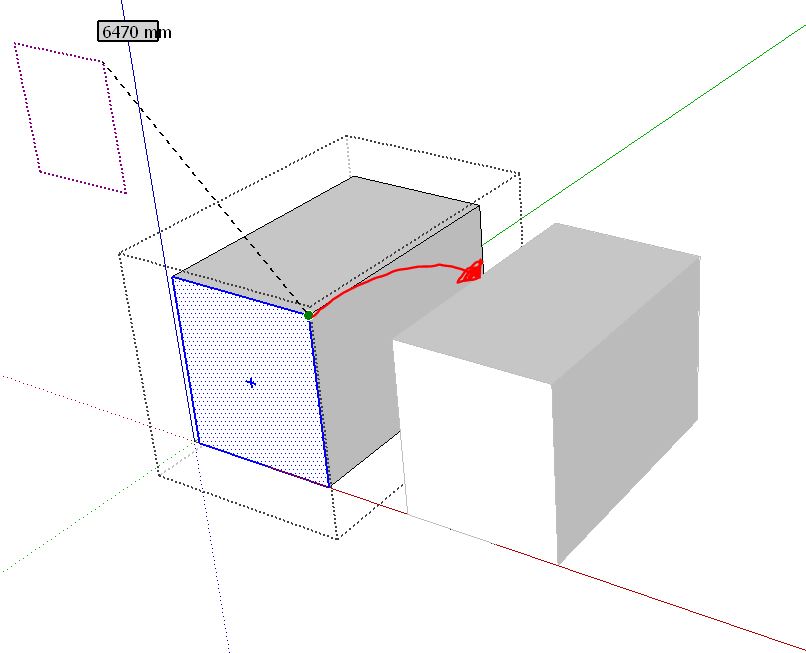
You actually don't need the plugin anyway. But that's not the issue. I only noticed that snapping to other objects, while in a group, is not possible...while it is possible when you ungroup the object. I would like to know if it is me being stupid...or that I have to switch between the "original" move function and MoveAlong(which I prefer in MOST cases).
-
RE: [Plugin] MoveAlong - v1.2b - 07 Jul 14
I've a problem...I checked all your instruction movies, but can't find a solution. When I want to move lines or faces in one active group I cannot snap or interfere with objects outside the active group. Am I missing something?? I installed the latest version...
Thanks in advance....
-
RE: [Plugin] s4u_toComponents
YES it Works! Now I've the 'Immense' toolbar!
Thanks again!!!! -
RE: [Plugin] s4u_toComponents
I AM! Yes! Uhmm..but one question, I've installed the plugin but I don't get the extended toolbar like you..I still have the normal 5 icons..is this correct?
Thank you! -
RE: [Plugin] s4u_toComponents
It's such a brilliant plugin! I love these kind of "modifiers"...superb...Thanks again!
-
RE: [Plugin] follow me rotate
Oh no TIG, then you misunderstood me...I was actually very glad with your analysis
 ..But I did what you wrote down and it still gave an error message(only deleting the cn version). I just removed the plugin, installed it again, removed the CN file...and again the error. Maybe my 'cocktail' of plugins doesn't match with this particular one!
Well please don't spend to much time on this as I'm, I guess, the only one with this problem...Thanks Tig! -
RE: [Plugin] follow me rotate
mmm...okay...I'll analyse TIG's "essay" thoroughly again, en then I'm going to test it...Thanks!!!
-
RE: [Plugin] follow me rotate
Thanks Dave. Uhm yep, via Extension Warehouse and later(after getting the Error)via the "install extensions" option in the preferences...mmm...still the same error.
-
RE: Render Options for New MacPro?
As an design office we've switched entirely to pc's. This is because of the and "stability". They say Macs don't have hang-ups or hardware issues? Well don't come to me with that...I've also been a Mac user since 25 years, but they are so much focusing on what the main stream wants. And then there's the flexibility of hardware, we change hardware now and then and gives us the opportunity to test setups with rendering...and that changes things! We saw that our "old" MacPro's(dual Xeon, don't get me wrong) were sooooo much slower then our new pc's(single core, but with two GTX780i's)...it really safes us hours! And, I actually must say I prefer Windows8 then OSX....sorry...So coming back to your question; The new MacPro is a beast and not even that expensive, but I would spent my money on a pc and get used to Windows...and actually there isn't so much difference...