Dear All,
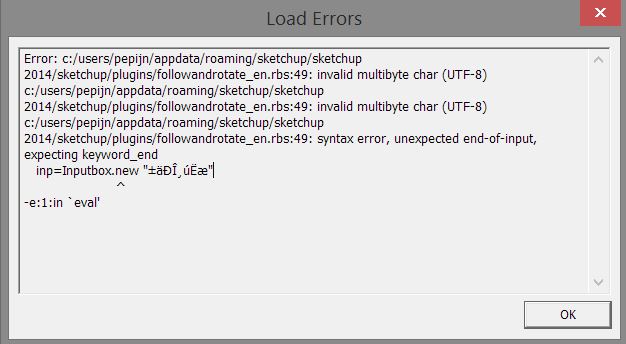
After installing this plugin in SU14, and after a restart, I got this error message. Am I missing something?  Isn't this plugin compatible with the 2014 version? Thanks!!
 P
Offline
P
Offline
Dear All,
After installing this plugin in SU14, and after a restart, I got this error message. Am I missing something? Isn't this plugin compatible with the 2014 version? Thanks!!
Welcome to the conservative party of Sketchup....while almost every company enjoys the new possibilities of nowadays...Sketchup won't.....As a company we are now considering other packages because of this attitude....
Great plug-in! But would it be possible not the change an object's position when you lock it? This would make the plug-in perfect.... 
...I found it...you'll have to active the toolbar in the extensions-list in the preferences window. mmmm
Is it true that Supderdrape doesn't work in 2014 when installing it with the PluginStore manager? I can't see it anywhere !
Thanks Jody, that will help...
....This is exactly what I want to know to! If your reseller quits, what then? I also prefer to have a direct license with Trimble and not with my reseller. Hope this is possible!
Will there be still any updates on this plugins? This is actually one of the best plugins ever made for SU...
I THINK THIS IS ONE OF THE MOST REVOLUTIONARY PLUGIN IN YEARS!!!!
I'm your biggest fan!  )!
)!
Thanks!
I think that the problem with most of you is that you expect Sketchup will become like more "professional" modellers. So, like Cinema4d, and 3dsMax etc etc...These are parametric modellers with advanced tools and also more tools...Sketchup, now has a problem. What is the pilosophy behind Sketchup now and where does it goes to?. If they choose to have a modeller that is good for modelling and to create 'sketchy' renders with quite simple modelling tools..Sketchup is great now. But if they want to bring it to a higher lever they should choose another name(a new product) and use the same intuitive ui with deformer-tools etc etc...At this point, every release will be disapointing...believe me...
Hi SU-pers!
Some while ago a read a topic about someone who was searching for a way to map a key on a keyboard to work like a scroll wheel-button. I know some Apple mice don't have such a wheel, and for myself,I'm working with a Wacom pen, I also miss the easiness of the quick-orbit tool(which goes back to the previous tool when releasing the button)...Today I found a free little program called NeatMouse(Windows), and with that you can map any(!) key on your keyboard which will behave like a the scroll-wheel button...FOr me this is working like a charm!
http://neatdecisions.com/products/neatmouse/
...oh...it's not for OSX ;(...sorry
Hey Sdmitch....Thanks for the link and yes this is exactly what I mean..."Panelisation"...And Olishea, your right, if there will be a plugin which can do so, it would indeed be fantastic!!!
...Oh...and Chris I've been looking to the Kirill LSS tools and you're right that is is powerfull but it can't do "panelisation"  !
!
Hey Chris!
Well your plugin, which is great by the way, does the job in another way...What really would be great is a plugin that 'fits' a component to a surface. So first you select a surface, then a component and finally the amount of components to be copied...I think this will give a LOT of possibillities and would be very very powerfull(also great for organic structures etc etc)...
Grtzzz
Pepijn
Thanks Pilou!! That's a great suggestion! But it would be greater if you have components that are copied on a surface...mmmm

Hi SU-pers!
I just saw this clip on YouTube;
http://www.youtube.com/watch?v=iZtMpNzJj70
...and I was wondering if there is a plugin in SU that can do this job?!
THANKS!!!