sketchucation logo sketchucation
    • Login
    1. Home
    2. ntxdave
    3. Posts
    Oops, your profile's looking a bit empty! To help us tailor your experience, please fill in key details like your SketchUp version, skill level, operating system, and more. Update and save your info on your profile page today!
    Check out Febhouse | New extensions for Shadow Analysis in SketchUp Download
    ntxdaveN Offline
    • Profile
    • Following 1
    • Followers 0
    • Topics 177
    • Posts 2,798
    • Groups 1

    Posts

    Recent Best Controversial
    • RE: Shapes, torus, dome, etc. Not for 2015?

      @tig said:

      The oldie @Last version is a single file name 'shapes.rb'.
      It's loads as a basic Plugin, NOT an Extension.

      The newer/superior Sketchup Team's EWH version is an Extension - named 'Shapes Tool'.
      Its installation is in two parts: the 'su_shapes.rb' file and its 'su_shapes' subfolder containing the main files.

      So leave the 'su_' stuff alone and find the ancient 'shapes.rb' file [in the Plugins folder] and delete it... [or you could use SketchUcation Uninstaller on it [.rb >>> .rbx] and then it doesn't auto-load OR show up on the Plugins Manager's lists etc...]

      When SketchUp restarts the 'good' version should load...

      Thanks for the reply but I have some interesting ones (all in the plugins folder):

      • Did not find any file name shapes.rb
      • There is a su_shapes.rb file and su_shapes folder
      • There is also a jwm_shapes.rb file and an jwm_shapes folder
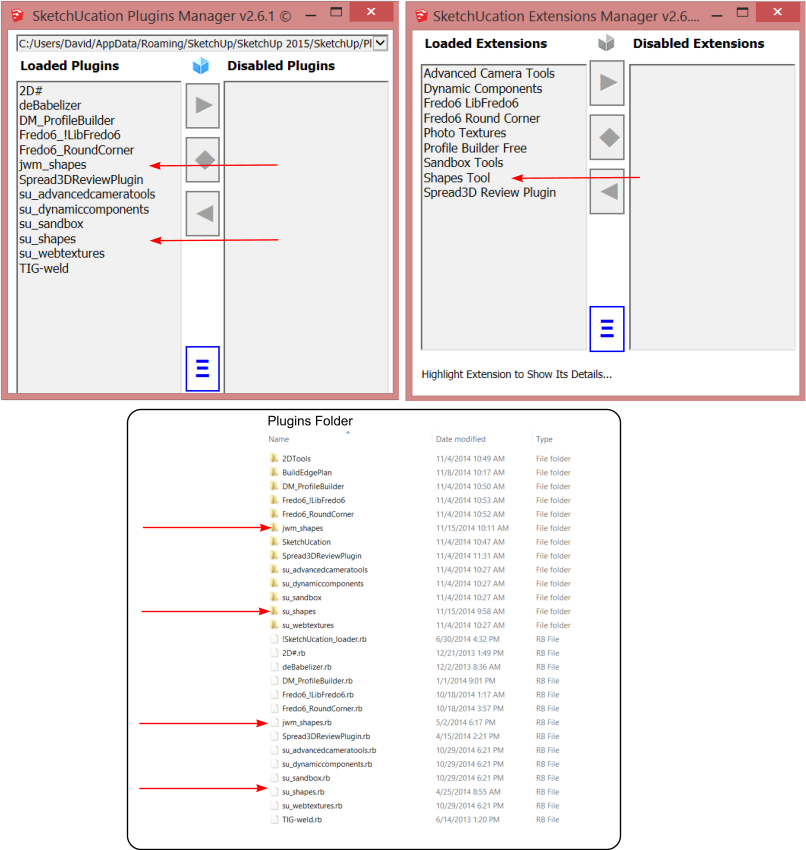
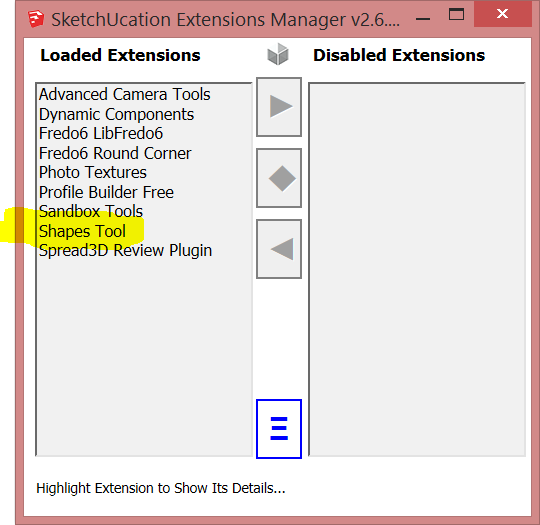
      Capture - Shapes Tool Information.png

      See the screen captures above and let me know what I should keep and what I should delete πŸ˜„ I think they have created a little bit of confusion with the switch from plugins to extensions.

      While I like this tool, I see that it could become problematic in that I cannot control where the shape is drawn. The good news is that it is added as a group so it can be easily moved however, there could be a problem in that it is always drawn at the intersection of the axes (do not know the correct term to use) so if another object is already in that position you might have trouble getting to it to move it..........πŸ˜„

      posted in SketchUp Discussions
      ntxdaveN
      ntxdave
    • RE: Shapes, torus, dome, etc. Not for 2015?

      OK - during this process I also installed the old one. Now I want to delete it. From the screen shot below, is the Shapes Tool (highlighted) the one I should uninstall?

      If so, where do I go to uninstall it. When I look in the plugin folder, I see su_shapes. Is that it?

      Since they now are changing from plugins to extensions, are they installed in different folders? If so, where are they? I would like to clean this up......


      Capture - SU 2015 Extensions.PNG

      posted in SketchUp Discussions
      ntxdaveN
      ntxdave
    • RE: Shapes, torus, dome, etc. Not for 2015?

      Interesting tool........how do I control where the shape is drawn?

      posted in SketchUp Discussions
      ntxdaveN
      ntxdave
    • RE: 2015 - .skb Files

      @box said:

      Program Files x86 is for 32bit programs while Program Files is for 64bit.

      I thought something like that but was not sure.......Thanks for the feedback.

      Just wish I could figure out why I cannot change the default program for opening .skb files.

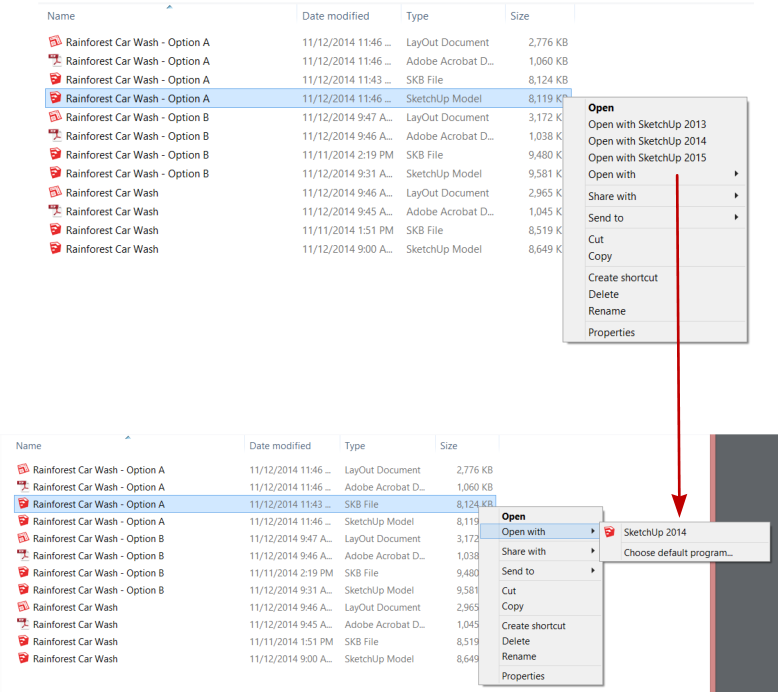
      Here is an example of what I see with 2015.......Notice the difference in the selection between the .skp and .skb files. I have tried multiple times on the .skb bile to "change the default program" and when I navigate to Sketchup.exe in the Sketchup 2015 folder, it still tries to open the .skb file with the Sketchup 2014 version.


      Capture - Default File Open Propeties.png

      posted in SketchUp Discussions
      ntxdaveN
      ntxdave
    • RE: 2015 - .skb Files

      @ely862me said:

      It works alright for me. But I would advice you to open the file from inside Sketchup - File/Open .
      If you choose to always open the file with Sketchup, you might, at some point, mismatch the files and update the one you shouldn't .

      If you still want to do that, just go and rename the Sketchup.exe(from the Sketchup installation folder) to Sketchup2015.exe . Then there should be no more misleading .exe names between 2014 and 2015 versions. Be aware that when you update you should delete the Sketchup2015.exe because it won't be replaced by the new Sketchup.exe .

      I tried renaming the Sketchup.exe to Sketchup2015.exe and then I got an error message about not being able to find a .dll file (did not capture the full name). I have sent the problem to Trimble Tech Support but have not heard anything back from the.

      Yes, I can open the file just fine using File/Open but a Windows Explorer convention since its early conception has been that you can set the default application to open a file when you double click on the file name. When I go through the normal Windows procedure for doing that, it always reverts back to the 2014 version. Once think I have noticed is that when I installed 2015, it put Sketchup in the Program Files director. The previous versions (2013 & 2014) were installed in the Program Files (x86) directory. I have been tempted to copy the entire Sketchup 2015 folder to the Program Files (x86) directory and see what happens.

      posted in SketchUp Discussions
      ntxdaveN
      ntxdave
    • RE: 2015 - .skb Files

      @box said:

      .skb are backup files and shouldn't open that way.

      .skp on the other hand....

      I understand but I should be able to open the backup file with the version that created it 😞

      Works fine with 2014 but I am not able to get the Windows 8.1 setting changed to work with 2015 😠

      posted in SketchUp Discussions
      ntxdaveN
      ntxdave
    • 2015 - .skb Files

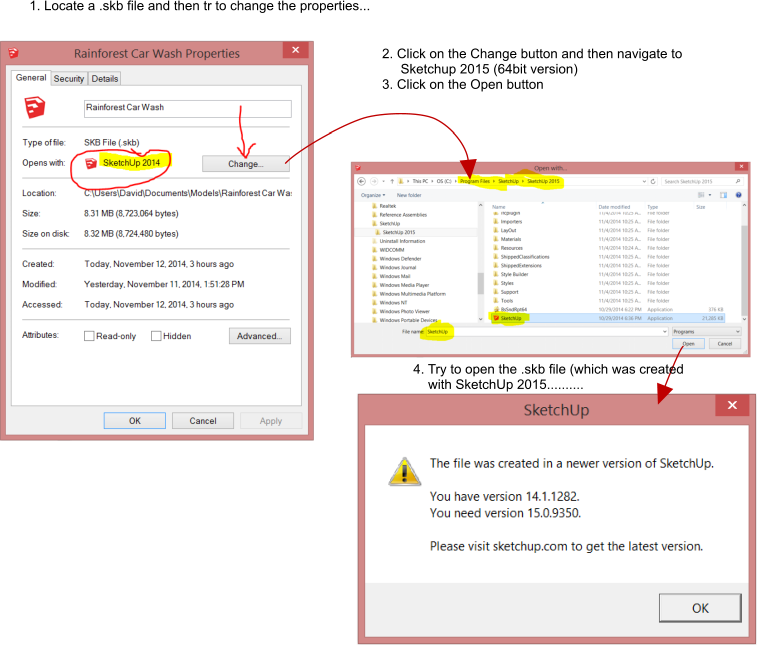
      I have tried several times to change the setting in Windows 8.1 to have .skb files open with 2015 Pro but cannot get it to work. Seems like no matter what I do, the setting does not update to SU Pr0 2015. Wondering if anyone else has had this problem and if you did how did you solve it.


      Capture - Change Open SKB Properties.png

      posted in SketchUp Discussions sketchup
      ntxdaveN
      ntxdave
    • RE: Sketchup Pro 2014 Classifiers

      I have tried several times and continually get the error message I previously showed.

      Anyone have any idea about what I might be doing wrong?

      If I get this to work and I have my own classifications, is there a way to provide a drop down list of the classification categories so that I can just select the one the component belongs to?

      Not exactly how sure I am that this really accomplishes anything for me though.

      posted in SketchUp Discussions
      ntxdaveN
      ntxdave
    • RE: TIG's 2D Tools plugin in 2015

      @tig said:

      I see no such lag.

      With creation or editing [an edit is in effect a create as a new definition is made for the instance[s] and the old one deleted from the data-base].

      I have v2015 WIN Pro 64bit

      If anything it seems faster than v2014 ?

      Do you have any other plugins installed which might be using observers etc to look at created components and thereby slowing it down ?
      If you manually make a component are there similar lags ?

      This is the first report of a possible issue...

      No - I do not have any other plugins that are using observers......

      If I do not get the lag when creating components or any other things. 2015 has been very fast for me. I just noticed this today. Do not remember seeing it yesterday or before and have not made any updates........

      OK - I just went and tried again with one of the files where I noticed the problem earlier and it worked fine (and VERY fast). Do not know what might have been happening (I have all of the same things opened on my PC). I will assume it is fine but I will watch it to see if it happens again.

      Thanks for the quick reply...........

      posted in SketchUp Discussions
      ntxdaveN
      ntxdave
    • RE: Sketchup Pro 2014 Classifiers

      @alexschreyer said:

      Copy the example from the Wikipedia page to a test.XSD file:
      http://en.wikipedia.org/wiki/XML_Schema_(W3C

      Save it somewhere and then load it into your model from Model Info > Classifications > Import...

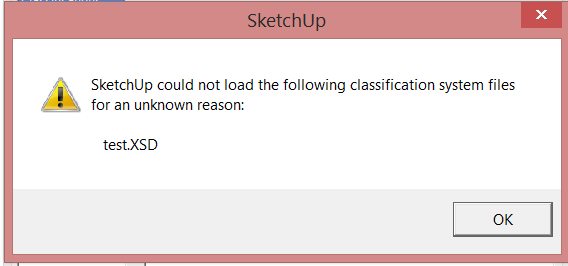
      Have not been able to get this to work in 2015. I keep getting this error when I try to import the text.XSD file........


      XSD Error Message.PNG

      posted in SketchUp Discussions
      ntxdaveN
      ntxdave
    • TIG's 2D Tools plugin in 2015

      I have been noticing a performance problem with TIG's 2D Tools plugin in SU Pro 2015 that I did not see in SU Pro 2014. In particular, if I create or edit 2D Text, it seems to be going through a lot of cycles and takes a long time to show up (compared to SU Pro 2014).

      It works, just takes a while and I see the little spinning circle for a while.......

      posted in SketchUp Discussions sketchup
      ntxdaveN
      ntxdave
    • RE: Which plugin will help me draw...

      @jean lemire said:

      Hi J0asia, hi folks.

      If it may help you, click in sequence on the scenes tabs of this SketchUp file for ideas.

      Nice little tut!!

      posted in Newbie Forum
      ntxdaveN
      ntxdave
    • RE: BuildEdge Plan - SU 2015 64Bit

      @box said:

      You should look at this thread too as you are interested.
      http://sketchucation.com/forums/viewtopic.php?f=15%26amp;t=59710

      I took the survey.........

      posted in SketchUp Discussions
      ntxdaveN
      ntxdave
    • RE: BuildEdge Plan - SU 2015 64Bit

      @box said:

      From the buildedge site.

      Thanks

      I sure missed that...............hope they update. This looks like a really good tool. I also just looked at a bunch of stuff on the 2016 wish list and from what I see/understand, this tool would address some of the things I see there.

      posted in SketchUp Discussions
      ntxdaveN
      ntxdave
    • BuildEdge Plan - SU 2015 64Bit

      I just tired to install BuildEdge Plan with SU 2015 64B version and I started getting error messages when I load SU and it would not show the extension on my toolbar.

      Did I do something wrong or have others had a similar problem with this extension/plugin?

      I did uninstall it to eliminate the problem for now. It looks like a very handy tool though.

      posted in SketchUp Discussions sketchup
      ntxdaveN
      ntxdave
    • RE: Fillet multiple corners

      @cotty said:

      if you use the purpe inference

      What is the purpe inference?

      posted in SketchUp Discussions
      ntxdaveN
      ntxdave
    • RE: Follow me tool on multiple surfaces

      You could also look at something like the Profile Builder plugin/extension. You might need something more than the free version so that you can build your own profile. If you buy it, you can build any profile you need and it will then use that profile along a welded path.

      You can find it at http://www.smustard.com The full version (where you can build your own profile is $20. I use the "free" version quite often.

      posted in Newbie Forum
      ntxdaveN
      ntxdave
    • RE: Fillet multiple corners

      @s shepherd said:

      A gif is worth a thousand words

      S

      Thanks for sharing.

      Wonder what other gems are hidden in 2015?

      posted in SketchUp Discussions
      ntxdaveN
      ntxdave
    • RE: SketchUp 2016 Wishlist

      @utiler said:

      SketchUp

      Custom linetypes - dashed, center, dotted, whatever we decide.
      Would make a world of difference. Just the start of my list; feel free to add.

      I agree 600% You can come pretty close to this with TIG's 2D Tools but it puts hidden styles in your model for the line style. Seems to me that this is something that out to be a native part of the application for anyone in the construction industry.

      I like your line styles and the suggestion to be able to draw them in color. Again, almost a "must have" for the construction industry.

      posted in SketchUp Discussions
      ntxdaveN
      ntxdave
    • RE: Portable Workstations for Sketchup

      @mike lucey said:

      I still miss my old 17" MacBook Pro. Having the extra screen real estate of the 17" over the current 15.4" MBP was great, even the retina resolution does not fully compensate. However, my problems will be solved when I get my hands on some very portable Packed Pixel screens!

      [attachment=0:10s8udcl]<!-- ia0 -->PackedPixels-Uses-Office.jpg<!-- ia0 -->[/attachment:10s8udcl]

      If anyone is not familiar with Packed Pixels, you can check it out here, http://www.packedpixels.com/#home

      Great idea but I am afraid they will wind up pricing themselves out of business. In one of the clips they say they estimate they will be about $500. That is a darn expensive screen (IMHO).

      Are they actually available anywhere?

      posted in SketchUp Discussions
      ntxdaveN
      ntxdave
    • 1
    • 2
    • 129
    • 130
    • 131
    • 132
    • 133
    • 139
    • 140
    • 131 / 140