sketchucation logo sketchucation
    • Login
    1. Home
    2. ntxdave
    3. Posts
    Oops, your profile's looking a bit empty! To help us tailor your experience, please fill in key details like your SketchUp version, skill level, operating system, and more. Update and save your info on your profile page today!
    ⚠️ Important | Libfredo 15.8b introduces important bugfixes for Fredo's Extensions Update
    Offline
    • Profile
    • Following 1
    • Followers 0
    • Topics 171
    • Posts 2,679
    • Groups 1

    Posts

    Recent Best Controversial
    • RE: Reversed Faces

      Dave R - You passed along some VERY good tips. I like the idea of the green back color as it is very obvious when you have the reversed face. I also like the tip of not applying any colors or materials until I am done drawing the model. This, coupled with the more obvious back color could be a great time saver in the long run.

      @TIG - Some interesting information about the Ruby coding (I assume this is Ruby) but I am not doing any Ruby coding so hard to see how to apply any of the information.

      I am going to download the plugin suggested and give it a try on my file. I am posting my .skp file as requested before so that you guys can give me more tips.

      Now for some more "newbie" type questions:

      1. How do I create and save my own styles (want to apply Dave R's suggestion)?
      2. Since I am not an architect nor an artist, I sometimes struggle with this concept of drawing in 3D. I have downloaded plugins like Profile Builder and some others to help me when drawing things like structural beams and etc. I think the Push/Pull has lead to some of my problems (like changing the size of a cylinder with the Offset and the push/pull items a couple of you have mentioned. Now the question, what is the best method for people like myself to really learn to use the tool correctly?
      3. I have a collection of around 100 components that have been built to be used in models. Does anyone have a good approach for going back through all of those components and cleaning up these problems? Yes - I am going to assume there is no alternative than to just go back and painfully clean up some probable messes.

      This thread has been a real eye opener for me and I really appreciate the feedback that has occurred/is occurring.


      Mitter&WrapWashers.skp

      posted in Newbie Forum
      ntxdaveN
      ntxdave
    • RE: Reversed Faces

      If it is white it is the front if it is blue it is the back. They need to be the right way around for 3D modelling. The most basic way to fix them is to right click each blue face and select reverse face. There are more complex and simple ways of fixing it, but understanding which face is which and how to flip it is fundamental.[/quote]y

      But I have colored most faces before I was a aware of all of this so now I can not just look at the model and identify the reversed faces.[quote="Box"]I may be wrong but I seem to remember reversed faces being mentioned several times in your previous posts.

      posted in Newbie Forum
      ntxdaveN
      ntxdave
    • RE: Reversed Faces

      @box said:

      Without any images, .skp's or other information the only answer possible is, Bad Modelling.

      I will post one tomorrow but from looking at other posts, it seems to be a common problem.

      In particular, the model I was just looking at has some four sided support beams that all have reversed faces.

      posted in Newbie Forum
      ntxdaveN
      ntxdave
    • Reversed Faces

      I am preparing some models for 3D printing and finding that there are a bunch of reversed faces in my model. I do not understand why. Can someone enlighten me and tell me why this happening and what is the most efficient way to get them corrected?

      posted in Newbie Forum sketchup
      ntxdaveN
      ntxdave
    • RE: SketchUp Animation

      @dave r said:

      Good luck getting it sorted.

      Not sure I "got it sorted" but my resolution was to add a scene that duplicated the one that is not showing up and all is fine for the client. As long as they are satisfied, so am I β˜€

      posted in Newbie Forum
      ntxdaveN
      ntxdave
    • RE: SketchUp Animation

      @dave r said:

      Hard to tell without seeing the file. Is it possible you have the first scene set so it isn't included in the animation?

      NO - Checked that the first thing. I am going to experiment with reversing the two scenes and see what happens. I am under a crunch because I need to create 10 of them for a client who wants to use them at an expo which starts on Sunday.

      This is the first time I have seen this happen 😞

      posted in Newbie Forum
      ntxdaveN
      ntxdave
    • SketchUp Animation

      I am creating an animation from a model that has 3 scenes. When I play the movie, it starts with the 2nd scene in my list of scenes. Why is that happening?

      posted in Newbie Forum sketchup
      ntxdaveN
      ntxdave
    • RE: Component does not show up in list of components

      @dave r said:

      [attachment=0:16trugmg]<!-- ia0 -->Screenshot - 2_15_2014 , 6_13_27 PM.png<!-- ia0 -->[/attachment:16trugmg]

      The blue faces are reversed.

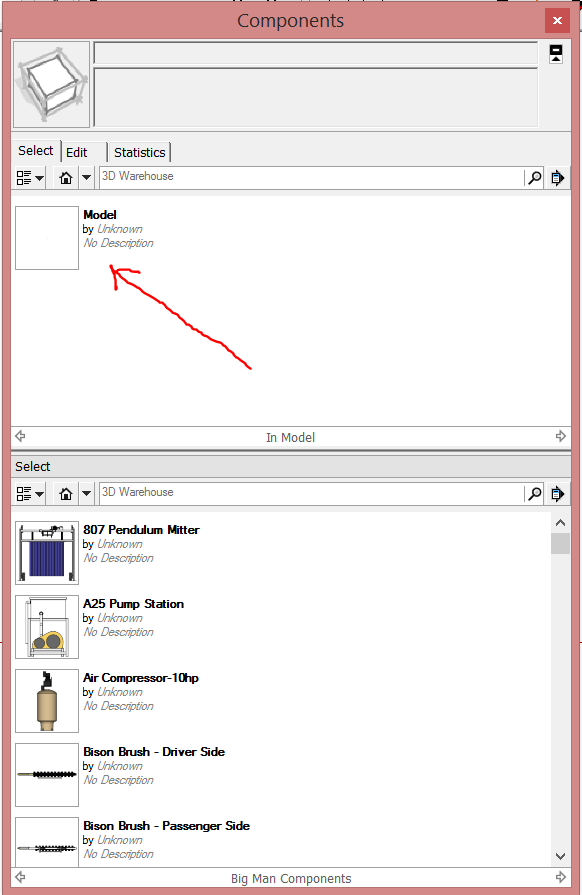
      If you click on the little + icon in the upper right corner of the Components window a secondary pane will open. Set it to the library where you want to save the component. Set the top one to In Model. Click and drag the thumbnail for the component from the top to the bottom pane.

      When I try to drag it, I get a icon that indicates I can not drag it to the window below.
      I do not understand what I am doing wrong but I finally have it over there.

      I do not understand what you mean by reversed faces.

      posted in Newbie Forum
      ntxdaveN
      ntxdave
    • RE: Component does not show up in list of components

      @dave r said:

      Have you tried dragging the component from In Model to your My Components folder in the Components window?

      BTW, you ought to fix the reversed faces.

      Still learning - I do not know how to do the drag and not sure what you mean be reversed faces.

      posted in Newbie Forum
      ntxdaveN
      ntxdave
    • RE: Component does not show up in list of components

      @dave r said:

      Could you share the SKP?


      Buff-and-Dry.skp

      posted in Newbie Forum
      ntxdaveN
      ntxdave
    • RE: Component does not show up in list of components

      Yes, it is a .skp (not.skb) file and it is in this folder:
      c:Program Files (x86)/SketchUp/SketchUp 2013/Components/MyComponents

      All of the other components in that folder show up when in SketchUp when I do:
      Windows/Components/MyComponents

      I went into the .skp file and made sure it was a component and not a group. I even went into the file, did an Explode then did a Select All and then Make Component and saved it back to the same folder. Still no luck. This is the only file I have identified so far in that folder that does not show up.

      posted in Newbie Forum
      ntxdaveN
      ntxdave
    • Component does not show up in list of components

      I created a component (.skp file) and stored it in my component folder in the SketchUp Component folder but it does not show up in the list of components when I am creating a model. I have a bunch of other components in the folder and they all show up but one. I tried adding it again and then refreshed the In Model list of components in my model but only that 1 item is not showing up.

      Any hints of something I should go check?

      posted in Newbie Forum sketchup
      ntxdaveN
      ntxdave
    • Round Corner Plugin Not Showing Up

      I have been trying to install the Round Corner plugin and am getting a message that it was installed successfully but it never shows up. I did install the Fredo6 Lib version 5.6a first and it shows when I look at the plugin manager.

      What am I doing wrong? I have done this before on another computer and it worked fine.

      posted in Plugins
      ntxdaveN
      ntxdave
    • RE: 3D Editable Text

      @ntxdave said:

      @box said:

      Not at all, you just need to add thickness or intesect it to remove the ZFighting, it is designed as 3D text.

      You will find Tig's Text Tags more useful for 2D text. They are also editable.
      http://sketchucation.com/forums/viewtopic.php?p=47399#p47399

      I tried the intersect faces and it did not work well and the text was no longer editable.

      Does Tis's 2D text tag allow you to "tie" it to a face so that if I rotate the object (say box) the text rotates with it or does it behave like the standard 2D text which stays in place no matter how I rotate the model or object?

      Thanks - I just downloaded Tig's tool and I can make it work exactly the way I want for the text I am adding to my models much easier that the other tools.

      Now I need to understand how to use the rest of his 2D tool set.

      posted in Plugins
      ntxdaveN
      ntxdave
    • RE: 3D Editable Text

      @box said:

      Not at all, you just need to add thickness or intesect it to remove the ZFighting, it is designed as 3D text.

      You will find Tig's Text Tags more useful for 2D text. They are also editable.
      http://sketchucation.com/forums/viewtopic.php?p=47399#p47399

      I tried the intersect faces and it did not work well and the text was no longer editable.

      Does Tis's 2D text tag allow you to "tie" it to a face so that if I rotate the object (say box) the text rotates with it or does it behave like the standard 2D text which stays in place no matter how I rotate the model or object?

      posted in Plugins
      ntxdaveN
      ntxdave
    • RE: 3D Editable Text

      @box said:

      The reason the standard text works is it has been designed to sit just above the surface whereas thomthom's sits on the surface.
      They are designed to be 3D and there are different advantages to the position of each. For example The standard won't easily intersect with the face but Thomthom's will.

      So what you are saying is that I can never use Thomthom's plugin to add 3D text to the face of an object.

      posted in Plugins
      ntxdaveN
      ntxdave
    • RE: 3D Editable Text

      @gilles said:

      This is just normal and call z( or Y or x ) fighting, if you don't want to see this you must intersect the text with the box, or give thickness to the text.

      When you say "intersect", I am not sure what you mean. I did this just like Cotter's screencast.

      I do not want the text to have any thickness. The normal 3D text tool is working the way I want it to so I am using it. I just cannot edit the text if I make a mistake. I have to delete the text and re-add it.

      posted in Plugins
      ntxdaveN
      ntxdave
    • RE: 3D Editable Text

      @cotty said:

      @ntxdave said:

      What you all seem to be missing is that I am not using the "out of the box" 3D Text tool.

      What text tool do you think was used in my screencast?

      Sorry, I had looked at the other screencast in this thread instead of yours. Your screencast is exactly what I had tried. In fact, I did it again and am including another screenshot that I hope helps demonstrate my problem (this text is not really tied to the face - if I rotate the screen it stays just like it is shown - if I rotate the box, it does not include the text).

      Notice how the text is showing on the face of the box.


      Capture-ED Text 2.PNG

      posted in Plugins
      ntxdaveN
      ntxdave
    • RE: 3D Editable Text

      What you all seem to be missing is that I am not using the "out of the box" 3D Text tool. I am using the 3D Editable Text plugin which not placing the text correctly. The standard tool works fine except that the text is not editable.

      The plugin does not place the text on the face. I have tried many ways to accomplish it with the plugin.
      Capture-3D Text.PNG

      Notice that the text and the face overlap and you can flip things until your heart is content but the text does not wind up on the face. It is attached to it but is not "on" it. If I move the face around, the text goes with it but is somehow behind it. I am confident it has something to do with the ordering of objects in the drawing and is somewhat of a bug with the plugin.

      Thom Thom, if you are monitoring, perhaps you can suggest a solution. I have found a work around but it is a little bit of a pain.

      posted in Plugins
      ntxdaveN
      ntxdave
    • RE: 3D Editable Text

      @box said:

      You don't need to preselect the face. Type the text and adjust it's size and thickness then click on the face and it will attach. But make sure the face orientation is correct as Gilles points out.

      No matter what sequence I do things in, the plugin places the text behind my face and does not attack to the face.

      Since I am in a crunch, I am using the standard 3D text tool which works. I just have to be careful not to make a mistake with the text. If I do, I just delete it and redo it. With the standard tool, I thought you did have to click the face first so the text is tied to the face.

      posted in Plugins
      ntxdaveN
      ntxdave
    • 1 / 1