sketchucation logo sketchucation
    • Login
    1. Home
    2. ntxdave
    3. Posts
    Oops, your profile's looking a bit empty! To help us tailor your experience, please fill in key details like your SketchUp version, skill level, operating system, and more. Update and save your info on your profile page today!
    Check out Febhouse | New extensions for Shadow Analysis in SketchUp Download
    ntxdaveN Offline
    • Profile
    • Following 1
    • Followers 0
    • Topics 177
    • Posts 2,798
    • Groups 1

    Posts

    Recent Best Controversial
    • RE: [Plugin] 3D Parametric Shapes - makes placeable components

      @tig said:

      this version now works fine in all SketchUp versions since at least v8, including v2015.

      It is now separated from the SketchUp's own "su_" version from the EWHouse...

      They now have separate Extension names and menu items etc, and so they could be installed side-by-side - Although considering the improvements to this tool, I'd now recommend it over the "su_" one - it offers all of its functionality, plus some extra forms and the ability to determine the shapes location as it is created...

      Do NOT install the old @Last legacy version !

      Thanks for the quick feedback. I think the fact that I can now control where the shape is drawn is a very strong point. I will install it and remove the su_ version.

      posted in Plugins
      ntxdaveN
      ntxdave
    • RE: [Plugin] 3D Parametric Shapes - makes placeable components

      @johnwmcc said:

      v2.5 changes the drawn shapes from groups to components, and allows the user to place them at any pickable point, not just insert them at the world origin.

      Thanks to Jim Foltz for providing sample code which I was able to adapt.

      See Plugin Store, or the first post in this thread, for the latest v2.5

      Has it been tested with 2015?

      Since I have the "other" version installed (not your version), what steps do I need to take to update (assuming your updated version is "clean" for 2015)?

      posted in Plugins
      ntxdaveN
      ntxdave
    • RE: Zoom cutting problem in make 2015-64bit

      @tig said:

      The 'clipping-plane' issue has been discussed endlessly...
      It still occurs in v2015 - but I don't see that it is any worse that it ever was.


      The main causes are your model, and are fixable [unless you are modeling a city!].

      They occur most frequently if you have imported a CD DWG...

      Typical causes/cures.

      Geometry or Guides that are miles from the model's origin [move things back to the origin - or delete it - if it's not needed?]
      Geometry or Guides inside Components/Groups that are miles from that container's origin [delete it - it's not needed?]
      Components [ex-Blocks] that have their origins [insertion-point] miles from their geometry [change the axes in the context-menu to be sensibly located]
      Imported Components [ex-Block] that in CAD were incorrectly imported at the wrong size and rescaled, so in SketchUp you then have a Component that is them miles across, but scaled much smaller in the model - e.g. a 1000mm door imported into CAD as if it were meters not mm, and then scaled down to be 1m if a kilometer across albeit scaled down...


      Remember that these objects which might be causing the issue might be 'hidden' or be assigned an OFF layer - ensure everything is visible before trying to delete wayward objects...
      Also ensure you have 'reset the axes' in the context-menu so you do not get a false sense of where [0,0,0] is !

      I have been seeing it a lot in 2015. I only saw it once or twice in over a year of using 2013 & 2014. It has happened to me on some very simple and small models that were centered at 0,0,0. Usually if I mess around with zooming and rotating for a little while it will end up going away. The funny thing I have noticed it is that it happens more often for me on simple models than on complex ones.

      posted in SketchUp Discussions
      ntxdaveN
      ntxdave
    • RE: Spiral help please

      @box said:

      It's done with a plugin called Sketchy Physics, one of the most frustrating and fun plugins ever sent to torture us.
      There is a servo hinge on the little door at the top that opens with a slider and then it is simple gravity that makes the ball run.
      The chains, pulleys, buckets and assorted clockwork machinery that is running on the inside to elevate the balls, is a tad more complex.
      I'll warn you now before you rush off to try it, it doesn't work with 2015 yet.

      Sorry to keep coming back but are you saying that Sketchy Physics creates the animated gif file?

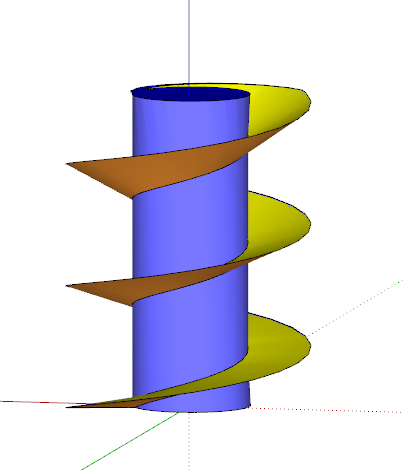
      Another "learning" question: How do you achieve the indented curve look of your spiral blade? I have never had to do anything like this but when I learn tricks like that from you guys it helps me get a better overall grip of the tool.

      posted in Newbie Forum
      ntxdaveN
      ntxdave
    • RE: Spiral help please

      @box said:

      @ntxdave said:

      @box that is a really neat animation. Curios about the software you used for the animation.

      It's all Sketchup, just a very simple bit of Sketchy Physics

      OK - how do you do that animation with Sketchup?

      posted in Newbie Forum
      ntxdaveN
      ntxdave
    • RE: Spiral help please

      You guys make me want to run and hide Here I was proud and happy that I finally got the screw created and then you guys just blew me away.

      @box that is a really neat animation. Curios about the software you used for the animation.

      @Jeff - that was a really interesting video.

      @DaveR - I like the way you had multiple pitches to your helix and the transparency to the finished blade.

      Honestly, I enjoy feedback like in this thread. For people like myself you certainly help me to advance my skills by reaching out and, at the very minimum, trying to learn new things which I do not normally use in the work I do. One never knows when one of he "tricks" you learn from these exercises will help solve something you are trying to do.

      😍 😍 😍

      posted in Newbie Forum
      ntxdaveN
      ntxdave
    • RE: Spiral help please

      @jeff hammond said:

      @ntxdave said:

      Here is another one using Jeff's 3 helix method. I used the Helix tool (in the 3D Shapes context menu). A little trickier with the scaling but another interesting affect.

      that's happening because you're scaling using the shift key (uniform) while using a middle scale handle or- not using the shift key and planar inference with a top-corner handle

      anyway, grab one of the corner-middle scale handles, press&hold option/alt key, scale then use the measurements box for uniformity.. i.e. enter 2.5,2.5 in the box

      Thanks Jeff - again a good piece of information to tuck away for future reference.

      Seems like there is just no end to things to learn. Particularly if they are features you do not use on a regular basis. Again, all part of the continued learning process.

      posted in Newbie Forum
      ntxdaveN
      ntxdave
    • RE: Spiral help please

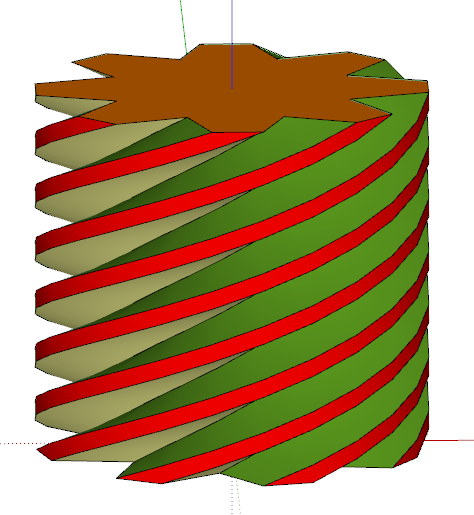
      Here is another one using Jeff's 3 helix method. I used the Helix tool (in the 3D Shapes context menu). A little trickier with the scaling but another interesting affect. Once drawn and scaled, I created a box and trimmed the top so that the scaled helix did not stick up above the cylinder.

      Capture - Helix Spiral.PNG

      For any others who may care, here are the steps I used to create this one:

      1. Created a helix Draw>3D Shapes>Helix
      2. Rotated 2 copies of the helix by 15[sup:bhfl8sky]0[/sup:bhfl8sky] Selected helix Ctrl-Rotate 15 2x
      3. Created a circle the same radius as the helix
      4. Used Push/Pull to extrude the circle to the same height as the helix using inference for the correct height
      5. Selected all items then right-clicked and selected Explode
      6. Selected the top row of the helix's on the cylinder face and used the scale too to extrude
      7. Selected the cylinder faces and used the scale tool to get the cylinder back into shape (this had to be done multiple times to get things back into the proper cylinder shape)
      8. Used the bucket tool to add color to the faces the way I wanted it
      9. Since one of the extruded helix faces now extended above the cylinder, I created a box that was larger than the diameter of the cylinder and helix faces and then made it a group
      10. Selected the helix/cylinder shapes and made them a group
      11. Placed the box at the top of the helix/cylinder at the height I wanted and then selected both the box and helix/cylinder and clicked on the Subtract Solids tool to trim the top

      Hope someone finds these steps useful and/or informative.

      Once again - Thanks Jeff, Box and others for opening my eyes. I had watch that original video several times but the real trick was in some of the subtle things that you do not really see clearly in the video. In particular, the Select All - Explode and being able to triple click on the line segments to select them all.

      Learning new things can be fun even if you do not have any particular place to go apply them.

      posted in Newbie Forum
      ntxdaveN
      ntxdave
    • RE: Shapes, torus, dome, etc. Not for 2015?

      @jim said:

      @ntxdave said:

      Again, my biggest complaint (if you want to call it that) is that you cannot specify where you want the shape drawn but as I said before, since it is placed in your model as a group it is easy to move.

      It would not be difficult to change the plugin so that the generated shape automatically attaches to the cursor for placement. The shapes would just need to be created as Components instead of Groups.

      Maybe make a feature request in the plugin thread or on github.

      JWM does not think he can do it (I posted in the thread you suggested). I would like the su_ version to be modified. I do not need the extra two features in jwm's version. The "native" one that works in 2015 would be fine for me...........

      posted in SketchUp Discussions
      ntxdaveN
      ntxdave
    • RE: Spiral help please

      Well, I gave it a rest last night and FINALLY, I GOT IT 😍

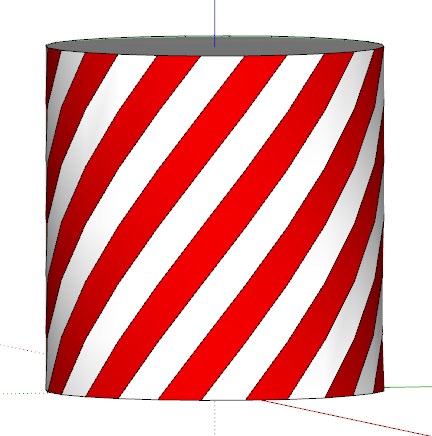
      Here is my example.
      Capture - Spiral.PNG
      I have to admit that Jeff's 3 helix example made me see the light!!

      posted in Newbie Forum
      ntxdaveN
      ntxdave
    • RE: Spiral help please

      Well, I made some progress but still not quite there..........

      Capture - Spiral 1.PNG

      As you can see, I got the darn thing to let me color the stripes however, I had to color each stripe independently. I then could not select one color of stipe and use the scale tool to move it to create the slots like in the video. I think that it is all still related to the fact that I do not have the lines to form the helix's.

      posted in Newbie Forum
      ntxdaveN
      ntxdave
    • RE: Spiral help please

      @box said:

      @ntxdave said:

      [*]Drew a line the size of one segment and then rotated it upward

      Is it possible this is your error. You don't rotate the segment, you lift the endpoint.
      If you rotate it it wont connect to the next row of segments and you'll have all the individual segments floating about.

      Perhaps an image would help us see where you are going wrong.

      When I said rotated it I really meant lifted it.......by wording on my part. I think the first real issue is that the rows are not connecting.

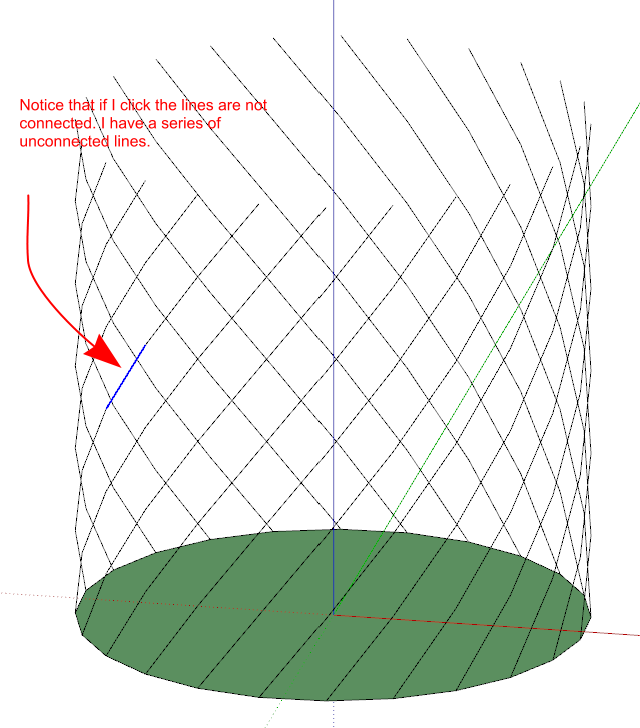
      Here is what I wind up with...........
      Capture - Helix.PNG

      Notice that I have a series of unconnected lines. I think that is probably the route of the problem. What the heck am I doing wrong. I am feeling dumber by the minute.......

      posted in Newbie Forum
      ntxdaveN
      ntxdave
    • RE: Spiral help please

      @kathryng said:

      I was just about to write back to ntxdave, and tell him that I had found the answer, which was to just "select all" and then explode. Hope you are proud of me Box - I figured it out all by myself.

      Boy - I need to quit posting and showing how much I am missing. First of all, when I get done creating the helix's they are a bunch of line segments, they are not connected. I tried what you and the others said but I am really missing something that should be obvious.

      Here are the steps I have taken:

      1. Created the circle
      2. Made the circle a group and locket it
      3. Drew a line the size of one segment and then rotated it upward
      4. Copied the line 23 times creating the first "row" of the heix's
      5. Copied the row of rotated lines 19 times to create the helix's

      After these steps I have tried several things all of which seem to be contrary to what the rest of you are saying. I do not get a real set of helix's (i.e. according to the videos I should have 24 helix's). Instead I get 24 sets of line segments which "look like" helix's.

      When I try the Select All and Explode, I get the bunch of line segments and I have my cylinder with it's 24 faces but I never seem to be able to combine them so that I can perform the coloring and other things shown in the videos.

      This is making me feel really stupid since I have been using SU for over a year now and this seems like it should be pretty straight forward. This is making me not want to post again and show my ignorance. 😞 😠

      posted in Newbie Forum
      ntxdaveN
      ntxdave
    • RE: Spiral help please

      @ely862me said:

      The circle is drawn for reference. After you draw the circle, make it a group and right click/Lock . Then draw a line over only one segment. Pick an endpoint and move it up . Then rotate that line while holding CTRL to make a rotated copy of it. Enter 15 in the vcb and hit enter. Then type x23 in the vcb and hit enter. You will now have 24 starting helix segments. Now select all the segments and move while pressing CTRL them up until they reach the top of the other ones. Right away type x20 in the VCB and you have 24 helixes created .

      https://www.screenr.com/PRkN

      OK everyone - I am feeling very stupid. I have no problem creating the helix but how do you then combine the helix lines with the extruded circle to be able to manipulate things?

      I see in both of the videos that after you create the helix you are then able to select any of the helix lines independently and delete them. I also saw in the original video that once the lines were "connected" to the face of the extruded circle so that he could create the "candy cane". Why am I not "getting it"? Creating the multiple helix was easy but combining them with the "cylinder" has stumped me.

      posted in Newbie Forum
      ntxdaveN
      ntxdave
    • RE: Spiral help please

      @box said:

      As long as you lift on the blue and array to the correct endpoints it will line up.

      http://i155.photobucket.com/albums/s296/storeben/SU/End.gif

      I understand what is going on but I am not able to manipulate one segment like he is doing. What am I doing wrong?

      I created a circle, then I used the Explode Curve command but when I try to rotate one of the segments it is still attached to the circle.

      posted in Newbie Forum
      ntxdaveN
      ntxdave
    • RE: [Plugin] 3D Parametric Shapes - makes placeable components

      Feature Request- I would like to see a modification that would allow you to specify where the 3D shape is drawn. I currently is always drawn at 0,0,0. While the shape is added to your model as a group which allows you to easily move it, there could be times when that space is occupied and you would have trouble getting to the shape just added. It would be good if you could click the spot where you want the shape added before adding it.

      This was discussed in another thread and it was suggested that I add it as a request in this thread........

      posted in Plugins
      ntxdaveN
      ntxdave
    • RE: SketchlUp Dictionary

      @ely862me said:

      @rich o brien said:

      Best to read something and when someone mentions something you don't understand then pounce.

      What Rich said is the best to do.
      You won't find anywhere a list with these therms because some of them are not even in the dictionary . They came out of necessity.

      Usually I just google the words or have a search on the forums. If I can't find anything about it, I just ask.

      That is what I will continue to do.........just threw it out as a suggestion.

      Be prepared for me to pounce !!

      posted in Newbie Forum
      ntxdaveN
      ntxdave
    • RE: SketchlUp Dictionary

      @jean lemire said:

      Hi Dave, hi folks.

      A good start would be to use SketchUp's help menu and choose the choice labeled "Knowledge center".

      This will take you here:

      http://help.sketchup.com/en

      Then, you can use the search box to see if there is some help text covering the word or expression you saw in a post.

      Just ideas.

      Thanks for the link but that is not what I am looking for. I get more confused when I see words like helix (just a simple example) that are not specific to the product (the SU help system is more geared to the product). Terms like helix (and a whole host of others) are not native to me. I do look them up but I have not found a real good source that I like.

      People on the forum are very helpful but some of them use terms that some people like me do not understand and therefore struggle to get the full impact of what is being said.

      This was just a thought on my part to try to more clearly understand the information being shared. It is kind of like when I first got into the whole computer arena with an accounting education. People would tell me things and I had not idea what they had just said so a lot would go in one ear and out the other.

      posted in Newbie Forum
      ntxdaveN
      ntxdave
    • SketchlUp Dictionary

      Although I have been using SU for a little over a year now, I still find the terminology used by you experts is sometimes a little confusing for me. I do not have an engineering background so sometimes I find some of the posts/answers are kind of confusing. I have been trying to learn by looking us some terms.

      I appreciate your expertise and would like to learn more of the terminology so that I can more clearly understand your answers.

      Can someone point to a good source for the terminology used in this industry (drawing with tools like Sketchup)? 😍

      posted in Newbie Forum sketchup
      ntxdaveN
      ntxdave
    • RE: Shapes, torus, dome, etc. Not for 2015?

      TIG - Once again thanks for the reply. Actually, I think I understood you. I removed the jwm_ versions. I think the Helix tool by itself is all that is really needed you can always build a profile and use the Follow Me (or use something like the Smustard Profile Builder plugin) to do the ramp stuff.

      Again, my biggest complaint (if you want to call it that) is that you cannot specify where you want the shape drawn but as I said before, since it is placed in your model as a group it is easy to move.

      posted in SketchUp Discussions
      ntxdaveN
      ntxdave
    • 1
    • 2
    • 128
    • 129
    • 130
    • 131
    • 132
    • 139
    • 140
    • 130 / 140