sketchucation logo sketchucation
    • Login
    1. Home
    2. ntxdave
    3. Posts
    Oops, your profile's looking a bit empty! To help us tailor your experience, please fill in key details like your SketchUp version, skill level, operating system, and more. Update and save your info on your profile page today!
    Check out Febhouse | New extensions for Shadow Analysis in SketchUp Download
    ntxdaveN Offline
    • Profile
    • Following 1
    • Followers 0
    • Topics 177
    • Posts 2,798
    • Groups 1

    Posts

    Recent Best Controversial
    • RE: Portable Workstations for Sketchup

      @sketch3d.de said:

      @ntxdave said:

      ASUS "Republic of Gamers" Laptop 17.3"...

      @ashscott said:

      ...looking for ... small laptops...

      I understand but having worked on a 14" laptop I find that the bigger is screen if far more valuable when working with a tool like SU. Just MHO..........

      posted in SketchUp Discussions
      ntxdaveN
      ntxdave
    • RE: Spread3D

      Since I only got one comment about the product, I thought I would post my own review. Remember, I am not a SU power house so my views may be tainted.

      I like Spread3D and think it is a good product. The price is certainly affordable. The "Pro" version is only $5/month. There is a free version but your presentations are only viewable for 24hours.

      Strengths

      • Easy to learn - The UI for Spread3D makes it very easy to learn. There are a number of tutorials that seem to cover all of the capabilities pretty thoroughly.
      • Play/Autoplay - Spread3D allows you to play/autoplay your presentation so that it is good for a kiosk type of environment or if you want to display your presentation in an unattended mode. There are settings for the slide duration and transition speeds. * Hierarchy - Spread3D gives you full access to the hierarchy in your model that can be manipulated at the slide level. Thus you can control the visibility or some limited animation of a group or component in he model at the slide level. Certainly strengthens the concept of using groups and components in your model in SU.* Links to external documents and videos - While I did have not yet used this feature, Spread3D allows you to connect to other documents and videos outside your model. You can also create links to external web sites. * Comments - Again, I have not used this feature (but I did look at it) that provides the capability to allow others to add comments about your model or presentation.* Rotate/Zoom/Pan/Measurements - You can add buttons to a slide that will allow the user to rotate, zoom, pan and even use a ruler on the slide. This again, is controllable at the slide level.* Auto Rotate- You can create a slide that will automatically rotate when the slide is viewed.

      Weaknesses

      Only One Model per Presentation - For me one of the biggest weaknesses it that you can only have one SU fie/model in a presentation. Therefore, if you want to have multiple models included in a presentation you must combine them into a single SU file and scene (you cannot export multiple SU scenes into a single presentation. If you combine models into a single file, you can overcome this limitation somewhat by using the hierarchy to control what is visible on the slide but this could get messy in a hurry* Fonts & Text display - Currently there is a limited set of fonts that can be used in a Spread3D presentation. There are also some limitations on how the text is controlled on the slide (how it appears, color and etc.). However, I have been told that this is being addressed in a future release (no timing on the update). One interesting thing I did discover though is the ability to create a scrolling list/text box.* Performance in IE - One of my presentations would never load in IE. All of my presentation did run smoothly in Chrome (I have only tested with IE 11 and Chrome). Since most of our clients use IE, this could be a problem in making our presentations available via our web site. For a show/convention we can make sure the machines being used have Chrome installed.* No Touch Screen Support - While this is not a show stopper, it is preferred for a show/convention so that the presentations can be used in a kiosk type of environment without having to have a mouse connected.

      Bottom Line
      Bottom line is that this is a good product that is VERY reasonably priced. It has a lot of good basic features and I have no problem recommending it. Just be aware of the one SU file limitation and you should be able to learn/use it in a very short time. The documentation is very adequate to get you going quickly.

      posted in SketchUp Discussions
      ntxdaveN
      ntxdave
    • RE: Portable Workstations for Sketchup

      ASUS "Republic of Gamers" Laptop 17.3" with i7-4700HQ CPU @ 2.40GHZ. I have 12Gb of memory with 1Gb graphics memory. There are some newer models that have 2Gb of graphics memory.

      Good screen size for working with SU and enough memory to "get things done". ASUS makes good machines........

      posted in SketchUp Discussions
      ntxdaveN
      ntxdave
    • RE: Import DWG file

      @cotty said:

      Use the tape measure tool for a known length in your model, enter the correct length in the VCB and confirm the dialogue...

      PERFECT

      Now I am "off to the races". I really appreciate the assistance on this forum. I have been using SU for slightly over a year now but keep learning new stuff every day. Do not know how you guys know all of this stuff........I am not an engineer and have no other CAD related background. Find that I have leaned enough to accomplish what I have needed to so far but there is SO much more!!

      😍

      posted in SketchUp Discussions
      ntxdaveN
      ntxdave
    • RE: Import DWG file

      @kaas said:

      If you do have a pdf you could also convert the pdf to dxf using Inkscape and import the dxf into Sketchup.

      OK - I got a "clean" install of Inkscape and was able to make the conversion from PDF to DXF. I then imported the DXF and yes, I CAN now see all of the detail. Just one problem, the scaling does not match. When I use the tape measure tool in SU, it comes up with an entirely different measurement than what is shown in the PDF/DXF file.

      Any suggestions on how to change it so that I can use it with the proper dimensions?

      Just to let you (and anyone else reading this thread), this is a great step forward and I really appreciate the suggestion of converting via Inscape (which looks like an interesting tool on its own).

      posted in SketchUp Discussions
      ntxdaveN
      ntxdave
    • RE: Import DWG file

      @kaas said:

      @ntxdave said:

      I am importing a DWG file into SU but I do not see all of the details. I have a PDF version of the file that shows tons of details that I cannot see in SU after importing the DWG file.
      Is there some type of setting that I am missing or is this the standard behavior?

      Have you tried changing the import scale settings in Sketchup? Maybe the details are merged into 'nothing'.
      If you do have a pdf you could also convert the pdf to dxf using Inkscape and import the dxf into Sketchup.

      Only option I saw was to change to inches which did not do anything to solve the problem.

      I started installing Inkscape and got all kinds of garbage so I stopped the installation. Anyone aware of any other software that can make the conversion?

      posted in SketchUp Discussions
      ntxdaveN
      ntxdave
    • RE: Update a component

      @box said:

      Make sure you are aware of what you are naming. The Name field in the entity info window is for the specific instance of the component. The root component name is the Definition.

      I had them both named the same πŸ˜•

      posted in SketchUp Discussions
      ntxdaveN
      ntxdave
    • RE: Import DWG file

      @andybot said:

      Can you open the dwg file? Check to make sure that everything you want to import is in model space, also that there are no missing (or not bound) xrefs.

      SU will not let me open it - only import it.

      SU is the only software I have. I have seen this with other DWG files people have sent me to look at as well.

      posted in SketchUp Discussions
      ntxdaveN
      ntxdave
    • RE: Import DWG file

      @cotty said:

      It's hard to search for a solution without the file, an image, ... if it's a not so usual probem.

      Point well taken.....I do not have permission to share the file though.

      posted in SketchUp Discussions
      ntxdaveN
      ntxdave
    • RE: CL3VER

      Since I got to comments from anyone else, I am going to write my review and see if that generates any other feedback.

      Overall, I found CL3VER to be a very strong product with a lot of interesting features. However, for me, the learning curve was a little steep. There are good tutorials on their site but many of them only cover the basics and when using the product you very often need to get into the "nitty gritty" to get things done.

      Stengths

      • Many useful tools such as buttons, 3d buttons, images, 3d images, iframes, highlight, cameras and several other tools that let you manipulate things in the viewport & presentation sceen.

      • Multiple camera views that can be manipulated in many ways. Almost too many in some instances but overall a very strong feature.

      • The ability to combine several SU models/components into a single presentation

      • Ability to manipulate materials in a slide. As an example, my model had a object that I wanted to let the user see how it looked with different materials. It was fairly easy for me to accomplish that.

      • Some ability to animate objects in a slide. This could be objects that you added or components in your model.

      Weaknesses

      • While they just implemented the capability to view the entire hierarchy of your model and do some manipulation of that hierarchy, it is only at the presentation level. Would be nice to be able to do manipulate pieces of the hierarchy at the slide level.

      • Alignment of objects in a slide. In my case, I added arrows to point to pieces of equipment in the slide. In some cases, the arrows wound up out of view in the viewport. While you can hide some of the toolbars, I found that the alignment I could see in the viewport when composing the slide changed when I went into "preview" mode. To further complicate that, when I "published" the presentation, the arrow wound up in still a different position than what I saw in either "compose" or "preview" modes. This got even more interesting in that if I view the presentation in Chrome and IE (the only browsers I tested with) alignment changed again. This turned out to be a challenge to find a middle ground that was acceptable.

      • Performance in IE was very poor for my presentations. Even when I got them to load they either painted the screen very slowly (one "part" at a time in some cases) and one of them would just quit working at all. If you are a Chrome user.......go for it. However, even there I had a brick building that would not show the brick wall correctly at times. Also, if you do not have a lot of memory you may have difficulties viewing your presentation.

      • There is no support for the FREE version

      • By far the biggest weakness for me is the pricing. In the end it was just FAR too expensive for us. I will not go into details here but in was a total "show stopper" for us.

      Bottom Line

      I think CL3VER is a good product with a lot of potential. I will continue to monitor the updates they have planned. If price is no object for you, then I would recommend the product. It has a lot of good features.

      posted in SketchUp Discussions
      ntxdaveN
      ntxdave
    • RE: Update a component

      I wound up deleting the original and completely starting from scratch to accomplish the update. Since I go not responses, this must be the only way 😞

      As I said in another post, I feel like the king of no responses. I have had several now with no responses.............

      posted in SketchUp Discussions
      ntxdaveN
      ntxdave
    • RE: Import DWG file

      Perhaps I used a bad title or I am just the king on no responses

      I am still wondering if I am doing something wrong when I import a DWG file. I only see partial contents. As an example, I imported a DWG file of a building where I wanted to then add/show some contents. The building detail does not all show. In some parts of the building I had to add lines to "complete" the drawing.

      Is this normal or is there something I can do to get more detail to show in SU?

      posted in SketchUp Discussions
      ntxdaveN
      ntxdave
    • Import DWG file

      I am importing a DWG file into SU but I do not see all of the details. I have a PDF version of the file that shows tons of details that I cannot see in SU after importing the DWG file.
      Is there some type of setting that I am missing or is this the standard behavior?

      I can understand that when I import the DWG file, it pulls all of the pages into a single view in the viewport but I thought I should be able to see everything in the DWG file.

      posted in SketchUp Discussions sketchup
      ntxdaveN
      ntxdave
    • Update a component

      I have a folder/library where I store my components that I have created and use in my models. I have tried to update one and change its name but the dropdown list of components (for my folder/library) still contains the old name.

      I have looked at the component in SU via the outlined and via the list of In Model components and it has the correct name in both of those places. I then drug it from the In Model list to the list in the lower window and got the message that the file had been updated. However, when I went to build a new model and used the updated component, it still showed the old name. I clicked on the Refresh and the name still stayed the same. So, I went into my folder and deleted the old file and then used the drag operation to create a whole new component. I looked in the folder and yes, there it was with the new file name. However when I look at the list of components in a new model it still shows the old name.

      How do I get the information for the component to update properly?

      posted in SketchUp Discussions sketchup
      ntxdaveN
      ntxdave
    • RE: Spread3D

      @pierrearchi32 said:

      Use it a lot !!!! Fantastic tool.

      Thanks for the post. I am still testing. Therer are some really nice features and a couple of things I would like to see added.

      Wish some others would chime in πŸ˜„

      Have you tried viewing any of your presentations in IE? If so, what was the results?

      I have one that runs OK(?) but another that always hangs on the "LOADING" screen. Both run fine in Chrome.

      posted in SketchUp Discussions
      ntxdaveN
      ntxdave
    • RE: Spread3D

      Box: I got it the same place you did.

      Dave: I had tried renaming the .zip file before and for some reason it did not work. I just tried it again and got it to work. It is now installed.

      I really appreciate the feedback and do not understand why I do not natively see it as a .rbz file.

      Off to try/evaluate.

      posted in SketchUp Discussions
      ntxdaveN
      ntxdave
    • RE: Spread3D

      @ntxdave said:

      All I got was the .zip file and then the .rb file inside. I will go try again..........

      Thanks Dave........

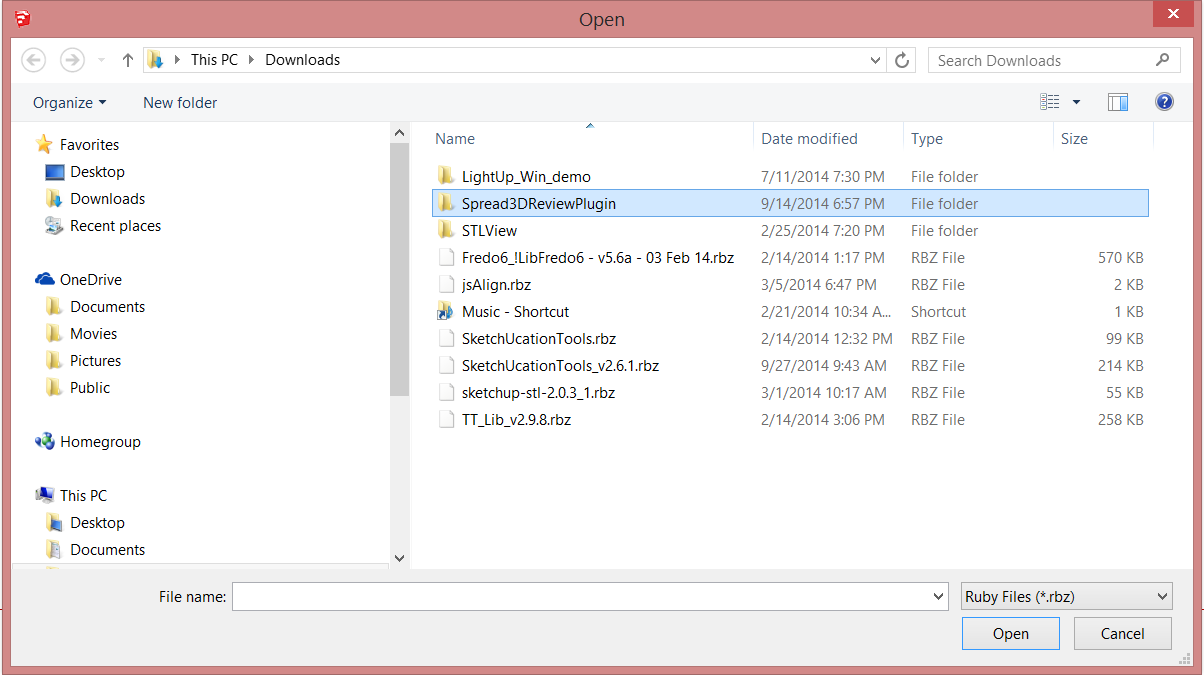
      That is what I just got again.........no .rbz file. The download gave me a .zip file. Inside it I see the .rb file and a folder that says Spread3d.ReviewPlugin but I do not see a .rbz file.

      When I tried to install it in SketchUp, here is what I see......what the heck am I doing wrong? I have tried this about a dozen times now with the same results every time. How the heck did you get a .rbz file?


      Capture-Spread3d.PNG

      posted in SketchUp Discussions
      ntxdaveN
      ntxdave
    • RE: Spread3D

      All I got was the .zip file and then the .rb file inside. I will go try again..........

      Thanks Dave........

      posted in SketchUp Discussions
      ntxdaveN
      ntxdave
    • RE: Spread3D

      Lots of views but not a single comment.... 😐

      I had posted on their forum that the Windows download does not contain a .rbz file. After a send post (couple of weeks ago) they posted a message that says "under review". Nothing has happened yet though.

      Wondering is anyone is/has used the product and can give any feedback. I would like to try it but so far can not install it. ❓

      posted in SketchUp Discussions
      ntxdaveN
      ntxdave
    • RE: CL3VER

      Interesting that I have had a number of views but not a single reply 😐

      Either this means that no one else is using the product or that no one wants to comment. I have built a couple of presentations now but have not made the decision to purchase the product. I think it is a good product and they just added a new feature that is a step forward that I think lays the foundation for some powerful features that to date have not been added (again, just my opinion).

      Would love to hear from someone who has/is using the product to see what you think. ❓

      posted in SketchUp Discussions
      ntxdaveN
      ntxdave
    • 1
    • 2
    • 130
    • 131
    • 132
    • 133
    • 134
    • 139
    • 140
    • 132 / 140