sketchucation logo sketchucation
    • Login
    1. Home
    2. ntxdave
    3. Best
    Oops, your profile's looking a bit empty! To help us tailor your experience, please fill in key details like your SketchUp version, skill level, operating system, and more. Update and save your info on your profile page today!
    Urasik Extensions | Lots of new extensions to check out Learn More
    Offline
    • Profile
    • Following 1
    • Followers 0
    • Topics 176
    • Posts 2,794
    • Groups 1

    Posts

    Recent Best Controversial
    • RE: TrueBend Axis Problem

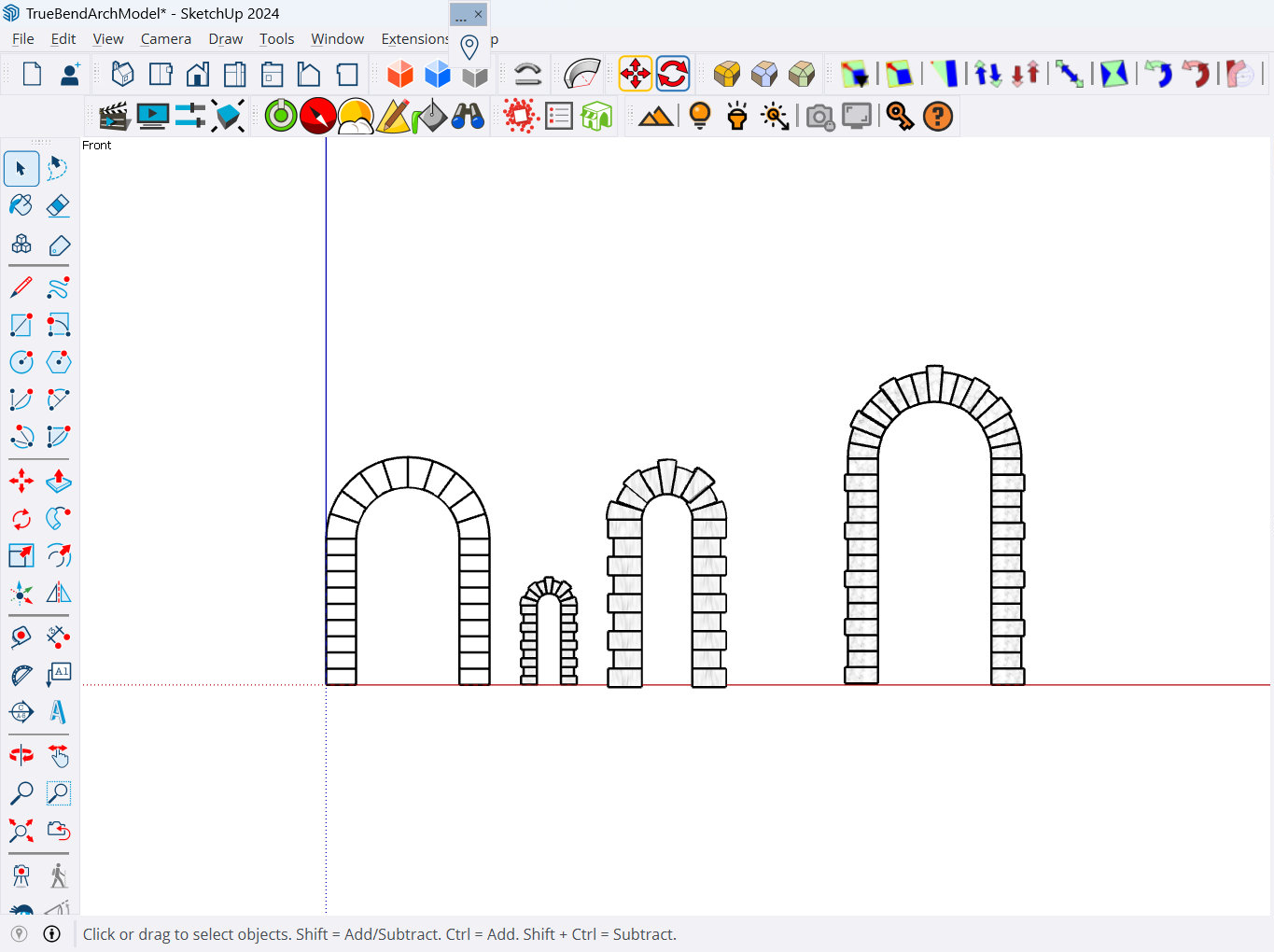
      @Rich-O-Brien Thanks Rich, Gus & TIG. I finally got my act together and was able to figure things out before seeing these last posts. Here is my result (but I like the stuff you guys did as well).

      TrueBend Arch Model.png

      I guess this "exercise" exemplifies my age and lack of use lately. 😑

      posted in Extensions & Applications Discussions
      ntxdaveN
      ntxdave
    • RE: Wingless Dirt Sprint Car

      JMJ, it is not fair to post snap shots. 😄

      Again, some excellent work! 👍

      posted in Gallery
      ntxdaveN
      ntxdave
    • RE: Thinking of our Majid today

      @Mike-Amos said in Thinking of our Majid today:

      When I left the regular army in 1983 I wanted to go to university.

      I got out of the US Army in 1968 and was lucky enough to us the GI Bill to help pay for me to go to college ai night. 😀

      I am lucky enough to have a team of doctors that I think are great people. Although I am in my 80’s, I think I am lucky that I can keep things pretty positivs. 😃😃

      posted in Corner Bar
      ntxdaveN
      ntxdave
    • RE: Rayscaper Learning-Practice

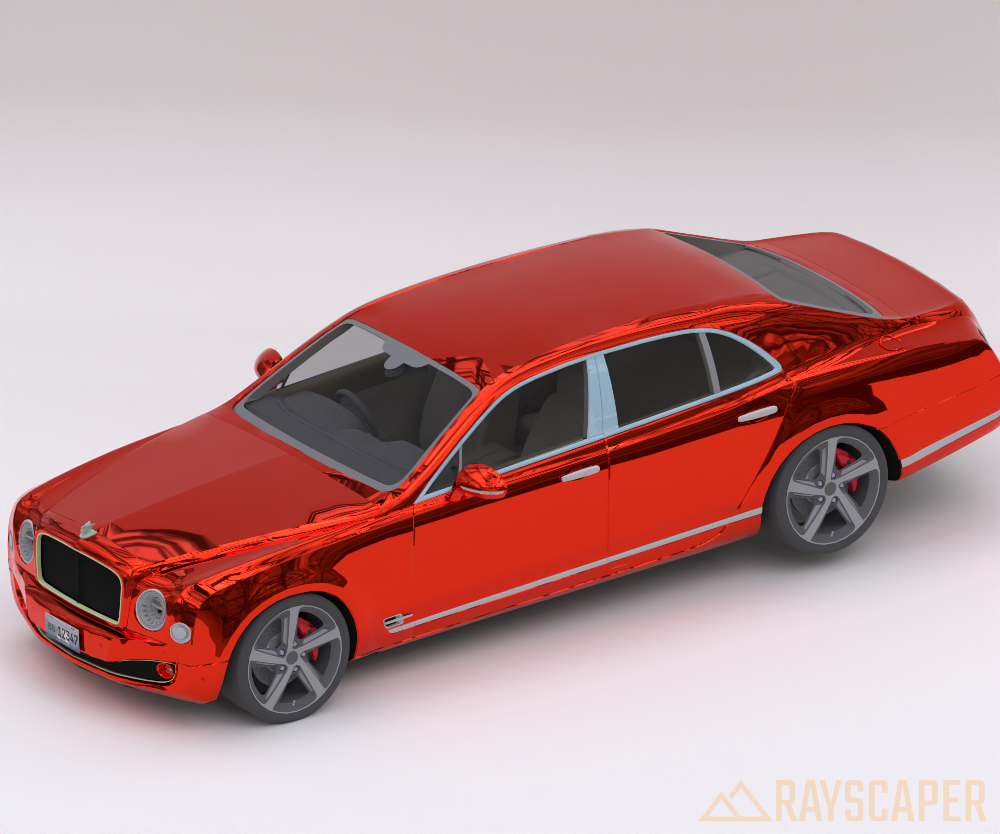
      My latest practice/learning experiment. The Bently car is from the 3D warehouse (do not remember who the contributor/designer was - Sorry).
      Bently Model.png

      posted in Extensions & Applications Discussions
      ntxdaveN
      ntxdave
    • RE: '23 Ford T-Bucket

      Another great one!

      posted in Gallery
      ntxdaveN
      ntxdave
    • RE: Reviving timber constructions.

      Very interesting. I think a lot of this has to do with the type of building which varies a lot from one part of the world to another. Some parts of the world have very much conservative styles compared to other parts of the world thus, the type/style of the roofing can vary very much. Always good to have an “open” mind though.

      posted in Corner Bar
      ntxdaveN
      ntxdave
    • RE: Rayscaper Learning-Practice

      @ntxdave OK, I adjusted the items you pointed out. And I should have mentioned before that the material was Disney Metalic. However, I made some adjustments:

      • Dialed back the metal
      • Increased the roughness
      • Dialed back the IOR

      Hope you find this on to be improved.
      Revised Bently Model.png

      posted in Extensions & Applications Discussions
      ntxdaveN
      ntxdave
    • RE: RayScaper tryout

      @nlipovac Rich, I agree. You are 100% correct (IMO).

      posted in Rendering & Subdivision
      ntxdaveN
      ntxdave
    • RE: [Plugin] 2D Tools

      OK, after more experimenting, I finally got everything to work correctly.

      posted in Plugins
      ntxdaveN
      ntxdave
    • RE: TrueBend Axis Problem

      @Box Thank you sir! I finally got things working correctly and was able to "play around" a little. The image below represents what I figured out using the FredoScale tools. I greatly appreciate your help. 😁 👍 👍
      FredoScaleSample.png

      posted in Extensions & Applications Discussions
      ntxdaveN
      ntxdave
    • RE: RayScaper tryout

      @pixelcruncher Some good answers (IMO) Thomas.

      As for the start/stop buttons, again IMO, I think you should have to click the start button before Rayscaper starts rendering. There are times when you want to make some settings, like the HDRI background and making some material selections/settings and camera/FOV and maybe some lighting settings, before you start rendering. Again, just IMO.

      Looking forward to your next update(s). 😁

      posted in Rendering & Subdivision
      ntxdaveN
      ntxdave
    • RE: Sketchucation Tools 5.0...

      @Rich-O-Brien said in Sketchucation Tools 5.0.1:

      @ntxdave

      • Is there a way to find out which plugins I installed yesterday?

      Use the Filters dropdown and choose Installed

      • How do you go about deleting/uninstalling a plugin?

      Use Extensions > Extension Manager

      I do not see any link to be able to remove one of the plugins on the list of plugins in the list. Am I missing something?

      You can't remove extensions from the current device's Bundle

      Thanks a lot for the reply/ Somehow, I missed it yesterday. I wish that the Installed list would show when the plugin was installed. I think I figured out that I had only installed one new plugin and thanks to you and @TIG I was able to identify it and remove it.

      posted in Extensions & Applications Discussions
      ntxdaveN
      ntxdave
    • RE: Affinity Studio is Free

      OK, I finally had the opportunity to begin working with the application. Thank you again for the link. It has me going. 👍

      I obviously have a long wat to go and MANY things to explore but again, you link has me off and running. It will take some exploring and "trying" but at least I have a starting point.

      All I have done so far is work with the vector graphics tool so I need to do some additional learning/practicing. This looks like a really exciting tool to learn. 😀

      posted in Extensions & Applications Discussions
      ntxdaveN
      ntxdave
    • RE: Movie Software Suggestion/Recommendation

      @HornOxx I have downloaded it and am trying to learn. Looks like it has a lot of the features I want but I still have a lot of things to learn. In particular, I want to be able to animate some text (like make it slide on to the screen).

      Is there a charge for the desktop version? I will keep you posted as I learn. 😀

      posted in Extensions & Applications Discussions
      ntxdaveN
      ntxdave
    • RE: Movie Software Suggestion/Recommendation

      @HornOxx said:

      😉 Prima! (I can´t translate "Is there a charge for the desktop version? into something that makes sense in German" 🤣) Aren't you running the program on a computer? Or does that mean “does it cost anything”? Hmmm—my version didn't cost anything.

      Yes, I meant does it cost anything.

      Animated text: There are various pre-animated text templates available (I never like those things), or you can use a simple standard text, place it, and set a keyframe, then reposition it, even in size or rotation, and set another keyframe.
      You can do the same with an alpha-channel PNG, for example, an arrow or a red circle...
      (before you waste too much time, check YouTube for “CapCut keyframes” or “keyframe animation”).
      I look forward to hearing how you're getting along 🖐️

      Thanks, I will need to learn more about how to use keyframes properly.

      As of right now, I am making some interesting progress. As soon as I can, which might be a while, I will share the progress I am making. As of now, this seems to have the features I want/need for the project I want to do.

      posted in Extensions & Applications Discussions
      ntxdaveN
      ntxdave
    • RE: Movie Software Suggestion/Recommendation

      @HornOxx said:
      Yes, that’s right—I live in the Frankfurt area 👋 Where were you stationed back then?

      I was stationed in Baumholder……down near Idar-Oberstein.

      Hopefully I can post something later today.

      posted in Extensions & Applications Discussions
      ntxdaveN
      ntxdave
    • RE: Movie Software Suggestion/Recommendation

      I think I solved the problem. It appears that I was using some features that are only available in the Pro version. For others, I had been using some animation of text. When I eliminated that, I can now generate a video.

      posted in Extensions & Applications Discussions
      ntxdaveN
      ntxdave
    • RE: Movie Software Suggestion/Recommendation

      For those who are interested in CapCut, here is the link to a great guide for those who are just getting started.

      CapCut User Guide

      Hope you find it an interesting guide. It has a lot of information about the toolbars in the application.

      posted in Extensions & Applications Discussions
      ntxdaveN
      ntxdave
    • RE: Movie Software Suggestion/Recommendation

      Hope someone can help me. I am trying to learn more about some of the "effects" in CapCut. I have added an image to my trial project and have been able to animate it. I have it moving across the screen, rotating and scaling. Now I want to get it to fade in. I have watched some videos of how to do it, but it does not seem to be working. I have set 3 keyframes. The first one sets the fade to 0, the second one to 45% and the third one to 100% so I should be seeing it start at not showing and fade it as it moves across the screen. However, I am seeing it all through the video.

      Can someone give me some advice?

      posted in Extensions & Applications Discussions
      ntxdaveN
      ntxdave
    • 1 / 1