sketchucation logo sketchucation
    • Login
    1. Home
    2. kaas
    3. Posts
    Oops, your profile's looking a bit empty! To help us tailor your experience, please fill in key details like your SketchUp version, skill level, operating system, and more. Update and save your info on your profile page today!
    πŸ”Œ Smart Spline | Fluid way to handle splines for furniture design and complex structures. Download
    K
    Offline
    • Profile
    • Following 0
    • Followers 0
    • Topics 47
    • Posts 864
    • Groups 1

    Posts

    Recent Best Controversial
    • RE: Project Video Scanner

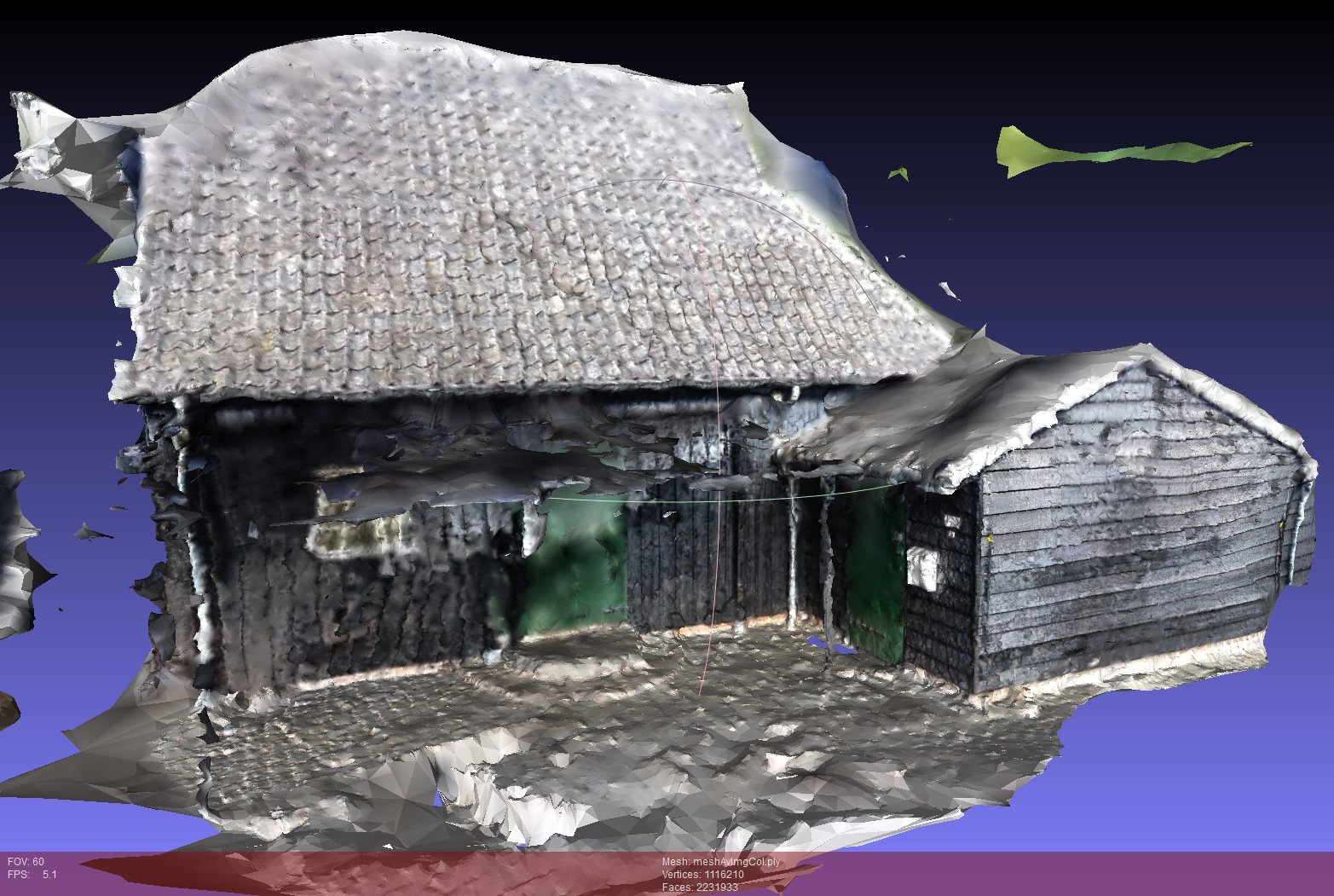
      Excited about these techniques, I did some tests with VisualSFM & CMPMVS.
      You don't need a stereo camera and a normal camera will do just fine. Just need a lot of overlapping pictures. Take a video and export every 10th frame as a picture worked fine as well.

      Tried it on the exterior of a nearby mill. Calculation of the 3d model using these programs took several hours - 123D created the 3d model in several minutes but it had less detail (64k vertices vs 1.1M vertices) and the textures looked blurry.

      The end result resembles the building but it's not really useful to me (yet):

      • Nothing is flat in the 3d model - even if the real thing has flat surfaces. That will make rebuilding a low poly object in SketchUp difficult - how to decide which bump/point of the model to snap to??
      • It's hard to get the (textured) model into SketchUp. Meshlab opens the model in seconds. Blender in a minute, SketchUp's ply importer is already busy for 3 hours and I'm not sure if it will ever finish. Maybe have to split up the large model in Blender into smaller ones and rebuild it in SketchUp?!

      Also:

      • reflective surfaces don't work well (found that one out 'scanning' a table with some objects on it)
      • the software needs 'anchors' to match the individual frames. For more large uniform planes (ceiling, white walls etc) the software can't find matches so that results in large gaps.

      Still, it's fun to see the software build something 3d out of pictures.

      mill.jpg

      posted in Freeware
      K
      kaas
    • RE: Tell Me About Your BOM

      maybe this can give you a start (I google-d for: excel script calculate flatten duplicate entries)

      http://www.techrepublic.com/article/pro-tip-count-duplicates-and-unique-values-in-excel/

      http://www.wikihow.com/Find-Duplicates-in-Excel
      -> maybe method4/5 - it all depends on the complexity of your report.

      posted in SketchUp Discussions
      K
      kaas
    • RE: Tell Me About Your BOM

      @ashscott said:

      Over the years I have constantly been requested to produce bills of materials in Sketchup.... I still get all these unnecessary rows from Generate Report ...

      Maybe you could make a script in Excel that 'flattens' these duplicate elements into one element? It can't be that hard or..? Like that, you could still model in SU like you're used to.

      JQL is spot on. To really be able to trust the output of 'generate report' you would have to model very clean and be very accurate. It could be you're spending a lot of (or even more) time by doing so. I don't think this would add to pleasure while working.

      posted in SketchUp Discussions
      K
      kaas
    • RE: [Plugin] PLY Importer

      @jim said:

      ...It should soon be available in the Extensions Warehouse.

      It didn't make the warehouse? I cant find it searching for 'ply'. Has it been renamed maybe? Trying the one on github now.

      posted in Plugins
      K
      kaas
    • RE: Price Rise

      official statement http://blog.sketchup.com/sketchupdate/lets-talk-about-price

      edit: added and revised some math

      So, new people pay 41% extra compared to 2012. People who already have a license continue to be happy using SketchUp paying $120 every year.

      posted in SketchUp Discussions
      K
      kaas
    • RE: Dimensions: custom arrows & turn off extension lines

      If you reaaally want to change the dimension style, you could do it in SketchUp:

      1. create a dynamic component with your custom endpoint and a dimension line without endpoints
      2. scale the dynamic component in 1 direction - the value of the dimension will update accordingly
      3. copy and repeat

      If your endpoint is just a perpendicular line, scaling won't affect it and it will look ok. If your endpoint is anything else, scaling will affect it and it will look messy. If you are into Ruby, you could make a nice plugin out of it that will rescale the endpoints accordingly to look 'normal' again though.


      dimComponent.skp

      posted in LayOut Feature Requests
      K
      kaas
    • RE: Imagery no longer available?

      see the official notes here
      http://help.sketchup.com/en/article/3000177

      posted in SketchUp Discussions
      K
      kaas
    • RE: Price Rise

      a > 30% price increase is quite a bit. Curious about the reason...

      posted in SketchUp Discussions
      K
      kaas
    • RE: Project Video Scanner

      I realized there might be one 'small' problem.. these kind of applications create meshes with a very high polycount. Something like 100k to several millions of triangles for single scan objects. Importing those meshes into Sketchup will at least slow Sketchup down bigtime or will even fail.
      Too bad Trimble Scan Explorer only reads their own file format and no commonly used point cloud file types.

      edit: I see JuJu already said the same in the top post.

      posted in Freeware
      K
      kaas
    • RE: Project Video Scanner

      @juju said:

      ...for existing built fabric I would think accuracy of <0,01m would be sufficient

      You're right, 0.001m is maybe asking a bit too much. I would settle for < 0.005m

      Very interesting these new techniques. Looks like maybe you don't need to spend several K's anymore to finally be able to make a quick and accurate enough 3d scan of a house/rooms/outside in the very near future.

      What to choose...

      • Google Project Tango - claims 1% accuracy = not enough
      • Google Project Tango with Smart Picture 3d = claims 5mm? goal = 2mm.
      • Structure Sensor - claims 1% accuracy = not enough
      • MS Kinect with Skanect - support for Kinect seems to be 'dead' since Structure sensor acquired Skanect

      edit: added accuracy for Tango & Structure sensor

      posted in Freeware
      K
      kaas
    • RE: Project Video Scanner

      Nice! If the accuracy is good enough( < 0,001m) maybe this technique could be used for making a 3d scan for remodel jobs? Walking around a house with this kind of camera would be far more easy (and fun) than using a laser meter and writing down measures.

      posted in Freeware
      K
      kaas
    • RE: SketchUp 2016 Wishlist

      I would love to some see extra customization options for the toolbar icons; custom toolbars with flyouts like on the 'getting started' toolbar. Not only for the native commands but especially for all the plugins. That way, you could group plugins into custom categories and really clean up your interface and get some screen space back.

      edit: More customization options for the dimensions in Sketchup (and Ruby) would be very welcome as well. Custom size for the endpoints, custom trailer and leader sizes, maybe even custom endpoints.

      posted in SketchUp Feature Requests
      K
      kaas
    • RE: Your Recommendations Please

      can't recommend any machine but I did read somewhere last week about one machine that's apparently having a lot of unhappy users: Makerbot.

      Just a moment...

      favicon

      (blog.adafruit.com)

      posted in SketchUp for 3D Printing
      K
      kaas
    • RE: MS Surface Pro 3 for Sketchup?

      I expect the screen space to be way too small for being able to work effectively. You already loose quite some screen space for the title bar, menu, bottom bar, layers etc etc.

      posted in Newbie Forum
      K
      kaas
    • RE: Level Import to UE4

      To keep the orientation and position of objects (groups) in UE just like in Sketchup, I just wrap them into a component with its axis set at the origin.
      Normally I end up with: 1 component (axis at origin) with all the terrain objects (groups) in it, 1 component (axis at origin) with all the exterior building objects and 1 component (axis at origin) for the interior / furniture.

      I use fbx export (selected) to get them directly into UE.

      Edit: maybe have another look if you really need every object to go through 3dMax as well. Only some objects I run through Blender for mapping but most of them are just plain Sketchup-> fbx ->UE

      posted in Developers' Forum
      K
      kaas
    • RE: How to adjust line thickness of particular objects?

      it can be done if you use Layout though by stacking scenes (like layers) showing different elements that require different line thickness

      posted in Newbie Forum
      K
      kaas
    • RE: FBX Export doesnt export textures

      works for me too. Did you apply them on the faces or on the groups? (don't know if that would make a difference though).

      posted in SketchUp Discussions
      K
      kaas
    • RE: Geometry size not consistent in SU 2015

      If I'm not mistaken, SketchUp uses inches as internal units. You (and me) use mm's. I think because of the conversion of mm's to inches to mm's, you will most likely see the ~.

      My question though is: do you really need the decimal accuracy when using mm's for your line of work? As an architect I'm happy if the contractor is that accurate. No need for me to worry about decimals when using mm's accuracy.

      posted in SketchUp Discussions
      K
      kaas
    • RE: Colour By Axis

      @seasdes said:

      These are the settings that I am now using for single house projects. Is this what you would use?

      I do work in the archi sector and I also have my units set at mm's. I don't use a digit for precision. I never had need for 0.5 mm units. Maybe that is why color by axis was off for me?!

      You can easily test it with your precision though. Draw a long line. Make a copy, rotate it by .1 degree. Copy that rotated line, rotate it again by .1 degree etc. Repeat until color by axis doesn't show parallel anymore.

      posted in SketchUp Discussions
      K
      kaas
    • RE: Colour By Axis

      @seasdes said:

      I have my edge colour settings set to Colour By Axis. This works fine to check whether eges are drawn parallel to the axis.

      Beware: I found out the hard way Colour By Axis is off by a small margin. So if you think they are parallel by looking at the colors, in reality they are off by some degrees.

      posted in SketchUp Discussions
      K
      kaas
    • 1
    • 2
    • 22
    • 23
    • 24
    • 25
    • 26
    • 43
    • 44
    • 24 / 44