sketchucation logo sketchucation
    • Login
    1. Home
    2. kaas
    3. Posts
    Oops, your profile's looking a bit empty! To help us tailor your experience, please fill in key details like your SketchUp version, skill level, operating system, and more. Update and save your info on your profile page today!
    πŸ”Œ Smart Spline | Fluid way to handle splines for furniture design and complex structures. Download
    K
    Offline
    • Profile
    • Following 0
    • Followers 0
    • Topics 47
    • Posts 864
    • Groups 1

    Posts

    Recent Best Controversial
    • RE: Sketchup modelin problem

      What you're seeing here is the triangles that are hidden / not visible in SketchUp. Cleaning up won't help because there is nothing wrong with the objects.
      Have you tried applying materials? Does it still show? Maybe it's some exporter setting - I'm guessing you're using cryengine? If so: maybe have a look at

      http://www.playuptools.com/downloads/
      or this video of someone who exports models from SketchUp to CryEngine.

      posted in Newbie Forum
      K
      kaas
    • RE: Free Normalmap Generator

      have you used it? Do you like it? Maybe compared it to AweSomeBump already?

      posted in Freeware
      K
      kaas
    • RE: No internal shodows

      In your sig you write 'AMD Radeon'. If I remember well, the Radeon drivers caused issues with SketchUp before. Maybe their openGl drivers for win10 are still a bit ...

      posted in SketchUp Discussions
      K
      kaas
    • RE: No internal shodows

      your file opens fine for me. All shadows are as they should be. Have you tried exploding the group and re-grouping?

      posted in SketchUp Discussions
      K
      kaas
    • RE: SketchUp 2016 Wishlist

      A wish for SketchUp:
      option to name a section plane -> Entity Info box

      posted in SketchUp Feature Requests
      K
      kaas
    • RE: SketchUp 2016 Wishlist

      A wish / fix for Layout:

      • Don't add an extra style (myStyle1 / myStyle2 etc ) if the style is updated in SketchUp. Just update the style in LayOut to the new settings.
      • If someone wants a new style in LayOut - just make a new one in SketchUp.
      • Or at least give the user a prompt in LayOut to re-use the existing style in layOut OR update the existing style to the one from SketchUp OR keep the style in LayOut and create a new one (also nice if inserting several SketchUp files).
      posted in SketchUp Feature Requests
      K
      kaas
    • RE: Toolbar position

      For native toolbars I don't think you can.

      But for your own ruby scripts you can. If I remember well, you can read the current position of the mouse in ruby & javascript and feed that info to a new webdialog in ruby.

      posted in Developers' Forum
      K
      kaas
    • RE: SU & LO: different colors in section cut ?!

      Joao,

      Thanks for your efforts. I just posted the same question on the official forum. I hope Trimble reads that daily. Lets hope they will know what to do to fix it.

      Max

      posted in SketchUp Discussions
      K
      kaas
    • RE: SU & LO: different colors in section cut ?!

      Hi Joao,

      I tried your suggestions (your procedure is what I normally do anyway - I always have fixed scenes with every style option checked for every scene - just for the previous example I did a quick copy of the plan in Layout to show it in 3d in Layout as well):

      1. create scenes for every view
      2. create a new style and apply it to every scene. delete the old style.
      3. insert / update in Layout
        -> see attached files - problem is still there. Anyone knows how to fix it??

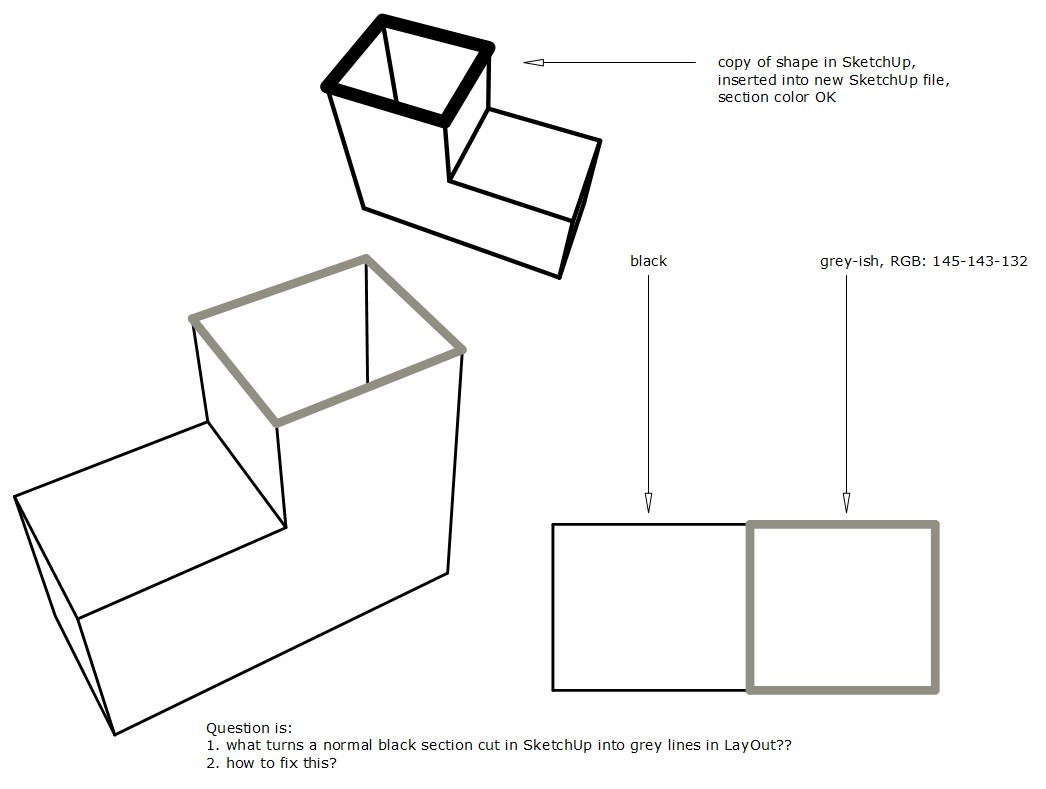
      What 'fixes' it is:

      1. copy the shape in SkecthUp
      2. open a new SketchUp file
      3. insert into SU
      4. create new scenes and new styles
      5. insert into LayOut.
        -> it seems to me its a bug in the SU file somewhere but not in the object itself. To do this for several working drawings is ... rather not go that way.

      BIG question to me still is: what turns a normal section cut in SketchUp into a different colored section cut in LayOut and how to fix it??

      ps. nice plugins to make tasks more easy are always welcome πŸ˜„


      LO_sectionCut_colored.jpg


      LO_grey section cut.layout

      posted in SketchUp Discussions
      K
      kaas
    • RE: SU & LO: different colors in section cut ?!

      Hi Joao,

      Thanks for investigating. Your points are clear but I haven't found a solution yet. I'm using the same workflow from the last 5 years so I can't see why this is happening.

      Re-applying styles doesn't solve it.

      posted in SketchUp Discussions
      K
      kaas
    • RE: SU & LO: different colors in section cut ?!

      Adding a sample file showing the problem. Can be opened in LayOut 2015. My BIG question is: what can turn a black normal section cut in SketchUp into a grey-ish section cut in LayOut??


      LO_grey section cut.layout

      posted in SketchUp Discussions
      K
      kaas
    • RE: SU & LO: different colors in section cut ?!

      Hi Juju, thanks for the suggestion. It's just the native cutplane that I use here - no cutfaces or section groups or Skalp or ... everything is on layer 0.

      I did some more testing.
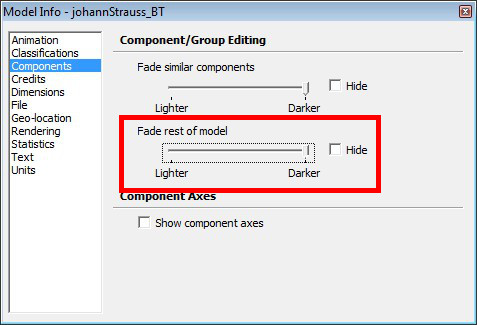
      What fixes it in SU is: go into <model info> - <components> - drag the 'fade the rest of the model' slider all the way to 'darker'.
      You have to do that for every scene though, it's not stored in system settings or the style..

      In Layout - the section cut still is grey. Why ????


      solved in SU - not in LO.jpg

      posted in SketchUp Discussions
      K
      kaas
    • RE: Windows 10

      @numerobis said:

      I think it should work like with win 7 pro/home. Home comes without some networking and group policy features, but thats the same for win 7 home.
      https://www.microsoft.com/en-us/WindowsForBusiness/Compare (Business Experiences)

      The big change from Win7 Home to Win 10 Home is that you can't disable automatic updates!

      Thanks for the reply. They changed a few things from 7 to 10 so it's no guarantee it will work in 10 again. Your link clearly states - no domain join for win10home. Still hesitating to upgrade if I'm not 100% sure it will work.

      posted in Corner Bar
      K
      kaas
    • SU &amp; LO: different colors in section cut ?!

      I finalizing some working drawings and just noticed something strange in some(!) of my sections in Layout:

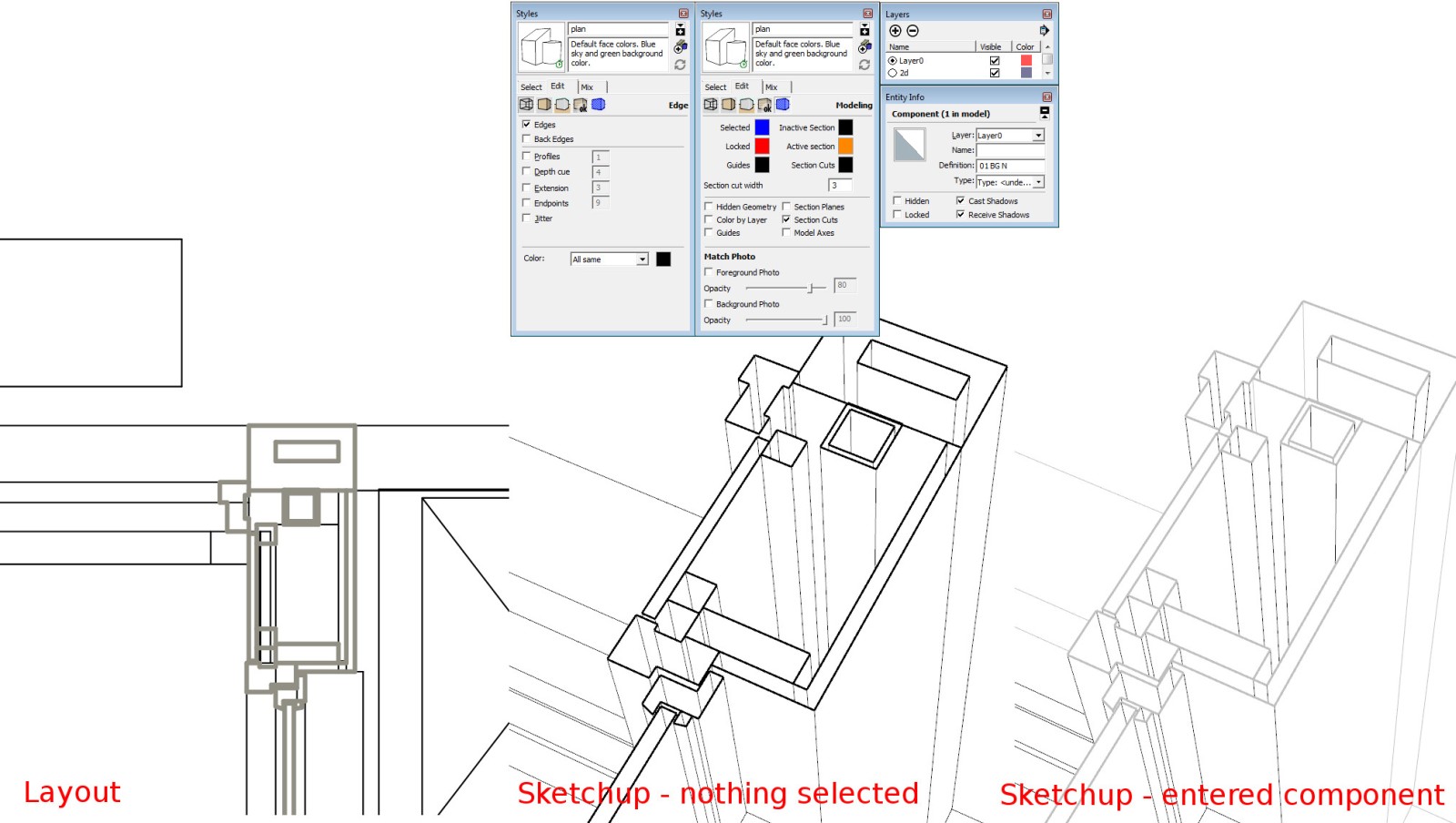
      In Layout, the section cut itself is displayed in some shade of grey, the rest is black.
      In Sketchup, If I look at the object , nothing selected - all is black.
      If I enter the component, the section cut itself turns grey, the rest is black ?!
      If I exit the component, all is black again.

      In Layout, I'm using vector style. If I set it at raster, it's all black. Hybrid is mixed colors again.
      In Layout, some sections are all black, some are mixed - they all use the same style though.

      This has never happened before and I would like all to be black again.
      Any suggestions why / where to look for a fix for this??

      Help greatly appreciated.

      Max


      sectionCut colors.jpg

      posted in SketchUp Discussions sketchup
      K
      kaas
    • RE: Windows 10

      Question: I have 1 pc running win7x64 home premium and 1 pc running win7x64pro. First one will upgrade to win10home and the other to win10pro. Can they still connect / share files over the network if both are upgraded? I expect not (no domain function available in win10home) but maybe someone knows?

      posted in Corner Bar
      K
      kaas
    • RE: Layer indicator

      This feature is already available. Try: windows-entity info
      edit: stupid me - your question was about layout - not SketchUp. Thankfully already answered by somebody else.

      posted in LayOut Feature Requests
      K
      kaas
    • RE: Self Illumination (emissivness)

      shadeless could be useful for screens and low poly trees (crossed planes). Anything where you don't want shadow effects but just a flat unshaded plane. Would that be hard to implement? Blender has it and my guess would be: any 3d modelling-rendering program.

      posted in SketchUp Discussions
      K
      kaas
    • RE: Project Video Scanner

      Hi Juju, here's some answers:

      • which cameras used (also, FOV lense specs) -> I tried a Olympus SP600UZ and that worked fine. For the mill I used a 1080p video, made with a Samsung Galaxy S3 - used Blender to convert every 10th frame of the video to a single image.
      • what resolution -> 1920x1080
      • size of *.ply files -> high quality file was 95MB, low quality was 8.9 MB
      • how long did these take to process -> I think it was four hours for both programs
      • what is you system specification -> Win 7 X64 - 3.4Ghz (I5 3570) - 8GB - GTX560TI
      • anything else relevant that you have not previously mentioned -> its fun. Just try shooting some pictures and feed it into those programs and off you go.

      to get you going, maybe have a look at some youtube videos. I don't have the link at the moment but there are some showing these two programs after another.

      posted in Freeware
      K
      kaas
    • RE: Project Video Scanner

      @unknownuser said:

      You're blowing my doors off...
      I don't think thats a good thing or...? Kristoff, I'm sorry if I hijacked your thread. I just thought, these programs and their results were related and thus relevant.

      posted in Freeware
      K
      kaas
    • RE: General workflow tips for house design?

      I think you will get totally different replies here from every person. It takes time to try and find out a workflow that fits you.

      I gave up on getting the fastest result and focused on accuracy and having fun while working. After doing a lot of projects in SketchUp I'm still refining my process and building my libraries although by doing so, it gets faster.

      While modelling objects like doors and windows, I spend some extra time making them in a way so they can be easily reused in another project - even with slightly different dimensions or details. They are build as nested objects (groups) just like they would be created in real life. For instance, a door has nested objects for: frame, door, glass, handle, etc

      Plugins that help in the process are:

      • FredoScale (Fredo6) - easily scale complex objects - even with nested hierarchies.
      • Profile builder2 pro (by Dale Martens) - build cavity walls just by tracing the outline
      • Mirror by TIG
      • Solid Inspector (by Thom Thom) - I use a solid-based workflow. Building materials are solids so everything I model is a solid as well. The design gets assembled from individual elements in SketchUp just like it would on the construction site.
      posted in SketchUp Discussions
      K
      kaas
    • 1
    • 2
    • 21
    • 22
    • 23
    • 24
    • 25
    • 43
    • 44
    • 23 / 44