Layer indicator
-
Hi,
I'd like to have some indication of what layer an obkect is on. Seems to me the only way to find out is to turn on and off one layer after another and see what disappears and what doesn't. Maybe a properties tag or the object's layer highlights somehow. Maybe a problem with objects on locked layers, as they cannot be selected at all?
Thanks
Mikar -
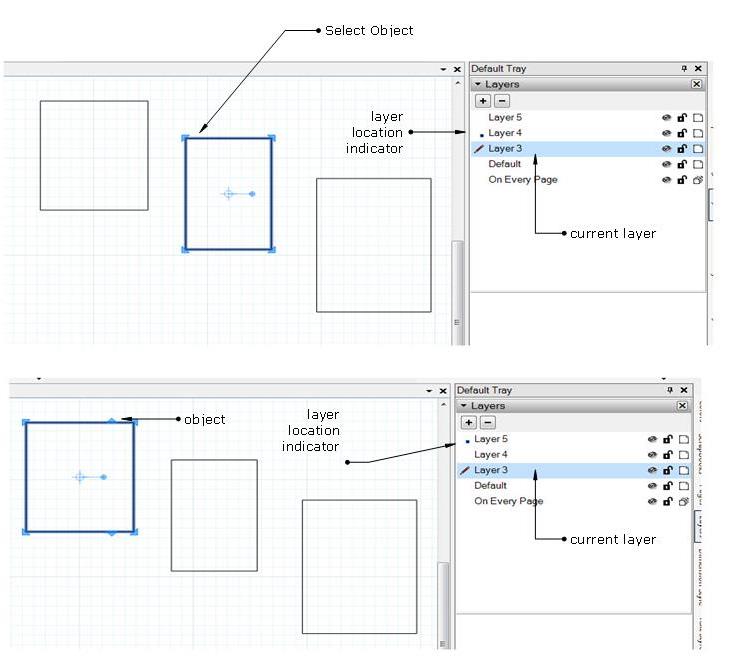
Whenever an object is selected in the layer tray a dot is activated in the layer it is located.
-
@agrazdi said:
Whenever an object is selected in the layer tray a dot is activated in the layer it is located.
Oh, thanks! I didn't notice that.
But what with locked layers? I can't select an object when it is located on a locked layer, so I can't find out which layer it is on other than try & error turning layers on and off, right?
cheers
Mikar -
This feature is already available. Try: windows-entity info
edit: stupid me - your question was about layout - not SketchUp. Thankfully already answered by somebody else.
Hello! It looks like you're interested in this conversation, but you don't have an account yet.
Getting fed up of having to scroll through the same posts each visit? When you register for an account, you'll always come back to exactly where you were before, and choose to be notified of new replies (either via email, or push notification). You'll also be able to save bookmarks and upvote posts to show your appreciation to other community members.
With your input, this post could be even better 💗
Register Login


Advertisement