sketchucation logo sketchucation
    • Login
    1. Home
    2. jgb
    3. Posts
    Oops, your profile's looking a bit empty! To help us tailor your experience, please fill in key details like your SketchUp version, skill level, operating system, and more. Update and save your info on your profile page today!
    โš ๏ธ Important | Libfredo 15.8b introduces important bugfixes for Fredo's Extensions Update
    Offline
    • Profile
    • Following 0
    • Followers 0
    • Topics 73
    • Posts 803
    • Groups 1

    Posts

    Recent Best Controversial
    • RE: Ring model keeps crashing SU 8 and 2014

      Never even thought about materials....... Maybe you got something there.

      However I am experimenting with creating a usable "Gear Tooth" texture.

      I got something almost usable, so I am tweaking that into usefulness.
      There are a lot of gears in this model, the ring is an extract to play with and post here.

      Up to now, I used a gear tooth model construct like that in the ring. I don't need to show real meshed teeth, in 99% of cases. The alternating black/grey bands will suffice, but it is laborious and rarely formed a solid gear, or one without a lot of fixing to make solid.

      Using a texture to "look like a gear" (which is all I really need) will simplify the model as a whole.

      I have a standard 22 materials pallet for all models I create. That pallet is "painted" on the reverse side of the man sized reference template (Greg). This ensures that my materials and textures are consistent across all my models, as I quite often borrow comps from other models. It also maintains the same order the standard materials are listed in Entity Info so I can find them fast.

      posted in SketchUp Discussions
      jgbJ
      jgb
    • RE: Ring model keeps crashing SU 8 and 2014

      Those tiny fragments are present in all the groups that were copied around the ring.
      Only a few groups caused crashes, but were fixed, plus this one that I cannot resolve.

      They were caused, but not noticed, by a dumb error I made creating the gear teeth lines.
      One MUST be aware of joining lines that are constrained, rather than to endpoints. I missed most of them in this case. ๐Ÿ‘Š

      I am no longer interested in SOLVING the problem as I am redrawing the entire gear tooth portion. That will result in a cleaner gear representation as well. โ˜€

      I AM INTERESTED in why this group crashes SU, where most exact copies before did not. ๐Ÿค“

      I created an all white back & front style years ago because I had a bitch of a time orienting all the faces on complex parts. Doing an explicit orient-faces did not orient all the faces and I still had to go in and reverse a lot of them. For me it solves more problems than it creates.

      posted in SketchUp Discussions
      jgbJ
      jgb
    • Ring model keeps crashing SU 8 and 2014

      This ring has crashed SU-8 about 20+ times and SU-2014 3 times. ๐Ÿ˜ฒ

      (Still using 8 till I find the time to tweek 2014 with plugins and shortcuts) ๐Ÿ˜’

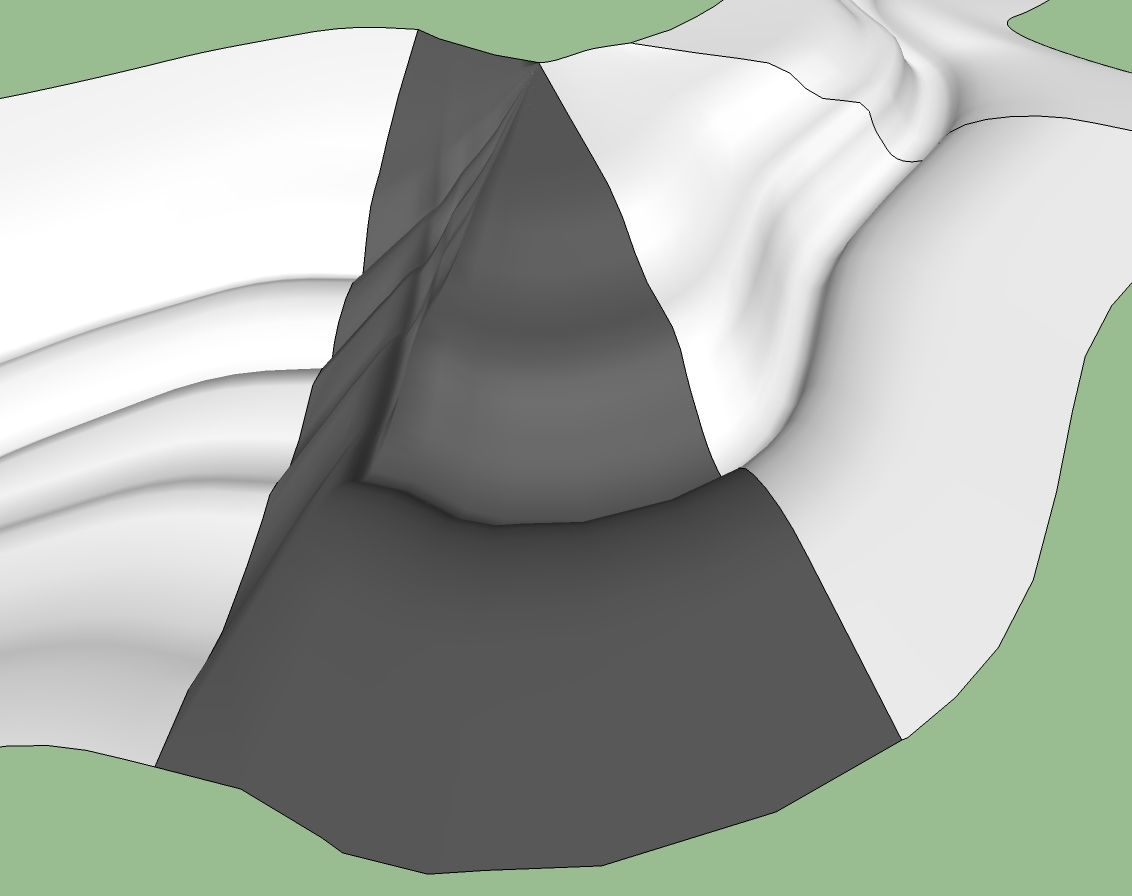
      I am creating a large diameter ring gear. For the gear teeth part I created a small part of the circle (the piece hanging in mid-air) as a group and array copied it around (75 copies). SU crashed when I did it in 1 swell foop, and again at reduced copies. It went well when I only copied fewer than 10 at a time.

      When I went to explode all the groups, SU kept crashing with no BugSplat. Win-7 says its looking for a solution, but never finds one for either 8 or 2014.

      I could not explode more than 1 copy at a time, file saving every step.

      That went well, but 3 groups in various locations kept crashing when I went to explode them individually.

      So I pulled the 3 down below the ring, exploded them there with no problem. But when I selected any 1 and moved it up into place, Splat.

      Deleting and redrawing some lines did work for 2, but not this last one.

      Any attempt to bring it up and close any gaps, Splat.

      I know there are a bunch of tiny lines not discovered till I started peering deep, but redrawing does not help.

      The entity count is way too high at over 35,000 (due to the fragments) so I will redraw the whole gear teeth section to clean it up. I do not intend to make "real" teeth, just a flat representation will suffice.

      But now I am curious as to what is crashing SU. ๐ŸŽ‰

      Putting that section up in place (exploded) crashes Sketchup

      posted in SketchUp Discussions sketchup
      jgbJ
      jgb
    • RE: Automatic face modification based on geometrical rules

      My first reaction is "Huh???" ๐Ÿ˜•

      However, if I think what you want is to reduce the number of segments in a "line" that borders a face, then maybe this will help.

      If the "line" is a contiguous curve of some sort, then selecting the line will (may) show the number of segments, in Entity Info. If that segment count is NOT greyed out, then change the number (down) to reduce the segment count.

      But no, there is no way to automate this over multiple faces.

      posted in Newbie Forum
      jgbJ
      jgb
    • RE: Group or Component

      There is one other thing that differentiates components from groups. This was tested a long time ago in the original SketchUp forum when this recurring discussion came up. Layers and Layer0 was next most common.

      SU is a database of linked objects.

      A component is a SINGLE definition of a bunch of objects in the database.

      Multiple copies of that comp are simply lookup pointers to the original comp definition in the database. That's why a change to any one copy of a comp. will affect all other copies.

      A group is also a definition of a bunch of objects, but each multiple occurrence in the model is a separate definition in the database. That's why a change to a group does not affect any other same group copies.

      That is also why a lot of the same groups make for a much bigger database file than a lot of the same comps.

      When SU wants to display a group, it has the definition in the database right at hand. Takes nearly no time to compute the display.

      When SU wants to display a comp. it has to go and lookup the definition each and every time to display it. That takes a bit more time plus the display time.

      That is why a very small model with a lot of one component will take a longer time to display than a large model with the same number of objects as groups.

      Like I said before, and as others said too, use groups or comps according to the attributes you need.
      One is not "better" than the other unequivocally.

      posted in Newbie Forum
      jgbJ
      jgb
    • RE: Group or Component

      Box

      As an aside, the AB or BA-609 is now the AW-609.

      AB was Agusta-Bell and BA was Bell-Agusta. Using AB or BA depended on which side of the Atlantic you were on (Italy or USA).

      However Bell divested its share of the partnership and Westland (British) picked it up, so now it is the AW-609. The aircraft is in final certification testing, and due (way overdue) to be certified late this year or early next.

      As far as group/comps are concerned, either can be copied to the side and worked on or looked at. I do this a lot, especially if a comp to be edited is deeply buried in other geometry.

      However unless the various combinations of parts are properly nested (within separating groups/comps) and visibly separated by layers, you cannot compare various sets to find interferences or commonalities. You need the freedom to do both.

      Again, I agree that comps overall are "better" than groups, and unique comps. can in most cases replace a group, but all 3 have unique attributes that are useful when needed.

      posted in Newbie Forum
      jgbJ
      jgb
    • RE: Group or Component

      @gussnemo said:

      Interesting how a rather simple question can lead to such a lengthy discussion. One which doesn't have a definite ending. There doesn't seem to be a wrong or right answer, just different approaches to the same end. Producing that which is seen in the minds eye.

      So far this is only 1 page....

      Other "simple questions" have gone on for many pages.

      That's the beauty of SketchUcation. โ˜€

      posted in Newbie Forum
      jgbJ
      jgb
    • RE: Group or Component

      Box
      Yes that is true, but if that unique comp is indeed unique, it makes little difference if it is a comp or a group.

      Goto the Warehouse and look at my model of the AB-609 Tilt-Rotor. Notice the multiple copies of components/groups for the engines and props or cabin in different positions, and the layers that control the visibility of those groups. Those overall groups could be unique comps, but to what advantage?

      posted in Newbie Forum
      jgbJ
      jgb
    • RE: Group or Component

      My $0.02.

      Components and groups serve most of the same purposes.

      Rule of thumb...... One such object in a model can be either a group or a component; whereas 2 or more copies of the object must be a component, especially if you may change its geometry later on.

      Grouping components can have an advantage over making a bunch of components a component.

      If the bunch of comps is a comp, then you can copy it multiple times, and any (and all) edits of any one is applicable to all.

      But a group of comps has an advantage over a comp of comps, in that the comps in a group can change positions, orientations and other attributes without impacting any other group of the same (or more or less the same) set of comps in it.

      Example.
      In my airplane designs for (say) a landing gear assy. all the bits are comps.
      But the overall assy of these comps is a group. That way I can show the LG in various conditions of retraction, extension, compression and angles of deployment, with the various comps, such as hyd cylinders, struts etc. "mechanically" linked.

      If I change the length of a hyd. cyl. or tire diameter, then that change ripples through all the groups in their various positions. However if I change the extension of that cyl. (and adjust the relative positions of the other comps) then only that group is affected.

      I do this a lot to visualize complex moving parts and their relationship to other parts at various positions of movement. If an interference shows up at say, the 3rd position, requiring a part to be modified, all the same other parts in the other positions change as well.

      I put each of the groups on separate layers, as well as some of the parts on separate layers, so that I can easily see/compare positions.

      I can explain this further if anybody wants.

      posted in Newbie Forum
      jgbJ
      jgb
    • RE: Follow me path problem

      The entities that made up the initial component would most likely be part of a larger structure, and not fully standalone. Exploding the comp puts the entities back in place so to speak.
      But if it were a standalone object, then yes, there would be no need to explode it.

      posted in Newbie Forum
      jgbJ
      jgb
    • RE: I'm Convinced!

      My story is a bit similar.

      Years working with ACAD, 2D was great, but I was never able to draw a good 3D shape (aircraft fuselage). ๐Ÿ˜• It took me about 2 weeks to get something usable in so called 2 1/2D.

      Tried other apps but none were either good enough, or simple enough.

      Then I saw an advert for SU in some tech pub I subscribe to, so I gave it a try.

      In under 2 hours after I very first turned it on, I had my fuselage shape. ๐Ÿ˜
      (The hard way with zero plug-ins)

      I then scrapped ACAD. That was over 8 years ago.

      And I now have over 25 plug-ins, but only use about 6 regularly, especially Fredo's Curviloft. ๐Ÿ‘ ๐Ÿ‘ ๐Ÿ‘

      posted in Newbie Forum
      jgbJ
      jgb
    • RE: Follow me path problem

      Just a suggestion here. What Tig said is totally correct, but scaling up then down of the model or just a part of it sometimes will create placement problems.

      Make the part you want to offset a component (not a group).
      Copy that component to a clear area of the model space.
      From OUTSIDE the bounding box, scale it up by whatever.
      ๐ŸŽ‰ (Critical, do not scale from inside the box)
      Edit the scaled up copy.
      Do your offset. The line segments created will be large enough to make a complete perimeter.
      Exit the copy.

      Notice that the original is what you want.

      Delete the scaled up copy then explode the original component.

      Everything remains in place.

      posted in Newbie Forum
      jgbJ
      jgb
    • RE: Saving Component View

      The way you did it will work, but ONLY if there is just 1 instance of the component.

      Where there are component copies, and you try to redefine the exploded elements (of one copy) as a component again, using the same name, it will become a unique component, with the desired new t-nail view.

      The other copies will belong to the "original" comp. and will retain the old t-nail view.

      posted in Newbie Forum
      jgbJ
      jgb
    • RE: Help with circles and arcs

      Draw it as a set of 1/4 circle arcs as you depicted.
      Select all the arcs and explode the curves. This will give you defined endpoints.
      Make the whole thing a group.
      Turn on End points in the styles dialog.
      Then using a Biezier curve (plug-in tool), trace each endpoint in one go.

      The result will be a single smooth curve.

      posted in Newbie Forum
      jgbJ
      jgb
    • RE: Need Help creating a component.

      The table top is dead easy.

      Draw a circle of desired diameter.
      Push/Pull it to desired thickness.
      Select all and make it a component or a group.
      Then in your materials, select the "Transparent" set, then a glass material, and paint the table top. You can always adjust the color and transparency.

      The base is far more complicated, and depends on whether you want just an "image" of it or a full 3D model. Either way, you are going to need a few plug-ins from Fredo to accomplish that.

      I can help you with that, but be warned, it is not a trivial task.

      As far as "drawing around a circle" I presume you to mean, making a bigger/smaller circle of an existing circle. There are a few ways to do this.

      With the circle tool, locate the center of the existing circle, snap to it, then make your new circle any size you want.

      With the offset tool select the circles face and draw the offset at any size bigger or smaller than the existing circle.

      Another way is to select then copy the circle to the clipboard.
      In the entity info box, redefine the circle radius to what ever.
      This will resize the circle.
      Paste-in-place to bring back the original.

      posted in Newbie Forum
      jgbJ
      jgb
    • RE: SKP format is so slow; I wish...MULTITHREADING

      I used to have 2 to 3 minute loads, saves and autosaves.

      Switched to an SSD (Solid State Drive) as ๐Ÿ˜„ and now loads, saves and autosaves of same model are in the order of 3 to 5 seconds. ๐Ÿ˜ฎ

      Also, the PC boots to full go in 1 minute 35 seconds of which 50 seconds is the IPL, and 45 seconds is Windows 7. Usta be about 7 minutes before SSD.

      That gave me time to cleanup my desk waiting to get going, now I don't have the time. ๐Ÿ˜†

      posted in SketchUp Feature Requests
      jgbJ
      jgb
    • A better "Solids" representation.

      This is actually a 2 part (related) suggestion.

      1. Right now if an object is a solid, its volume is shown in Entity Info.
        Then I have to define outside of SU its material density and compute its weight.
        Then I have to go back to components and in the description, enter the weight in a unit of choice.

      The problem here, aside from the extra computations, is that if I change the units, the weight is not in the changed units (ie: kg/lbs), or if I modify the solid object, the defined weight must be recalculated and re-entered.

      The solution is to define in SU Materials, a density for any material that would apply to a solid, ie: concrete, aluminum, steel, etc. Then let Entity Info display the weight in any current units.
      Allow for manually entering/editing any materials density. Just colors would be zero density.

      So how would SU "know" an object is a defined density material, considering you can paint an object in multiple colors/materials?

      Simple. ๐Ÿ’ญ Allow the exterior faces of the object to be any color or material, but the INTERIOR FACES MUST be 100% a single defined density material. ๐Ÿ’ญ (99% and no weight calc.)

      1. When an object is displayed with a cut through section plane, a solid objects interior is quite visible making it difficult to visualize as a solid, especially if a section cut is printed/exported for others to see. This visualization is particularly difficult if the section cut is through a complex mechanical assembly like an auto transmission. You cannot discern the gears and bits.

      ๐Ÿ’ญ Using the criteria from above to identify a solids material (interior faces), the section cut of only the solids should be faced with the solids material. ๐Ÿ’ญ This cut face is only seen in section cuts and are not part of the objects geometry.

      posted in SketchUp Feature Requests sketchup
      jgbJ
      jgb
    • RE: [Plugin][$] Curviloft 2.0a - 31 Mar 24 (Loft & Skinning)

      You would probably do better if you connected the edges at the banks with a manually drawn curve. Then use the skinning function. Ignore (for now) the control curve path. I quickly tried this but it resulted in a partially bad curve. ๐Ÿ˜ข (See Attachment)

      In doing complex skins as this that will not form right when tried as a whole piece, (airplane fairings for example) I found it better and quicker to split the perimeter in several easier sections, skin them, then explode them in place. Unfortunately, I have no time just now to do this for you. ๐Ÿ˜ž

      Also, on the right side the edge is made up of a lot of small faces that really do not add any useful detail to the mesh. Simplify them, and it should make a better skin overall.

      Almost, but not there yet.....

      posted in Plugins
      jgbJ
      jgb
    • RE: When I zoom in, model gets cut off

      Also make sure "Show hidden geometry" is turned ON. ๐Ÿ’ญ
      A hidden line or soft line way out there will drive you nuts if you can't see it.

      If you still have difficulty finding that wayward entity, do a "Select All" (EDIT; Select All) then GROUP the entire selection and that wayward entity will be at a far end of the bounding box, highlighted in blue.
      Delete it then explode the group.

      posted in SketchUp Discussions
      jgbJ
      jgb
    • RE: A test with Daz3D model *Nudity warning*

      @frederik said:

      That's easy...
      Export to i.e. OBJ and use the import function in Daz3D... ๐Ÿ˜„

      If I had known it was that easy, I would have persevered with my copy of DAZ years ago.
      I found it a bit too steep on the learning curve, so I put it away.
      Stayed with my tried and true Disney(esque) cell by cell animation.
      All XXX rated of course. ๐Ÿ˜†

      posted in WIP
      jgbJ
      jgb
    • 1 / 1