MS is going to really push Win-10 real soon now.
I have signed up for an early (free) copy.
But how well will SU-2015 work with it?
Has anybody tested it, or is SU-2016 going to be the Win-10 version?
Oops, your profile's looking a bit empty! To help us tailor your experience, please fill in key details like your SketchUp version, skill level, operating system, and more. Update and save your info on your profile page today!
Urasik Extensions | Lots of new extensions to check out Learn More
 Offline
Posts
-
Has anyone tested SU-2015 with Windows 10?
-
RE: [Plugin] Solid Inspector
I just noticed something; whenever I import an SU-8 model into SU-2015 and make edits to some faces (in what was a perfect solid in SU-8 or SU-15) I often end up with multiple faces off single lines that SI-2 does not see, and SU says it is no longer solid.
It has happened in 3 models so far, and I quite often get 3 faces on a single lined perimeter. When I delete just the extraneous faces, it regains solidity.
It does not happen when the solid originates in SU-15.
Betchya nobody else sees this.

-
RE: [Plugin] Solid Inspector
While I really appreciate TT's SI2's ability to fix problems, (for me it works well about 90%++ of the time) it would be better if it could simply highlight an "unfixable" problem, now indicated as "info" and maintain that highlight when exiting the tool, so I can find it fast and fix it manually.
Perhaps, by creating a group on its own temporary layer that traces/duplicates the unfixable errors and renders them in red lines/faces, as is done now to identify those errors. That way I can see and fix any problem outside SI2, then simply delete the highlight layer/group.
Just a thought.....
-
RE: [Plugin] Solid Inspector
I found it impossible to fix. The bottom face was 3 faces bounded by a single line rectangle. I could not delete a face, it kept coming back if I tried to fix something on an adjoining face. Then when I thought it was almost OK, I did another SI which found many problems. So I said let SI fix it. Ended up with about 8 valid lines and faces. SI "fixed" it by blowing most of it away.
I blew the rest away, started fresh, and that turned out OK.So, anybody, I don't need it fixed. I posted it for ThomThom to ferret out the why.
-
RE: [Plugin] Solid Inspector
Another "shiny" but flawed non-solid. Multiple errors not detected; open faces, multiple faces (the bottom has 3 faces).
I was adding corner cubes and did an interim solid check
There were other errors it fixed, but somehow not these.
-
RE: [Plugin] Solid Inspector
Now that I knew where to look, I copied the comp to 1 side and saw the white face.
Gone in 5 seconds and fixed! Thanks again Dave.
In its original location those gear teeth in that area were visually covered by another gear (comp) so I could not see it. It was also the same area that SI2 found numerous non-fixable errors, and in my manual search and cleanup, missed that one. I never looked at the isolated comp I sent to this thread.
ThomThom: Is this sort of error findable or fixable in SI2?
I don't recall having this sort of error undetected in earlier SU-8 versions of SI. -
RE: [Plugin] Solid Inspector
Thank you. That is in the very same small area that I had a lot of SI2 found errors (most it could not fix) that took a while for me to find (no circles!!) and manually fix.
How did you find it so fast???
-
RE: [Plugin] Solid Inspector
Another problem.....
Inspector says "all Shiny" but SU-15 says not solid.

Why??
-
RE: [Plugin] Solid Inspector
I do not recall seeing anything other than the warnings box.
I will try to set up a "fail" and see if I get that same error message, or see a viewport.
Stay tuned......
10 min later ====================
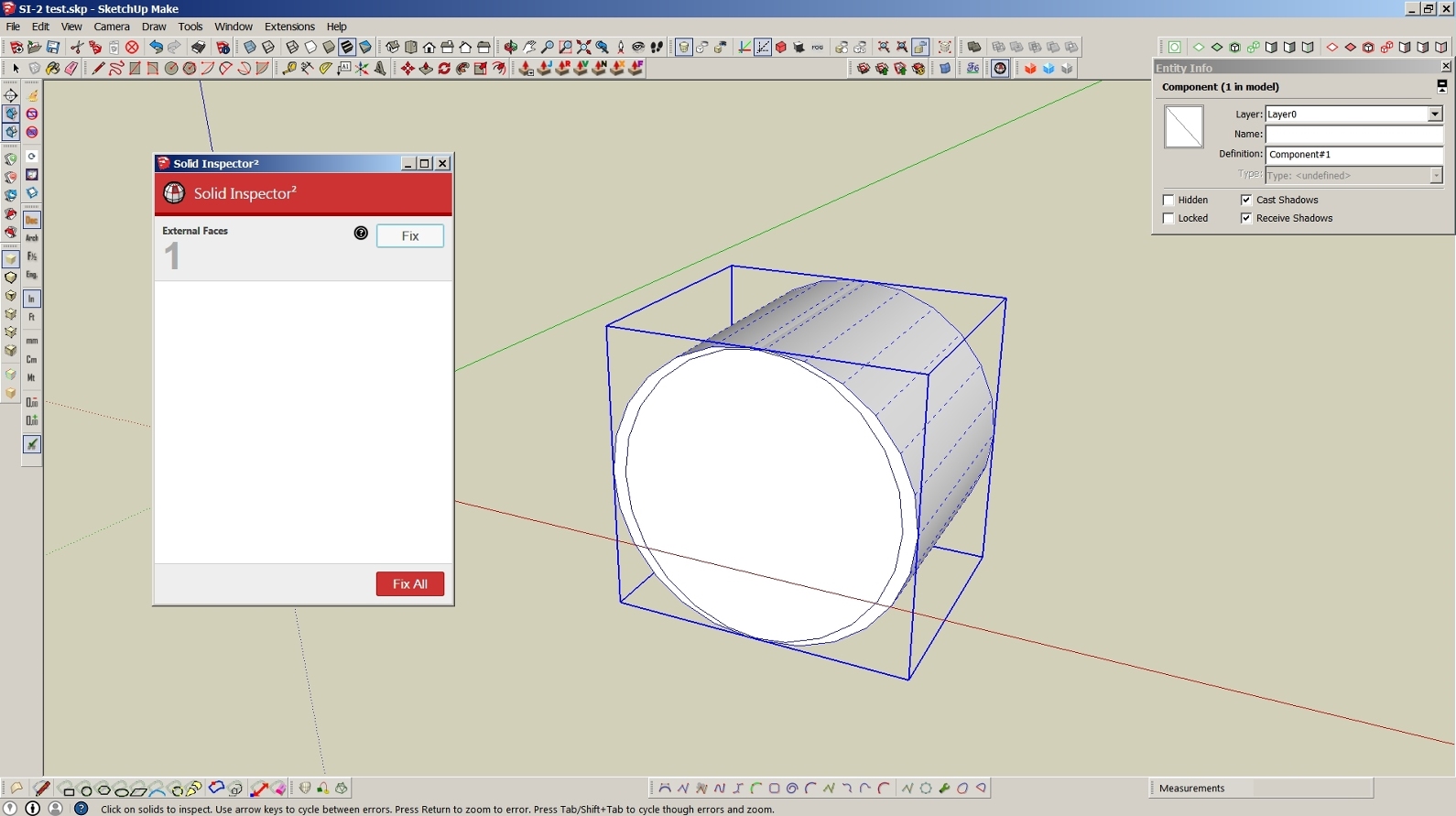
Well I did not get the same error msg with this test, but I got an error msg without a circle or a "viewport" pointing me to where the error was, in this case an external face.
It is at the top center of the comp.Unless I zoomed in, I would not see where it was, especially if it were much smaller.
The error is hard to find without a red circle.
-
RE: [Plugin] Solid Inspector
I don't know if something ain't right or what....
I really like the improved SI over what I had been using in SU 8 for years.
I'm now on SU-15.
But I just noticed that the found errors are not highlighted with big red/yellow circles. Up until yesterday, that was not a problem, as SI fixed 100% of my errors.
But then there was a new error (can't remember exactly what) that only offered info and no fix. The problem was the line was so tiny, even in red, that it took me about an hour to find it in an object with over 4,000 lines. Only by zooming in and going over the whole thing twice (2 separate but identical errors) did I find the tiny red lines, deleting them, and all was OK.
No red circle to guide me to the errors. Why?
-
RE: Maybe SU-2017
Kris
I mainly agree with you when in development stages of an SU model.
But not all of your concerns apply to presentation and just looking at a result.
First off you would not have to be on your feet all day, most VR can be effective sitting down. You would spin the model around rather than simulate by actually walking around, much like the SU native walk-around. Take Gravol before doing this.

Also, what grabbed my attention is for visualizing curved surfaces, such as airplane fairings, and trying to smooth them out to conform to various intersecting surfaces. Can be tedious in current SU, but using VR you can simply tilt your head to see irregularities and fix them. At least I think that would be true.
It's a start.... I remember way back in the late 60's the corporate IBM mainframe got a new "high tech" 14 inch video monitor (black and green, 24 lines by 80 char wide text only running at 300 char/sec.) for the system console monitor to replace the slow console line printer. Gee Whiz Batman, that was cool!! My very learned and tech savvy boss stated to the IBM rep that "he could see its use for the computer console operator, but not at all useful for a programmer who needed to see his work on paper". I kid you not!
-
RE: Maybe SU-2017
Juju
There is a whole lot more to Hololens than its ability to run on Win xx. There has to be an interaction from SU to the HL display and an interaction from the HL to SU (ie: pan, zoom, tool use, etc).
SU computes an object in 3D but it natively displays in 2D.
And the HL takes its vue cues from hand motions as well as motions of the headpiece itself.None of this is native to either Win XX or SU 20xx. (yet!!)
-
Maybe SU-2017
Probably too much to do for SU-2016....
 Incorporate Microsoft's HoloLens.
That would sure beat a mouse and a 32in screen.

-
RE: [Plugin] Custom Toolbars Plugin
Kinda wondering why no response to my last post.

I just deleted the toolbars dir and .rb and reinstalled.
No errors.
No toolbars.I looked at the Toolbars dir and the TB's I wanted were not there.
I looked at my SU-8 TB dir and there they were.
Copied both missing TB txt files over and now I have my TB's.... finally. -
RE: [Plugin] Custom Toolbars Plugin
Other than the day I installed the toolbars, I haven't used SU-15 till yesterday.
When it powered up I noticed 2 toolbars were missing of the 3 I use (the Scenes and the one with hide/unhide icon). I checked, and it was active in extensions, but the TB's themselve were not in the List Toolbars.
I reinstalled but no change. Searching I found the JF-Toolbars menu with the "Show Errors"
This is the output.....
*cannot load such file -- purgeall.rb
C:/Users/jgb/AppData/Roaming/SketchUp/SketchUp 2015/SketchUp/Plugins/jf_custom_toolbars/files/loader.rb:119:in
module_eval' C:/SketchUp 15/Tools/RubyStdLib/rubygems/core_ext/kernel_require.rb:45:inrequire'
(eval):2:inblock (2 levels) in <module:CustomToolbars>' C:/Users/jgb/AppData/Roaming/SketchUp/SketchUp 2015/SketchUp/Plugins/jf_custom_toolbars/files/loader.rb:119:inmodule_eval'
C:/Users/jgb/AppData/Roaming/SketchUp/SketchUp 2015/SketchUp/Plugins/jf_custom_toolbars/files/loader.rb:119:inblock (2 levels) in <module:CustomToolbars>' C:/Users/jgb/AppData/Roaming/SketchUp/SketchUp 2015/SketchUp/Plugins/jf_custom_toolbars/files/loader.rb:104:inforeach'
C:/Users/jgb/AppData/Roaming/SketchUp/SketchUp 2015/SketchUp/Plugins/jf_custom_toolbars/files/loader.rb:104:inblock in <module:CustomToolbars>' C:/Users/jgb/AppData/Roaming/SketchUp/SketchUp 2015/SketchUp/Plugins/jf_custom_toolbars/files/loader.rb:100:ineach'
C:/Users/jgb/AppData/Roaming/SketchUp/SketchUp 2015/SketchUp/Plugins/jf_custom_toolbars/files/loader.rb in
in <module:CustomToolbars>' C:/Users/jgb/AppData/Roaming/SketchUp/SketchUp 2015/SketchUp/Plugins/jf_custom_toolbars/files/loader.rb:51:inmodule:JF'
C:/Users/jgb/AppData/Roaming/SketchUp/SketchUp 2015/SketchUp/Plugins/jf_custom_toolbars/files/loader.rb:49:in<top (required)>' C:/SketchUp 15/Tools/extensions.rb:197:inrequire'
C:/SketchUp 15/Tools/extensions.rb:197:inload' C:/Users/jgb/AppData/Roaming/SketchUp/SketchUp 2015/SketchUp/Plugins/jf_custom_toolbars.rb:33:inregister_extension'
C:/Users/jgb/AppData/Roaming/SketchUp/SketchUp 2015/SketchUp/Plugins/jf_custom_toolbars.rb:33:in<module:CustomToolbars>' C:/Users/jgb/AppData/Roaming/SketchUp/SketchUp 2015/SketchUp/Plugins/jf_custom_toolbars.rb:23:inmodule:JF'
C:/Users/jgb/AppData/Roaming/SketchUp/SketchUp 2015/SketchUp/Plugins/jf_custom_toolbars.rb:22:in `<top (required)>'*I noted above that I need to load "Purgeall.rb" but it was not there when I first installed and it worked OK.
Why would I need it when the problem occurs before any model is loaded? Only my template is up.
Edited
Just installed Purgeall but no change to toolbars.
 Error message is gone.
 -
RE: SketchUp 2016 Wishlist
Either REPLACE an existing SU-Ver whatever and maintain all configuration settings (toolbars, shortcuts, file locations, etc) including updated plugins and extensions so far as possible.
OR
Install the new version and transfer all old configuration settings (etc) to the new version.
It took me 2 1/2 days to configure my newly installed SU-15 to mirror my old SU-8.
-
RE: [Plugin] Custom Toolbars Plugin
My error was installing "toolbars" and not the newer renamed "jc-toolbars".
I deleted the old toolbars and all is now well.
Thank again.
-
RE: [Plugin] Custom Toolbars Plugin
I just compared the Toolbar files for SU-8 and SU-15.
They are identical.
The Toolbar.rb is...
*require "sketchup"
require "extensions"path = File.join(File.dirname(FILE), "toolbars", "files", "loader.rb")
ext = SketchupExtension.new("Custom Toolbars", path)
ext.description = "Loads your custom Toolbars."
ext.creator = "Jim Foltz jim.foltz@gmail.com"
ext.copyright = "2008 Jim Foltz"
ext.version = "2008-04-04"
Sketchup.register_extension ext*Is there anything more recent?
-
RE: [Plugin] Custom Toolbars Plugin
When I get a chance I will compare the scripts of my SU-8 Toolbars to SU-15 and get back here with the findings.