We are putting put a new version today. I fixed some problems which were causing some other drawings to crash.
Oops, your profile's looking a bit empty! To help us tailor your experience, please fill in key details like your SketchUp version, skill level, operating system, and more. Update and save your info on your profile page today!
FredoBend | Powerful new bending tool for SketchUp Download
 Offline
Posts
-
RE: Problem with repeated crashing of Sketchup when rendering
-
RE: RpReports
I will take a look at these next week and see if there is a way we can process Chinese characters.
-
RE: Problem with repeated crashing of Sketchup when rendering
Yes - we have pretty much moved on to IRender nXt. It is a free upgrade for anyone who purchased IRender after June 2007.
We are getting much better rendering results from IRender nXt. However, animation is not working yet and we haven't figured out hw to support RPC objects from ArchVision.
-
RE: NPR tools
We started on NPr tools - and I added some information to the Wiki.
But development was slowed down while we are fixing some thing in IRender nXt.
We will start in on it again in a little while - especially because I want to have a Mac version running by next spring to show at the Art Director's Guild - since it was the Art Directors using SketchUp which helped inspire the product in the first place.
But, for now, all I can say is: Please be patient.
-
RE: RpReports
CSV file - after creating a PDF file, look in your temporary folder for a .CSV file which was created there. When we create an application for you, we can arrange to put the CSV file in a different place, and have a button to create the CSV file without creating the report, and launch a Ruby script or EXE to use the report.
Dimensions
You use width, depth, and height in the calculations field of the attributes file.
See: http://wiki.renderplus.com/index.php?title=RpReports_Customization#Substitutions
You can use the substitution codes - like %w% %d% and %h% in the calculation fields as well as the description fields.
Languages
I don't know if Chinese will work. If you can get the RpReports demonstration to work, try putting some Chinese in the attributes fields and see what happens.
-
RE: Why don't more people use SketchUp to place 3D components?
But if you were a kitchen designer, proposing a custom kitchen for a consumer who was not a SketchUp user, you might use SketchUp to layout the new Kitchen and then find components to place in it.
If you find a great stove on the 3D Warehouse, you can use it. And you might even decide to prefer furniture items which had great components on the warehouse, because you might be more likely to close the design and sale to the client with better graphics and a better rendering.
Manufacturers who think this is a good idea might be willing to spend time to put their components on the 3D Warehouse - or use a program like RpReports which lets them distributes their components only to their dealers and distributors.
-
RE: Why don't more people use SketchUp to place 3D components?
The chairs are from the libraries which come with ProjectSketch - a new office furniture placement application for SketchUp being released by one of our clients - ProjectMatrix.
ProjectSketch is free with a generic furniture library. These chairs are from the Herman Miller library. There is an annual fee for use of the manufacturer specific libraries.
There are 3D symbol libraries available for more than 60 manufacturers:
http://www.projectmatrix.com/mfg/index.htm

-
RE: Why don't more people use SketchUp to place 3D components?
@unknownuser said:
Are you able to share the girl in this image?
It would be a welcome component to many if you could.I contacted the client who made the rendering. She is from the Google 3D Warehouse (from Antics Technologies):
-
RE: Why don't more people use SketchUp to place 3D components?
Here is a reflection example one of our furniture clients created - by making the floor transparent and mirroring the rest of the geometry through the floor to make the floor appear reflective.

(Image courtesy of ProjectMatrix)
(Rendering created with SketchUp - no third party rendering add ons) -
RE: [Plugin] Exporting a texture from a material
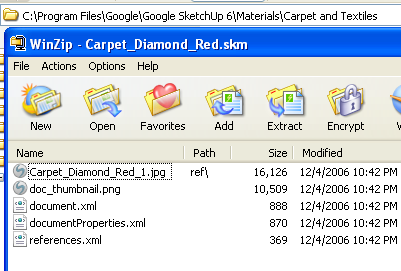
Here is a carpet.skm file - located in the SketchUp Materials folder.
-
RE: Watch out Google!!
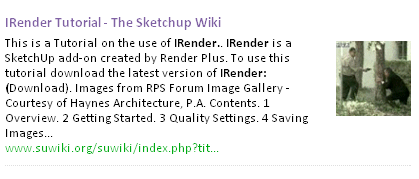
I really like their layout - with images and a better (longer) excerpt from the web pages.
But I was amused that I did not recognize the image they chose for this entry from SuWiki:
-
RE: [Plugin] Exporting a texture from a material
Did you try the texture_writer ruby script in this thread?
I would expect it to work on the mac.
- Also, have you tried reading the texture from the .skm file. You can open the file with WinZip and see the texture stored in the file.
-
A query for Revit Users
First, we are creating a version of IRender nXt for Revit. (A third party rendering program)
If you are a Revit user and would like to try the Beta test version, go to
And download the latest nXt version for Revit.
Second, We would love to find a Revit user in the Denver area who would be willing to help us figure a few things out. If you would be willing to visit with us and discuss rendering, creation of components, transfer from SketchUp to Revit, etc. please contact us.
-
RE: RpReports
RpReports outputs a .CSV file which can be read by Excel.
RpReports can use the length, width, height and z-offset of the component as attributes, and in attribute calculations, so it can calculate areas and volumes, and use them in cost calculations.
We work with out clients to help them create the data they need.
-
IRender nXt - new version
New version 7/25/2008
We have released a new IRender nXt
This version:
Uses a new extract logic which should have fewer freezes and bug splats.
(Since this new logic has not been tested with everything, let us know if you see any problems)
Added the use of a background image for the rendering.
You can download the new version from:
http://www.renderplus.com/pdf/download.htm
Notification:
If you subscribe to this thread, you will receive a notification whenever a new version is released.

Previous Versions
New version 7/1/2008
-
Creates softer shadows from lights - see Soft Shadows
-
Allows you to save the rendering with a transparent background - See IRender Alpha Images
-
Has new defaults for spotlight field angles, and thick glass. - See Defaults
Plus numerous bug fixes and small improvements.
New version 6/04/2008.
-
Has a much improved options tab dialog - making it easy to set the options you need most - Lighting defaults and render paramaters, while still keeping the power of the other options available.
-
Allows you to easily create a new material from our Select Material to Place dialog.
-
Improved the Materal Editor Texture tab functionality, allowing you to set the Color Strength when using AutoBump.
-
Fixed the watermark for Trial mode.
Older versions:
-
Fixed the daylight portal problem introduced in the last release.
-
Fixed the Glow Type buttons and various other problems in the Material Editor.
-
Has a new Paint function to set materials on faces inside components with just one click.
-
Has an easier to use Material Editor.
-
Adds material properties - Daylight, Thin and Caustic to the Material Wizard
-
Enables the # of reflective and # of refractive bounces on the Special Options setup tab.
-
Add "Daylight Portals" to provide better lighting for interior scenes
-
fixed an error when loading the Light Fixtures dialog, when a point lamp was the last lamp placed.
-
updates the rendering progress message more frequently, and displays scanline number.
-
uses the new AccuRender nXt toolkit, which allows larger files to be processed.
-
lets you add plants and materials directly from the AccuRender libraries
-
make render with or without preview a toolbar icon choice - rather than a setting.
-
Fixes a problem which was causing sun and cloud intensity not to work.
-
Fixes a problem with gemoetry on Layer 0 in groups.
-
Combines lamps and light fixture into a single dialog
-
Uses better default for sharpness for mirrors and reflective objects.
See: http://wiki.renderplus.com/index.php?title=IRender_nXt for information in IRender nXt
See: http://wiki.renderplus.com/index.php...Latest_Release for more information on this latest release.
Trial Version
IRender nXt has a new 30 day trial version. If you have tried IRender before, you can have a new trial for Version IRender nXt
IRender nXt runs from inside of SketchUp Version 6.0
-
-
RE: RpReports
Yes,
You get one "OEM License" - to be used to create and test the application, and "Licenses" to be used by designer, distributors, etc. to use your library and create reports.
See: http://wiki.renderplus.com/index.php?title=RpReports_Pricing for the full pricing matrix.
Your RpReports application can include any of the RpTools features you want.
-
RE: RpReports
RpReports creates a PDF file with an image of the SketchUp model, and a report of the attributes below it.
RpReports is mainly designed for applications where you have a library of 3D components which your designers, your sales force, your dealers or your distributors use to create client presentations. The PDF file is then created to show your design to the client and create a report of parts used, sizes, prices, etc.
The designers who create the SKP models wil use your RpReports license. (When you purchase RpReports you also purchase the Client Licenses for your users). The customers who view the PDF image and report can use the free Adobe Reader.
This sample report,
http://wiki.renderplus.com/index.php?title=Image;Ffe-bom-report.jpg
does not have a very good image. The image in your PDFs is based on the quality of your 3D components - since it is taken directly from your SketchUp model
-
Problems with RPS 3D PDF
@unknownuser said:
I am running the trial of 3D-PDF using version 6 of Sketchup Pro and Windows XP SP3.
I have found that I get different results if I run from an export 3D and putting the *.skp file through 3D-PDF! The latter gives best results but does not reproduce section views. Running 3D-PDF using export 3D from Sketchup results in errors with the positioning of texture files and no user generated views are made nor are any section views created. Am I doing something wrong please? Otherwise, this is just what I want to be able to send my clients PDF files of their Sketchup models!
Our PDF programmer is on vacation until Thursday.
However, send us a (preferably small) SKP model, and the 2 PDFs you are creating - from 3D export, and from the stand-alone 3D PDF and we will try to figure out what is wrong.
I am posting this on the forum as well, so others can read the response and perhaps make comments.
-
RE: Attribute dictionnary
If you want to see what dictionaries are already on an entity use:
model = Sketchup.active_model
entity = model.selection[0] # get selected entity
entity.attribute_dictionaries.each { |dict| puts dict.name}
If you want to see what attributes are stored on a component definition, use:
model = Sketchup.active_model entity = model.selection[0] entity.definition.attribute_dictionaries.each { |dict| puts dict.name} -
RE: Using YouTube for tutorials
Hey Chris - long time no see (hear) - thanks