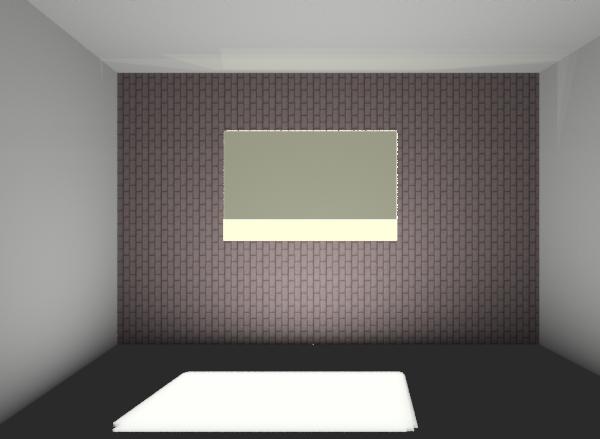
Actually, I should have test rendered your model before adding the border.
It works in the latest version - which you do not have yet.
You rendered it in the HH14 version. In the latest version it renders properly. I will release it next week.
 Offline
Actually, I should have test rendered your model before adding the border.
It works in the latest version - which you do not have yet.
You rendered it in the HH14 version. In the latest version it renders properly. I will release it next week.
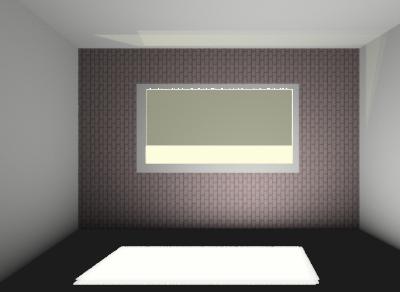
I was able to "fix" this by adding a small border to the window with no texture.
Perhaps this will help while we try to figure out what is wrong.
Thanks for sending the images. We will see if we can fix it.
@unknownuser said:
In the first image there are strange lighting lines...
in the 2nd one the lines - noneThe 2 skp files are the same, except that in the first one I applied a texture image to the wall that contains the window.
I have tried it in many ways with different files...it happens all the time when there's a texture image on the wall.
Thanx for your help
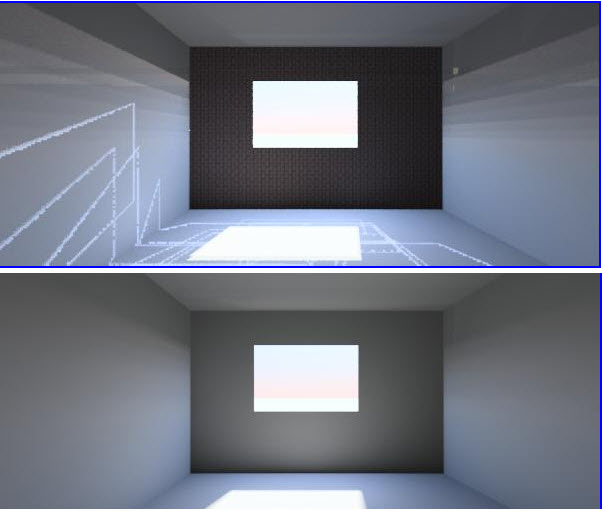
IRender works with most of the light fixtures in the SketchUp components libraries. In addition, it has a wizard to create additional floor lamps and table lamps, based on shade and base choices, and size parameters.
Also, you can use IRender to create light bulbs or spot lamps which can then be placed directly in the model, or placed in light fixture components.
Finally, you can define any face, group or component to act as either a light source, or a spot light source. (Spot lights have a beam angle and a field angle and a direction).
IRender is an add-on for SketchUp and support for IRender is provided here on the SUC Forum, and also on the AccuRender nXt Forum (nXt is the rendering engine used for IRender) ( http://nxt.accurender.com/ )
Material Libraries
Do you mean the materials which come with IRender Plus?
The materials in the library are from the older AR3 version of AccuRender.
They can be modified during the selection process. However, you will have to save the modified material and then select the modified material that you saved. (I have not tries this.)
We are in the process of converting the AR3 material library into a nXt material library. Then they will be easier to modify.
Bump Maps
It is better to add a bump map and create a nXt material.
You will need two images - one for the color of the brick and the joins, and another for the depth of the joins.
You can place the first image on the SketchUp material, and place the second image using the Advanced material image and define it as a bump map.

Section Planes
I'll need to try this and see if it is working.
@gaieus said:
I'd personally hate if I had to move things with the arrow keys (say in a couple of less intuitive way than with the mouse).
The problem with using the arrow keys, is that if you are in a view where the red and green axis are rotated, then you may have to use the right arrow to move something up, or the shift-left arrow (for the blue axis) to move something to the right.
However, the arrow keys can be very handy in "nudge" mode, where you move an object, say 1" or 1mm at a time until you get it where you want it - by repeating the arrow keys, rather than trying to use the mouse.
We just have our own "humble" opinion on this matter.
SketchUp was designed to create 3D objects and 3D shapes. It was not designed to be used to create floor plans or to place components.
Render Plus is devoted to creating "tools to enhance Gooogle SketchUp" (our byline). Our experience is in Architectural CAD (walls, doors and windows), and in office furniture (placing and reporting on symbols or components).
We found the tools for both of these to be weak in SketchUp. (This wasn't really what SketchUp was created for.) So we created a set of tools to make it easier to place and manipulate components after they were already created and placed in a library. These wizards do a lot more then just let you use arrow keys, they let you specify exact dimensions for moves, copies and mirror functions. And they were designed so that new, casual users could use SketchUp without having to study tutorials first to learn how to mirror a room full of furniture into another room.
If SketchUp desires to change focus and become more of a CAD system, then perhaps it will have to add these tools. However, SketchUp has created a Ruby interface, and a C++ SDK which lets its user base add the functionality which is not already in SketchUp, and that may be enough
Take a look at RpTools:
http://wiki.renderplus.com/index.php?title=RpTools

In order to move an item with the arrow keys, you have to specify a move increment.
You can move it with the move dialog box, or the arrow keys.
Yes, for daylight 3DS would be easy, and transparent materials are generally also reflective.
However, you may want to have a reflective floor or mirror, or an artificial light. These can be defined in 3DS or FBX format and it would be easy to read the settings from Kerkythea, Podium or IRender settings and pass them on.
We are planning to read the IRender Reflectivity and Light settings an pass them to FBX.
My questions is does anybody already create 3DS or FBX files with light and reflection settings (which would make it less useful for us to do this)
It may be that the FBX toolkit we use can also create .3DS files. I'll have to check.
Is it true that you add light definitions and reflections after you export the .3DS file from SketchUp? Or is there a SketchUp plugin somewhere which helps with that.
Are there "tricks" you use to make it easy to re-apply the lights and reflections after you change the model in SketchUp and/or when you create a new SketchUp model?
We are working on an interface to allow defining lights and material
properties - such as reflection - in SketchUp and then exporting them to FBX for use with 3DS Max and Maya.
Does anyone use the FBX exports for these and other products?
Is there already a way to define lights and mateirals in SketchUp and
write them to a FBX file?
If not, would this be of value?
@unknownuser said:
    hi.

    if i would like to purchase the copy of IRENDER. how much will it cost in singapore dollars?

    purchasing online is it just getting the activation code?

    so if i purchase online... how am i eligable for updates? will the updates be forever?

    is there any special discount rates?

    cause my main purpose is the IRENDER NXT.

    kindly advise on this issue.

    thank you.
You can purchase IRender or IRender Plus using Google Checkout from this website:
http://www.renderplus.com/pdf/purchase.htm
We can also provide a Pay Pal invoice if you are unable to utilize Google Checkout.
You will receive all updates for 6 months, and can continue to use those versions indefinitely. After that, if you want a new version, you will have to pay an upgrade fee of approximately 40% of the full purchase price.
The purchased version is the same as the version you are using, except that with IRender Plus you will download libraries of approximately 500 plants and 5,000 materials. You will receive a license and authorization code to use IRender.
Thanks Chris,
In looking through these charts, such as the one at:
http://www.microsoft.com/windows/products/windowsvista/editions/choose.mspx
It looks like Home Premium does not allow Remote Desktop access.
We use Remote Desktop a lot, because it lets us use 2 or 3 computers at the same time - all from a single keyboard and mouse. (We display the remote computers on a second monitor, which has worked very well for us.)
Unfortunately, if I purchase the computer with Home Premium, I cannot easily upgrade it to Business - I have to go all the way to Ultimate.
At least according to this site:
http://www.microsoft.com/windows/windows-vista/get/anytime-upgrade-overview.aspx
Does anyone have any ideas what the differences are between these two versions?
I did see this page:
http://techgage.com/article/windows_vista_version_comparison
Especially with the method I defined for this sample, do_rescue(), it would be a problem if everyone started adding one to his/her ruby application - because SketchUp would use the last one which was loaded.
In my actual application, I added do_rescue() to a class, which (hopefully) will be unique. But we have about 10 separate applications, and each one has to contain its own copy of do_rescue() and about 10 other routines which are shared by all the applications. And it is a problem how to keep them synchronized. (One problem here, is that I haven't found a good way to use the same source file in several applications - defining the same routines, but in different classes)
One problem with a "service library", is that application developers would add it to their installer, and, (depending on how well they wrote their installer), people who installed older applications might overwrite new versions of the service library, and/or developers might make changes to the service library which won't work with older applications. (We all try not to do this, but all to often things creep into newer versions of a library which won't work with the older versions.)
Still, it would be good to find a way to enhance SketchUp by adding some common ruby routines which we could all use. Maybe we can get SketchUp to appoint (and/or fund) someone to create a "ruby library" for SketchUp which everyone would use, and which would provide its own installer for version control.
Thanks - just the hint I needed.
I was trying to figure out how to let the user copy the message to an email.
I am putting this here in case it helps someone someday.
When you get an error while running a ruby script, it appears with a traceback in the ruby console. However, if someone is running your script with the ruby console closed, then there is often no warning that an error has occurred.
This code lets you put a begin/rescue/end sequence around almost anything, and give the end user a useful error message.
You do not need to put the begin/rescue/end sequence near the error. It will still report a useful error message even if the error is quite a ways into the calling sequence.
If you use these in several places in your code, ruby will execute the one closest to where the error occurred. You only need to define do_rescue() once, and you can call it as needed.
def do_rescue(e, who)
        smess = sprintf("%s ERROR during; %s;\n\t%s\n\nCalled by;\n\t%s" +
			"\n\n\tPlease report this error to support@xxx.com\n\n",
			e.class.name, who, e.message, e.backtrace.join("\n\t"))
        UI.messagebox(smess, MB_OK, "XXX Error")
end#def

def test_error1
	begin
		test_error2 # code which may contain an error
	rescue Exception => e
		do_rescue(e, "Test Error") # put a message here to describe the process with the error
	end#begin
end#def
def test_error2
	test_error3
end#def
def test_error3
	xx = yy.to_i # this gives a run time error
end#def
We have uploaded the new version of IRender nXt, HH12a.
You can download a copy from: http://www.renderplus.com/pdf/download.htm
This version fixes a bug which prevented models using Object Properties from rendering properly.
It also fixed some problems with the balance between Ambient Light and Natural Light
See: Object Properties: http://wiki.renderplus.com/index.php?title=Object_Properties
See: Ambient Light: http://wiki.renderplus.com/index.php?title=Ambient_Light
We have uploaded the new version, HH12a.
You can download a copy from: http://www.renderplus.com/pdf/download.htm