sketchucation logo sketchucation
    • 登入
    Oops, your profile's looking a bit empty! To help us tailor your experience, please fill in key details like your SketchUp version, skill level, operating system, and more. Update and save your info on your profile page today!
    🔌 Smart Spline | Fluid way to handle splines for furniture design and complex structures. Download

    Rayscaper New Releases

    已排程 已置頂 已鎖定 已移動 Extensions & Applications Discussions
    rayscaperrender
    407 貼文 11 Posters 40.4k 瀏覽 12 Watching
    正在載入更多貼文
    • 從舊到新
    • 從新到舊
    • 最多點贊
    回覆
    • 在新貼文中回覆
    登入後回覆
    此主題已被刪除。只有擁有主題管理權限的使用者可以查看。
    • KrassK 離線
      Krass
      最後由 編輯

      Helo Thomas,
      Yes, other renderings have the same problem, but I remember that this one down below didn't pose any problems even though the light sources were significantly less powerful. Maybe further away?
      https://jskup.fr/wp-content/uploads/2025/03/loft-cuisine-grise-web.jpg

      Krass

      1 條回覆 最後回覆 回覆 引用 0
      • KrassK 離線
        Krass
        最後由 編輯

        Hello, with better settings (transparent shadows) and a little cleaning (5 mn, photoshop), another render, I am very satisfied with it
        https://jskup.fr/wp-content/uploads/2025/04/rendu-9.48.jpg

        Krass

        1 條回覆 最後回覆 回覆 引用 1
        • P 離線
          pixelcruncher Extension Creator
          最後由 編輯

          Hey, Rayscaper users!

          Another release!

          Rayscaper 0.9.50 Beta is available in the SketchUcation store. More fixes and improvements. As always, I recommend upgrading to the latest version.

          What Changed?

          • Bring back the transparency shadows option for the glass material. This option makes the glass material invisible to
            shadow rays, allowing direct light to pass through the glass. This is useful for allowing direct light through glass
            in indoor scenes.
          • Add extra logging to help diagnose failed installations.
          • Cyrillic glyph support: The user interface now supports Cyrillic characters.
          • Improved pixel filtering: Fixed an issue where edges appeared overly jagged with the default settings.
          • Enhanced texture sliders: Scale and translation sliders now have more intuitive ranges.

          Help me build the community 👍

          If you like Rayscaper, please share your renders (final or work-in-progress, it doesn't matter)! This is motivating and will help me showcase its capabilities to new users.

          Happy Rendering!

          I'm the developer of Rayscaper: https://rayscaper.com/ - Fast and easy rendering for SketchUp.

          majidM 1 條回覆 最後回覆 回覆 引用 0
          • majidM 離線
            majid
            最後由 編輯

            Those renders are lovely!

            My inspiring A, B, Sketches book: https://sketchucation.com/shop/books/intermediate/2612-alphabet-inspired-sketches--inspiring-drills-for-architects--3d-artists-and-designers-

            1 條回覆 最後回覆 回覆 引用 1
            • KrassK 離線
              Krass
              最後由 編輯

              Great!
              Thank you!

              Krass

              1 條回覆 最後回覆 回覆 引用 1
              • majidM 離線
                majid @pixelcruncher
                最後由 編輯

                @pixelcruncher I DMed you, do you mind checking it please?

                My inspiring A, B, Sketches book: https://sketchucation.com/shop/books/intermediate/2612-alphabet-inspired-sketches--inspiring-drills-for-architects--3d-artists-and-designers-

                1 條回覆 最後回覆 回覆 引用 1
                • KrassK 離線
                  Krass
                  最後由 編輯

                  I notice that your new default HDRI map intensity settings are excellent, almost no adjustments needed, it's a huge improvement

                  Krass

                  P 1 條回覆 最後回覆 回覆 引用 1
                  • P 離線
                    pixelcruncher Extension Creator @Krass
                    最後由 編輯

                    @Krass Great to hear that! Still more good stuff coming.

                    I'm the developer of Rayscaper: https://rayscaper.com/ - Fast and easy rendering for SketchUp.

                    1 條回覆 最後回覆 回覆 引用 0
                    • majidM 離線
                      majid
                      最後由 編輯

                      How may I share a "carpaint" material pack?
                      If it is easier to make it in another app and share (online or locally) or use the RS?
                      How may I set a castum "preview" for the materials? If it is possible to change the "internal" material test scene?

                      My inspiring A, B, Sketches book: https://sketchucation.com/shop/books/intermediate/2612-alphabet-inspired-sketches--inspiring-drills-for-architects--3d-artists-and-designers-

                      1 條回覆 最後回覆 回覆 引用 0
                      • Rich O BrienR 離線
                        Rich O Brien Moderator
                        最後由 編輯

                        @majid

                        If you go to C:\Users\SomeName\AppData\Roaming\Rayscaper\UserAssets you will find the custom materials you have made zipped.

                        If you unzipped you will see the preview image. If you change that image and zip it making sure to delete the original zip and name the new one the same you get custom icons.
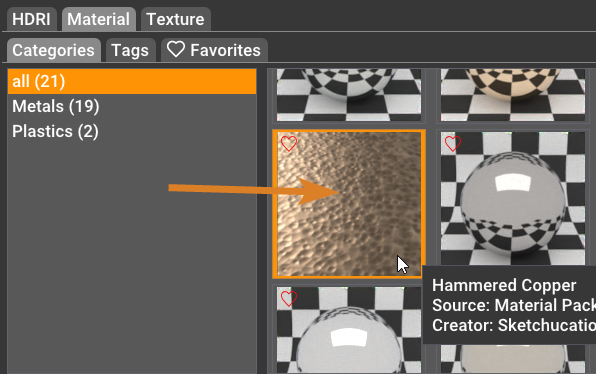
                        image.png

                        Download the free D'oh Book for SketchUp 📖

                        1 條回覆 最後回覆 回覆 引用 2
                        • P 離線
                          pixelcruncher Extension Creator
                          最後由 編輯

                          Back from a holiday, but whatever Rich says makes sense 🙂

                          I'm the developer of Rayscaper: https://rayscaper.com/ - Fast and easy rendering for SketchUp.

                          1 條回覆 最後回覆 回覆 引用 0
                          • KrassK 離線
                            Krass
                            最後由 編輯

                            hello,
                            I thought I read above that Rayscaper had become free, exactly I read that there was no longer a limitation on rendering size. Thank you for confirming this.

                            Krass

                            Mike AmosM 1 條回覆 最後回覆 回覆 引用 0
                            • Mike AmosM 離線
                              Mike Amos @Krass
                              最後由 編輯

                              @Krass

                              Not heard that and frankly it is nonsensical.
                              Rayscaper is being developed by one very hard working human being in his off work hours.

                              You need to be very careful when using the internet for information, spelling and slight word differences can lead you right up the garden path into the manure pile.

                              Absentia mortis praesentiam vitae probat, vita autem est argumentum constantiae.

                              1 條回覆 最後回覆 回覆 引用 0
                              • P 離線
                                pixelcruncher Extension Creator
                                最後由 編輯

                                To clarify, Rayscaper is commercial software. A license costs $99 or $74.99 for SketchUcation users.

                                You can use Rayscaper for free, but then it has a watermark over the render. I removed the limitation on rendering size, as I didn't want to spend my energy on crippling the experience in the free version. I still want you to have a great experience, even with the free version, in the hope that that can convince you to support the work and buy a license (which you both did, so thanks for that!). And if you don't want to buy the license, that's cool too.

                                I'm the developer of Rayscaper: https://rayscaper.com/ - Fast and easy rendering for SketchUp.

                                Rich O BrienR 1 條回覆 最後回覆 回覆 引用 0
                                • Rich O BrienR 離線
                                  Rich O Brien Moderator @pixelcruncher
                                  最後由 編輯

                                  @pixelcruncher is hard at work crushing bugs and adding quality of life stuff for the next release....
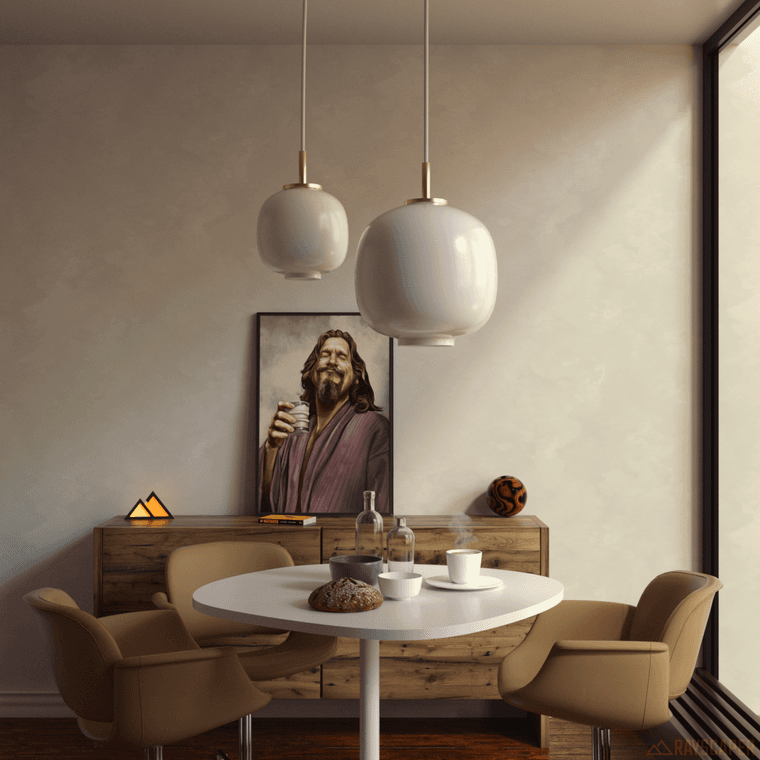
                                  Interior render using Rayscaper for SketchUp no denoising

                                  Above was 5000 samples at 2k resolution on a 4080 card with no denoising in 14.5mins

                                  Below was 500 samples at 2k resolution on a 4080 card with denoising in 1.5mins
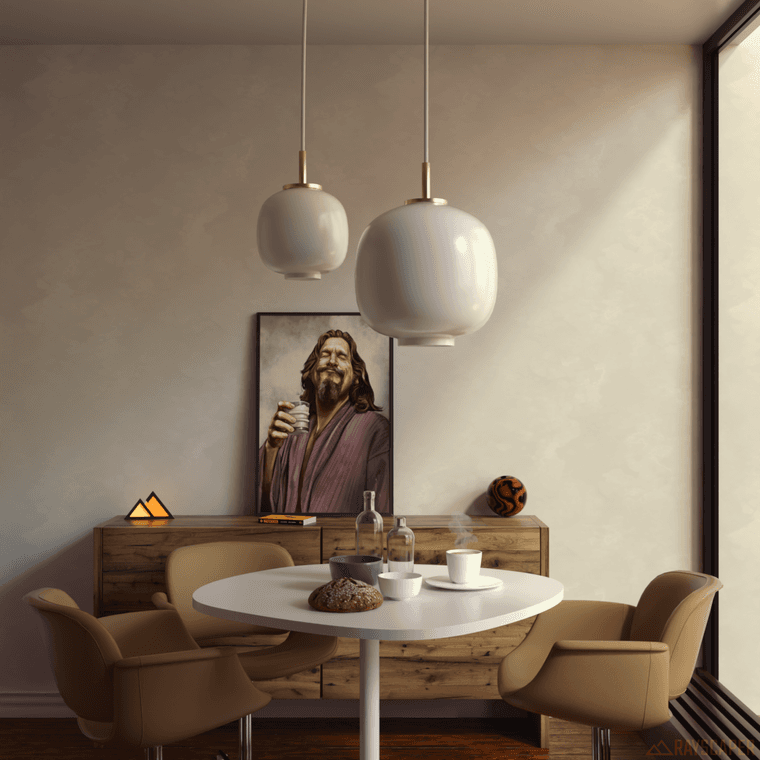
                                  Interior render using Rayscaper for SketchUp with denoising

                                  Download the free D'oh Book for SketchUp 📖

                                  majidM 1 條回覆 最後回覆 回覆 引用 6
                                  • Mike AmosM 離線
                                    Mike Amos
                                    最後由 編輯

                                    I think he is doing a great job tbh. No complaints.

                                    Absentia mortis praesentiam vitae probat, vita autem est argumentum constantiae.

                                    1 條回覆 最後回覆 回覆 引用 2
                                    • P 離線
                                      pixelcruncher Extension Creator
                                      最後由 編輯

                                      The next release is coming soon. I was working on a lot of internal stuff in the engine. In the future, I plan to do more frequent releases, as they give me a tighter feedback cycle and make the process less lonely.

                                      I'm the developer of Rayscaper: https://rayscaper.com/ - Fast and easy rendering for SketchUp.

                                      1 條回覆 最後回覆 回覆 引用 1
                                      • P 離線
                                        pixelcruncher Extension Creator
                                        最後由 pixelcruncher 編輯

                                        Hey, Rayscaper users!

                                        Another release with some bug fixes. Thanks for reporting all those bugs!

                                        Rayscaper 0.9.64 Beta is available in the SketchUcation store. As
                                        always, I recommend upgrading to the latest version.

                                        What Changed?

                                        • Fix weird artifacts in the interactive render viewport.
                                        • Fix the upside-down images when saving.
                                        • Add transmission support for the PBR material. This makes it possible to create glass or liquid materials with the PBR material.
                                        • Fix a regression when renaming light components. Rayscaper lights should now correctly use the name of their SketchUp light component again.
                                        • Fix glass rendering, when multiple glass surfaces overlapped, Rayscaper would render them too dark.
                                        • Fix the render timer in the viewport. It will stop counting when the render is paused or finished.

                                        Help Me Build the Community 👍

                                        If you like Rayscaper, please share your renders (final or work-in-progress, it doesn’t matter)! This is motivating
                                        and helps me showcase its capabilities to new users.

                                        Follow me on Twitter.

                                        Happy Rendering!

                                        I'm the developer of Rayscaper: https://rayscaper.com/ - Fast and easy rendering for SketchUp.

                                        1 條回覆 最後回覆 回覆 引用 2
                                        • Rich O BrienR 離線
                                          Rich O Brien Moderator
                                          最後由 編輯

                                          Yay! Great update Thomas

                                          Download the free D'oh Book for SketchUp 📖

                                          1 條回覆 最後回覆 回覆 引用 1
                                          • S 離線
                                            sashapepperspray
                                            最後由 編輯

                                            thank you for the new release.
                                            I noticed two bugs with this release

                                            1. it does not Support SketchUp material inheritance anymore. Faces, or objects that have the default material painted on them, but the group that they are in have a material, show up as unpainted (with the default material).
                                            2. the rendered images have a watermark on the bottom, even though I have a license (and I doublechecked that it is connected)
                                              [as a side note, any idea when you will connect the sketchup pbr materials to the rayscaper material properties, so that I don't need to set up metalness, roughness, etc, twice?]

                                            P 1 條回覆 最後回覆 回覆 引用 0
                                            • 1
                                            • 2
                                            • 16
                                            • 17
                                            • 18
                                            • 19
                                            • 20
                                            • 21
                                            • 18 / 21
                                            • 第一個貼文
                                              最後的貼文
                                            Buy SketchPlus
                                            Buy SUbD
                                            Buy WrapR
                                            Buy eBook
                                            Buy Modelur
                                            Buy Vertex Tools
                                            Buy SketchCuisine
                                            Buy FormFonts

                                            Advertisement


