What are your environment settings? I would think its a light leak issue. Have you tried to model something above you ceiling to close it in and prevent direct light from hitting it?
Oops, your profile's looking a bit empty! To help us tailor your experience, please fill in key details like your SketchUp version, skill level, operating system, and more. Update and save your info on your profile page today!
⚠️ Important | Libfredo 15.6b introduces important bugfixes for Fredo's Extensions Update
V
Offline
Posts
-
RE: Need some advice with Vray settings ...
-
RE: Missing items - going mad
I can confirm that on build: 2.00_23706 there is an issue. I tried to regenerate all materials and reset all material and render settings and it still renders blank. I copied and pasted it into a new scene and it seems to be fine after that.
-
RE: Window material
One more material here that I use sometimes. This uses a lot of artistic license, but sometimes you just want a glass material to appear 'glassy'. This is a cheat that does not use Fresnel and is not fully transparent. It's a nice cheater.
-
RE: Problems with renders
Also,
Don't use emissive materials to light your scene. I suspect that is how your recessed cans are setup? Emissive doesnt work the same way a V-Ray Light Material works in Max. It can only be used as a way to make a material 'look' lit.
-
RE: Problems with renders
In order to light an interior you will need some interior light sources or you get these splotches. I think most folks add IES lights combined with some rectangular lights in front of the windows to toss in some lighting. Fernando did a nice interior tutorial on Youtube.
-
RE: Cool Tutorial on Ronen's Site
I would argue that changes are easier in Photoshop than having to re-render a scene in VR. Esp if it is going to have atmospheric effects. Deven has said this is on the list for the next release, so you will most like get your wish.
The most important thing to do with a PS file is make everything non-destructive and adjustable. I never use dodge and burn because if you have to make an edit to the base render, your basically starting that process over and you will never get it the same. Instead I use adjustment layers for all edits like this.
-
RE: Missing items - going mad
I'm not sure what version of 2 that you have but there have been some issues that have been fixed. I would talk to Chaos about getting a copy of this nightly and see if it solves your issues. I have not come across any issues with missing geometry in this release.
-
Cool Tutorial on Ronen's Site
Cool VR4SU 2.0 Tutorial on Ronen's Site
http://www.ronenbekerman.com/making-of-mediterranean-house-nookta/
-
RE: Easy question for you: how to do mold and humidity effect?
Nomer get's into a technique on his website.
-
RE: Window material
You can also use a single plane for the glass with a thin glass material. I've attached one that I use sometimes.
-
RE: Window material
Nomer has nice resources on his site as well.

Vray Sketchup Glass Material
Thanks to Jonathan Ignas for sharing this beautiful glass material. Check this out. Here are the sample render using this material.
(sketchupvrayresources.blogspot.com)
-
RE: Having trouble with HDRI's - getting washed out skies
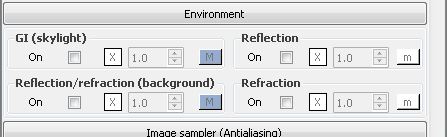
Turn off GI (skylight) - All you need is the domelight. That's probably the issue.
-
RE: Window material
If your glass is a single plane, you want to give it some thickness, like .12 and use a standard glass material. I have attached one, but if you are not using v2.0 it might not load correctly.
-
RE: Vray Proxies
A trick I use is to be sure to place each ID material to one of the proxy triangles. This way it is seen as used and will not purge and it also stays along with the component.
Beware that purge plugins will also purge materials that are used as part of a 2-sided material. Chaos recommends using the purge material feature inside the material editor.
-
Special Pricing of V-Ray 2.0 for Freelancers!
V-Ray for SketchUp Freelancer Special Pricing http://www.chaosgroup.com/en/2/freelancer_promo.html
-
RE: [Extension][$] CompoScene v2.0.2 (Updated)
A+++ This is fantastic. I can't tell you how many times I setup each of these passes on the fly.
-
Spherical export
Is there any way (without a rendering engine) to export a hidden line view as a spherical camera? I know this can be accomplished with V-Ray and a toon shader, but I am looking for an faster and easier way.
-
RE: Easy question for you: how to do mold and humidity effect?
Honestly, the best way to achieve what you are looking at in that photo can be done 2 ways. 1. Map a large scale map of the brick with the staining applied to the texture
2. Just add the grunge in postHere is a great resource for grunge textures
http://www.cgtextures.com/ -
RE: Final image size
If you are using the demo, I believe it has a size limitation.
