Yeah, do as Devin suggests and try the light subdivs first. The other thing is that you are 1.48 which is a pretty outdated version. Not sure if this would change things, but I would consider the upgrade to 2.0
Oops, your profile's looking a bit empty! To help us tailor your experience, please fill in key details like your SketchUp version, skill level, operating system, and more. Update and save your info on your profile page today!
⚠️ Important | Libfredo 15.6b introduces important bugfixes for Fredo's Extensions Update
V
Offline
Posts
-
RE: Vray render problem
-
RE: Does vray run faster in sketchup pro??!
FormFonts is my #1 - they also have a bunch of nice ones in the SketchUcation Shop
-
RE: Vray render problem
If you want to do a quick and test and get better results, I would suggest just increase the global subdivs under the DMC sampler. This will multiply all sudvis if you model by this number. It will increase render times though. Start off by trying 1.5 and then maybe go as high as 2.5 or 3.
-
RE: My first run of vray 1.6
There is no need to do that. Which Gunthrie HDRI are you using? If the sun is hidden behind clouds, then this is an overcast HDRI and will no produce a direct shadow, just like real life. Try the HDRI I sent a link to, this worked perfectly for me. If you get the same issue with this HDRI, then I can look at your file.
-
RE: Vray 2.0 importing proxy issue
If you go the Chaos forums under Beta, you will see an entire series of tutorials I put together regarding proxies and grass scattering.
You can also see this tutorial here.
http://help.chaosgroup.com/vray/help/sketchup/150PB/tutorials_2d_proxies.htm
-
RE: Does vray run faster in sketchup pro??!
As a general rule, I would say that 3D Warehouse models tend to be my last stop to getting content for a rendering. They are poorly modeled and sometimes the textures have funky characters which can make VR go haywire.
-
RE: Vray render problem
What version of V-Ray? How are those lights setup? Are they rectangular lights or an emitter material?
-
RE: My first run of vray 1.6
Domelight Tips-
- Turn off your GI and BG in your Options
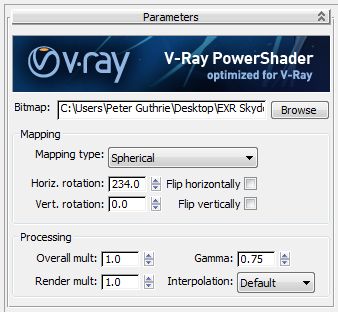
- Add a spherical HDRI map to the dome light - make sure to set the mapping to Environment
Note - You need an HDRI file in order to get shadowing. If you use just a dome light with no texture, it will be the same as just having your GI set to white. The horizontal rotation of the map controls where the sun is in relation to the dome. In my example I used 250. - Increase the subdivis in the dome light settings to 12 or higher to reduce noise
- Use a good HDRI file - something made professionally - I use VizPeople's collections as well as http://www.hdri-hub.com/ which has some nice freebies.
Note - some free HDRIs from the web are poorly created. - Depending on the HDRI, you can decrease the gamma of the map to increase the shadows, I would try .85-.9 first.
- Use RT to play around with the rotation of the map to adjust how your sun is projecting.
I used this file http://www.hdri-hub.com/hdrishop/freesamples/freehdri/item/113-hdr-111-parking-space-free in my test
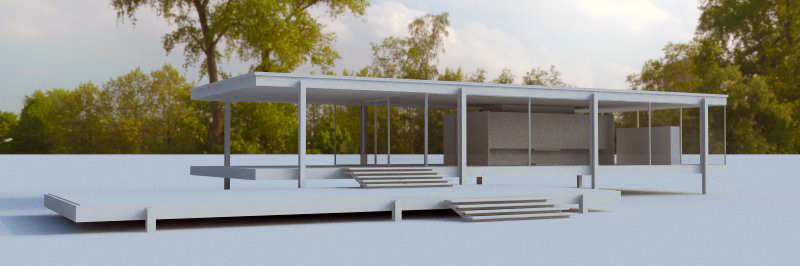
Peter Gunthrie discusses the gamma adjustment on his blog. He also creates beautiful HDRI images that can be found on 3DOcean.
HDRi lighting workflow — PETER GUTHRIE
Following on from a tip I first saw on Bertrand Benoit's blog , I have now adopted a new method of loading my HDRi skies. Essentially you can increase the apparent strength of the sun (and therefore get stronger shadows) by changing the gamma of the loaded HDRi map. If you use the vrayHDRi map (w
PETER GUTHRIE (www.peterguthrie.net)
-
RE: My first run of vray 1.6
1.49.01!!! NO! dont do it! Seriously, get the latest 2.0 release trial and give it another go. I am in no way ever looking back at 1.49.01.
-
RE: Free demo version?
Were you testing 1.6? If so, I would think that because 2.0 is really the final release of 1.6 beta, you have used up the 30 days already. You might be able to contact chaos and ask for an extension to fully test 2.0 I would think.
-
RE: Rendering huge images with VRay 1.4 for Sketchup
Would you mind sharing what one of these things look like with a link? I am very curious.
-
RE: V-Ray 2.0 is HERE!!!!
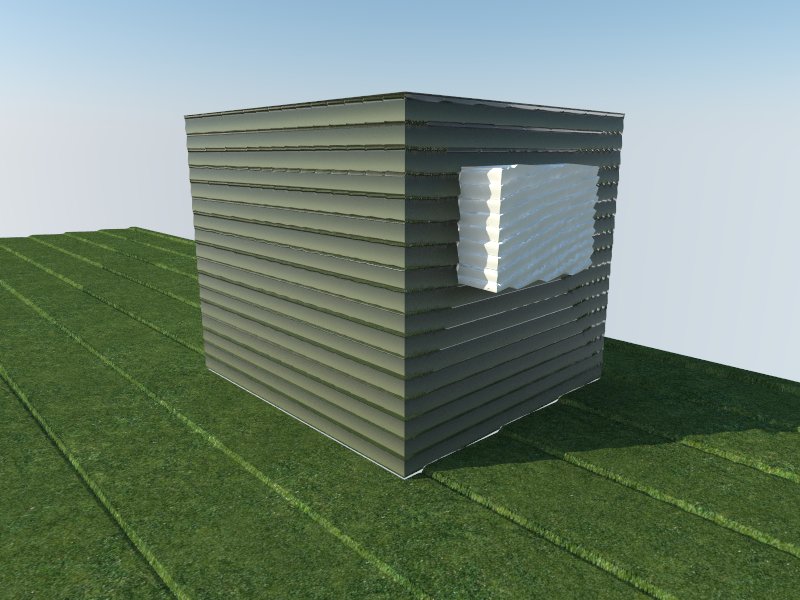
This is not true actually. If you don't group it, then the displacement will be applied to all the connecting faces as seen in my example. Note that in this test, my grass has its own displacement map but that has been overridden.
-
RE: Materials or what
Yep, it is. 1.49.01 used to purge out any saved material settings when you loaded a material from the SU material library. It also purged all of your material settings on a copy and paste and importing a component. Those days are over! 2.0 keeps these settings.
So, when you create a material you like, just drag a copy of it from your material browser in SketchUp into a V-Ray material folder. That way, you have all your favorites ready to go. I have a library with glass, a few plastics, grass with bump, concrete, etc. Things I use all the time.
Another tip is make a library with a generic gray diffuse and a reflection layer at various glossiness levels and save those as a starting point for making plastics. For example, I have a library that has Plastic 90, Plastic 80, Plastic 70, etc. Then all I have to do is apply this from my library to my model and adjust the diffuse color right in SketchUp and I already have my reflection layer setup.
NOTE - that any maps such as reflection or bumps are not saved along with the SKM file, so you need to have a network library location that keeps them organized and in a central location.
-
RE: V-Ray 2.0 is HERE!!!!
Losing a port is a problem that can be solved for less that $10.
http://www.newegg.com/Product/Product.aspx?Item=N82E16817182205 -
RE: Rendering huge images with VRay 1.4 for Sketchup
Why would you ever need a 32,000 wide pixel image?
I always just render straight to EXR from V-Ray and have never had an issue with memory. If you open the EXR in Photoshop, you will need ProEXR in order to see your channels. I open the file, make my exposure and level adjustments and then send the file to 8 bit or 16 bit if necessary. 32 bit is just a waste of time. It's really there for high end Hollywood video comping from what I understand. Besides, being out of 8 bit disables some of Photoshop's filters.
Just to add, V-Ray 2.0 has a lot of improvements on memory as well as 64 bit rendering capabilities. Also, now that we have the progress bar back, your can render to EXR and use No Memory feature and actually know where you are in the rendering process.
I found that rendering to VRIMG and then converting was a total waste of time. Pay the $100 and get ProEXR and you will not regret it.
-
V-Ray 2.0 is HERE!!!!
A big day for all of those who have been using 1.49.01 waiting for this release.
http://www.chaosgroup.com/en/2/vrayforsketchup.html -
RE: Cove lighitng for curved ceilings
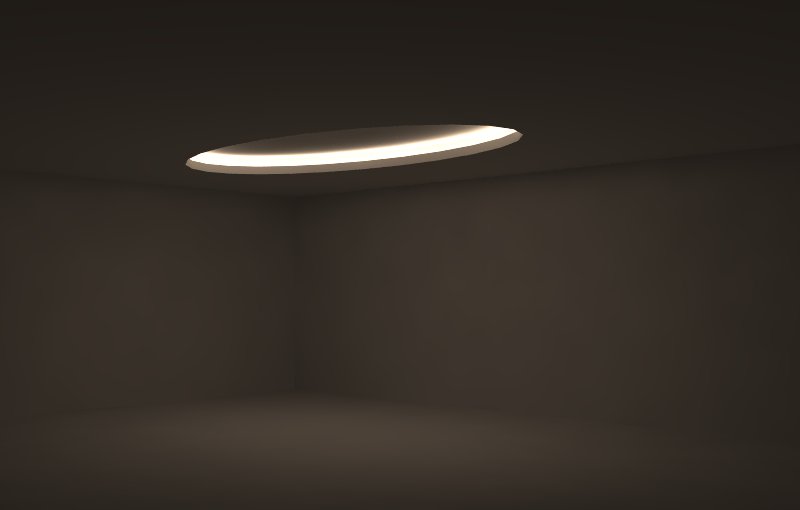
It can be done with an emissive material, but you need a lot of samples to clean the render up. The only other way I could think of doing it is to have a series of light planes arranged around the oval.
-
RE: Free demo version?
30 days and you should get a watermark on your renders after that.
-
RE: Rendering in VRImage?
The only concern to me is that it's not very intuitive and if you don't know about it, you instantly think something is wrong because it's lit up like a big warning. That was my first impression of it when I saw it many betas ago.