sketchucation logo sketchucation
    • Login
    1. Home
    2. valerostudio
    3. Posts
    Oops, your profile's looking a bit empty! To help us tailor your experience, please fill in key details like your SketchUp version, skill level, operating system, and more. Update and save your info on your profile page today!
    ⚠️ Important | Libfredo 15.6b introduces important bugfixes for Fredo's Extensions Update
    V
    Offline
    • Profile
    • Following 0
    • Followers 0
    • Topics 129
    • Posts 1,382
    • Groups 1

    Posts

    Recent Best Controversial
    • RE: Dust effect in ray of light

      For now, you can try to hack it with a ZDepth pass and some photoshop brushes. There are some good light ray brushes on DeviantArt.

      http://www.deviantart.com/?q=light+ray+brushes

      Alex Hogrefe has a good tutorial on his blog.

      http://www.alexhogrefe.com/blog/2011/9/5/sun-rays-tutorial-video.html

      posted in V-Ray
      V
      valerostudio
    • RE: BUG / Reflection layer lost, is it resolved with 2.0 ?

      I have not had any issues with this old bug.

      posted in V-Ray
      V
      valerostudio
    • RE: Having trouble with HDRI's - getting washed out skies

      Which Gunthrie HDRI are you using? I do find that if you set the Gamma to .85 and use an intensity of 1, you should be fine. Also, make sure that your GI and BG are turned off when using the dome light, unless your intent is to mix the dome with the VRay Sun.

      I do like Peter's HDRIs, but I have to say that I have great results with VizPeople Vol 2 HDRI's. Very sharp shadows and great lighting.

      Link Preview Image
      Page Not Found - Viz-People

      favicon

      Viz-People (www.viz-people.com)

      posted in V-Ray
      V
      valerostudio
    • RE: Vray proxy export issue

      I have been testing this nightly and I can safely say that the mesh export issue is resolved. Thanks Devin!

      posted in V-Ray
      V
      valerostudio
    • RE: Patterned lighting through lampshade

      You would need the create the map to be applied to the sphere and then possibly UVW map it outside of SketchUp, maybe using UVtools and Blender? I dont know. All I know is that mapping a sphere in SU alone is dicey.

      posted in V-Ray
      V
      valerostudio
    • RE: Can i have more than one IES light in a model/scene?

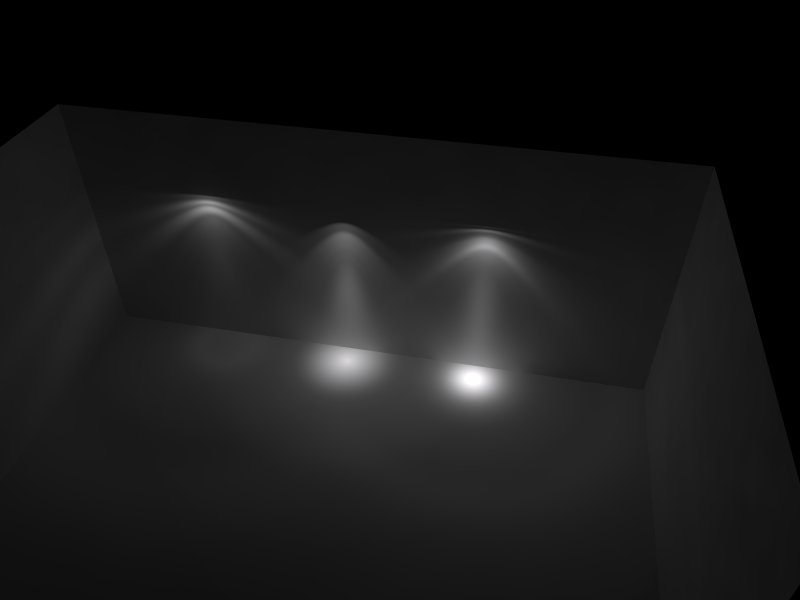
      You can absolutely have more than one IES in a scene. I have never encountered a problem having more than one. I would simply try another IES file. There is a nice set on the web that has like 20 IES files. I like to use this one unless a client has a specific file they need to render. In that case, you have to speak with the manufacturer if the file isn't rendering.
      multi IES.jpg

      Here is a huge collection of files.

      Link Preview Image
      VRAY for sketchup IES LIGTH complete collection

      complete IES light Vray collection frre download

      favicon

      (www.sketchuptexture.com)

      posted in V-Ray
      V
      valerostudio
    • RE: Shading and bump issues (VfS 1.6)

      If you looking for sharp corners on the tile, maybe I would just model it. It's not a ton of modeling and would yield the most realistic result. Would you mind packing and sharing the model?

      posted in V-Ray
      V
      valerostudio
    • RE: Problems with renders

      3 questions -

      1. What version of V-Ray
      2. How is your environment GI setup
      3. Show us your render settings.
      posted in V-Ray
      V
      valerostudio
    • RE: Shading and bump issues (VfS 1.6)
      1. I actually don't mind how the grout lines are rendering. I have more problems with the general lighting of the scene. Seems a bit dark and uninviting. I would also reduce the reflection on the tile, it is distracting and seems unrealistic. Look at this link below.

      http://www.houzz.com/photos/2349852/German-Village--Ohio-Basement-Remodel-contemporary-basement-columbus

      1. What I meant about settings was the amount you have set. Is it set to 1? I have found using 1 is a bit problematic, so try something like .85
      2. 1.6 is a beta, and its a beta that had a lot of bugs. The most current 2.0 is where you want to be and it will not affect any settings you have.
      3. The splotches are most likely from your render settings. Interiors that are low light, like this one will need 2 things. A - more light B - higher light cache settings. Chaos has given us the lovely feature of presets. Try them out. Use Interior - High Quality.
      posted in V-Ray
      V
      valerostudio
    • RE: Shading and bump issues (VfS 1.6)

      Can you post the bump map file and show us your material settings?

      Are you on 1.6 or 2.0? 1.6 was only a beta and you should be on 2.0 now.

      posted in V-Ray
      V
      valerostudio
    • RE: Displacement issues

      2.0 bump mapping has improved significantly. I would not use displacement on tiles or bricks. Seems like an incredible waste of render time to me. Try bump, trust me.

      posted in V-Ray
      V
      valerostudio
    • RE: Problem with hi-res texture maps

      No. You have 2 diffuse textures essentially stacked. The first is low res and this will be in the upper Diffuse layer. Then you have the hi res as the diffuse layer underneath it.

      SketchUp will use the one on top as the texture in your model. So, the trick here is to have that layer as a low res map and tell VR to render it 100% transparent, without the SketchUp window realizing it. We cannot use the transparency color box because this will also affect the transparency in the SU window.

      What we do is under transparency apply a AColorTex in the map, then set that color to pure white.

      This tells VR to ignore that layer and use the high res one underneath when rendering and because SU doesn't see at any of the VR tex parameters, the low res map stays in the SU window.

      This trick is used quite a bit in many scenarios. Example would be if you needed to see a bump map of a texture in order to set the UVW mapping for something like water. It is very important to understand and have this one in your back pocket at all times.

      posted in V-Ray
      V
      valerostudio
    • RE: Problem with hi-res texture maps

      Got to have a new texture for each. Trust me, you will run into issues if you do not.

      posted in V-Ray
      V
      valerostudio
    • RE: Scaling Materials on my Project

      First of all one of your materials (most likely the grass, has displacement and is not grouped on it's own. This is why your entire model is rendering with displacement. If you want to use displacement, the object with that material needs to be in its own group. If you don't want to use it, just untick displacement in the material.

      As for scale, your diffuse is controlled by SU, so whatever the scale is in your view port in SU, is how VR will render it. If you have additional maps, such as a bump, the texture file will be tiled in the same scale as the diffuse. Sometimes you have a bump or reflection map that doesn't match up with the diffuse and you will need to tweak the UVW scaling in the bitmap parameters.

      posted in V-Ray
      V
      valerostudio
    • RE: Empty scene I sketchup 2013 with vray 2.0

      My tip is to check any proxies you may have to ensure the links are correct.

      posted in V-Ray
      V
      valerostudio
    • RE: My IES light is not work

      Nice tutorial here too

      Link Preview Image
      Setting up IES Lights in V-Ray for SketchUp :: SketchUp 3D Rendering Tutorials by SketchUpArtists

      In this mini-tutorial, Onel Pabico shows you how to set up your IES lights in V-Ray for SketchUp, includes some simple tips for adjusting the amount

      favicon

      (www.sketchupartists.org)

      posted in V-Ray
      V
      valerostudio
    • RE: My IES light is not work

      Here is a nice resource for some IES files. I have a small set of maybe a dozen that I use that I know work well.

      Link Preview Image
      VRAY for sketchup IES LIGTH complete collection

      complete IES light Vray collection frre download

      favicon

      (www.sketchuptexture.com)

      posted in V-Ray
      V
      valerostudio
    • RE: My first run of vray 1.6

      Make sure the rotation of the HDRI texture is setup so that the sun is casting on your facade. Post a screenshot of your HDRI and dome light settings if you can.

      posted in V-Ray
      V
      valerostudio
    • RE: My first run of vray 1.6

      That file looks like it should be fine. You're using a hi-res unblurred version?

      posted in V-Ray
      V
      valerostudio
    • RE: Vray 2.0 importing proxy issue

      Take note, if you download an OBJ from the web or another resource, and the UVW coordinates are not applied to the OBJ, then when you convert the file using the ply2vrmesh utility, you will not get the proper ID channels and the mesh will not have any UVW information. These OBJs are basically useless.

      I found this to be true with the OBJs that come from Evermotion. Their files break the materials into subgroups in the OBJ and currently, the ply2vrmesh utility will not create ID channels from these groups. The other way around this is to import the OBJ into SU and texture it there and then export the vrmesh file directly in SU, but my experience is that SU will not be able to import very large OBJ files. Maybe 20MB max, not sure.

      Another option is to texture and create the mesh in Blender using my other tutorial on the Chaos forums.

      posted in V-Ray
      V
      valerostudio
    • 1 / 1