Is it possible to get some kind of progress bar with this plugin? I usually use it toward the end of a project, where I have imported a bunch of components and have a lot of materials. I ran this yesterday and I wasn't sure if SketchUp had crashed or it was still working. I let it sit overnight and it was just working away. It would be nice to know how far it has to go. Thomthoms Cleanup does a great job of doing this.
Oops, your profile's looking a bit empty! To help us tailor your experience, please fill in key details like your SketchUp version, skill level, operating system, and more. Update and save your info on your profile page today!
Sketchucation Tools 5.0.7 | Licensing improvements and bug fixes Learn More
V
Offline
Posts
-
RE: [Plugin] MaterialConsolidator
-
Bring back randomization
Can we bring back random divisions to FlexWindow? Luckily, I still have an old FlexWindow 2.1.01 saved out. Am I the only one who loved using this to create storefronts?
-
RE: SketchUp 2019 release
@rempage said:
Thanks. It's The Boundary indeed. Sadly you can't find it on their website.
Interesting thing is that on CG Architect, in their latest article, when the Boundary lists all he software tools they use, SketchUp is not on the list.
-
RE: Importing 3d model
The coloration of the chair is probably setup as a refractive material in the Max file. This will not come into SketchUp, so the above texture is a clever trick.
-
RE: Can't seem to create surfaces after draping linework on topo
This issue happens can you import CAD files and drape them. It's always been a bug and it lingers still. I would recommend using EdgeTools and clean up any little bits and shards in your CAD file. Then you can try also running it on your topo after draping. This doesnt always work but it gets a good amount of unclean cuts. You can also bet that arcs tend to have this issue when draping. To find the culprit, I turn on hidden and start painting my areas, you will eventually find where the bleeder is and fix the teeny-tiny edge that did not cut cleanly.
Also try Fredo's Edge Inspector.
-
RE: Sorting Plugins in Menu
For years I have requested a way to have saved work spaces in SketchUp. This could even include customized Menu items, that way you have categorized your plugins. Send Trimble an email and make this a priority for them!
-
RE: Rendered Walkthrough
VRay cloud is very nicely integrated and easy to use but I thought that I read that you can find cheaper farms out there. The price tag of Enscape will pay for itself with one animation job. Not pushing Enscape down your throat but we have all been there with V-Ray and Enscape is just damn fast and easy.
-
RE: Rendered Walkthrough
@dprince said:
I would still like to know how to do the walk through using vray. no matter how long it takes to render
VRay will render animation based on SketchUp scene tabs. For example I would make a scene tab for point A of my walkthrough, then one for point B, point C, etc.
Setup your animation settings in model info with Scene delay off and a reasonable amount of time for the transitions, so the speed is the way you like it.
Render using VRay with animation enabled and saving to a folder. VRay will save each frame out. Then use an application to combine the frames into a video file. I bet there are a bunch of free ones. Photoshop will also do this now.
There are plugins that can make the walkthrough smoother and with animation (doors open for example) but that becomes more complex, and you have to make sure its VRay compatible, but the procedure above is the fastest way to get up and running (pun intended).
Smustard had some nice path animation plugins a long time ago. I am not sure if they still work. Worth a shot.
-
RE: Rendered Walkthrough
This was an issue in the past with laptops. You still may have a graphics card Enscape can use. Try this https://enscape3d.com/knowledgebase/multi-gpu-issues/
-
RE: Creating relistic grass using vray fur
Turn on Level of Detail in the fur options. You might be asking a lot of your machine with such a large area.
-
RE: A more paintely plugin?
Time to go back in the way-back machine and start looking for Grant Marshall and "The Dennis Technique". I could see a workflow that uses SketchUp with styles as your base and then some painted layers in Photoshop or Corel Painter using a Wacom.
Jim Leggitt also has a book about mixing SketchUp and real hand techniques.
-
RE: Power Toolbar (2.5) - fix for 2019
@cadfather said:
that's weird - at least if you got an error message - and i take it the location allows full access (not sure on mac)
I went through all my 2019 plugins folders and made sure to delete everything, re downloaded the fix, and then reinstalled and I do have it working now. Thanks for your help and patience with this. I couldn't live without Powerbar!!!
-
RE: Power Toolbar (2.5) - fix for 2019
@cadfather said:
yes Uli, as Juju said - make sure you have the latest update - i have no errors on my machine
Not sure what it could be. I have uninstalled all previous versions, reinstalled the update, it shows up in the Extension Manager as enabled, but no toolbar and the CADFATHER PACK doesn't show up in the Help menu either.
-
RE: Power Toolbar (2.5) - fix for 2019
Will we get support for 2019? It doesnt seem to be installing correctly.
-
Cannot Log In to PluginStore
Even though I can log into the forums with no issue, if I try to log into the Plugin Store, I keep getting a message that says, "Invalid Token". I tried in both Chrome and IE.
-
RE: Lumion 8 is just amazing!!
There's a teaser for Lumion 9 on Youtube. Looks like true IBL lighting and environments. Also looks like fur-like grass maybe.
-
RE: Quad based furniture?
Form Fonts and Podium browser might be good options too, but the stuff on Podium isn't always quads.
-
RE: Controlling shadows in hdri dome light
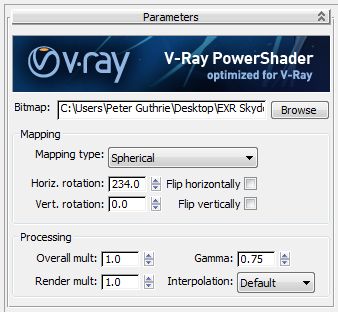
I have also seen posts where artists have worked with the gamma. Not sure if this is still relevant in 3.6
HDRi lighting workflow — PETER GUTHRIE
Following on from a tip I first saw on Bertrand Benoit's blog , I have now adopted a new method of loading my HDRi skies. Essentially you can increase the apparent strength of the sun (and therefore get stronger shadows) by changing the gamma of the loaded HDRi map. If you use the vrayHDRi map (w
PETER GUTHRIE (www.peterguthrie.net)
-
RE: Vray3.6 displacement problem ... help!
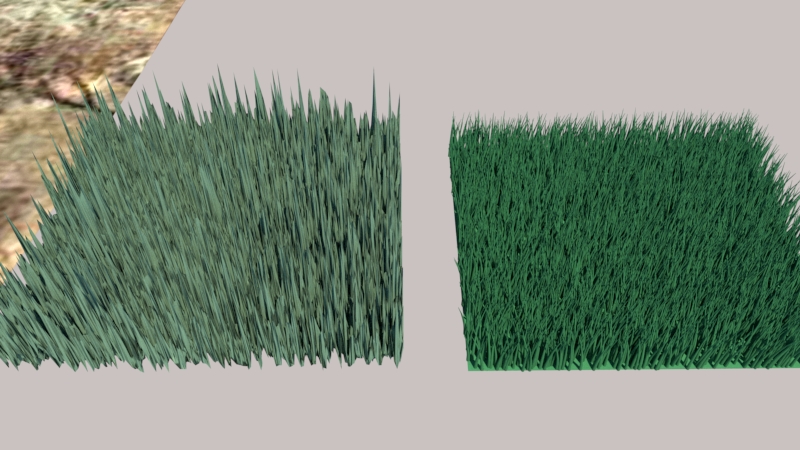
Use fur for carpets man! - displacement is not worth it. Fur is 1000X faster and better for this application. I try to stay away from displacement altogether honestly.
If you must - like you said above, the material needs to applied directly to the faces (not to the group).
Displacement on the left, fur on the right
-
RE: Custom texture images won't render
Theres a good chance that you need to remap the texture's location. Open the material editor - click on diffuse - see if its missing.
Are you using 3.6?