sketchucation logo sketchucation
    • Login
    1. Home
    2. utiler
    3. Posts
    Oops, your profile's looking a bit empty! To help us tailor your experience, please fill in key details like your SketchUp version, skill level, operating system, and more. Update and save your info on your profile page today!
    Urasik Extensions | Lots of new extensions to check out Learn More
    Offline
    • Profile
    • Following 0
    • Followers 0
    • Topics 222
    • Posts 2,425
    • Groups 2

    Posts

    Recent Best Controversial
    • RE: Layout move tool

      @jql said:

      There's almost* nothing you can't do with the move tool. In that aspect it's great.

      It's just the most cumbersome tool to use I have ever worked with. In that aspect everything is wrong with the move tool.

      What's wrong with the move tool is that it's actually the select tool!

      So you're right, there's nothing wrong with the move tool, the problem is with select tool!

      *almost refers to the fact that you can't infer your dongle for rotate.

      Exactly what JQL said and more.

      LO's move tool needs to operate how SU's move too does; allow the user to simply snap to nodes without having to search around the selected zone and find a toggle to use as a snap.

      Also, the rotate handle allows us to rotate an object but only very crudely. It needs to be able to provide the user an alignment to rotate from as well as user input via the VCB.

      Or separate the move tool and create a rotate tool. Again, just like SU does.
      posted in LayOut Discussions
      utilerU
      utiler
    • RE: Different Line Colors With Section On

      Hi Spence, is the geometry you're cutting a section through a model or component?

      If so click on the model and check its colour; if its not the default colour then change it to default.

      Happens to me too from time to time when you're racing around a model colouring things....

      posted in LayOut Discussions
      utilerU
      utiler
    • RE: [Plugin] GKWare Cabinet Maker

      @garry k said:

      Yes - you are filtering out Metric.
      This setting will show everything else.

      Gotcha. Filtering is filtering out. A bit back to front but I understand now. thanks.

      posted in Plugins
      utilerU
      utiler
    • RE: [Plugin] GKWare Cabinet Maker

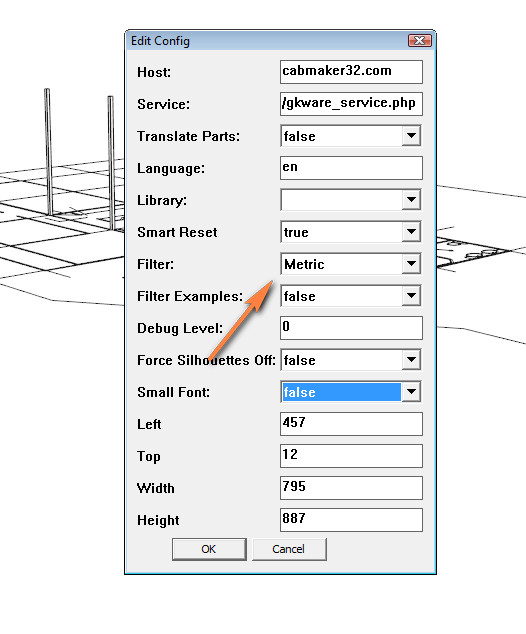
      I have that set to metric but still the defaults show imperial....


      2016-02-15_094932.jpg

      posted in Plugins
      utilerU
      utiler
    • RE: [Plugin] GKWare Cabinet Maker

      Thanks but my defaults only show imperial_rules & imperial_rules_upper...?
      How do I change it to metric?

      posted in Plugins
      utilerU
      utiler
    • RE: [Plugin] GKWare Cabinet Maker

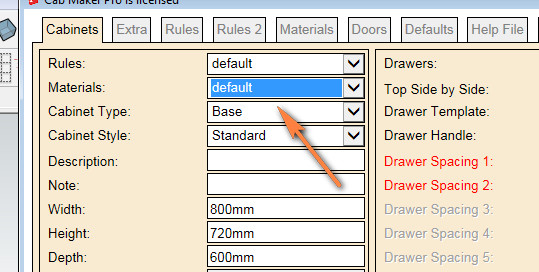
      Hi Garry, is there a way for Cabmaker to identify material list as per what is in the current model?


      2016-02-15_091501.jpg

      posted in Plugins
      utilerU
      utiler
    • RE: [Plugin] GKWare Cabinet Maker

      Thanks Garry, all sorted now!

      posted in Plugins
      utilerU
      utiler
    • RE: [Plugin] GKWare Cabinet Maker

      Hi Garry, not sure what's going on here. I can't seem to get the plugin going....?
      When I click to start the second point ['select right front corner"] won't happen. Neither will it allow me to enter a length in the VCB.

      Any ideas?

      posted in Plugins
      utilerU
      utiler
    • RE: Sefaira now part of Trimble family

      Wow, sounds like an marriage!!

      posted in SketchUp Discussions
      utilerU
      utiler
    • RE: [Plugin] GKWare Cabinet Maker

      Garry, I just can't keep up with you at the moment!!!!
      Been a busy few weeks so each time I get to read back through some posts I find that your plugin is moving super fast!

      Are you nearing completion? I s'pose at some point you should put it out as a 'release' version and give your fingers a rest!!

      posted in Plugins
      utilerU
      utiler
    • RE: Weird dialogue boxes on start up..??

      Doing a complete re-install. Office clean up here on saturday morning so thought I might as well give it a clean out....

      posted in SketchUp Discussions
      utilerU
      utiler
    • RE: Weird dialogue boxes on start up..??

      @rich o brien said:

      Have you PlusSpec installed? It launches those CLI dialogs.

      1001Bits does too in case it is that also.

      Yeah Rich, I spoke to Andrew D about if it was PlusSpec but apparently not.

      And no 1001 bit tools loaded either.

      posted in SketchUp Discussions
      utilerU
      utiler
    • RE: Weird dialogue boxes on start up..??

      Annoying as hell!!!!

      posted in SketchUp Discussions
      utilerU
      utiler
    • RE: Weird dialogue boxes on start up..??

      Thanks mate; not sure if its a windows thing but this is how long it takes to open....


      SketchUp StartUp.wmv

      posted in SketchUp Discussions
      utilerU
      utiler
    • Weird dialogue boxes on start up..??

      Hi everyone,
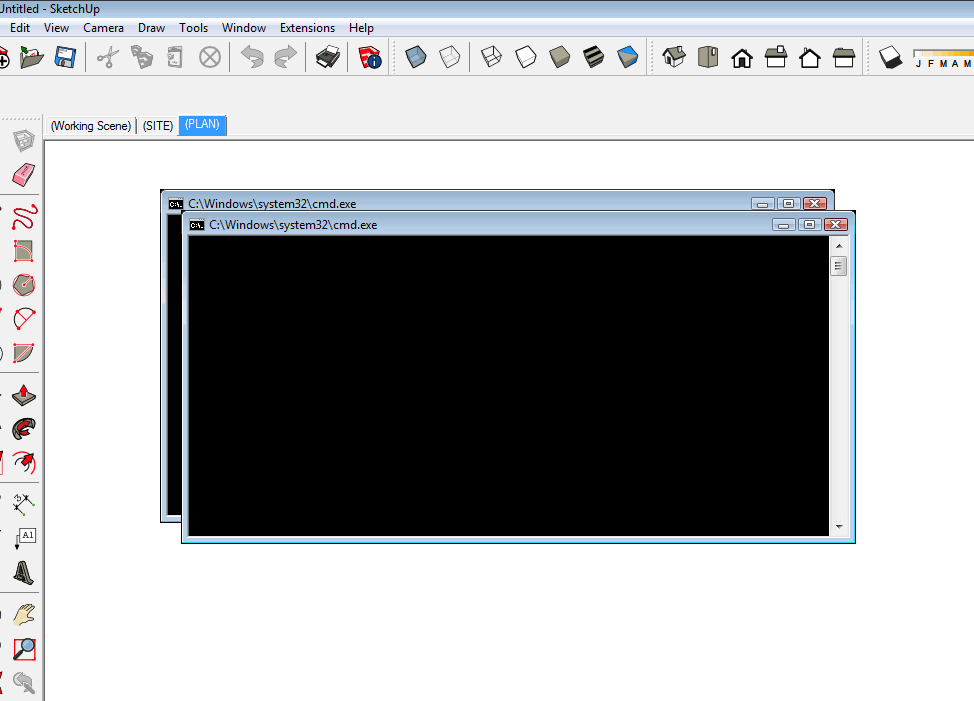
      Is anyone getting these dialogue boxes on startup?

      I thought it was just normal for SU take a little bit of time t wake up but apparently not.


      2016-01-29_135122.png

      posted in SketchUp Discussions sketchup
      utilerU
      utiler
    • RE: DC's - Can Scenes be made to recall their properties?

      Thanks Jim, looks like a bit of late night reading there.. Cheers.

      posted in SketchUp Discussions
      utilerU
      utiler
    • RE: DC's - Can Scenes be made to recall their properties?

      @faust07 said:

      Here an example from 3D-warehouse. It should work with doors too.

      I opened this file and the model isn't a DC? I'm not sure; can you explain....?

      posted in SketchUp Discussions
      utilerU
      utiler
    • RE: DC's - Can Scenes be made to recall their properties?

      Thanks guys, as I thought; very hard to do. I'll have a good think about it and see what I come up with.

      Cheers.

      posted in SketchUp Discussions
      utilerU
      utiler
    • DC's - Can Scenes be made to recall their properties?

      Hey guys,
      Just wondering if there is a way for scenes to recall a DC's properties?

      Say with a door: I want it to show 'open' in plan view but in elevation I want it 'closed'. Currently, I'm having to update my plans, export to PDF then closing the doors and updating my model to export to elevations.... bit of a pain.

      Is this possible? Would it help others?

      posted in SketchUp Discussions sketchup
      utilerU
      utiler
    • RE: [Plugin][$] Profile Builder 2

      Thanks Dale, yes makes sense. I was just hoping to be able to push PB2 a bit that's all.

      Cheers.

      posted in Plugins
      utilerU
      utiler
    • 1
    • 2
    • 10
    • 11
    • 12
    • 13
    • 14
    • 121
    • 122
    • 12 / 122