Ok, gets get started on the next version:
- LineTools
Custom linetypes [dashed, centre, dotted, etc]
As with CAD programs in general, I really think that SketchUp users would benefit from being about to create and use custom linetypes.
- Layers
SU10 - Ability to nest Layers
IMO, this is one of the main focuses of future releases should productivity be a priority.
I posted a while ago about how Layers and the Outliner could be brought closer together. http://forums.sketchucation.com/viewtopic.php?f=15%26amp;t=40338
I know there are users that might use Outliner and love it however it's only really useful in 'working' not setting out your presentation with scenes, export to Layout, etc..
Firstly, I use SU and LO for Architectural presentation so manipulation of geometry is paramount. For a long time now, I’ve tried many different ways of setting up my layer structure to try and facilitate the different ways of modeling / output for each project. It was only recently that I realized that this is the answer!!!!
Let’s consider this:
Leave Outliner as it is for those whose use it. Hiding a group in Outliner and then saving the currently scene means it is hidden, period. Try going to any other scene and it is not visible. This has no use for saving to and exporting scenes to layer.
Re-work the Layer Manager UI to be similar to Outliner in that groups and components that are assigned a layer have the ability to be ‘nested’ to a parent layer.
See adjacent example:
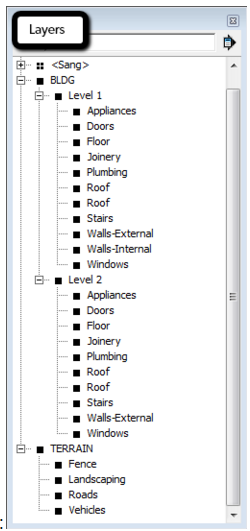
This allows the user to at least have some control over his / her layer/geometry structure visually as well as being a lot quicker to alter visually. Not to mention if I'm in a group, create another group and want to assign it to a new layer that I should be able to click in the Layer drop down and do so. This automatically creates a new layered named as required and 'nested' within the parent layer group. You would even have the ability to move layers from group to group as required to be included in grouped visibility control.
Maybe as with Outliner double click on a nested layer and you’re taken straight to the group/component on that layer and start working.
I’m sure you’ll agree; this would change the way we work in SU significantly.
Now let’s put it into workflow:
Say I have modeled a project on a site and want to export a ground floor plan. I cut sections where required and create a new scene called same and save. Now I want to create a first floor layout. If I don't want my site to show beneath in the first floor layout I can turn off the parent 'SITE' layer....BAM! No scrolling through the layer dialogue clicking here and clicking there to isolate geometry. The fact that the nested layer function avoids a global alphabetical search of the layers list it is much easier to see how your model is layered as well as a much quicker way to manipulate visibility.
I would love to hear from any of the Googlers’ about their thoughts on this.
BTW, obviously I have used the Outliner Manager to communicate this idea so no toggles for visibility, current active, color [never used it], etc are shown. These would be as they are I assume.
Really need to be able to create custom linetypes [dashed, centre, etc...]
Relying on exporting to LO and exploding is just laborious.
There'll be more but these are what comes to my mind...