nice work, Pilou!!!
Oops, your profile's looking a bit empty! To help us tailor your experience, please fill in key details like your SketchUp version, skill level, operating system, and more. Update and save your info on your profile page today!
Urasik Extensions | Lots of new extensions to check out Learn More
 Offline
Posts
-
RE: Deck build. SU to real.
Neat little project, Baz. How big was the bucket?

-
RE: 3D Windows for SketchUp
Looks way too laborious for my liking....
-
RE: SubD examples and models
@box said:
Believe or not Thomthom, they do. They've gotten very draconian around here since I was away.
Much rather be over there.They certainly have, Box. In Queensland they've started serving last drinks at 2am!!!!
-
RE: FlexWindow 2.1 - dynamic component
Ok, I should have troubleshot a bit; It seems to be ok in a new model.....
-
RE: Edificius BIM Software???
Interesting to see where this goes, Clayton.
-
RE: FlexWindow 2.1 - dynamic component
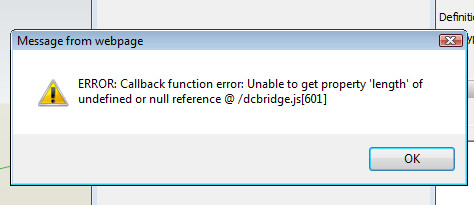
Hi Yoni, this is what I get from any of the three DC's whether i drag and drop, insert manually or drag and context click:
I'll PM you the model.

-
RE: Snap leader to top line of text (always)
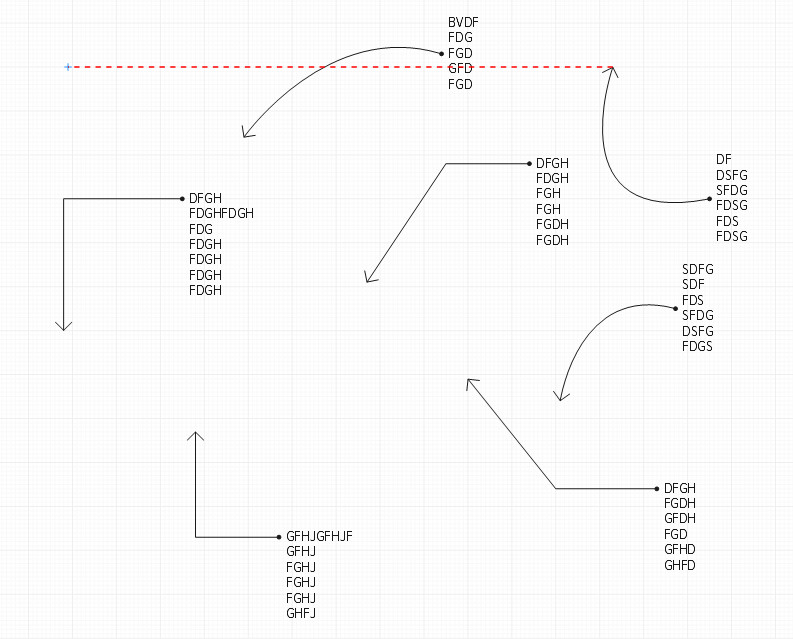
That seems to only happen with curved leader?
-
RE: FlexWindow 2.1 - dynamic component
@nickchun said:
This looks good but I have had this error come up
[attachment=1:3kminymn]<!-- ia1 -->Capture.JPG<!-- ia1 -->[/attachment:3kminymn]
Followed by this one..I'm getting this too. [exploding it doesn't help at all....]
Any suggestions?
-
RE: Architectural layer name conventions
@jql said:
@unknownuser said:
A quick way to update multiple scenes that have similar layer arrangement is to simply select the scene, in the scene manager tray, select all scenes that have a similar layer arrangement, then toggle on then off the "visible layers" selection. Then all scenes will update automatically.
The same goes for any of those variables listed in the "properties to save:"
This seemed to go unnoticed in here, but it's the best way, apart from Layer's panel, to update layers.
Managing scene's properties is very easy with these settings once you figure out how they work.
I understood what Nick was saying, JQL but how would you handle say a scene with only contours on it when you've introduced a number of new layers? You'd still have to activate that layer and turn off all the new ones. [and any other scenes for that matter....]
PS
[I like to have a separate layer for this as I can scale back my colour to say grey so that it visually sits behind the main subject]. -
RE: Architectural layer name conventions
@db11 said:
@utiler said:
True, thanks guys you're both right there are a few plugins that offer that option. I'm going to have to take a look at Jiminy's Layer Panel thread; I have seen it but never DL'd it as it seemed a little over the top..
Layer Panel is a fantastic idea and a needed functionality, however the actual extension is quite buggy and unstable (at least on a Mac). I gave up using it after too many frustrations, as much as I had wanted a hierarchical layer manager. Maybe it's more usable on a PC?
JF Add Layer is a great little plugin that solves the new layer visibility issue, but that doesn't help with the larger problem of simplifying layer management with models and/or workflow that require more than a few.
It would be nice if Trimble would acknowledge/address the multiple feature requests on this issue over the years, but I wouldn't hold my breath.
Doug
You're absolutely right, Doug. There are a lot of workarounds from fantastically generous script writers in our community but at some point I believe Trimble needs to acknowledge some fundamentals require work. And layer management is one of them....
-
RE: Architectural layer name conventions
True, thanks guys you're both right there are a few plugins that offer that option. I'm going to have to take a look at Jiminy's Layer Panel thread; I have seen it but never DL'd it as it seemed a little over the top..
-
RE: What is the best background colour for working on computer
I've had mine set to 204/204/204 [80% black / white] for some time but I actually like 240/240/240 better. Thanks Rich!!
While on base colours, does anyone stick with the standard default front / back colours?
-
RE: Architectural layer name conventions
Great reading guys! I work very similarly to you guys [minimizing layers / high dependency on scenes] but one thing I have never got into is Outliner. I posted about how I thought Layers should work like Outliner so the benefits of both were rolled into one.
http://sketchucation.com/forums/viewtopic.php?f=15%26amp;t=40338What I do wish is that Scenes would have a simple toggle to allow or restrict 'ALL NEW LAYERS' to be visible or not. I use scenes to only display section cut face also but each time you create a new layer then you have to remember to go back and turn it off in those scenes you only want one element to show....
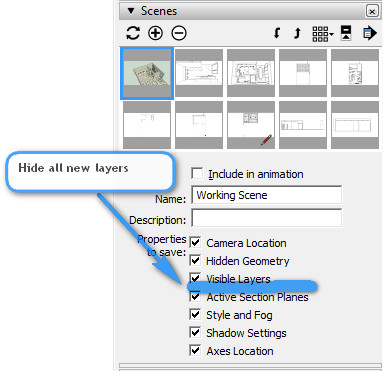
Actually I'm going to add this to the 2017 wishlist right now!!
-
RE: Make material not RECEIVE shadows
The only thing I can think of is make the material less than 70% transparent.....
-
RE: 3D Base Camp 2016
@dave r said:
Well, for those of you who missed #D Basecamp, it was a great time. Biggest one ever with some amazing presentations and some really cool demos. Bootcamp was also excellent.
As Rich said, video was shot at Basecamp. Well, most sessions were recorded. They expect the videos to be released in about a week after they get them edited and uploaded.
Pretty cool swag this time including a SpaceMouse Wireless and the "Stick of Knowledge"
Andrew, I missed you again.
Yes I know, Dave. Was so looking forward to this year but its been such a busy time [and renovating our home] I just couldn't make it..... Sounds like a fab time was had; I'm sure we'll see pics filtering through in the coming day to tease us all a little more!!
-
RE: 3D Base Camp 2016
Thanks very little Rich....

Tell Dwighty to double up on his merchandise and I'll pick it up next month in Sydney!! [if his liver doesn't fail in the meantime...]