sketchucation logo sketchucation
    • Login
    1. Home
    2. thomthom
    3. Posts
    Oops, your profile's looking a bit empty! To help us tailor your experience, please fill in key details like your SketchUp version, skill level, operating system, and more. Update and save your info on your profile page today!
    ๐Ÿ”Œ Smart Spline | Fluid way to handle splines for furniture design and complex structures. Download
    Offline
    • Profile
    • Following 0
    • Followers 8
    • Topics 628
    • Posts 16,952
    • Groups 4

    Posts

    Recent Best Controversial
    • RE: Vertex tools

      @jql said:

      @thomthom said:

      @rv1974 said:

      Some humble features requests:

      1. Is it possible to enable snapping on gizmo manipulating;

      Not in the currently released version. But it's on my list for the new release.

      And inferences? Like we discussed before?

      I need to look through my notes on inferences with the gizmo. I recall having conversation about this.

      posted in Plugins
      thomthomT
      thomthom
    • RE: Version 2 is out!

      If you make changes after you subdivide you will lose those changes as soon as you interact with SUbD again.

      The workflow for subdividing is that you manipulate the original control mesh and subdivide as a final result.

      I'm a little unclear to exactly what you do, if you are able to do a video capture that would help a lot.

      posted in SUbD
      thomthomT
      thomthom
    • RE: Version 2 is out!

      I looked at your attached model, and it looks like you modified the subdivided mesh. Those changes will be lost if you toggle back from subdivided.

      But as for the getting stuck when switching, I'm not seeing that - here is what I observe:

      2017-03-21_12h48_56.gif

      posted in SUbD
      thomthomT
      thomthom
    • RE: Version 2 is out!

      A QuadFace Tools compatible "quad" (by extension SUbD compatible quad) is either a coplanar face with four vertices, or two triangles where their shared edge is soft+smooth and casts-shadows turned off.

      Have a look at the QFT wiki for more details: https://bitbucket.org/thomthom/quadface-tools/wiki/Overview#!quadface-definition

      When Sandbox Tools create it's mesh it creates just soft+smooth edge between the triangles. So it's not automatically a compatible QFT quad. For that you need to use the "Convert Sandbox Quads to QuadFace Quads" function in QFT:
      https://bitbucket.org/thomthom/quadface-tools/wiki/Features#!convert-sandbox-quads-to-quadface-quads

      posted in SUbD
      thomthomT
      thomthom
    • RE: Version 2 is out!

      Can you share an example model?

      posted in SUbD
      thomthomT
      thomthom
    • RE: Version 2 is out!

      Yes, from that screenshot it looks like SUbD treated each triangle as a separate face. Converting the mesh to QFT mesh will ensure the two sets of triangles from the Sandbox mesh will be treated as a single quad.

      posted in SUbD
      thomthomT
      thomthom
    • RE: Version 2 is out!

      @optimaforever said:

      Thanks Thom for the reply,

      Actually the sharp border option didn't work at all.
      Perhaps had I to convert the sandbox mesh (+ artisan) to QFT quad first?

      That might be it... using QFT there is a toolbar button to convert Sandbox Tools meshes to QFT meshes.

      Can you share a sample model?

      posted in SUbD
      thomthomT
      thomthom
    • RE: Version 2 is out!

      @optimaforever said:

      Hello Thom,
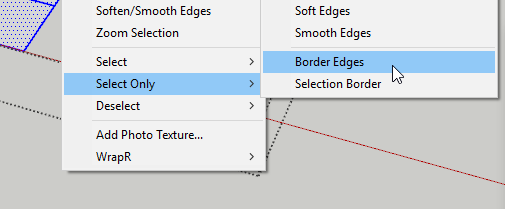
      Is there a quick way to select the rim edges of a quad mesh?

      Selection Toys will to that for you.
      2017-03-20_09h39_32.png

      @optimaforever said:

      I have to keep the vertices at their place so I need to crease the corners , yet their selection can take some time and I was wondering if there's some script for this.
      Usually I use Select Outer Edges by Chris Fullmer but it seems it's not supported anymore in SU2017.

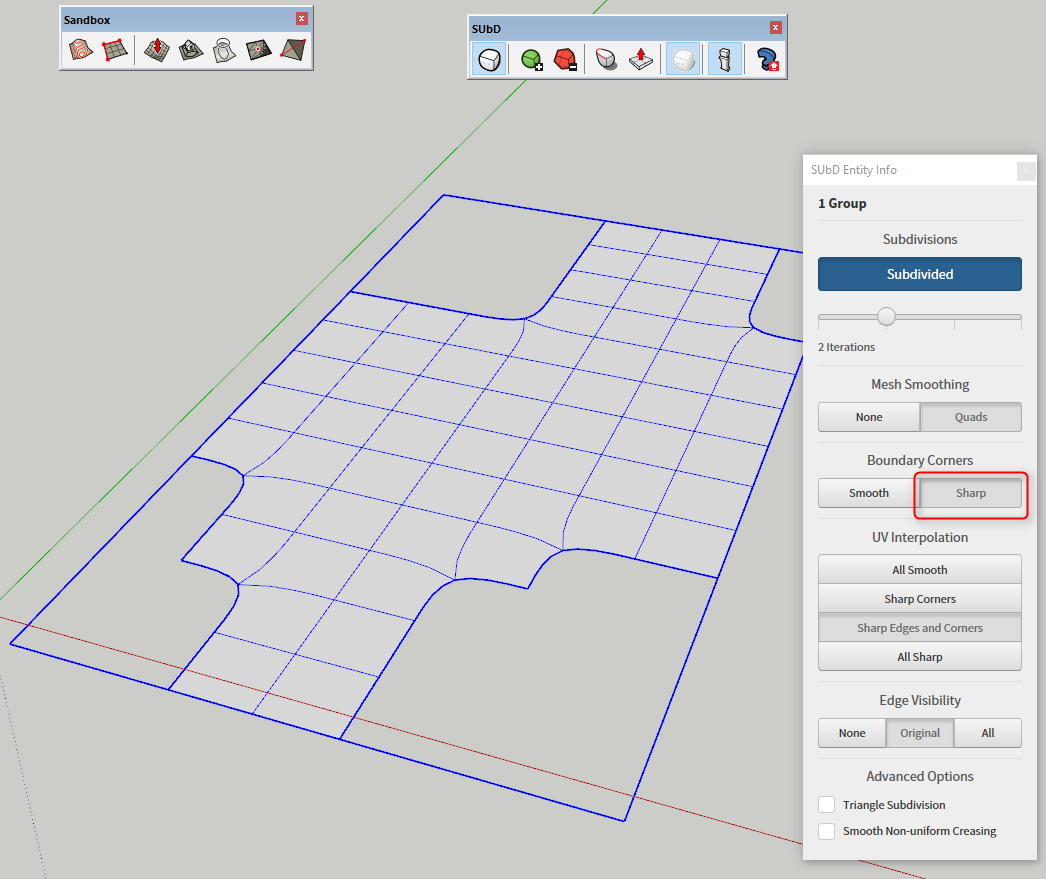
      In SUbD v2 you can set corners to always be sharp - then you only need to crease the "inner corners".
      2017-03-20_09h41_36.png

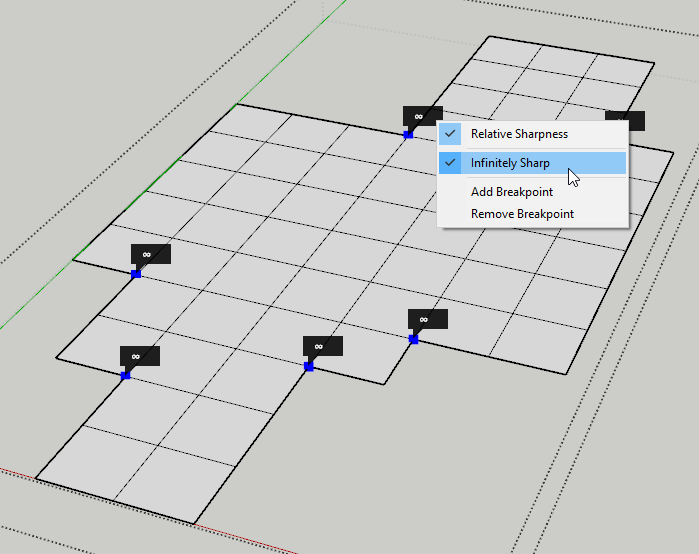
      Creasing the edges will have little effect - you want to crease the vertices.
      2017-03-20_09h44_22.png

      posted in SUbD
      thomthomT
      thomthom
    • RE: Version 2 is out!

      Can you share a sample model?

      posted in SUbD
      thomthomT
      thomthom
    • RE: Version 2 is out!

      Have you looked into the creasing tool? It let you control how much things a smoothed by.

      posted in SUbD
      thomthomT
      thomthom
    • RE: Vertex tools

      @pilou said:

      Because after apply some deformations and click on the empty space
      seems selection is losted being always inside Vertex tools! ๐Ÿ˜ฎ
      !

      Clicking in empty model space clears the selection as intended - mimicking native SketchUp selection.

      @rv1974 said:

      I have some issues with scaling along local axes. It simply not 100% precise.
      Please see attached. I tried to flatten to 0.00 but had no luck.
      Another problem- I can't wind a way to input values (while scaling) with keyboard,
      mouse(=pain) only. Do I miss something?

      Next release will have snapping at origin. And other gizmo improvements.

      @rv1974 said:

      Some humble features requests:

      1. Is it possible to enable snapping on gizmo manipulating;

      Not in the currently released version. But it's on my list for the new release.

      posted in Plugins
      thomthomT
      thomthom
    • RE: Version 2 is out!

      @rv1974 said:

      FF, Chrome, maybe IE (not sure). Each new visit to buy page adds number of goods without option to tweak. Tried to purge history and erase cookies for this site..
      But anyway managed to get some. Great tools, many thanks!

      I just noticed that from the front page there is a clash between the front page graphic and the shopping cart.
      But from any other page it's working fine, the spinners adjust the amount.

      posted in SUbD
      thomthomT
      thomthom
    • RE: Version 2 is out!

      @rv1974 said:

      BTW There is a bug on the 'view your cart' page: it is impossible to change the quantity of SubD's and Vert-tools via up\down spinners. I had to buy it from another PC.
      It happens if you visited (and clicked 'buy' button) previously.

      hm... what browser?

      posted in SUbD
      thomthomT
      thomthom
    • RE: SUB-D Extrusion Problems SU 2016

      Hi

      Are you talking about the custom Push/Pull tool that SUbD provides? Which version of SUbD are you using and what OS?

      Do I understand it correctly that SU2017 works as you expect, but SU2016 doesn't?

      posted in SUbD
      thomthomT
      thomthom
    • RE: Version 2 is out!

      @designo_84 said:

      why i can't use the 50% discount, today is still 11 of march?, the discount is appear only on the top but when i enter to paypal it gives me the full price.

      Are you the same user that reported this on Extension Warehouse? If not, PM me.

      posted in SUbD
      thomthomT
      thomthom
    • RE: This will be flying in Dubai skies this April (WIP)

      Ok, if you are still working on it I'll wait until the final piece. Always nice to be able to show the progress to end result.

      Very nice quad-mesh!

      posted in SUbD
      thomthomT
      thomthom
    • RE: Is there a way to disable auto-heal?

      Can you provide some screenshots of what you are describing?

      posted in SUbD
      thomthomT
      thomthom
    • RE: This will be flying in Dubai skies this April (WIP)

      Can I re-post this on the SUbD Facebook page?

      posted in SUbD
      thomthomT
      thomthom
    • RE: Call for translators

      Additionally, Crowdin lets me have multiple translators on the same language. So if you know someone to pair up with even better.

      Eventually I might open up to the public in general, but I want to run a controlled test first.

      posted in Developers' Forum
      thomthomT
      thomthom
    • RE: Call for translators

      As Pilou mentions, it's a low number of strings. And you don't have to do it all at once. Some here and there when you have time.

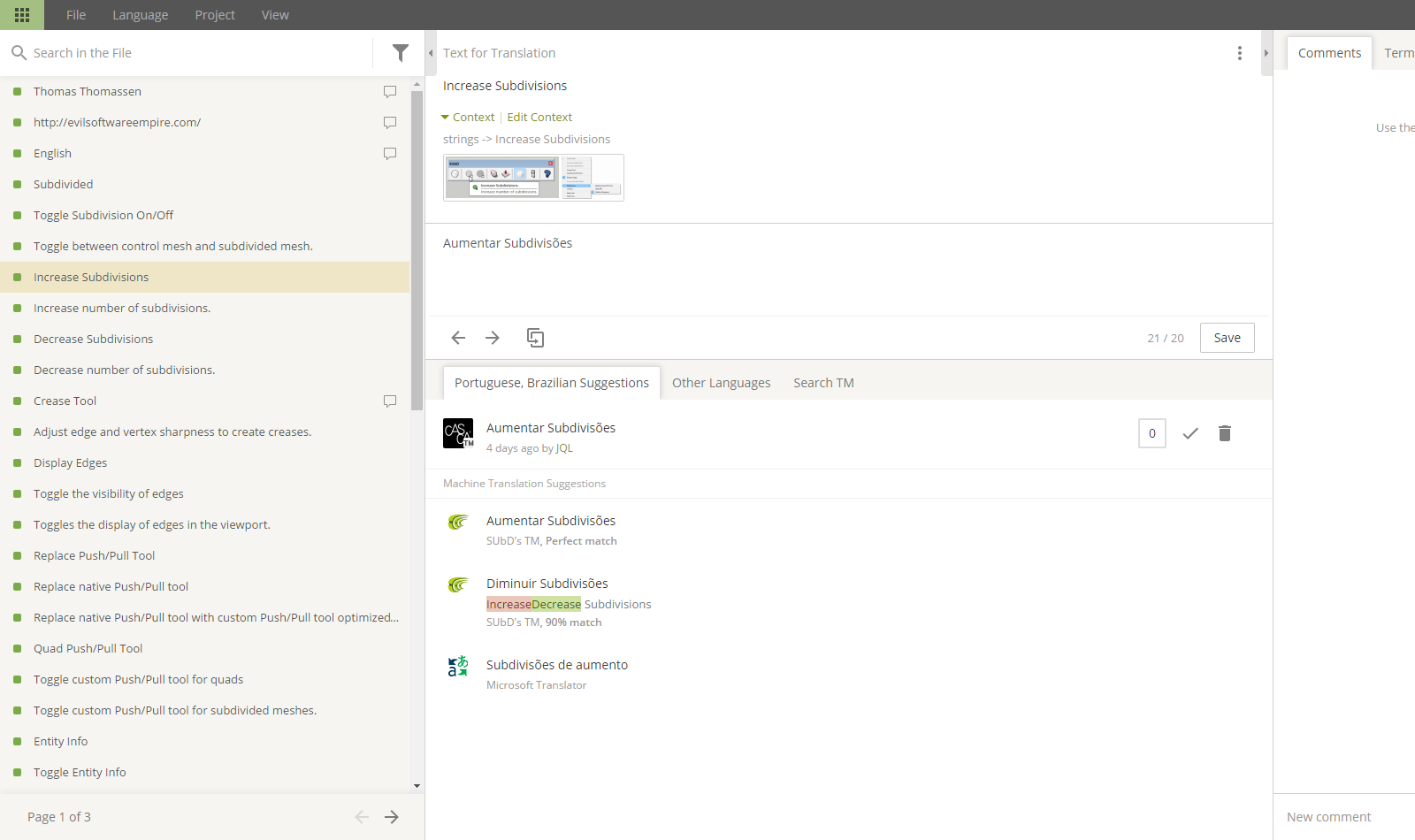
      I'm also testing out Crowdin to manage translations - hopefully making it easier for translators:

      Crowdin Interface

      posted in Developers' Forum
      thomthomT
      thomthom
    • 1
    • 2
    • 10
    • 11
    • 12
    • 13
    • 14
    • 847
    • 848
    • 12 / 848