@robin morritt said:
Hi Samuel:
I'm pressing on with my universal metric thread modeller.
Should I report issues using Github Issues?
Or would you prefer us to use this forum?Thanks,
Robin.

Hi Robin 
GitHub has my preference.
 Offline
@robin morritt said:
Hi Samuel:
I'm pressing on with my universal metric thread modeller.
Should I report issues using Github Issues?
Or would you prefer us to use this forum?Thanks,
Robin.
Hi Robin
GitHub has my preference.
@robin morritt said:
I am trying to create a universal nut and bolt modeller using the amazing Parametric Modeling.
I've been trying to "Subtract" threads from a cylinder.
If I route the group "Move" -> "Subtract solids", as screenshot, then the first prism is subtracted.
If I route the group "Move" -> "Make group" -> "Subtract solids", the "XYZ" group is ungrouped.
If I route the group "Move" -> "Select" -> "Subtract solids", then various interesting things happen.I really haven't got the foggiest idea how to use "Select".
Is there somewhere I can get a bit of background on how to use it?[attachment=0:tvug2vb0]<!-- ia0 -->Screenshot 2021-03-30 012046.png<!-- ia0 -->[/attachment:tvug2vb0]
Interesting project Only place I know where you can find some infos about "Select" is documentation.
@robin morritt said:
Samuel:
I don't understand this plugin, but I've just downloaded it and donated £5 because it looks like an amazing development. I saw your thread on the SketchUp Community Forum - and I spotted the word Eneroth in the description. It has all the hallmarks of Trimble royalty.
A couple of suggestions, if I may. 1) Place plenty of strategic links to the relevant Sketchucation Forum for those of us who struggle with this site's navigation. 2) Provide users with more options to contribute. I find SubscribeStar user friendly and non-intrusive, for example. Getting £5 out of me is like getting blood out of a stone, but it is something I quite like to do, and appreciate it when people overcome their natural shyness of pointing out that free stuff isn't entirely free and give me options.
I'm just some old bloke who talks too much. Apologies for that.
Congratulations and best wishes for the success of your gamechanging plugin.
Robin.
Hello Robin,
Even if I develop this plugin because it's a fun challenge, donations of any amount are always welcome  So thanks!
@didier bur said:
Just downloaded and installed v0.0.2 (v0.0.1 was working OK, apart from several Bug Splats) but this time the dialog is blank. Any idea ? (maybe I must uninstall v0.0.1 prior to installing v0.0.2 ?)
Hi Didier,
Try to remove it manually then install its 0.0.3 version (released today). Tell me if problem persists.
What's new in 0.0.3 version?
Download latest Parametric Modeling plugin from the SketchUcation PluginStore.
@jenujacob said:
hi Samuel,
Great plugin! i really hope this grows into something like GH for Rhino.
now, I am no coder, and I have absolutely no idea how this thing works under the hood. But, would be it possible to click in the SU window to enter values for points instead of typing in the x.y.z coordinates?
thanks!
Hi Jacob, Thanks! I'm thinking about a "Parametric Modeling > Extract Point From Construction Point" entry in context menu when a construction point is selected in SketchUp window. This would be a shortcut to add a "Point" node.
@catchen5890 said:
I have a problem while importing step in sketchup 2020
Compatibility with STEP models isn't very good. Unfortunately, I don't have a solution for the moment.
@turbodizayn said:
Is there some manual? Sounds GRATE! If it is good I will donate)))
Help will be available from next version.
@lelam11234 said:
Good plugin. But I have the suggestions.
- Tab Number: It has an extra cell so we can name it
- Tab Draw *** : It has an extra cell to Hide/Unhide
Thanks.
Thanks for your suggestions.
@cloo said:
Looks really cool, and a lot of work ahead.
Since you GPL it, do you have plans to move development to github or so and let other cool folks contribute to the progress?
Yes. I will publish to GitHub the source code of this plugin in a near future.
With Parametric Modeling, a new free SketchUp plugin:
Demos


Warning
This plugin is still in beta. Compatibility between versions is not guaranteed.
Download
Get Parametric Modeling plugin from the SketchUcation PluginStore.
@luiz_m11r said:
Hi, Samuel! I'm very exciting to start using this plugin. I keep getting this error message though. Already tryied installing the Microsoft Visual C++ library but it still doesnt work. How can i fix it?
Hi Luiz. Your problem is maybe related to glTF... Can you please share with us .gltf file and textures you are trying to import?
@dolfek said:
Hello,
please, where is a problem? I have sketchup 2021.
Thank you for your answer.
Hello.
It seems you are trying to import an .obj file that references a non-existent .mtl file. Can you please share with us these .obj and .mtl files?
What's new in 1.0.3 version?
Download latest Layers/Tags In Time plugin from the SketchUcation PluginStore.
What's new in 1.0.2 version?
Download latest Layers/Tags In Time plugin from the SketchUcation PluginStore.
What's new in 1.0.1 version?
Download latest Layers/Tags In Time plugin from the SketchUcation PluginStore.
With Layers/Tags In Time, a new free SketchUp plugin:
Demo & Screen

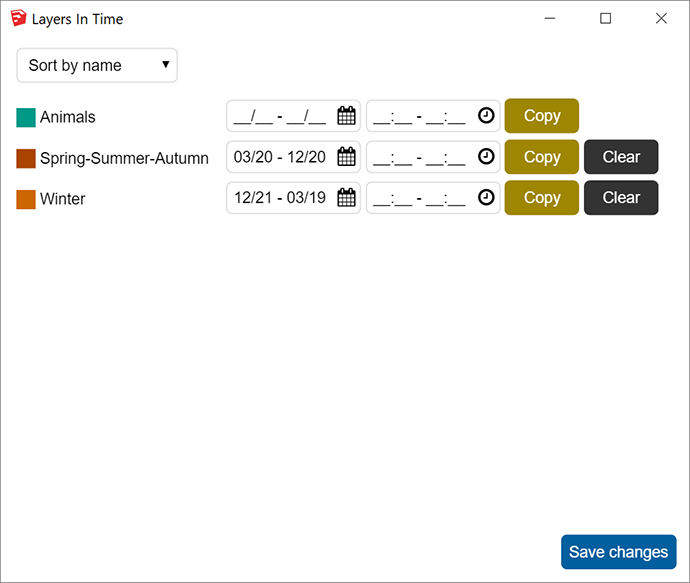
Download
Get latest Layers/Tags In Time plugin from the SketchUcation PluginStore.
1.0.5 version brings a new materials source: CC0 Textures.
Download latest Material Browser plugin from the SketchUcation PluginStore.

