sketchucation logo sketchucation
    • Login
    1. Home
    2. samuel_t
    3. Posts
    Oops, your profile's looking a bit empty! To help us tailor your experience, please fill in key details like your SketchUp version, skill level, operating system, and more. Update and save your info on your profile page today!
    Urasik Extensions | Lots of new extensions to check out Learn More
    Offline
    • Profile
    • Following 0
    • Followers 1
    • Topics 10
    • Posts 375
    • Groups 2

    Posts

    Recent Best Controversial
    • RE: [Plugin] Material Browser - v1.1.1 - 15 Nov 2025

      What's new in 1.0.4 version?

      • Texture Haven materials catalog has been extended to 198 entries.
      • Downloaded textures are cached during 1 month... This accelerates re-import of concerned materials and saves bandwidth.

      Download latest Material Browser plugin from the SketchUcation PluginStore.

      posted in Plugins
      samuel_tS
      samuel_t
    • RE: [Plugin] Material Browser - v1.1.1 - 15 Nov 2025

      @cmeed said:

      I downloaded again - the latest update from the SketchUcation PluginStore and this time its worked. It definitely didn't come in the first time. I'm up and running now ! whoop whoop

      😎

      @cmeed said:

      So I've opened it for 30 second and i' already asking about features!!!
      Could we have the ability to group materials together in folders and see these folders in material browser? this was a great help in flex tools

      I don't know yet if a feature of this kind will be implemented.

      @cmeed said:

      Material Question
      on a side note - do you know why i can't have more than 1 material with the same settings but different names? so
      Floor_Black (0,0,0)
      &
      Curtain_Black(0,0,0)

      or how different these colours need to be to recognised as different from each other....
      So,

      Floor_Black (0,5,0)
      &
      Curtain_Black(0,0,0)

      This looks like a SketchUp bug or limitation... You should create a topic about this issue.

      posted in Plugins
      samuel_tS
      samuel_t
    • RE: [Plugin] Material Browser - v1.1.1 - 15 Nov 2025

      What's new in 1.0.3 version?

      • One can filter materials by type (Brick, Wood, etc). Technically, a materials types dictionary is used and you can contribute to its development.
      • One can choose to display only model materials.
      • You don't need anymore to restart SketchUp after you've defined a custom SKM folder.
      • When materials source are displayed: a click on Texture Haven logo opens texture source page in external Web browser. Download a normal map (for example) becomes easier.
      • Plugin has been translated to french.

      Download latest Material Browser plugin from the SketchUcation PluginStore.

      posted in Plugins
      samuel_tS
      samuel_t
    • RE: [Plugin] Material Browser - v1.1.1 - 15 Nov 2025

      @cmeed said:

      This looks very interesting! I've downloaded the Plugin, although its not working - it looks like i need those extra ruby script java 'things' - I've been attempting to keep a library of textures with names, i can use again and again in my Lumion workflow so this looks promising and i would love to try.

      The native material window is ok, like the component window is also but now i use 'Component finder' from flextools as my main window - its fantastic, will your Material Browser be similar?

      I have no idea what to do with extra additions needed to make this work - it would be better to keep it simple with the downloads (unless i'm missing something)

      Cheers
      Chris

      Hello Chris.

      This plugin doesn't require Java. It does require Ruby but Ruby is already included in SketchUp πŸ˜‰

      Try to install this plugin following this video guide.
      If you don't succeed to install it, please provide me details: your operating system, your SketchUp version, what's not works...

      I will maybe inspire from FlexTools ComponentFinder plugin.

      Best regards.

      posted in Plugins
      samuel_tS
      samuel_t
    • RE: [Plugin] Material Browser - v1.1.1 - 15 Nov 2025

      1.0.1 version allows you to:

      • Change thumbnails size.
      • Display names and sources.
      • Use a custom SKM folder.

      Download latest Material Browser plugin from SketchUcation PluginStore.

      posted in Plugins
      samuel_tS
      samuel_t
    • RE: [Plugin] Material Browser - v1.1.1 - 15 Nov 2025

      1.0.2 version fixes and improves plugin zoom tool.

      Download latest Material Browser plugin from SketchUcation PluginStore.

      posted in Plugins
      samuel_tS
      samuel_t
    • RE: [Plugin] Material Browser - v1.1.1 - 15 Nov 2025

      Material Browser plugin is going to evolve very soon. Stay tuned! πŸ˜‰

      posted in Plugins
      samuel_tS
      samuel_t
    • [Plugin] Material Browser - v1.1.1 - 15 Nov 2025

      Introducing Material Browser, a free plugin for SketchUp.

      Features

      • Search for SketchUp materials by name from:
        • Active model
        • Local collections
        • Poly Haven
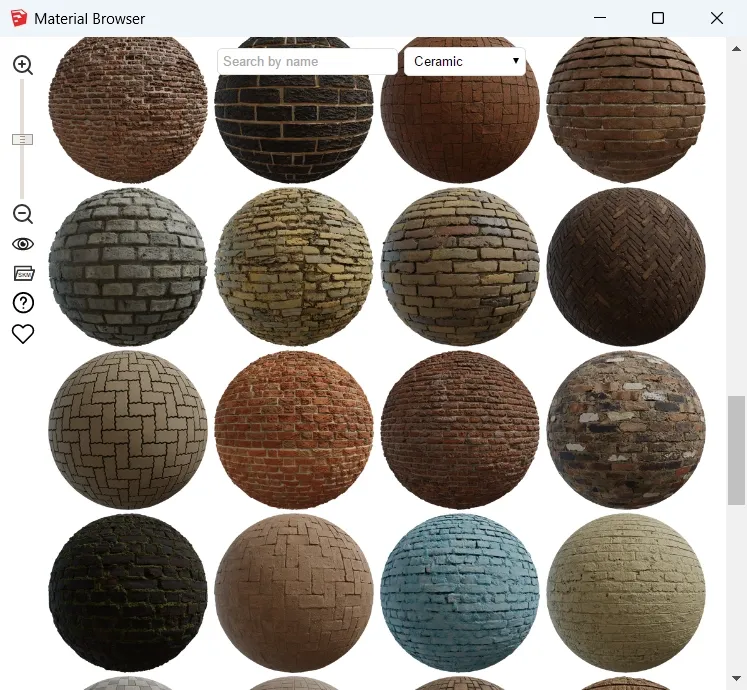
      • Filter materials by type (Ceramic, Wood, etc).
      • Display larger materials thumbnails, up to 256px.
      • Select material of your choice in one click.
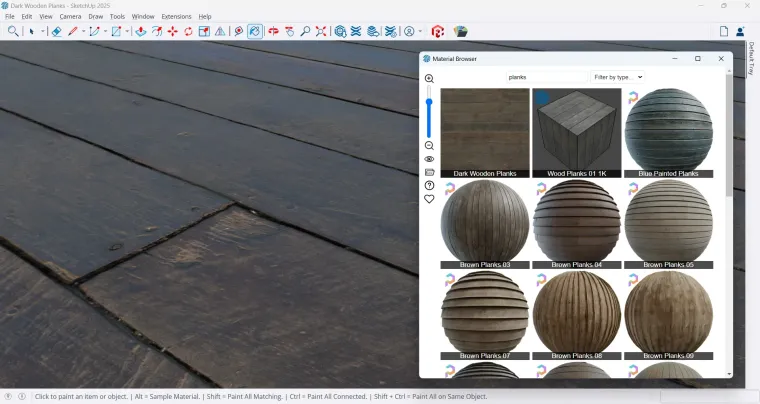
      • Support photoreal materials since SketchUp 2025.

      Screenshots

      SketchUp 2017 - Material Browser Plugin - Plugin View.webp

      SketchUp 2025 - Material Browser Plugin - SketchUp View.webp

      Availability

      You can download it from the SketchUcation PluginStore.

      posted in Plugins
      samuel_tS
      samuel_t
    • RE: [Plugin] Universal Importer - v1.2.6 - 30 July 2024

      1.1.6 version improves scaling accuracy during import and fixes file permissions issue on MacOS.

      Download latest Universal Importer plugin from SketchUcation PluginStore.

      Happy new year!

      posted in Plugins
      samuel_tS
      samuel_t
    • RE: [Plugin] Universal Importer - v1.2.6 - 30 July 2024

      @noire0891 said:

      Sketchup 2016 will be implemented?

      I don't think so.

      posted in Plugins
      samuel_tS
      samuel_t
    • RE: [Plugin] Universal Importer - v1.2.6 - 30 July 2024

      @nc3d said:

      Samuel

      Seems like a great plug-in, thanks for sharing this!

      We have an fbx we are trying to bring in but we are not sure how to get it to be placed exactly where we want it and at the right scale. I think we could find the right scale factor to get it right but unfortunately I can not type in an accurate enough number (only integers allowed) into the dialogue box.

      Is there a better way or different way we could have our model drop in more accurately?

      Kind Regards,
      Greg Hamilton

      Hello, There's no solution for the moment. Maybe I'll publish a more accurate plugin version in the future. Best regards.

      posted in Plugins
      samuel_tS
      samuel_t
    • RE: [Plugin] Universal Importer - v1.2.6 - 30 July 2024

      @brettmahon01 said:

      Hi, this plugin sounds amazing! i installed but i keep getting error message?

      Universal Importer Error: Command failed: "/Users/brettmahon/Library/Application Support/SketchUp 2019/SketchUp/Plugins/universal_importer/Assimp/Mac/assimp" info "/Users/brettmahon/.UniversalImporter/tmp/import.obj" > "/Users/brettmahon/.UniversalImporter/tmp/assimp.nfo"

      /Users/brettmahon/Library/Application Support/SketchUp 2019/SketchUp/Plugins/universal_importer/assimp.rb:166:in `get_texture_refs'

      Universal Importer Version: 1.1.5

      Hi, you have probably a file permission issue. Open a Terminal in your Mac then run these commands:

      
      chmod +x "/Users/brettmahon/Library/Application Support/SketchUp 2019/SketchUp/Plugins/universal_importer/Assimp/Mac/assimp"


      chmod +x "/Users/brettmahon/Library/Application Support/SketchUp 2019/SketchUp/Plugins/universal_importer/MeshLab/Mac/MacOS/meshlabserver"


      Then reopen SketchUp.

      posted in Plugins
      samuel_tS
      samuel_t
    • RE: [Plugin] Universal Importer - v1.2.6 - 30 July 2024

      @einstein said:

      Hello,
      I have a problem with importing Blend files. There is a model in Blender containing one object with all faces touching each other, so the object is "water-tight", "3D-printable" and there are no "border edges" (every edge is connected to two faces).
      When I import it to SketchUp, some faces stay connected but some disconnect, leaving doubled vertices living nearby but not touching each other. This basically makes a broken mesh.
      Can something be done with this issue - either manually, or within the plugin?
      I tried exporting from Blender to OBJ, then to SketchUp. It fixes the issue if I use ThomThom's QFT OBJ importer but introduces another issue - missing some faces.

      The BLEND model is in the ZIP archive because SketchUcation won't let me post BLEND files.

      Hello. I don't know Blender enough to help you 😞

      posted in Plugins
      samuel_tS
      samuel_t
    • RE: [Plugin] Universal Importer - v1.2.6 - 30 July 2024

      @einstein said:

      Hello,
      Would it be possible to support importing loose edges from Blender? When a mesh contains faces, it imports properly but if there are only edges, they don't get imported.
      It would also be cool if separate Blender objects would be imported to separate SketchUp groups. But I'm aware this can be a lot of work to code.

      Hello. No. You can see Universal Importer plugin for SketchUp as an Assimp script. This means that, in most cases, if Assimp doesn't support a feature: Universal Importer plugin doesn't support this feature.

      posted in Plugins
      samuel_tS
      samuel_t
    • RE: [Plugin] Universal Importer - v1.2.6 - 30 July 2024

      @kolarik said:

      1. Can you explain, how size of imported object is calculated? I am not able to import objects in correct size. See attached example - block 10x20x30mm

      Technically, sizing algorithm is a hack. Since in most cases, by default, imported object is oversized: plugin scales down this object to height set by user. This hack works pretty well with "tall" objects.

      @kolarik said:

      1. I am using milimetres as default in Sketchup - if the sizing rules would work, can it be changed into mm instaed of cm?

      Maybe if I ask user for a height in mm instead of cm, size of imported model will be more accurate...

      posted in Plugins
      samuel_tS
      samuel_t
    • RE: [Plugin] Universal Importer - v1.2.6 - 30 July 2024

      @lacee said:

      Unable to reduce a 6,000,000 poly SU2020 file / also unable to import OBJ source file for same #2
      Posted in GitHub.

      Hello Lacee. I just answered you at GitHub πŸ˜‰

      posted in Plugins
      samuel_tS
      samuel_t
    • RE: [Plugin] Universal Importer - v1.2.6 - 30 July 2024

      @rspierenburg said:

      I'm trying to import an OBJ. I want to keep the existing model scale but the plugin keeps asking for the height of the model. Is there a way to ignore that?

      Hello. You can't ignore that.

      posted in Plugins
      samuel_tS
      samuel_t
    • RE: [Plugin] Universal Importer - v1.2.6 - 30 July 2024

      @malditobill said:

      Hi. Do I have to install Assimp library and MeshLab software before Universal Importer? Ive just installed only Universal Importer and in the tool bar only get the reduce poligons icons.

      Hi. No. Assimp library and MeshLab software are bundled with Universal Importer plugin. SketchUp toolbar only contains shortcut to Poly reducer... In SketchUp menu, use "File > Import with Universal Importer...".

      posted in Plugins
      samuel_tS
      samuel_t
    • RE: [Plugin] Universal Importer - v1.2.6 - 30 July 2024

      @tig said:

      So do you need to explain to MAC users to open the Terminal first, and then try your tool...
      And any error-messages might appear in that Terminal window ?

      No, command line needs to be pasted in Mac's Terminal after that Universal Importer plugin crashes.

      posted in Plugins
      samuel_tS
      samuel_t
    • RE: [Plugin] Universal Importer - v1.2.6 - 30 July 2024

      @tig said:

      I think something might be getting lost in translation ?
      For 'Terminal' perhaps read 'SketchUp > Window > Ruby Console' [open it before doing anything]
      Although on a MAC there is a separate 'Terminal' app, surely you'd need it running before the error occurs ?

      I'm talking about that separate 'Terminal' app.

      posted in Plugins
      samuel_tS
      samuel_t
    • 1 / 1