How could I make 'polyline segmentor' command work? I simply can't find it. 
Oops, your profile's looking a bit empty! To help us tailor your experience, please fill in key details like your SketchUp version, skill level, operating system, and more. Update and save your info on your profile page today!
Urasik Extensions | Lots of new extensions to check out Learn More
R
Offline
Posts
-
RE: [Plugin] BezierSpline - v2.2a - 22 Apr 21
-
RE: Google SketchUp 7.1.6087
Yes it's fixed now:
When editing a component and selecting a component within it, instances of that component were incorrectly highlighted if the "hide similar components" setting was checked. Instances are no longer highlighted in this case.Thank you a lot!
-
RE: [Plugin] SmartPushPull v0.26 (05 nov)
Hi ar4itect I think your 'to do' list misses multiple adjasent\non adjacent faces push-pull.
It'd be special case of Fredo's JPP. BTW While ago I asked him to implement it but unfortunatly it didn't happen. -
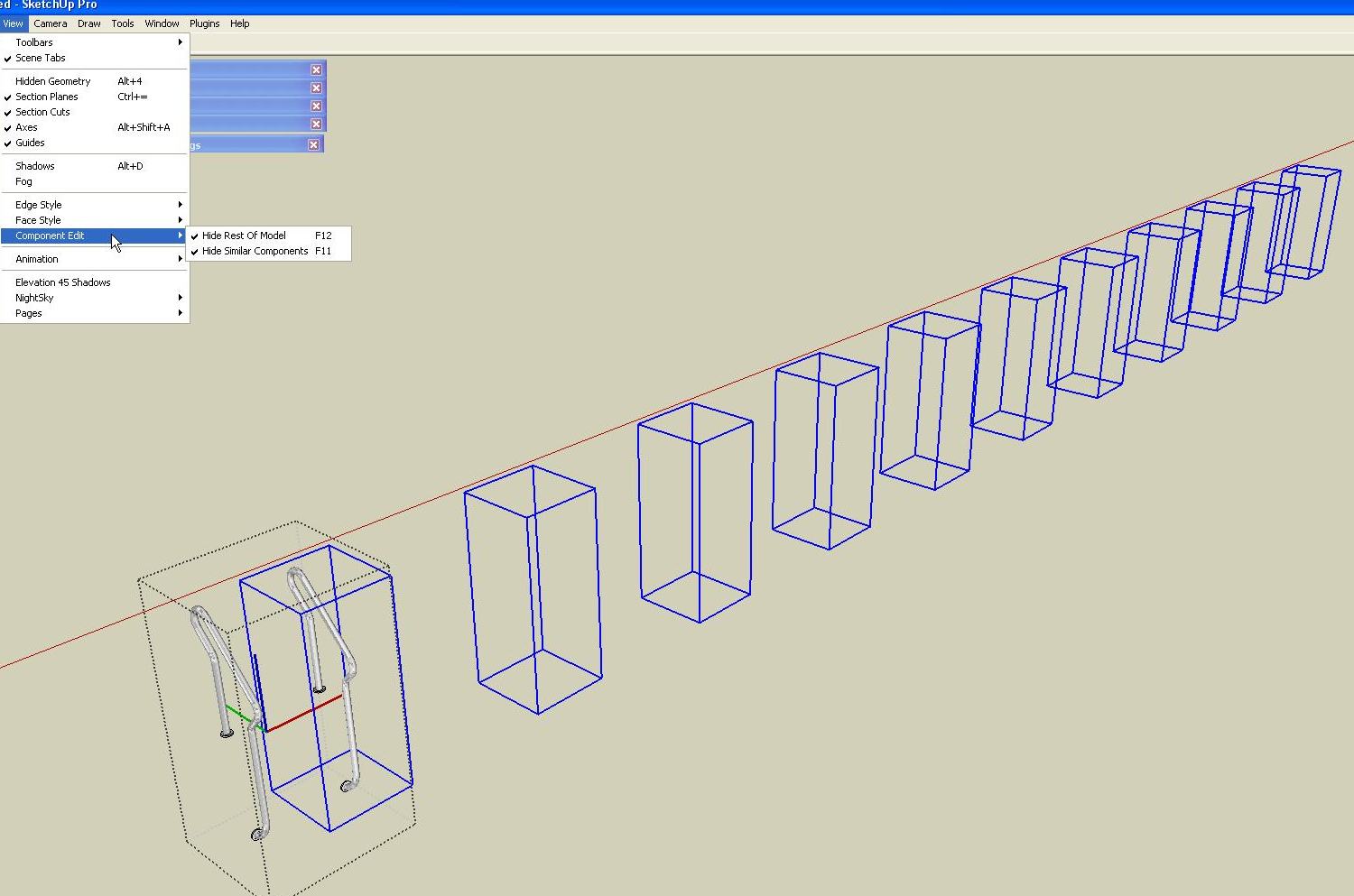
Phantom bounding boxes
Oh Those bounding boxes!
 even though 'hide rest of the model' and 'hide similar components' is ON I get this blue wire madness (when selecting nested components). This and greyed out context menu are very annoying 7.1 features- must be repaired asap
-
RE: [Plugin] SmartPushPull v0.26 (05 nov)
Finally! Shiny!
Dear ruby coders please help arc4tect to refine this tool (long awaited and really usefull- a real pearl in the ruby
slag) -
RE: [Plugin] 2D Tools
Fillet tool is a nice addition. Thank you TIG!
P.S.I have 2 sets of the same icons on one tollbar. How to solve it? -
RE: Right click menu disabled???
@dedmin said:
The latest plugin i have installed was center of component - before that everything were fine.
No- I didn't have it installed. Meanwhile I deleted pnts2mesh.rb (fredo's proxies will be next
 )
) -
RE: Right click menu disabled???
This is it!This faded context menu is driving me mad.
I guess it started 2 days ago and the cause is one of those newest rubies (2 weeks maximum). The number of bugsplats also rose exponentially :
Tomorrow I'll try to replace the the plugins folder with
the older one. -
RE: Beijing China
@solo said:
Welcome to SCF Dennis.
Just to clarify, are you the Dennis from the infamous 'Dennis technique'?
What's so infamous Dennis technique?
-
RE: [Plugin] Bounding Box View
@adamb said:
I mentioned sometime ago I'd post the LightUp version of this. So here it is - just put the Ruby in your plugins folder.
Right-click on a ComponentInstance and choose "Replace with Proxy Component" to flip it into a box.
Right-click again to restore the original geometry.Adam
Adam if only you could make proxy boxes be rendered as original components (on export 2d grafics) it'd be the greatest break thru!
-
RE: [Plugin] Scale2Face.rb
Tig it doesn't work within groups

And maybe clicking 3 points instead of face would be better solution?
Thank you (I mean it!) -
RE: Sketchup+VrayMax
@nomeradona said:
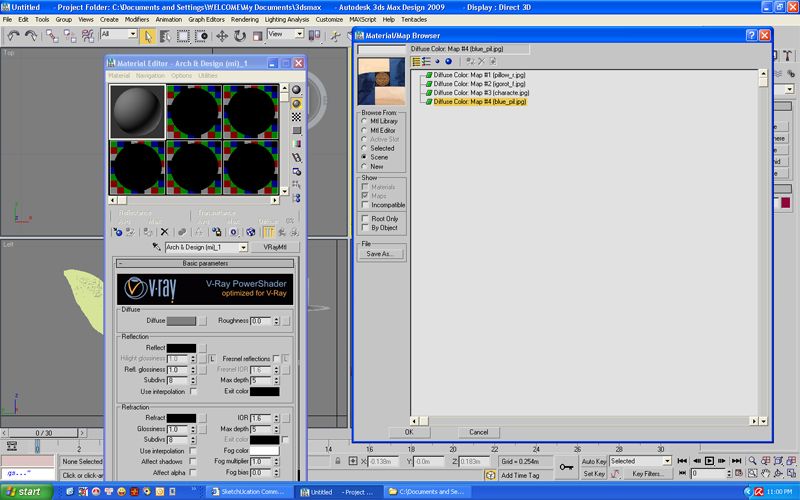
but i dont want to stop there. i want to create vray materials and tweak further their properties
- so create a new vray material and on the diffuse slot box load your texture which are located on the scene
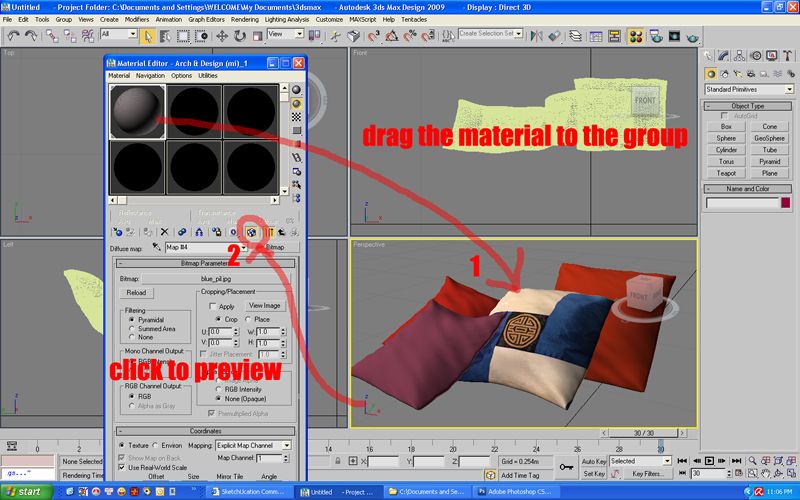
- drag the material to the group.. here is the importance why you need to group them. you can find them easily in max.
Simplier way:http://www.scriptspot.com/3ds-max/vraymtlconverter-v2-5
-
RE: [Plugin] Projections version 2a UPDATED
@didier bur said:
@didier bur said:
@unknownuser said:
You simply turned me into francophil
Were you francophobe ???

--
Nope I was francophag -
RE: [Plugin] Projections version 2a UPDATED
@didier bur said:
@unknownuser said:
Another thing: Could you add multiple not connected edges extrusion?
You can do that already. Select unconnected edges as you would do with connected edges !
--
You simply turned me into francophil
http://www.youtube.com/watch?v=ye0_QCUgwO4&eurl=http%3A%2F%2Fdirty.ru%2Fcomments%2F255512&feature=player_embedded -
RE: [Plugin] Projections version 2a UPDATED
@didier bur said:
Yes but I also see that you have another 'projection.rb' file which is the previous version. Do a clean install, removing ALL previous files in the Projections folder, and everything will go OK.
Regards,
Indeed it goes OK

Another thing: Could you add multiple not connected edges extrusion? It'd really add a lot -
RE: [Plugin] Projections version 2a UPDATED
@didier bur said:
hi rv1974,
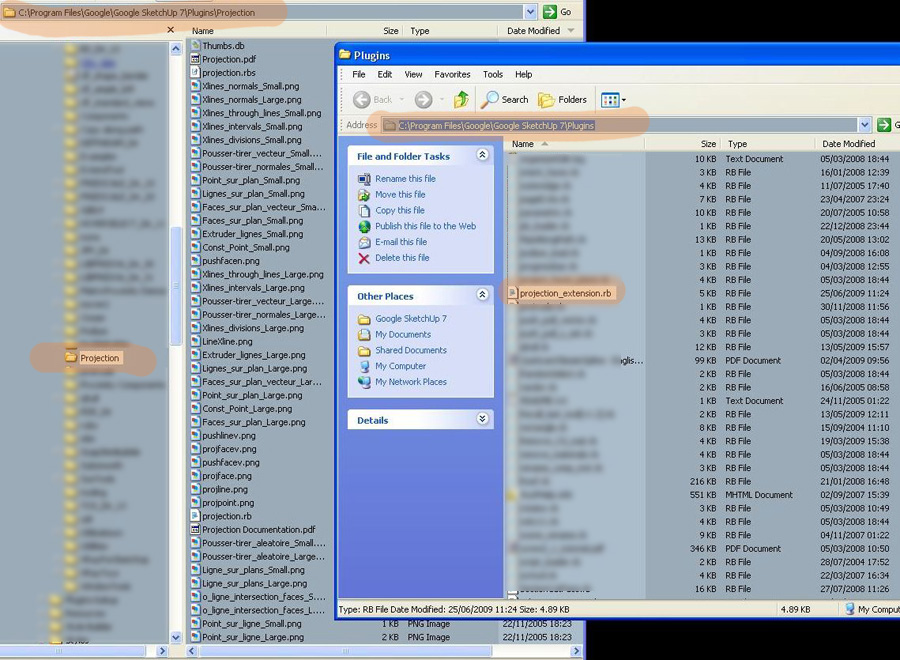
your installation is incorrect. You must have a sub-folder "projections" under plugins after unzipping the archive. Check for it, i'm almost sure this is not the case
For a 1st sight everything is OK. In fact I have your toolbar and the point tool working (one single click though)
-
RE: [Plugin] Multi face offset
@thomthom said:
Windowizer generates window components. This is just plain offset.
A "window component" is a pure abstraction. With glass inset =0 it makes the same plain offset+ additional options (i.e. materials assignment, edit and eraze in the future)