sketchucation logo sketchucation
    • Login
    1. Home
    2. rv1974
    3. Posts
    Oops, your profile's looking a bit empty! To help us tailor your experience, please fill in key details like your SketchUp version, skill level, operating system, and more. Update and save your info on your profile page today!
    πŸ”Œ Smart Spline | Fluid way to handle splines for furniture design and complex structures. Download
    R
    Offline
    • Profile
    • Following 1
    • Followers 0
    • Topics 96
    • Posts 1,847
    • Groups 1

    Posts

    Recent Best Controversial
    • RE: Pregnancy avoidance

      It's ok now. just firefox glitch. Gone testing and thank you!
      Sometimes I think the SU dev team is fooling community playing behind Fredo pseudonym.

      posted in SketchUp Discussions
      R
      rv1974
    • RE: Pregnancy avoidance

      Astonishing gif! But what's wrong with attachment?

      posted in SketchUp Discussions
      R
      rv1974
    • RE: Pregnancy avoidance

      There's outline of the ramp (plan). Say by design the end (AB) should be at -400. Please make the model of the ramp using FDD or Smoove tool(don't forget about clean interpolation). And good luck! πŸ’š
      @Fredo: I swear you was the real target of the topic starter! Gotcha! 😍


      ramp2.skp

      posted in SketchUp Discussions
      R
      rv1974
    • RE: Pregnancy avoidance

      This is close to what I want in SU:
      http://screencast.com/t/ZjIzMjIzZ
      2 main things: interpolation and no plan screwing.
      P.S. Even more:
      http://www.youtube.com/watch?v=GuXOO-Ofi0Q&feature=player_embedded
      You could skip the russian intro and gostraight to ~2.00

      posted in SketchUp Discussions
      R
      rv1974
    • RE: Pregnancy avoidance

      @unknownuser said:

      @rv1974 said:

      Yes I know. But it's too complicated to build additional surfaces and then clean it.
      All I want is to move vertex in distortion free mode .

      • Fredos plugin is not always work smooth to me:
        http://screencast.com/t/M2Q1NTMzZWUt

      TOS has currently a problem on closed surfaces.
      Try to remove the bottom of the cylinder and it should work.

      Fredo

      Yeah no worries I've found workaround. And thank you for the TOS once more!

      posted in SketchUp Discussions
      R
      rv1974
    • RE: Pregnancy avoidance

      Hi mates! As I can see the disscussion went in the wrong direction (mea culpa).
      I have no problem to build this damn ramp and the things like that (with at least 2 difftent ways:
      1.extrude plan outline->surface tools->loft (more correct)
      2.followmeandkeep.rb->interset with extruded plan (less correct))
      Both ways take time and efforts. The aim of this thread was to catch some ruby maker's eye to
      the neat (IMHO) idea- to move curve's vertexes in a kinda 'interpolation mode' and without plan distortion, or maybe to find
      the already existing script.
      Sorry for the lack of clarity β˜€

      posted in SketchUp Discussions
      R
      rv1974
    • RE: Pregnancy avoidance

      Take a look at this skp file. Hope it'd explain the problematics better then my broken english does.


      ramp.skp

      posted in SketchUp Discussions
      R
      rv1974
    • RE: Pregnancy avoidance

      Take the arc's end and drag it upward. Take a look at the twisted result in the top view. Zorro.rb is a totally diffrent story- the cylinder in the example picture is just a visual aid.

      posted in SketchUp Discussions
      R
      rv1974
    • RE: Pregnancy avoidance

      @notareal said:

      I would use ...zorro!

      for Seppuku? πŸ˜„

      posted in SketchUp Discussions
      R
      rv1974
    • RE: Pregnancy avoidance

      Just thinking aloud.. The original SU product placement is urban design\architecture. Historically
      the plan (plan view) is the 'alpha and omega' of the design process. I really can't see any benefit\use in curve bulbing. It appears there's a good niche for some ruby geek- the 'Interpolated_vertex_move.rb'.. or something like that πŸ˜‰

      posted in SketchUp Discussions
      R
      rv1974
    • RE: Pregnancy avoidance

      @chris fullmer said:

      Try exploding the arc (right click on it an dchoose explode arc) before moving its vertices. That might help,

      Chris

      The blue one is the explode+weld inheritor.

      posted in SketchUp Discussions
      R
      rv1974
    • RE: Pregnancy avoidance

      Yes I know. But it's too complicated to build additional surfaces and then clean it.
      All I want is to move vertex in distortion free mode .

      • Fredos plugin is not always work smooth to me:
        http://screencast.com/t/M2Q1NTMzZWUt
      posted in SketchUp Discussions
      R
      rv1974
    • Pregnancy avoidance

      There's some strange feature (personally I'd call it a bug)- moving the arc\curve endpoint in Z direction distorts the plan view (alters the radius value).
      Is some some tool or ruby that would make the curves keep original plan view.
      On the picture:
      1 The Original geometry- red AB arc
      2 Movin B to B1 causes blue\green pregnancy (depends on arc\curve)
      3 The Yellow one is what really I need.
      Thank you in advance
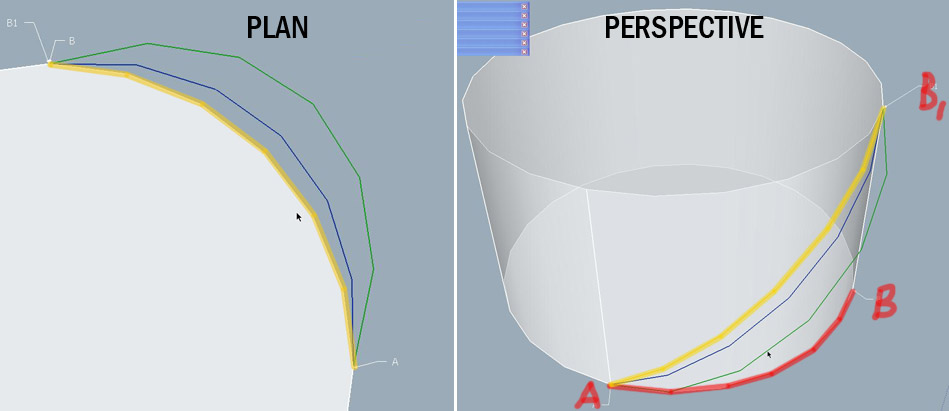

      ScreenShot119 copy.jpg

      posted in SketchUp Discussions sketchup
      R
      rv1974
    • RE: [Plugin] Material Replacer

      Thomtom huge thank you!
      2 things that would make this script a dream come true:

      1. To be able to make the 'first eyedropper click' a multiple one (with control key)- to select a set of materials to be replaced.
      2. To insert material editor into the picture. I mean ability to select materials (to be replaced\replacement candidate) both in model and mateditor.
        Almost forgot: πŸ˜„

      92743-0-0-2.jpg

      posted in Plugins
      R
      rv1974
    • RE: Vray's Limitation is SU (not a new statement)

      @thomthom said:

      @rv1974 said:

      It's sad but VRAYforSU is the oxymoron. Use original max version.

      Getting a Max license - not a cheap solution...

      And as for the semantics: can't say I see how one can define "V-Ray for Sketchup" as an oxymoron.

      There are some good examples of oxymoron in english wiki that depict my statement qiute well: Serious Joke, Sweet sorrow, Happy depression... πŸ˜†

      posted in V-Ray
      R
      rv1974
    • RE: Vray's Limitation is SU (not a new statement)

      It's sad but VRAYforSU is the oxymoron. Use original max version.

      posted in V-Ray
      R
      rv1974
    • RE: Shadow bug to be fixed (@TIG(?))

      @tig said:

      Since a SectionPlane is a DrawingElelment you should be able to do most things with it like Move, Rotate etc. You also have two extra methods to 'set' and 'get' a SectionPlane's 'plane'...
      You can't make a SectionPlane - unfortunately there is not equivalent method to entities.add_section_plane(plane) - though the trick of importing an 'empty' component that contains only a SectionPlane and then exploding it works - you can get it's id and then change it's location/plane...
      The BIG problem is that there is no entities.active_section_plane [returning a SectionPlane or nil if none is active] or entities.active_section_plane=SectionPlane [setting that active and all others not - equivalent to model.active_layers/= but entities based as there can be one active SectionPlane in each set], also SectionPlane.active? to see if a particular one is active and SectionPlane.deactivate to switch it 'off', would be good. Note that hiding/showing active/visible SectionPlanes can already be done though Display settings... and you can already search through an entities set and make an array of its SectionPlanes - though then you can't do that much to them... πŸ˜•
      If these simple methods were added to the Ruby API it would open up loads of possibilities... πŸ˜’
      It's beyond a mere scripter to hack into the SKP format and get/set the entities's active SectionPlane BUT it must be possible πŸ€“


      Why does the green color lenses of your geek sunglasses shine like light at the tunnel's end?

      posted in Plugins
      R
      rv1974
    • RE: Shadow bug to be fixed (@TIG(?))

      @cadfather said:

      well, i have full confidence in our ruby masters (while i open my prayer book..) πŸ˜„

      Me too. But if Thom is right, could it be a 3-stage script:

      1. it'd hide entire model and creates 'face me' face say 100cm from the cameras point.
      2. user sets sec plane manually and makes it active.
      3. script continues: moves 101 cm to the camera, , unhides model, set 45 degeree shadows,deletes temp face, creates scene. Pervertive? πŸ˜†
      posted in Plugins
      R
      rv1974
    • RE: Shadow bug to be fixed (@TIG(?))

      @thomthom said:

      There is one snag here: we got virtually no control over section planes via the API:
      http://code.google.com/apis/sketchup/docs/ourdoc/sectionplane.html

      We can only get and set the direction of the plane.

      No way method to add one (though one can work around this by putting a section plane inside a component and store that in the plugin's folder - that can then be used to add a plane)

      And there is no way to make a plane the active one. So we can get a nearly automatic process, but you'd have to set the active plane manually.

      Oh nooo.. Sometimes SU make me sh!t bricks 😑

      posted in Plugins
      R
      rv1974
    • Shadow bug to be fixed (@TIG(?))

      Hi! Here is some ruby idea:
      To fix shadow bug I use to add a section plane cutting the model via camera's point and facing the vista. But very often it's hard to add it manually.
      So why TIG you may ask? Optionally I'd like to unite sec plane creation with TIG's elevation_45_shadow.rb (as if some plane on 'face me' component in front of camera was preselected).
      P.S. And it should turn off 'view section plane'!
      Many thanks in advance.

      posted in Plugins
      R
      rv1974
    • 1 / 1