Merry Christmas, Rich. All the best for you and your family, and thanks for all the help and support in developing Rayscaper.
Oops, your profile's looking a bit empty! To help us tailor your experience, please fill in key details like your SketchUp version, skill level, operating system, and more. Update and save your info on your profile page today!
🔌 Smart Spline | Fluid way to handle splines for furniture design and complex structures. Download
P
Offline
Posts
-
RE: Ho Ho Ho! Merry Christmas
-
RE: [WIP] Reconstruction of my favorite disco Palladium New York
Nice model, great render.
-
RE: Rayscaper render.
Maybe the easiest is to attach one of those image files so we can have a look?
Nice, it played a trick on my brain because it took a while before I saw the word "Jesus".
I also have done an animation that show creating "Jesus" one letter at a time. However, I have not found a way to create the animation using Rayscaper. If someone can tell me how to do that, I would appreciate it so a can "bring the model to life".

Currently, Rayscaper does not have animation support. But that will come with the next release, although that will only support SketchUp scene animations (camera & sunlight). How are you animating these letters?
Cheers,
Thomas -
RE: Rayscaper New Releases
And there's still this problem with certain groups containing other groups and components that don't display unless everything inside is exploded. And I can't always explode everything, as I have variations to make in subsequent steps.
@Krass - Do you mind sending me a scene where this happens? I would like to investigate.
-
RE: Rayscaper New Releases
Just to confirm, your GPU is working again and your icons are back?
As for objects on hidden tags, it's still the same; objects on hidden tags in the SU viewport are displayed in the Rayscaper render.
Thanks for reporting. I could find a scene to reproduce it. Seems to happen only for components/groups nested within other groups. I will have a look at this bug.
I finally understand how to use the denoiser. You might initially think that a low-resolution render will be calculated faster... But actually, when the denoiser is applied during rendering, especially when the render resolution is high, the denoising is very clean.
It might seem obvious to you, but it took me a while to figure it out. So I leave the denoiser at full power and immediately set the render size to 2k or higher.
I should document that better. The denoiser works on the full resolution image. And it works now as a post-processing step, so enable/disable won't impact the rendering.
Thomas, you asked me why I apply an upscale layer after a ray-scaping render. For scenes with windows, I have to do two renders, like a photographer: a light one for the room's exposure and a dark one to replace the "blown-out," overexposed parts of the window. D5 Render doesn't have this problem because its renders aren't truly photographic; they're a kind of pseudo-pathtracing.
That's a clever trick, thanks for sharing. Does this mean the tone-mapping operations you are getting in the post-processing step aren't sufficient for you? Should there be more options to provide a better image from the get-go?
Regards,
Thomas -
RE: Rayscaper New Releases
when I display a SketchUp scene in RS, the hidden tags within that scene are still visible.
Do you mind sharing the scene via e-mail?
And there's still this problem with certain groups containing other groups and components that don't display unless everything inside is exploded. And I can't always explode everything, as I have variations to make in subsequent steps.
Same here, a scene with screenshots of the components would help a lot.
And i no graphic card
Can you check with the latest version I just released? Also check if that version brings the icons back. I think this has to do with your broken installation.
Regards,
Thomas -
RE: Rayscaper New Releases
Hey, Rayscaper users!
Rayscaper 0.9.79 Beta is available. You can get it via:
- The SketchUcation store.
- Direct download: link.
I recommend upgrading to the latest version.
What Changed?
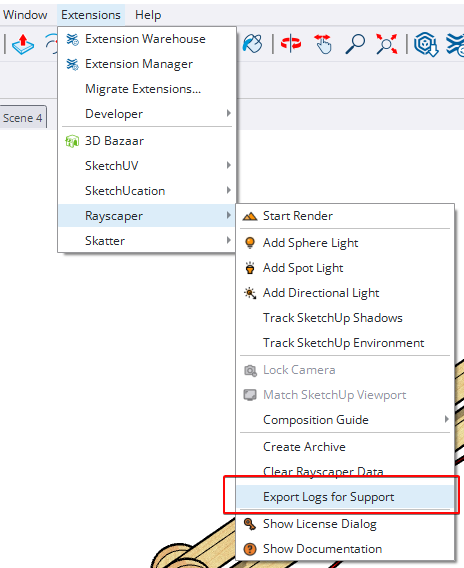
- Add log export feature. You can now export Rayscaper logs directly from the application menu, making it easier to
share diagnostic information when reporting issues. You can access it via the SketchUp menu bar:
Extensions > Rayscaper > Export Logs for Support. - Add a reset button for the post-processing tab. Quickly restore default post-processing settings with a single click.
Help Me Build the Community

If you like Rayscaper, please share your renders (final or work-in-progress, it doesn't matter)! This is motivating and helps me showcase its capabilities
to new users.Follow me on https://x.com/rayscaper3d.
Happy Rendering!
Thomas -
RE: Rayscaper New Releases
I think I figured something out about the blue material bug, I can make it happen in any file if I use the "edit texture in external editor" in the sketchup material editor, It shows up as blue.
That's a good clue. I think it also has to do with SketchUp's colorized textures only. But I haven't looked at that part in depth.
(Another thing I noticed, is that If i edit a material in sketchup, it does not automatically update the material in rayscaper.)
This is by design; You should press the reload button in the Rayscaper material editor. I could add an "auto-sync" option to do this automatically. Rayscaper has a richer set of material capabilities than SketchUp. I assumed you want to edit the materials in Rayscaper, and that it would be counterproductive to override them from SketchUp repeatedly. Maybe that's not a reasonable workflow assumption.
-
RE: Rayscaper New Releases
@Krass said in Rayscaper New Releases:
are you both talking about Twilight render ?
Yes, @majid and @Mike-Amos are talking about Twilight render. But I'm not too familiar with it myself. But it seems to have a couple of dearly missed features?
-
RE: Rayscaper New Releases
@Krass I will have a look soon to help you out here, stay tuned.
-
RE: Rayscaper New Releases
I think my friend @majid requested that before as well
 He has a keen eye for this.
Given that the Twilight website is offline, is there a source where I can find these things? Maybe I can actually provide tools for using Twilight materials in Rayscaper, or at least the same templates.
-
RE: Rayscaper New Releases
@majid said in Rayscaper New Releases:
I have a question regarding material libraries. I have prepared a Carpaint collection and am also going to prepare a water material pack. The question is that if the same name materials will be replaced? i.e. a car paint in my library is called 001red. Imagine there is another material in the Sketchup model by user and called 001red, I am wondering if RS will replace the same name with my material? To be more precise: How do material libraries in RS work?
Nice, users will love those material packs!
No — naming your materials isn’t essential for Rayscaper. Names only matter for finding them in the material library. They are necessary for the user, not for the software.
Behind the scenes, Rayscaper stores each material as a material pack, which is simply a ZIP file. This pack includes a human-readable configuration file and all the texture images used by the material. I will add this format to my documentation. I hope that, in the age of AI vibe-coding, people can build tools to convert materials from other renderers into Rayscaper, and vice versa.
When you apply a material in Rayscaper to any material in your SketchUp model, Rayscaper doesn’t replace the SketchUp material. Instead, it configures the existing SketchUp material using the parameters it reads from the material pack.
You can view the material packs that Rayscaper saves in the
%%AppData%%/AssetCachefolder (the exact path escapes me, I'm not at my PC right now).Cheers,
Thomas -
RE: Rayscaper New Releases
@Krass Can you post the error message from Rayscaper? Looking into this, sorry about that.
-
RE: Rayscaper New Releases
Hey, Rayscaper users!
Rayscaper 0.9.77 Beta is available. You can get it via:
- The SketchUcation store.
- Direct download: link.
I recommend upgrading to the latest version.
What Changed?
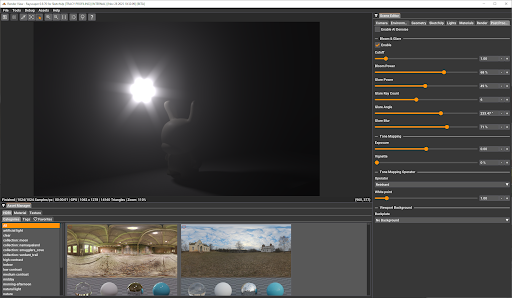
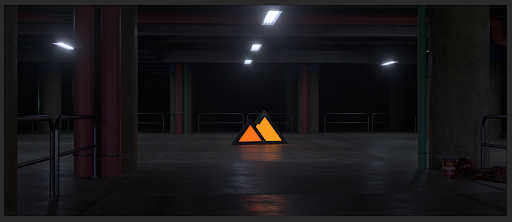
- Add Bloom and Glare post-processing effects. Enhance your renders with cinematic quality.
- Add visual feedback for render failures. A red "RENDER FAILED" text now appears when rendering encounters errors,
making it immediately clear when something goes wrong. - GUI enhancements: Improved sliders and tooltips. Sliders now have dedicated input boxes for more precise control.
- Fix texture environment image update. Loading a new HDRI would not restart the render.
- Bugfix: Fix grayscale image display in ImGui. Grayscale images were showing as red due to improper handling of
single-channel pixel formats. - Add procedural sky environment support. You can now create realistic sky environments directly in Rayscaper without
needing HDRI images. Perfect for quick outdoor renders with physically-based sky and sun simulation. - Add SketchUp environment tracking support (SketchUp 2025 or higher). Rayscaper can now automatically track and sync
with SketchUp's environment settings. - Add PBR material support for SketchUp 2025. SketchUp 2025's new PBR materials are now supported and will
automatically convert to Rayscaper's material system with proper metallic, roughness, and normal map values. Note:
Rayscaper does not support power/scale multipliers on image textures, so if your SketchUp PBR material uses a
roughness or metallic texture with a scale value other than 1.0, that scaling will not be applied in Rayscaper. - Bring back archive creation. You can now export your complete scene, including all assets, to a zip archive for easy
sharing and backup. - Separate max depth settings by path type. Advanced users can now configure maximum ray bounce depths separately for
diffuse, glossy, and transmission paths for more control over render quality and performance. - Bugfix: Fix FloatImageTexture color space handling. Float textures (like roughness and metallic maps) now correctly
use linear color space for accurate rendering. - Bugfix: Fix noise texture deserialization. Noise textures saved in previous versions now load correctly and don't
crash Rayscaper. @sashapepperspray - This should fix the crash you saw opening your file. - Bugfix: Avoid duplicate SketchUp shadow light. The sun/shadow light from SketchUp will no longer appear twice in the
scene.
The following screenshot shows the user interface enhancements:
Render by @Rich-O-Brien using bloom & glare for more realism:
Help Me Build the Community
If you like Rayscaper, please share your renders (final or work-in-progress, it doesn't matter)! This is motivating and helps me showcase its capabilities
to new users.Follow me on https://x.com/rayscaper3d.
Happy Rendering!
Thomas -
RE: Hot Rod
Good stuff @Mike-Amos - Nice hot rod, and happy to hear you are having fun rendering. We'll get those bugs sorted.
-
RE: Sci-Fi Throne Room
Would you be interested in rendering this model with Rayscaper (https://sketchucation.com/plugin/2677-rayscaper)?
I'm trying to build something that appeals to the Twilight userbase. And having your feedback on what works and what doesn't would be awesome.
edit: And of course, a superb render, well done!
-
RE: Rayscaper New Releases
@sashapepperspray Thanks for the scene! I can reproduce it, so that will help me fix it.