teto42740
Here is the first step using ideas I discussed before. http://sketchup.google.com/3dwarehouse/details?mid=5763d41196ce8b4048da91396cd7935f
What I did was exploded portions of your fist model to get to the basic tile which was solid. I created two then to make an s tile component. At this step you could " merge the two ( like in your second model) and use the shell tool to make what I think you want. I then converted all the tile groups you had to components ( use plugin for that), used the outliner to select all those and then in the component browser selected the s tile and did a replace selected to get to the model shown here. The coin is assigned a layer so turn those off and you will see areas needing some work. I would probably make those over lap components unique, trim to fit ,but since I almost never complete a model for someone learning finishing is up to you if desired.
Good Luck
Posts
-
RE: Hello, and a *huge* problem with hidden faces.
-
RE: Hello, and a *huge* problem with hidden faces.
teto42740
Couple fact toids for you:
Blender had a plugin that imported SU and then one of the later revs ( 2.5??) they tried to make SU import to Blender native and created a bug. I and several others wrote a bug report, its been some time ago , so don't know if it is fixed yet;
In your original model the basic cover tile ( had no pan at that time) was a solid but when you encapsulated that item it then reported as non solid. So you could have used the outer shell approach to make the classic pan / cover combo show a above and it would be " water tight". You would then what to make that a component. Then after converting all the groups you have in the original model to components you could replace with that combo. I have not done that yet. The concern of course is to not get in a mode where a bunch of those would have to be unique
Your original model has some 198k+ edges that can be decimated to a much lower value ( MeshLab comes to mind) but getting the model correct form the start will help in the long run.
Good luck you way very well be back. -
RE: Print to scale.....but its big
@deanlegg said:
Thanks for the replies
I'll give it a shot and let you knowWhy not give them a few more dimensions so template is not needed.Probably more accurate any way? The arc can be laid out by simple lofting approach and he should know how to do that > IE use chord vs radius( really bulge and chord)
-
RE: Hello, and a *huge* problem with hidden faces.
If the second model is OK with you that is what counts ,so do not let me put you to extra effort if not needed.
FYI: Reason for question is my experience base is seeing clay roof tile install with a pan tile ( concave side up ) and the cover tile ( concave side down) which then covers the channel between two of the pan tiles to make it water poof. However, in my preliminary search I think there is a tile one can buy which is basically the two ( pan and cover made as a unit) and they have a key lock feature which then locks adjoining neighbors and would make it look like your last model. In addition, it looks to me the shell tool in SU 8 free cannot be used on a global basis ,but just two components or group at a time. I was hoping this would act like an ambient occlusion filter that could be applied globally which then allows one to eliminate internal structure. I think Google targeted this tool to building models for Goole Earth and it could be useful there.
-
RE: Hello, and a *huge* problem with hidden faces.
@teto42740 said:
@gaieus said:
I think if you approached the whole thing differently, it could be more successful.
I did. And it was successful. But since I wanted to use the model elsewhere, epic fail.
You'll find below the model, to see the new approach.
Of course the model is not finished. For a good reason... Unfortunately.Clarification requested.
Unless I totally missed some thing the first vs second models you posted are completely different. The second model shows the tiles with both a concave and convex sides up which is typical. The first model does not. Can I assume the second model is correct? If so can you post #2 without the intersections so I don't have to create it or sections there of?
The reason I ask is the tile components are showing as solids in your model and would like to check to see what the free version solid shell option can do for you.
Secondly are you trying to make a realistic model or just one for the Cryengine ? The reason I ask it is typical the tiles do not intersect as shown in the second model -
RE: Modeling objects made from standard steel structural section
And another approach;
Make your tank first, use rectangle tool for the outside, use off set tool for " glass " thickness and then push pull down to set the out side depth and then pullback up hitting the cntrl key to create the bottom thickness. Use the L angle profile you want and the follow me tool to extrude it around the top where you will get the corners automatically. Group that top , copy down to bottom and mirror for the bottom frame. Install the sitle frames using buut joints=> no miters required.
BTW you could make one and then do the strecthing for other sizes. -
RE: Modeling objects made from standard steel structural section
Check Freods scale tool here http://forums.sketchucation.com/viewtopic.php?t=17948 It has an option allowing you to stretch the model to a target point and allows one to select the ref plane where the stretch is done. Thus changing the tank can be done without the distortion you can get with the scale tool.
BTW you can do this manually by making a small cutting plane through say the "stiles", doing the intersect and you now have two pieces you can move / stretch.
Just a idea based on my understanding of question
BTW you could also make two components or even one for that matter with the miters pre-made and then us that to make any tank size you want by this stretching . You would have to morrow the opposite ends or miter would be the wrong direction -
RE: Missing info in imported Cad files
See this and the presentation on sketchup and auto cad. Gives what prep is recommended before sketchup import http://sites.google.com/site/3dbasecamp2008/
-
RE: Cabinet Design program for Sketchup
@gaieus said:
And here it is in Google-Pidgin (for some reason, the characters appear in a very weird colour hard to see)
FYI at least for my IE8 you can set an option to ignore colors on the web page and the are ok then

-
RE: I´d like to join railing into stringer nicely
tibet
The 33+MB model size is too large for this stage of your model especially if is part if a larger model. You should get rid of all the high poly count groups because many of those can be made a single component. I have the model reduced to about 888KB.In terms of your question I am thinking you maybe getting your self in a box. If you look at any "typical" spiral stair case the railing is on the out side. Your approach would tend to funnel the user toward the side where the tread width goes toward zero. In addition the slope for a rail would very high ( Towrads infinity ) there since the run goes toward zero at that inside corner. If you want a spiral case make it a classic approah where you can model a "reasonable" hand rail. If not go to a more conventional single mid landing approach at the 90 turn. Check the 3d ware house for some ideas.
BTW Howard Leslie has two DC stair builder skp files you may find useful to get some ideas. Sorry could not quickly find the URL
Just some thoughts
Got the link http://forums.sketchucation.com/viewtopic.php?f=289&t=29484
A concept thought and different layout approach http://sketchup.google.com/3dwarehouse/details?mid=cb5b0fddc3e546d848da91396cd7935f -
RE: Save the Internet ... before its to late!
@mike lucey said:
Well we all know who behind this move! Its the '1%' that control oil / cash / power! Now they want to control the Net.
Yes, I agree that the Net should remain as it is, uncensored! However in order for this to remain to be the situation, users will have to speak out and make an effort to voice their opinion before its too late.
If politicians see big number 'hands off' voter they will sit up a pay attention. If they don't they will they won't as most of them are only interested in their cushy jobs and big pensions!
Well we really don't know and that is just an assertion with no proof and I think it is more those that are afraid of free info flow and are the ones who usually want to control the rest of us . Look at who pushes net neutrality and they will be identified
-
RE: Need Bird Mouth ruby for Rafters
BTW now that I know what the use intent is I would strongly suggest you visit your local Codes and Enforcement office ( City Engineers) and ask them if they have a requirements hadout for patio design for their area. Some do and can help you. They may spec. head room, member size and spacing , footing requirements ,connection requirements and etc.
-
RE: Need Bird Mouth ruby for Rafters
@jpalm32 said:
@sdmitch said:
@jpalm32 said:
@sdmitch said:
jpalm32, Are you looking for a plugin to add a bird mouth cut to an existing rafter or to create a rafter of given dimensions with all cuts applied?
For a new structure! Want to enter formula and be able to list cuts.
If you could provide an example of the input and output, I'll give it a try.
I'll work on an outline, need to finish some work.
It is for real patio roof layout. Don't want to use simpson on front beam.
I could measure "after" SU drawing but want way of quick design changes for builder.Take a look at above it was drawn using only the ref triangle ( Is very quick) to get the cuts and shoulld be more than adequate for patio unless it is complex. You cut the tails, using that short section as component then make multiples by push /pull and then plum cut on the other end. Any builder that knows what they are doing can frame this. If they do not should look for another
-
RE: Need Bird Mouth ruby for Rafters
Here are some thoughts to get started. The first decision to be made is: " Is this for show and tell cartoon or a real design. The requirements can be very different". Here is the concept model link http://sketchup.google.com/3dwarehouse/details?mid=d35773c467a68c5948da91396cd7935f and cartoon
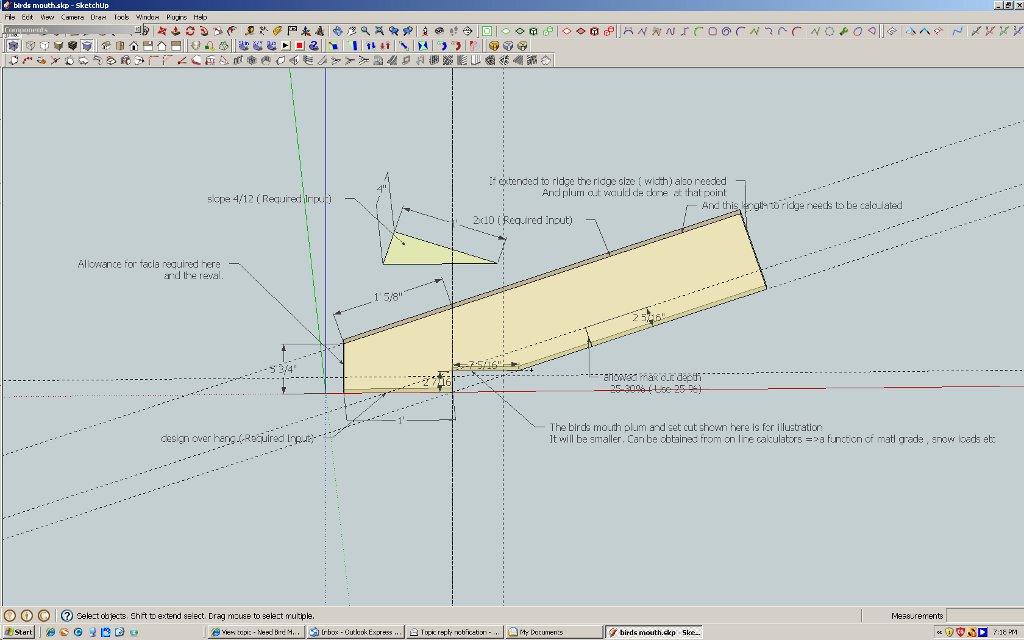 .
.
More than likely birds mouth is going out of style because of the use of truss designs now
BTW quick link for calculator http://www.awc.org/calculators/span/calc/timbercalcstyle.asp?species=Spruce-Pine-Fir&size=2x8&grade=No.+2&member=Rafters+%28Snow+Load%29&deflectionlimit=L%2F240&spacing=16&wet=No&incised=No&liveload=20&snowload=30&deadload=10&submit=Calculate+Maximum+Horizontal+Span -
RE: Need Bird Mouth ruby for Rafters
TmberFrames link above is no joy. They do " heavy" framing vs "light " like for a house. Using their concept ( pre made joints ) should be easy=> make a short plate, rafter at the correct slope, over hang required, facia size and create a short rafter that can be reused and scaled as needed like Dave's concept above. If the roof has many slope chages etc. then even this can get tedious
-
RE: Need Bird Mouth ruby for Rafters
Try this, TimberFramers, don't know if it has what you want but???? Sorry have their plugins but not the URL.
Quick search turned up this maybe it will help http://www.timberframecottage.com/su/ -
RE: Help with lofting and intersecting
Can't help on the CNC but many others can.
Suggest you make a seperate post with that subject because it may get missed with this present subject. -
RE: Help with lofting and intersecting
Very nice.
Could only find 2 stray lines.
Since you have Su8 Pro can't you use the Boolean subtraction to create the taped holes you want
BTW I used the model info statistics to purge unused and fix problems. The fix problems did not flag any issue. -
RE: How do I model this?
Thought here:
Orginator created cenetr line for the sections using the arc tool and then used either follow me and keep or shape bender plugin to add the " thickness" along the selected ref line either edge or center ref.
BTW using ThomThom's clean up tool helps quite a bite when working the ref model you cited.
BTW2 Using the arc tool out in " free space" can be difficult because it may want to inference where you don't ant it to. Drawing some plananr ref surface like a triangle some times helps me.Update 11-14-2011
Firther review seems to indicate this is from a cad file. It is almost impossible to work with it in SU because of the very dense geometry and no layer or components to speak except at the top level
The arc like sections are variable and will have to be modeled with a plugin that is " adaptive" such as TIGs extrude tool set -
RE: Curved Railing
@gidominik said:
@pmolson said:
My favorite tool for curved railing is this plug in.
http://forums.sketchucation.com/viewtopic.php?t=16465
it is the follow me and keep plugin.
very easy to use.
p
Thanks P...I like that plug in too. But I need that railing to follow the curve. See the SKP attachment..Thanks
Have not tried to make the railing yet but some observations for your consideration.
The railing has a very high number of groups make from the same entity. You have a possible large model and need to consider how to keep the model size down as you model or you will have some down stream problems with "slowness'. One way to help is to use components as much as you can. Suggest you watch the youtube tuts on that subject and factor that into your model while you have this " early" chance.
Just some thoughts