sketchucation logo sketchucation
    • Login
    Oops, your profile's looking a bit empty! To help us tailor your experience, please fill in key details like your SketchUp version, skill level, operating system, and more. Update and save your info on your profile page today!
    ⚠️ Important | Libfredo 15.6b introduces important bugfixes for Fredo's Extensions Update

    Sketchup X-Ray / Back Edges bug

    Scheduled Pinned Locked Moved SketchUp Bug Reporting
    sketchup
    16 Posts 3 Posters 1.7k Views 3 Watching
    Loading More Posts
    • Oldest to Newest
    • Newest to Oldest
    • Most Votes
    Reply
    • Reply as topic
    Log in to reply
    This topic has been deleted. Only users with topic management privileges can see it.
    • dereiD Offline
      derei
      last edited by

      Here is the model. I can't understand what is happening and why.
      Please check if it's happening to you too.


      Cabinet.skp

      DESIGNER AND ARTIST [DEREI.UK](http://derei.uk/l)

      1 Reply Last reply Reply Quote 0
      • GaieusG Offline
        Gaieus
        last edited by

        Hm. Indeed I do not have them in edit mode either. Let me play around a bit more...


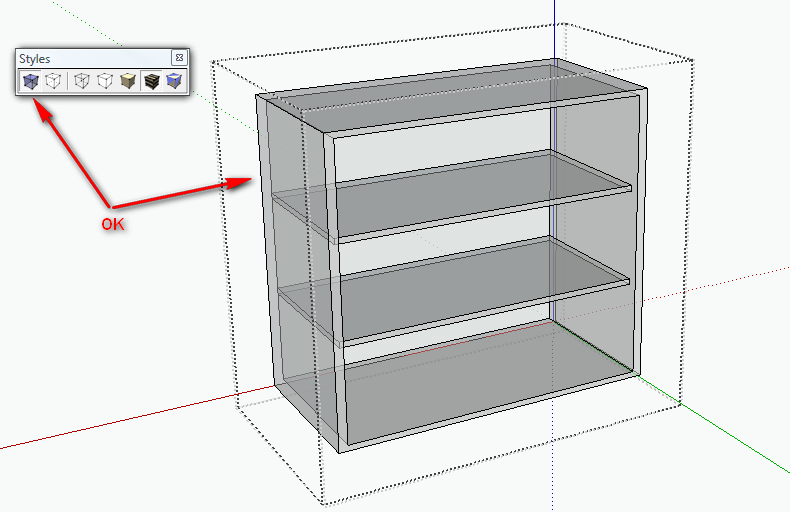
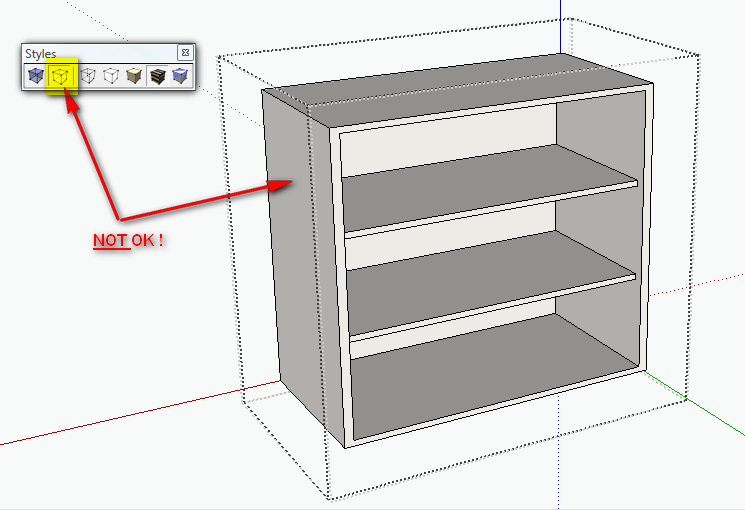
        Edit: If hide rest of model is active, the back edges disappear in group/component edit mode. But if you unhide the rest of the model, they appear. Can you confirm?

        (Do you use this feature? Window > Model info > Components. I have a shortcut for this)

        Yes, and it is still a bug.

        Gai...

        1 Reply Last reply Reply Quote 0
        • thomthomT Offline
          thomthom
          last edited by

          I see the same thing. But I also find that turning off Hide Rest of Model displays the backedges. But that's still a behaviour I only see in that model...

          Thomas Thomassen — SketchUp Monkey & Coding addict
          List of my plugins and link to the CookieWare fund

          1 Reply Last reply Reply Quote 0
          • thomthomT Offline
            thomthom
            last edited by

            Must be the style. I just switched to one of the SketchUp default styles and it display back edges in components with Hide Rest of Model.

            Thomas Thomassen — SketchUp Monkey & Coding addict
            List of my plugins and link to the CookieWare fund

            1 Reply Last reply Reply Quote 0
            • GaieusG Offline
              Gaieus
              last edited by

              Indeed style setting - still a bug IMO. If you set transparency to medium or faster, the back edges appear correctly.

              Gai...

              1 Reply Last reply Reply Quote 0
              • thomthomT Offline
                thomthom
                last edited by

                Ah! When Transparency is set to Nicer, and Hide Rest of Model is enabled, and you are inside a group/component - back edges doesn't display!

                This smells like a bug.

                Thomas Thomassen — SketchUp Monkey & Coding addict
                List of my plugins and link to the CookieWare fund

                1 Reply Last reply Reply Quote 0
                • thomthomT Offline
                  thomthom
                  last edited by

                  Gaieus beat me to it... 😒

                  Thomas Thomassen — SketchUp Monkey & Coding addict
                  List of my plugins and link to the CookieWare fund

                  1 Reply Last reply Reply Quote 0
                  • thomthomT Offline
                    thomthom
                    last edited by

                    How it can be reported: http://forums.sketchucation.com/viewtopic.php?f=11&t=29023
                    😉

                    Thomas Thomassen — SketchUp Monkey & Coding addict
                    List of my plugins and link to the CookieWare fund

                    1 Reply Last reply Reply Quote 0
                    • GaieusG Offline
                      Gaieus
                      last edited by

                      Also to Millard McQuaid in email.

                      Gai...

                      1 Reply Last reply Reply Quote 0
                      • dereiD Offline
                        derei
                        last edited by

                        That is the correct behavior. I checked my style and transparency was set to "nicer". Also I can confirm that hiding the rest of model affects back edges.
                        Thank you.

                        DESIGNER AND ARTIST [DEREI.UK](http://derei.uk/l)

                        1 Reply Last reply Reply Quote 0
                        • GaieusG Offline
                          Gaieus
                          last edited by

                          Well, I would not necessarily call it "correct" behaviour. Maybe "actual" behaviour. In fact if anything, nicer should display these settings the best - and of course, hiding the rest of the model should not have any kind of effect on this setting.

                          Gai...

                          1 Reply Last reply Reply Quote 0
                          • thomthomT Offline
                            thomthom
                            last edited by

                            @gaieus said:

                            Well, I would not necessarily call it "correct" behaviour. Maybe "actual" behaviour. In fact if anything, nicer should display these settings the best - and of course, hiding the rest of the model should not have any kind of effect on this setting.

                            I often find that Medium produce better result than Nicer for some odd reasons...

                            Thomas Thomassen — SketchUp Monkey & Coding addict
                            List of my plugins and link to the CookieWare fund

                            1 Reply Last reply Reply Quote 0
                            • GaieusG Offline
                              Gaieus
                              last edited by

                              Probably nicer taxes the video system too much. I have medium set in my default template so often I do not notice things that others do.

                              Gai...

                              1 Reply Last reply Reply Quote 0
                              • dereiD Offline
                                derei
                                last edited by

                                @gaieus said:

                                Well, I would not necessarily call it "correct" behaviour. Maybe "actual" behaviour.

                                I said "correct" meaning that is how you said in the earlier post... I was confirming your findings. Sorry for confusion. 😄

                                DESIGNER AND ARTIST [DEREI.UK](http://derei.uk/l)

                                1 Reply Last reply Reply Quote 0
                                • 1 / 1
                                • First post
                                  Last post
                                Buy SketchPlus
                                Buy SUbD
                                Buy WrapR
                                Buy eBook
                                Buy Modelur
                                Buy Vertex Tools
                                Buy SketchCuisine
                                Buy FormFonts

                                Advertisement