sketchucation logo sketchucation
    • Login
    1. Home
    2. dedmin
    3. Posts
    Oops, your profile's looking a bit empty! To help us tailor your experience, please fill in key details like your SketchUp version, skill level, operating system, and more. Update and save your info on your profile page today!
    🚨 Skimp | 25% Off until March 30 Buy Now
    D
    Offline
    • Profile
    • Following 0
    • Followers 0
    • Topics 79
    • Posts 923
    • Groups 1

    Posts

    Recent Best Controversial
    • RE: [Plugin] UVTools 0.2 Pro (Beta) (Updated for SU6)

      @alan fraser said:

      @dedmin said:

      And UU3D supports SketchUp's files directly.

      Ooooo!!! I must upgrade. Can it handle V8 files yet? Well somebody recognizes a gap in the market even if Google doesn't...and given the now huge list of import/export formats, there's little sense in Google limiting the export options of the free version.

      @unknownuser said:

      The SketchUp plugin has been updated to import/export version 8 SketchUp files.

      Link Preview Image
      Ultimate Unwrap 3D - News

      Ultimate Unwrap 3D, UV Mapping. Ultimate Unwrap 3D is a standalone UV mapping software for unfolding and unwrapping 3D models.

      favicon

      (www.unwrap3d.com)

      posted in Plugins
      D
      dedmin
    • RE: [Plugin] UVTools 0.2 Pro (Beta) (Updated for SU6)

      And UU3D supports SketchUp's files directly.

      posted in Plugins
      D
      dedmin
    • RE: DC avoids contact with others components

      Don't see any way to do this automatically with dynamic components. But You can set onclick Hide and do this manually. Or get the coordinates for each copy and compare it with the coordinates of the obstacles and set hide, but You need a predefined obstacles.

      posted in Dynamic Components
      D
      dedmin
    • RE: Axis nuisance

      You don't activate them - they are there. Every component/group has axes and you can change them, but cannot hide/disable. This is new in v.8.

      posted in SketchUp Discussions
      D
      dedmin
    • RE: Axis nuisance

      On the first picture You see model axis but when You open the component You see its axes.

      posted in SketchUp Discussions
      D
      dedmin
    • RE: TT guide tools not working

      TT guide tools.rb should be in the SketchUp's plugins folder.

      posted in Plugins
      D
      dedmin
    • RE: Importing sketchup files into other cad cam software

      @scott m said:

      I have been exporting dxf files created in su to our thermwood machine.I was wandering if there might be a plugin out there to join all the segments in a arc or circle to one continues arc or circle.When I use the export dxf/stl plugin and export lines it exports all segmints as idividual lines.The machine still cuts fine except that it will not reconize a circle as a drill operation.Also the segminets have to be verry small or else the cut comes out jagged.Another reason is if we importe a su file with arcs into ecabinets shape manager it will not allow us to trim the segments on a arch keep getting a error message canot trim lines on different plains. Maby someone is using sketchup along with ecabinets?

      DoubleCAD wont help You with arcs and circles imported from SketchUp - they still will be just bunch of small lines. You have to recreate them if You want true geometry. For 3d this is easier in SpaceClaim - http://www.spaceclaim.com/en/Resources/VidPlayer.aspx?v=Whats_New_2011.flv#
      Look at the Archive - SpaceClaim 2009+ Sketchup Import

      posted in Woodworking
      D
      dedmin
    • RE: [Plugin] [$] Artisan (1.2.3) - Feb 28, 2014

      Of course only the developer decides what should be free - We, the fellow users can only be grateful. But of course You can make better plugin than Artisan and give it to us for free 🀣

      posted in Plugins
      D
      dedmin
    • RE: Rotate - dynamic component

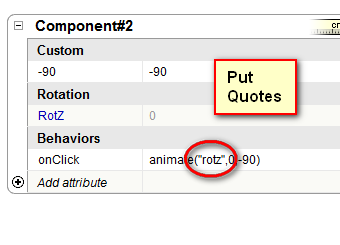
      2011-04-17_173117.png

      posted in Dynamic Components
      D
      dedmin
    • RE: [Plugin] [$] Artisan (1.2.3) - Feb 28, 2014

      Why not!? πŸ˜’

      posted in Plugins
      D
      dedmin
    • RE: App to convert a 3D model ( like pdf out of SolidWorks )

      http://www.simlab-soft.com/3d-plugins/3D-PDF-from-sketchup-main.aspx
      http://www.renderplus.com/wk/Products_w.htm#RPS_3D_PDF_-_Interactive_3D_PDFs
      http://www.edrawingsviewer.com/pages/products/GoogleSketchup.html

      posted in SketchUp Discussions
      D
      dedmin
    • RE: [Plugin]$ Keyframe Animation

      @tfdesign said:

      @regular polygon said:

      @tfdesign said:

      A great plugin, but I think your price is a little on the steep side.

      Well, I guess the market will ultimately decide this issue. But, compared to other commercial animation plugins, I thought the price was a bargain. 😐

      SketchUp was offered by Google to be a non-elitist app for everyone- why I imagine, it was offered for free, but for someone living in a 3rd-world country, or someone on unemployment benefit (and there is a lot of it about these days) $20 is a lot of money. Compared to say the SDS plugin, which IMO does something a lot more complex, and costs $2 more. Or how about even FredoScale, which is a dynamite plugin, but donationware. Please, don't get me wrong, and I'm sure your plugin will do very well, but again it will be richer countries like America who will be able to afford the more basic, yet essential payware plugins, leaving many in poorer nations, out (again).

      Tom πŸ˜„

      I'm in the worst position - living in the poorest country member of the EU, with almost European prices but with 3rd-world salaries! Average salary here 300 euro, 1 liter gasoline - 1.25 euro! But this plugin is well worth the money! Great work!

      posted in Plugins
      D
      dedmin
    • RE: How to get dimensions parallel

      @edson said:

      @dedmin said:

      Use guides to snap or align axes to the edges.

      thanks. but could you please be a little more specific? are there guides in LO? do you mean I should change the position of the axes in sketchup?

      Sorry, I didn't notice it is a LayOut discussion - I talked about SketchUP. But if You do this in SketchUP maybe it will help later in LayOut - never tried by myself.

      posted in LayOut Discussions
      D
      dedmin
    • RE: CAM / CNC ?

      Jim, that is nice! How is that working? Is the way SketchUP draws curves present an accuracy problem?

      posted in SketchUp Discussions
      D
      dedmin
    • RE: How to get dimensions parallel

      Use guides to snap or align axes to the edges.

      posted in LayOut Discussions
      D
      dedmin
    • RE: Cutlist plugins

      This one works with metric units - http://steveracz.com/joomla/content/view/45/1/

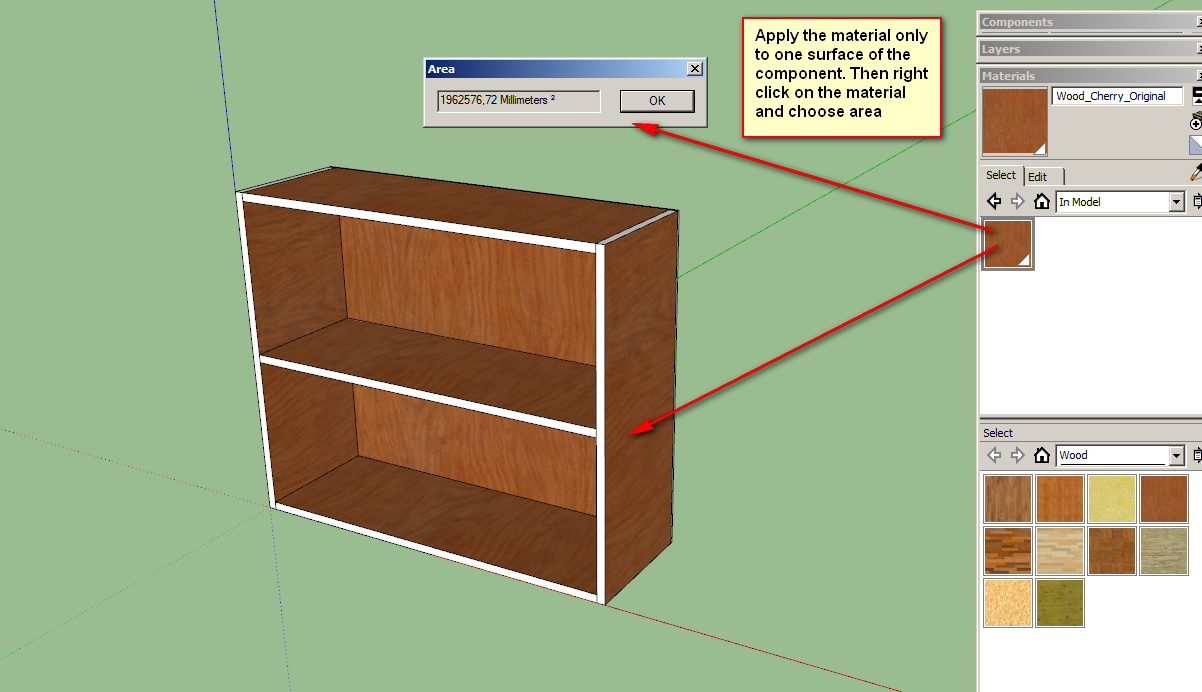
      2011-04-17_003006.png

      posted in Woodworking
      D
      dedmin
    • RE: Google is Listening!

      What about dynamic components!? This is a unique feature of SketchUP among other 3D software and holds huge power! Nothing fresh here?

      posted in SketchUp Discussions
      D
      dedmin
    • RE: New SpaceDesign Features

      Aha! I need to play more and lets You now! Thanks!

      posted in Extensions & Applications Discussions
      D
      dedmin
    • RE: New SpaceDesign Features

      Finally! You are getting closer to what I have been looking for a long time! Now it is possible to fully use the power of the component's data - I can put banding, calculate dimensions based on the grain direction and export exactly what is needed. What is missing - assembly field as in CutList plugin. Congratulations!

      posted in Extensions & Applications Discussions
      D
      dedmin
    • RE: New Layout book

      http://www.finewoodworking.com/item/15159/another-look-at-creating-plans-from-a-sketchup-model

      posted in LayOut Discussions
      D
      dedmin
    • 1
    • 2
    • 6
    • 7
    • 8
    • 9
    • 10
    • 46
    • 47
    • 8 / 47