sketchucation logo sketchucation
    • Login
    1. Home
    2. dedmin
    3. Posts
    Oops, your profile's looking a bit empty! To help us tailor your experience, please fill in key details like your SketchUp version, skill level, operating system, and more. Update and save your info on your profile page today!
    🚨 Skimp | 25% Off until March 30 Buy Now
    D
    Offline
    • Profile
    • Following 0
    • Followers 0
    • Topics 79
    • Posts 923
    • Groups 1

    Posts

    Recent Best Controversial
    • RE: New SpaceDesign Features
      load 'render plus/spacedesign2.rb'
      Error; #<LoadError; (eval);625;in `load'; no such file to load -- render plus/spacedesign2.rb>
      (eval);625
      (eval);625


      SpaceDesign is checked to load, everything is in place in the plugin's folder. No menu entities for SpaceDesign.

      posted in Extensions & Applications Discussions
      D
      dedmin
    • RE: New SpaceDesign Features

      Doesn't load. No menu.

      posted in Extensions & Applications Discussions
      D
      dedmin
    • RE: Missing DC Dictionary entries

      Hi Palo
      I want to thank You for this tool! Today I experienced what You had described and Your plugin fixed it! Thanks again!

      posted in Dynamic Components
      D
      dedmin
    • RE: Lock certain dimensions/sizes while resizing

      You can do this with dynamic components - http://www.youtube.com/watch?v=4aVW5X-tb8s

      posted in Woodworking
      D
      dedmin
    • RE: FluidImporter free .obj importer Beta 1.0.5 Updated
      posted in Extensions & Applications Discussions
      D
      dedmin
    • RE: Lock certain dimensions/sizes while resizing

      FredoScale or - http://www.finewoodworking.com/item/36283/resizing-a-model

      posted in Woodworking
      D
      dedmin
    • RE: Making chrome with Renditioner

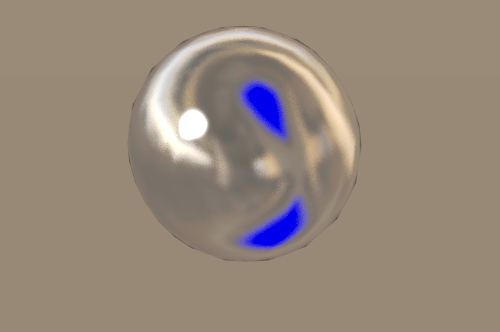
      For such a highly reflective materials the environment is very important - what are they reflecting? Here are two images - one with gray environment and the other with hdri:


      chrome_gray.jpg


      chrome_hdri.jpg

      posted in Extensions & Applications Discussions
      D
      dedmin
    • RE: Help With Export

      You are using different paper size for Your project - A4. Use the same paper size that will be printed. Some references are missing and it is hard to see the whole project.

      posted in LayOut Discussions
      D
      dedmin
    • RE: [Plugin] Boolean helper update 08122011

      Thanks,
      Nice idea!
      Some suggestions - add option to scale the whole scene and to zoom extents after each scale.

      posted in Plugins
      D
      dedmin
    • RE: Colour outline without layout

      http://forums.sketchucation.com/viewtopic.php?t=28957

      posted in Newbie Forum
      D
      dedmin
    • RE: [Plugin] Cutlister

      Does it exports only inches?

      posted in Plugins
      D
      dedmin
    • RE: [Plugin] Cutlister

      Hi ishboo,
      and thanks for this plugin!
      I don't have experience with CNC, so cannot help much. That is the main problem with making software that works for all - everybody has different needs and conventions. But with dynamic component's attributes one can make them as needed. Panels in my SampleBookcase were made to meet the way CutList Plus works - others can have their needs. But if Your plugin exports this data the output will be what one needs. Take a look at this treads -
      http://forums.sketchucation.com/viewtopic.php?f=323&t=29515
      http://forums.sketchucation.com/viewtopic.php?f=80&t=32789
      http://forums.sketchucation.com/viewtopic.php?f=80&t=29835
      http://forums.sketchucation.com/viewtopic.php?f=323&t=30259

      posted in Plugins
      D
      dedmin
    • RE: [Plugin] Cutlister

      Finlay - something like this is badly needed! I have a different suggestion - why not implement dynamic component's attributes in Your plugin - this way we can put a lot of useful data - banding, grain direction, padding, joinery and etc. I think it is not practical to include cutting layouts - better to use external programs for this. This way the use of the plugin can be extended a lot, not only for woodworking. Now we can put tons of useful data in dynamic components, but no way to export and use it for production. This is a simple bookcase as a sample.
      BasicBookcase.skp

      posted in Plugins
      D
      dedmin
    • RE: [Plugin][$] FredoScale - v3.6a - 01 Apr 24

      Just tried, but no BugSplat for me! Maybe some messing plugins?

      posted in Plugins
      D
      dedmin
    • RE: Redraw groups

      I have had a lot of problems with components messing around, renaming randomly and not allow me to have the same names for different components.Components are not very convenient when You have huge library with the same components in different hierarchy levels and try to mix them in a single project, make copies and etc.So far groups are working flawlessly except redrawing - so I will continue adding onclick redraw to each group. Thanks.

      posted in Plugins
      D
      dedmin
    • RE: Redraw groups

      Untitled1.swf

      posted in Plugins
      D
      dedmin
    • RE: Redraw groups

      I'm assigning attributes to groups instead of components and need a way to redraw a bunch of groups to refresh all the attributes data.

      posted in Plugins
      D
      dedmin
    • Redraw groups

      Is there a way to redraw all the groups in a file? I can do this individually by adding onclick REDRAW function to every group, but this is to time consuming.

      posted in Plugins
      D
      dedmin
    • RE: Plugin Idea

      @wolfy said:

      Hmmm thanks guys. The reverse face tool looks promising.
      It seems like the only way to dig through nested groups and paint individual faces is by clicking through them.

      I appreciate all the feedback!

      There is such a tool - I was hopping for a long time somebody to make a plugin

      @unknownuser said:

      Place Material

      Place Material uses an Explorer type tree to select materials and place them directly on faces without having to open components and groups for edit.

      The tool “drills” into the model to determine which face, (or component or group), to change to place the material.

      http://www.renderplus.com/wk/RpTools_w.htm#Place_Material

      posted in Plugins
      D
      dedmin
    • RE: Book model

      If You don't mind - cleaned, made it a component glued to any
      Book_WOK.skp

      posted in SketchUp Components
      D
      dedmin
    • 1 / 1