sketchucation logo sketchucation
    • Login
    1. Home
    2. Daniel S
    3. Posts
    Oops, your profile's looking a bit empty! To help us tailor your experience, please fill in key details like your SketchUp version, skill level, operating system, and more. Update and save your info on your profile page today!
    🔌 Easy Offset | Offset selected faces in SketchUp in positive and negative offsets. Download
    D
    Offline
    • Profile
    • Following 0
    • Followers 0
    • Topics 18
    • Posts 339
    • Groups 1

    Posts

    Recent Best Controversial
    • RE: [Obsolete] Offset On Surface (v1.0)

      WOWWWW. I just tried it and i can´t believe the results. It´s AMAZING!!!!! 😍 😍

      Looks like it has a lot of options... so i will read the manual, but the first things that I tried and see exceeded everything what I could have imagined.

      The standard offset tool looks prehistoric compared with your version.

      My SketchUp should say at startup: "SketchUp. Powered by Fredo6"

      Thank you!!!
      Daniel S 😍 😍
      posted in Developers' Forum
      D
      Daniel S
    • RE: In Development: Subdivide and Smooth

      Here!

      posted in Developers' Forum
      D
      Daniel S
    • RE: A Puppet Tool

      Lamentablemente no se puede hacer esto en SketchUp todavia. Es por eso lo publiqué en esta sección... como un deseo de que exista algo así.
      Está hecho con Adobe After Effects que es un programa de edición de video pero que tiene muchas cosas interesantes, como ésta.
      Igualmente es una herramienta que funciona en dos dimensiones.. por lo que solo podrías modificar imágenes y no el modelo 3D, igualmente seguro que te puede servir.
      Algo parecido con otra interface lo podes conseguir con el pluging SketchyFFD. Date una vuelta por el "Ruby Forum" para encontrar el link de descarga.

      Daniel S

      posted in SketchUp Feature Requests
      D
      Daniel S
    • Puppet Tool

      [flash=425,355:2yhn3sil]http://www.youtube.com/v/_VB_LgAwZC8[/flash:2yhn3sil]

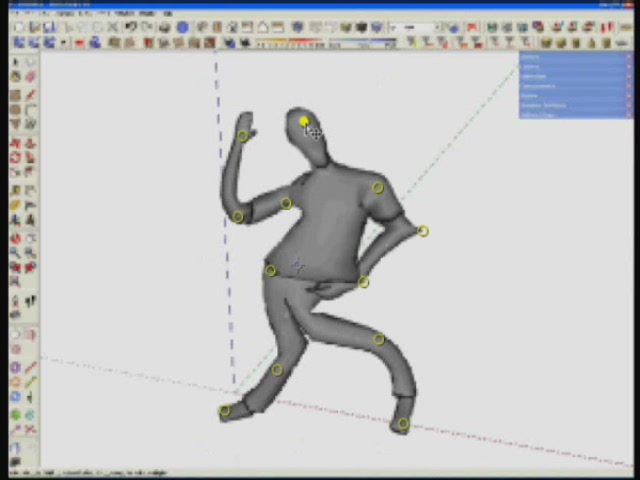
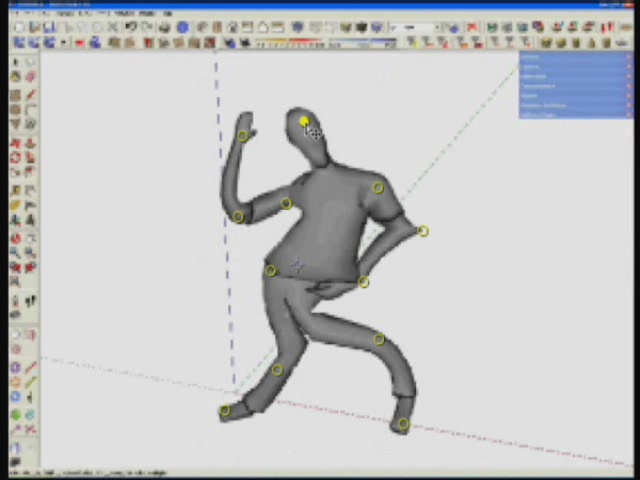
      The idea is that the Puppet will work by deforming part of the model according to the positions of pins that you place and move. These pins define what parts of the models should move and what parts should remain rigid.

      The video is fake. It is not really SketchUp, is only a simulation.

      I publish this in the wishlist but I publish here too because the last plugins are amazing and perhaps can be done something similar to this in the ruby world. The idea is to use it in combination with SketchyFFD and Subdivide and Smooth.

      Daniel S


      SU Puppet3.JPG

      posted in Developers' Forum
      D
      Daniel S
    • A Puppet Tool

      [flash=425,355:iburfvsp]http://www.youtube.com/v/_VB_LgAwZC8[/flash:iburfvsp]

      The idea is that the Puppet will work by deforming part of the model according to the positions of pins that you place and move. These pins define what parts of the models should move and what parts should remain rigid.

      The video is fake. It is not really SketchUp, is only a simulation.

      Daniel S


      SU Puppet3.JPG

      posted in SketchUp Feature Requests sketchup
      D
      Daniel S
    • SketchyPhysics 2.0 - Examples on Video

      I Just Upload this Video:
      [flash=425,355:2kkieplo]http://www.youtube.com/v/gHSnu_hUglk[/flash:2kkieplo]
      SketchyPhysics Examples - SketchyPhysics 2 Beta 1 version
      http://www.youtube.com/watch?v=gHSnu_hUglk

      All the models where found on the 3dwarehouse:
      http://sketchup.google.com/3dwarehouse/search?q=sketchyphysics&styp=m&scoring=d...

      If you want to see examples made with the first version of SketchyPhysics look at:
      [flash=425,355:2kkieplo]http://www.youtube.com/v/qLvXvzPvfWI[/flash:2kkieplo]
      SketchyPhysics Examples Part 1 - SketchyPhysics july 7 version
      http://www.youtube.com/watch?v=qLvXvzPvfWI

      Daniel S

      posted in SketchyPhysics
      D
      Daniel S
    • RE: Smooth and divide?

      Look here:
      http://www.sketchucation.com/forums/scf/viewtopic.php?f=57&t=5687

      Daniel S

      posted in Plugins
      D
      Daniel S
    • RE: [Plugin] Zorro

      Another great tool for SU!! Thank you!!
      Zorro 🤣


      Zorro tool.jpg

      posted in Plugins
      D
      Daniel S
    • RE: Joint Push Pull Classic (Old version) - v2.2a - 26 Apr 17

      Here i made them with other settings... try this ones please


      Icons for Mac2.zip

      posted in Plugins
      D
      Daniel S
    • RE: Joint Push Pull Classic (Old version) - v2.2a - 26 Apr 17

      About the icons.. i made the two that are blurry on mac on a different day.. so perhaps i export the icons with different settings...
      Jeff here i attach the two icons again... tell me if this fixes the problem (i don´t have a Mac for testing).

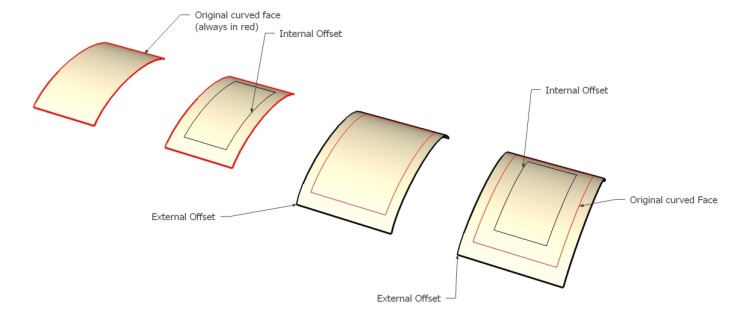
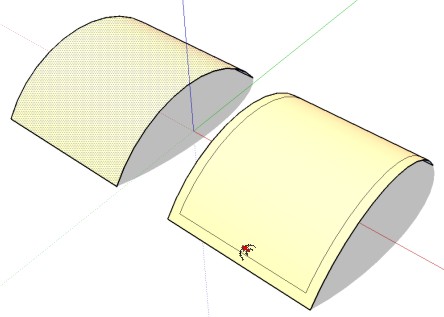
      And about the offset the best method for me will be option nº 1: Only offsets the external border edges of the surface.

      Daniel S


      Icons for Mac.zip


      offset.skp


      offset.jpg

      posted in Plugins
      D
      Daniel S
    • RE: Joint Push Pull Classic (Old version) - v2.2a - 26 Apr 17

      @unknownuser said:

      Edit the rb file, line 334, and change @option_finishing = 'D' to @option_finishing = 'K'

      Thank you! it´s working like i wanted!

      @unknownuser said:

      This would only work in single-face push pull (but there would be no difference compared to the Sketchup tool). Because you need to be multi-face, you have to select the faces first. Remember that 2 successive JPP may not be equivalent to a single one on the total set of faces!

      i understand... the problem is single-face or multi-face...
      it´s like the SketchUp push/pull vs your normal push/pull.
      In theory is better your normal push/pull because you can extrude single and multi faces... but the SU push/pull is faster... because it auto-selects faces on hover instead having to select faces first. Of course that are used in different situations but i think that you understand what i try to say.
      SketchUp has a lot of problems with curves faces (including no offset) ... This is one of the features that i was waiting for SU7... use the SU push/pull for curved faces... that is exactly your JPP for single faces.
      I attach a video example of what i´m trying to say...

      Daniel S


      PP vs JPP video.zip


      Other problem with curved faces.. you cannot offset

      posted in Plugins
      D
      Daniel S
    • RE: Joint Push Pull Classic (Old version) - v2.2a - 26 Apr 17

      Totally Amazing!!
      How can i set for default for Joint, Vector and Normal Push pull in the finishing options "thickening" instead "erase original faces"?? it´s easy with the TAB or F5 keys... but when i restart SketchUp i have to set my defaults again.

      Thank you,
      Daniel S

      PS. It´s possible to make the plugin work like the SketchUp push/pull? I mean... now you must select at least one face before running the plugin... and after doing the PP you have to select the icon again to PP another face....

      posted in Plugins
      D
      Daniel S
    • RE: In Development: Subdivide and Smooth

      😮 😮
      Amazing!! 😍 😍

      😮 😮

      Daniel S

      posted in Developers' Forum
      D
      Daniel S
    • RE: [Plugin] SketchyFFD (Classic)

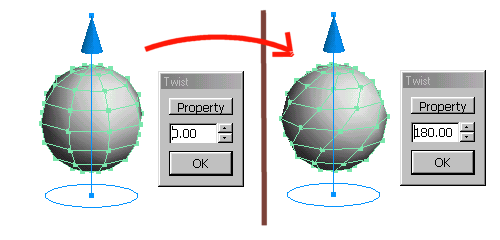
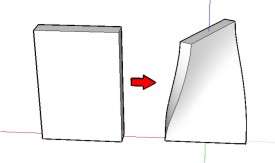
      Here i attach a video using FFD like a twist tool...
      it would be easy to make this automatic with ruby?
      i mean.. to set the center of rotation (like in TIG´s Grow.rb) and the rotation angle.

      Daniel S


      twist tool.gif


      FFD Twist Video.zip


      Twist FFD.jpg

      posted in Plugins
      D
      Daniel S
    • RE: [Plugin] SketchyFFD (Classic)

      Thank you Chris!!! 😍 😍 😍
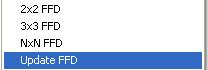
      The Update FFD is obsolete now 😄

      Daniel S


      Update FFD no longer in use.JPG

      posted in Plugins
      D
      Daniel S
    • RE: Lathe script

      Hi Whaat!!

      Look at the firsts 50 seconds..
      http://www.youtube.com/watch?v=qrHdaWTyu0I
      And you can try something like this online:
      http://www-ui.is.s.u-tokyo.ac.jp/~takeo/teddy/teddy/teddy.html

      I know that this is not a lathe tool... and there´s a lot of free programs that do this and can be imported into SU.
      But perhaps is possible this inside SketchUp with some changes to your lathe tool?.

      Daniel S

      posted in Plugins
      D
      Daniel S
    • RE: [Plugin] SketchyFFD (Classic)

      Fantastic script Chris!!!

      Hope that somebody pick it up and help with the UI.

      It works very fast!! To show interactively the deformation of the group in wireframe mode (like in Fredo6´s Shear) would be a good feature... perhaps will go more slow.. but will be a time saver because you don´t have to close the group, make a right click and select Update FFD and then wait to see if is the deformation you wanted and then make all the process again to fix it.

      This is other ruby that looks like a SU7 feature 😍.

      Thank You!!!!!!

      Daniel S

      posted in Plugins
      D
      Daniel S
    • RE: [Plugin] SUTool: a new way to manager your RB script

      Thank you Jim!!!! Now is working!!! 😍

      And i try removing the iconv.dll and works too... the problem was the convert.rb code.

      Now i have to see how to add the plugins 😄

      Thank you again!!
      Daniel S

      EDIT: the iconv.dll is needed.. if you open more than one sketchup it pop-up a msg. With the .dll in the plugins folder all works fine.


      working.JPG

      posted in Plugins
      D
      Daniel S
    • RE: [Plugin] SUTool: a new way to manager your RB script

      Not in my plugins menu..
      Perhaps is because i have not installed the full Ruby language 😒

      Daniel S

      posted in Plugins
      D
      Daniel S
    • RE: [Plugin] SUTool: a new way to manager your RB script

      @jim said:

      iconv.dll comes when you install the full Ruby language. I have uploaded it here, but I'm not sure where to tell you to put it - I would try in the SUTools folder first, or the Plugins folder. It might not work at all.

      The plugin works well for me. I will write up a quick How-to.

      Thank you Jim!!! I don´t get the error when i put the iconv.dll in the plugins folder.
      But i cannot find how to start the webdialog... is not on plugins.. tools... nowhere?

      Thank you again,
      Daniel S

      posted in Plugins
      D
      Daniel S
    • 1
    • 2
    • 13
    • 14
    • 15
    • 16
    • 17
    • 15 / 17