Look for TIG's slicer.rb plugin. You can take slices as thick as you specify and as many as you specify, through a group and have them all laid out flat if you wish.
Oops, your profile's looking a bit empty! To help us tailor your experience, please fill in key details like your SketchUp version, skill level, operating system, and more. Update and save your info on your profile page today!
🚨 Skimp | 25% Off until March 30 Buy Now
C
Offline
Posts
-
RE: Section of Timber Frame
-
RE: Highlighting Objects in Model
How about giving one set a distinctive texture in addition to colour?
-
RE: (search) automatic dimensions plug-in
I have generally found auto dimensioning in other programs to be a bit of a pain. You end up deleting or remaking stuff half the time because there are often too many dimensions created, or they end up in the wrong places - from a presentational point of view) etc.
-
RE: SketchUp Nurbs
@unknownuser said:
...or use some dedicated little efficient ergonomic nurbs prog like Moi

It doesn't run on a Mac!
-
RE: Which CAD program?
Have you looked at Vectorworks?
They do a 30 day trial.
-
RE: Must Have Ruby Plugins - Visual Index (Discussion)
Apple,
I confess I do something similar albeit using Curio to manage the info on the plugins.What would be nice would be if one of the Ruby experts could tie in such a list to the plugin loader (http://www.alexschreyer.net/projects/plugin-loader-for-sketchup/) which find very useful for rarely used plugins that I don't want cluttering up the menus.
-
RE: Bonzai 2.0 released
I have been playing with it - both the prior version and this one. It has some great features including a lot of excellent built-in video tutorials that are very well presented. I am nowhere near as fluid in my use of it as SU but I think that is just lack of practice. I have imported SU models via various common formats but have had little luck with direct imports (either getting the unsupported version thing with SU 7 stuff or Bonzai has just choked and died on large SU 6 models).
The Bonzai forum is strangely quiet and it is this lack of a community that has so far kept me from buying it. With Sketchup, we have this truly excellent place and a very helpful bunch of experts not even to mention the many other resources. I suppose it's a bit like the situation with any new thing and SU was like this in the early days as I recall. Having said this, I posted a couple of questions there and they got answered quickly by the moderator/admin.
As for Bonzai being Form -Z dummied up or down, I tried Form-Z and I guess I was too much of a dummy - the UI was just too cumbersome for me. I suspect Bonzai could well take over as the company's main interest as its user base is likely to grow quickly at the price and especially with the new functionality of version 2. I think the addition of components and dimensions might just be enough to cause me to buy a copy.
-
RE: Make face
You have to close the loop - just draw a line to connect the nearest edges (ends of the lines).
Is this something you modelled yourself or is it an imported CAD drawing for instance?
-
RE: Float toolbar on creation?
@thomthom said:
I've managed to get a list of Ruby created toolbars on PC.
But on Mac I got some problems.
I found a plist at /Users/<user>/Library/Preferences/One com.google.sketchupfree.plist and one com.google.sketchupfree7.plist
What I'm not sure how to is:
- find the current user so I know the path to the plist
- the name of the plist - which I think is related to the application id. http://developer.apple.com/mac/library/documentation/MacOSX/Conceptual/BPRuntimeConfig/Articles/UserPreferences.html#//apple_ref/doc/uid/20002092 Need a way to get the application’s bundle identifier for the Sketchup version the script is running in.
- the toolbar names I get from these files doesn't seem to be 100% complete. think they might only appear if they've been shown at some point.
I suspect the com.google.sketchupfree7.plist refers to a later install and that you can delete the other (maybe from a SU6 install?) without problems - just rename it temporarily and try .
I only have com.google.sketchuppro7.plist; com.google.sketchuppro7.LSSharedFileList.plist; com.google.LayOut.plist; com.google.LayOut.LSSharedFileList.plist; com.google.style_builder.plist
All clearly related to my SU 7 pro installation
-
RE: Request: Free-Rotate about a point
Sounds as if he is looking for the sort of tool that is in Solidworks which allows one to manipulate an object with the rotate tool whilst everything else stays still. That is it's a freehand sort of thing, not one where you select an axis of the object and then rotate it about that. I think it would be very handy in SU if it can be done.
-
RE: Float toolbar on creation?
There are plist editors available that make the task much simpler by parsing it for you and showing what can be changed etc. eg http://www.macupdate.com/info.php/id/14363
-
RE: Mac Snagit Beta
Haven't tried this one although it is available for a Mac. I use a Mac and for simple captures I use Imagewell. For the sort of extra functionality Snagit provides, Mac users might like to have a look at Voila - does about the same but costs less.
There is also Skitch for free - although this is web-based.
-
RE: Problem when creating recessed windows
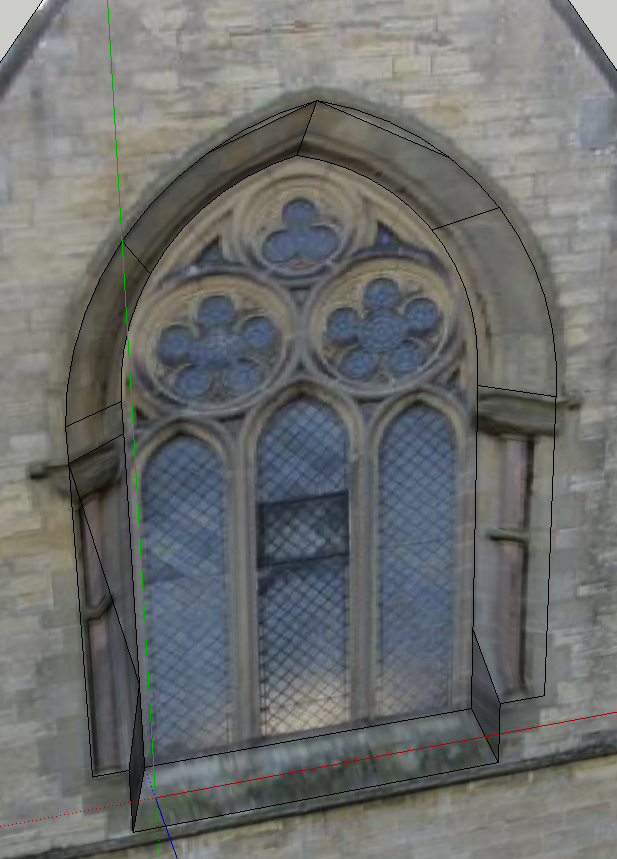
You can - just need to hide the lines that SU introduces. I wasn't sure quite where you wanted the recess to start.
Here's what happened when I tried it. The black lines you see can be hidden with the alt-eraser.

-
RE: Problem when creating recessed windows
I have modified your model here. Simply, I added an offset outside the window and connected it to the window frame with a few lines at top. mid-sides, bottom corners and then moved that back 400mm.
Be sure to lock in the z axis for the move (you have the face of the building lying on the ground) else you will simply be moving the window sideways.
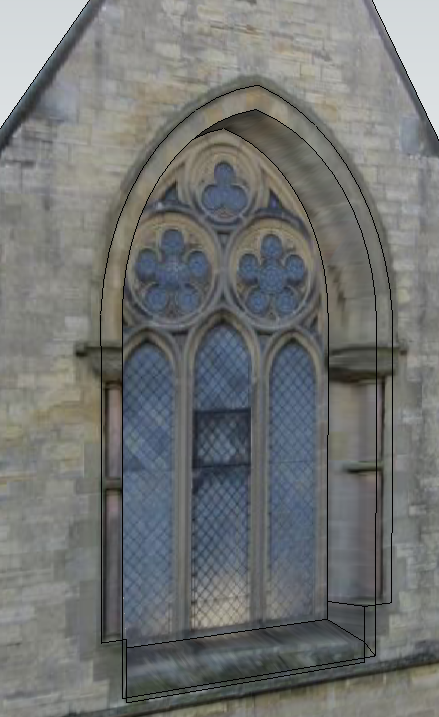
And with lines hidden.

-
RE: Problem when creating recessed windows
I am not seeing the problem - your model unchanged allowed me to do this (window pushed back 400mm). I can also push the outer face back without problems too - in case that was what you mean.
Perhaps I have misunderstood your problem?

-
RE: Dockable tools for Sketchup
Thoughts about what exactly? You'll need to amplify your question.
-
RE: [Plugin] Geom Interpolated Curve ver. 1.3.
Dave,
I don't know if it helps but here is a little video I made of using it.
-
RE: [Plugin] Geom Interpolated Curve ver. 1.3.
Dave,
I have tried this and find it a bit hit and miss to pick a control point. You have to move the select tool around a fair bit until a tool tip says "Guide point". You can click on this and the curve turns red and a message in the status bar says "Feel free to pick a c_point to interact with" then clicking on that point allows you to move the point and the line will follow.
