sketchucation logo sketchucation
    • Login
    1. Home
    2. Box
    3. Posts
    Oops, your profile's looking a bit empty! To help us tailor your experience, please fill in key details like your SketchUp version, skill level, operating system, and more. Update and save your info on your profile page today!
    πŸ”Œ Easy Offset | Offset selected faces in SketchUp in positive and negative offsets. Download
    Offline
    • Profile
    • Following 1
    • Followers 4
    • Topics 46
    • Posts 5,313
    • Groups 1

    Posts

    Recent Best Controversial
    • RE: Woodworking

      One of the best things you can do is watch lots of the video tutorials on youtube.
      Watch one section and then try it out then move to the next one.
      After a while you'll start to search for specific problems.

      There are so many simple little things that you will never stumble upon yourself. And a vid is so much better than a book to get things moving, then the book can solve the bigger problems.

      A couple of links.

      http://www.youtube.com/results?search_query=sketchup+tutorial&aq=1
      http://www.youtube.com/user/aidanchopra
      posted in SketchUp Tutorials
      BoxB
      Box
    • RE: Stretching to an exact dimension (inches)

      Most tools in sketchup work that way. You can finish the shape and then type the size or number of sides or distance etc.
      As long as you haven't started to do anything else whatever you type will be the focus of the last tool.

      posted in Newbie Forum
      BoxB
      Box
    • RE: Stretching to an exact dimension (inches)

      Click and move the scale in the direction you want, then click again, then type in your 1" and hit enter, or click drag and release, type your size and hit enter.

      posted in Newbie Forum
      BoxB
      Box
    • RE: Dimensioning to a sideline not a point

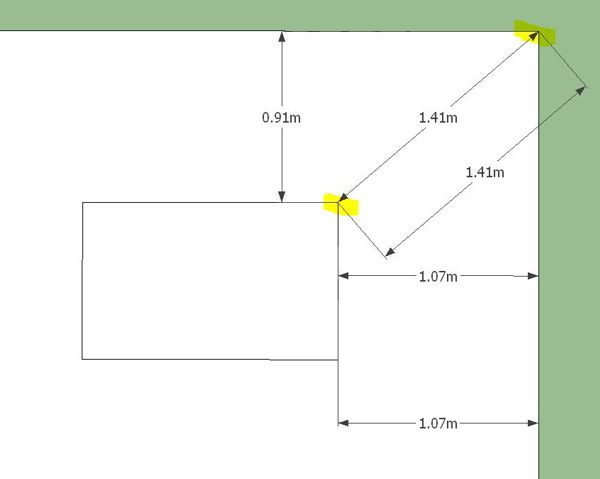
      You can basically click corner to corner and then move to the position you want and the dimensions will adjust accordingly.

      All of the measurements in this image are made from clicking the two highlighted points.


      Dims.JPG

      posted in LayOut Discussions
      BoxB
      Box
    • RE: Change location of the plugins folder in SU8

      I'm not sure, but perhaps this recent thread will help.
      http://forums.sketchucation.com/viewtopic.php?f=323&t=35803

      posted in Plugins
      BoxB
      Box
    • RE: My Plugins Folder

      Which is why I kept a copy of the original folder before adding anything. Although there is very little in it.

      posted in Plugins
      BoxB
      Box
    • RE: My Plugins Folder

      Why don't you rename the folder to OldPlugins or some such, start a new plugin folder and just add the ones you need as you go.

      posted in Plugins
      BoxB
      Box
    • RE: Having alot of problems with curves

      Sounds like you need Bezier Spline
      http://forums.sketchucation.com/viewtopic.php?t=13563
      and curve maker is another good one.
      http://forums.sketchucation.com/viewtopic.php?t=35614

      posted in SketchUp Discussions
      BoxB
      Box
    • RE: [Plugin] ExtrudeTools - Full Set

      Indeed you can, I just didn't know how, now I do. Thanks again.

      posted in Plugins
      BoxB
      Box
    • RE: [Plugin] ExtrudeTools - Full Set

      Just a thought Tig for another useful extrude.
      Extrude Edges by Rotation.

      I can see many uses for it. Most of them are possible another way but it would be nice to simply select an edge or face and extrude it around a point, much like extrude by vector. Handy for doing curved corners in pipes or adding a radius surface to a box etc.

      Just an idea as I find I use your extrusion tools all the time and this is the only one I seem to miss.

      posted in Plugins
      BoxB
      Box
    • RE: Visual Puns & Puzzles

      No offence taken, just the gate.

      posted in Gallery
      BoxB
      Box
    • RE: Visual Puns & Puzzles

      Ah Mr Lay you are so right, but I think I can be forgiven for not going all the way back to page 25 to check.

      posted in Gallery
      BoxB
      Box
    • RE: Visual Puns & Puzzles

      A quick morning coffee one.


      Puns2.JPG

      posted in Gallery
      BoxB
      Box
    • RE: Visual Puns & Puzzles

      Tunnel boring machine.

      posted in Gallery
      BoxB
      Box
    • RE: Visual Puns & Puzzles

      Please tell me it's not like the German word Bohrmaschine, as in Drill or boring machine.

      posted in Gallery
      BoxB
      Box
    • RE: SketchUp 16?

      @aerilius said:

      We need a "kinect ruby" πŸ˜„

      I'm actually working with a guy in Finland to make this possible.

      posted in Corner Bar
      BoxB
      Box
    • RE: Hidden geometry

      I quite agree Gaieus, which is why I said it only works if the shape is suitable.

      posted in SketchUp Discussions
      BoxB
      Box
    • RE: Hidden geometry

      You can unsoften all the geometry of one and hide the other.
      It will only work if the shape is suitable but it does work.
      This is a bit of overkill but it is what I was doodling with when I read your post.


      Hidden.JPG

      posted in SketchUp Discussions
      BoxB
      Box
    • RE: Visual Puns & Puzzles

      Mine's an espresso!

      posted in Gallery
      BoxB
      Box
    • RE: Visual Puns & Puzzles

      Ah mitcorb, I suspect you are wrong but you made me think a different way about the tyres.

      so I think it is magnet.

      Edit: that damn dave always winning the speed modelling, always getting the clues.........

      posted in Gallery
      BoxB
      Box
    • 1
    • 2
    • 254
    • 255
    • 256
    • 257
    • 258
    • 265
    • 266
    • 256 / 266