Redid shortcut M to MoveAlong as I did B to ThruPaint. Awesome 
Oops, your profile's looking a bit empty! To help us tailor your experience, please fill in key details like your SketchUp version, skill level, operating system, and more. Update and save your info on your profile page today!
⚠️ Important | Libfredo 15.6b introduces important bugfixes for Fredo's Extensions Update
 Offline
Posts
-
RE: [Plugin] MoveAlong - v1.2b - 07 Jul 14
-
RE: Modern Bedroom: "The Lion Sleeps Tonight"
@unknownuser said:
You must be very well awake the morning if youn don't want miss the stairs!

I agree: without a railing across the edge this is an accident waiting to happen. Nothing to do with the model and render which are great.

-
RE: Another Plugin Store Request
Sneaky (being graphically inclined I was expecting a tab), but very glad it's there. Thank you.
But also agree with Jim, so add me as a +1. -
RE: [plugin] Rotated Box [updated 30-Mar-2014]
@the.pjt
3Pts_Tools is a great tool set (yours and Sam's) and the toolbar.Comments:
-
Works fine in SU13, but the cylinder creation is somewhat counter-intuitive: In the Box Tool the base is created first, then the height. In the Cylinder Tool it is the opposite: the height is created first, then the radius. Not a deal-breaker, but it would be better (IMO) if they were both in the same order; base, then height.
-
In SU13 it works whether in the 'standard' plugin folder or in an 'additional' folder. In SU14 it does not load successfully in either location: I get load errors in either folder.
-
-
RE: [Plugin] Layers Panel 1.2.1
@jiminy-billy-bob said:
@bob james said:
What's more, sometimes undo does work.

Hmm, so not every time? Do you know in which case it doesn't happen? Or in which case it happens?
Does it happen in every file?For large files (e.g., >100MB): Yes, but not on every attempt to undo!!
-
RE: [Plugin] Layers Panel 1.2.1
@jiminy-billy-bob said:
Every time you undo?
Ctrl-z or Alt-backspace
Have to repeat many times before undo happens: most times undo never happens.
What's more, sometimes undo does work. -
RE: [Plugin] Layers Panel 1.2.1
I still cannot undo without this appearing keeping the undo from happening:
Undo Layers Panel ID

-
RE: [Plugin] RichSection V0.5.8 UPDATED march 2015
Works fine in the 'standard' plugin location (C:\Users\Bob\AppData\Roaming\SketchUp\SketchUp 2014\SketchUp\Plugins), but does not work (gets loading errors) in additional plugin location
-
RE: [Plugin] Custom Toolbars Plugin
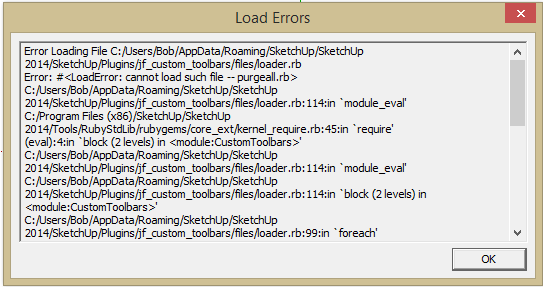
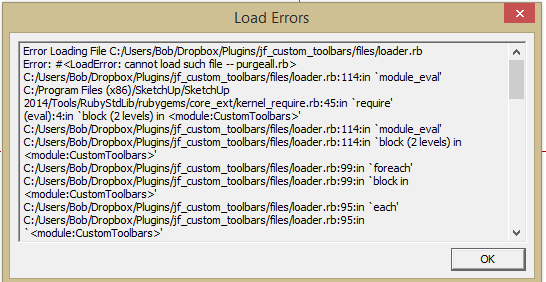
Tried both 'standard' plugin location and additional location.
-
RE: [REQ] un-select everything
Thanks:I was looking for 'deselect all'
@unknownuser said:
but in the shortcuts menu there is an option for 'deselect all'
-
RE: [REQ] un-select everything
@baz said:
This doesn't 'back out' like the escape key
That's the whole point of this discussion. Deselecting something buried within a component/group still leaves you inside the group/component. Backout deselects and brings the cursor all the way out of the group/component leaving you free to select something else in your model.
By the way:,I can't find this:
@unknownuser said:
but in the shortcuts menu there is an option for 'deselect all'
-
RE: [REQ] un-select everything
@unknownuser said:
Funny how people can be talking about the same thing and not notice.
massimo did notice.
@massimo said:
@krisidious said:
Esc does work and I use it often... But something to exit out of all groups and unselect everything back to the top of the model hierarchy would be nice.
This works like a charm.
That's what led me to turn Jim's code into backout.rb
-
RE: Deep nest
@jim said:
Bob, I could put "BackOut.rb" in the Plugin Store, if that would be alright with you.
It's your plugin, all I did was give it a name
@jim said:
Although I wonder if it's worth it for what is practically a one-liner; but I suppose code size isn't always related to usefulness.
This one is worth it
-
RE: Deep nest
@jim said:
Paste this into a file with the .rb extension in your plugins folder.
> UI.add_context_menu_handler {|menu|
>   menu.add_item("Close All Contexts") {
>     Sketchup.active_model.selection.clear
>     while (Sketchup.active_model.close_active); end
>   }
> }
>
Called it BackOut.rb, assigned a shortcut to it, added it to a key on my P.I. Engineering x-keys keyboard and now I can back out from within any group/component with one key. Sure beats pecking at the Escape key
Thank you very much -
RE: [Plugin] Layer Zero Fixup Tools
@jclements said:
Here are links to PutOnLayer
http://rhin.crai.archi.fr/rld/plugin_details.php?id=315And PutOnCurrentLayer
http://rhin.crai.archi.fr/rld/plugin_details.php?id=312@jclements said:
I combined the two into one.
Where

-
RE: [Plugin] SketchUcation Tools 2.6
EDIT:Rats! Guru Dan got in before I finished.
Advice from a definitely Non-Guru but battle-hardened source
@djohnson.nz said:
Hi Guys,
Is it intended that they only keep track of plugins each of them downloaded or are they supposed to look at the plugins folder and identify all the plugins then work the updates, would that even be possible.SketchUp Plugin Store can only 'see' what it has loaded.
@djohnson.nz said:
The transition to sketchup 2014 has been difficult with some of the old plugins not working anymore and copying the plugins folder from one version to the other is becoming more unreliable. Can you offer any advice as to a good way of dealing with this issue.David.
Take heart! We are all "suffering" to one degree or another. If all of the plugins in existence had been converted to account for the new version of Ruby, then the answer would be easy (somewhat tongue in cheek): Start fresh and load all of your plugins with SketchUp Plugin Store.
The problem has many faces (here are five of them):
- Most, but possibly not all, of the 'SketchUcation' plugins will eventually be updated, but have not yet gotten there.
- Many of the 'old standby" plugins are not and may never be updated because they come from 'other' sources (SMustard, blogs, etc.)
- Some of the converted plugins do not run in 'additional folders' (if you, like me, want a 'standard plugin folder available in a cloud' (e.g., Dropbox) so your home desktop, laptop and work desktop all have the same plugins available)
- There are two 'legal' folders for plugins: one for plugins that will be used by multiple users of a computer, and the 'standard' folder C:/Users/Bob/AppData/Roaming/SketchUp/SketchUp 2014/SketchUp/Plugins/. The new standard folder was created to eliminate the confusion stemming from not having permissions to access the plugins folder in the pre-2014 SU. (How's that working for you

 )
) - And, inevitably, some (hopefully small) subset of the converted plugins may not 'play nice' with each other.
Fortunately, at this point in time, most of the issues have been identified, but it has been a very bumpy road getting here.
Soooo: As I said at the beginning: Take heart! Start fresh and load all of your plugins with SketchUp Plugin Store. Unless there is no other apparent alternative, don't copy and paste from a previous SU version's plugin folder, but if you must then do it one at a time or you'll really find yourself in a mess.
-
RE: [Plugin] Layers Panel 1.2.1
Any updates you'd care to share on the work to make LP and Thea work together?
-
RE: Sketch
The talent of the artist in the video Solo posted has crossed the line into magic.
