Loaded into SU 2013, signed in, created pipe, clicked on route pipe, clicked on start point, dragged cursor ....... nothing happens except pipe definition disappears.
Our system has pipes up to 18" diameter: program only goes to 4".
 Offline
Loaded into SU 2013, signed in, created pipe, clicked on route pipe, clicked on start point, dragged cursor ....... nothing happens except pipe definition disappears.
Our system has pipes up to 18" diameter: program only goes to 4".
@dave r said:
This was just a quick doodle.
You're just trying make me feel hopelessly inadequate aren't you. 
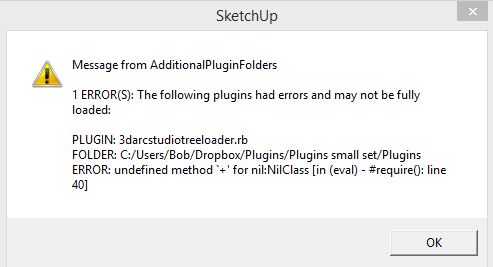
I use the "additional plugin locations" plugin and installed Tree Maker in my additional location. Tree Maker is one of those plugins that need to be in the default location. When I moved it to the default directory, it worked fine.
Loaded new version. Get error
@tig said:
There's a Plugins > SketchUcation item 'SketchUcation Plugins Uninstaller..'
That opens a dialog similar to the Plugins Manager.
It lets you Uninstall selected Plugins - the rb/rbs/rb!/rbs! files are renamed with a final x - rbx.rbsx/rb!x/rbs!x
They do not then appear in the 'Plugins Manager' or 'My Installs' lists.
You can Reinstall any 'x' plugins using the same dialog too.
I had not realized this was available 

Very handy. 
Seems like this should also be in SketchUcation Plugins Store in the "My Setup" 
For large projects, I often have multiple complex SU files open. This means I have multiple Layers, Entity Info, etc. windows open. But there’s no way to quickly tell which SU instance they belong to.
Would it be possible to have the file name appear in each window?
For example:
Layers - Airlock
Layers - Highbay
Layers - Transfer Tower
Entity Info - Airlock
Entity Info - Highbay
Entity Info - Transfer Tower
etc
@rich o brien said:
and who good members are.
What's a "good" member?
Why this sudden interest in voting. This incredibly useful forum has been operating very well without it for several years.
Using "+1" tells me someone agrees and even who it was.
@jiminy-billy-bob said:
@bob james said:
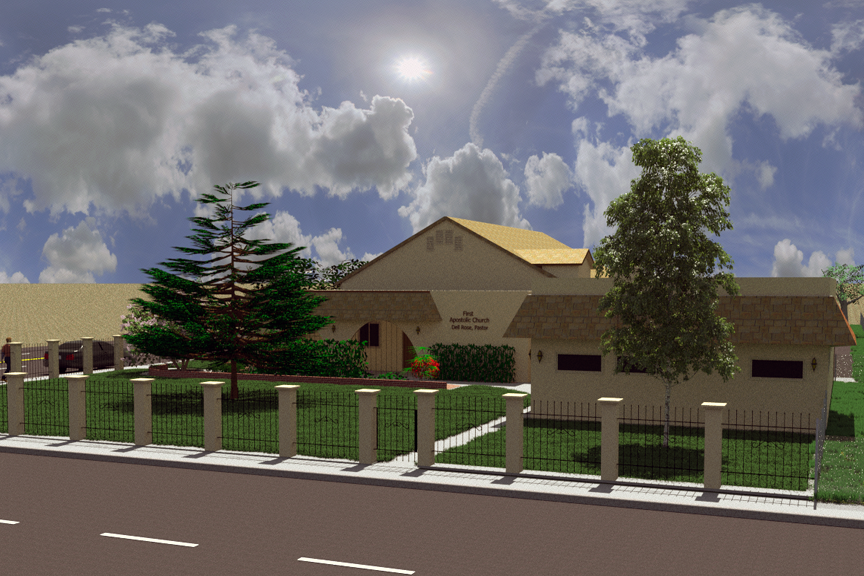
[Rendered with Thea Presto 1.3 in 45 seconds!]
I suggest you check your skybox, the mapping looks weird.
Can you help me by explaining what seems "weird"? 
I was working on a project to update a church that required a "Star Pine" and could not find a model anywhere. I happened upon this thread and downloaded Tree Maker. In less than an hour I had a tree that was more than adequate to match the existing tree (at least from the distances I needed).
VERY USEFUL - Thank you and keep up the great work!!
[Rendered with Thea Presto 1.3 in 45 seconds!]
@pbacot said:
Funny, that looks like a style of adding mortar so it looks rustic, but not done commonly. Bob, don't see what you mean. There are pan tiles (Light colored) in the picture. Does this make a tileable texture?
You can see the concrete better in this view:
http://www.ustile.com/Pages.aspx/Cielo-Imported-Tile
I'm used to S-tiles which make the "pan" area and the tile the same color (i.e.; not a common color for the whole pan)
@krisidious said:
looks good... don't know what's up with the cotton?
I'd guess that's supposed be the concrete used to bind the tiles and the roof.
But the tiles must touch horizontally!
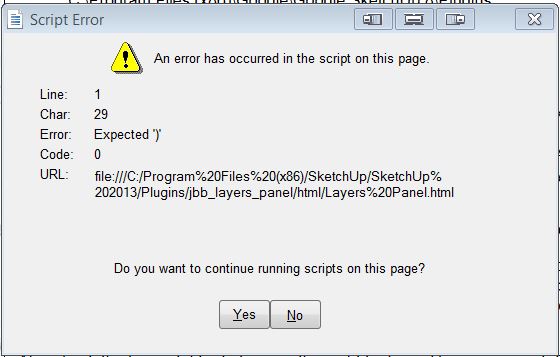
Still having some problems:
After working with a new model for a while I start getting this error.
@huckrorick said:
Re:
"It auto-updates the layer state of the current scene.
If you turn on or off a layer, it's saved in the scene.Isn't that what I would want to happen??"
From my use I would not want that to happen. When I open a scene I frequently want to turn on and off other layers while I'm examining the model. I do not want those changes automatically made to the scene. If I want the changes, then I click "update". It would be VERY inconvenient for my use to have every layer I turn on or off added to the scene.
Your logic has changed my mind: I agree with you 100%.
You continue to be awesome, Rich! A new set of twins and now an improved PluginStore.
@unknownuser said:
we could perhaps tell you that you have a list of plugins which you haven't got from the PluginStore, and then if we have equivalents available for you
I know it makes me appear the sluggard that I am, but that feature would be handy. I have 118 rb files and associated extensions (or not as the case might be). I have a list of the plugins I've purchased from other sources (Smustard, etc.) and a file of the rbz's I've downloaded, but it would be handy to know if some of them are in the PluginStore: especially to have the update notification.
Did fresh install of everything and the problem went away except for one model. I turned off all the layers and had no problem so I added one of the 40-or-so layers at a time and found one of the layers was causing the LP open/close error. Weird 
All seems to be well here at home. When I get to work I'll see how it goes there.
@jiminy-billy-bob said:
It auto-updates the layer state of the current scene.
If you turn on or off a layer, it's saved in the scene.
Isn't that what I would want to happen??
@tig said:
The SketchUcation Plugins Manager [and its other siblings - Extensions Manager and Plugins Uninstaller] will allow you to select multiple items in either column - Loaded/Enabled or Disabled - clicking and holding the Ctrl for individual items added to the selection or Shift key to add all up/down from the last one you selected [like any Windows app]...
Then click the red > button to disable as desired.
Thanks, TIG, that's what I did: I selected all of the plugins except Layers Panel using Shift Select and hit the disable button. They all went to the disabled side. I restarted SU and only the first plugin was shown in the disable column. I tried more than once because that's how I disabled all of the extensions in the Extension Manager.
@tig said:
IF you made a named 'Set' [blue button] of the current Plugins set up... BEFORE doing major change... then you can easily revert to that named 'Set' on a later occasion..
Neat idea
If I make a named set containing all of my plugins and another containing only Layers Panel, if I turn off the "everything" set and turn on the LP set will SU think Plugins contains only LP?
@jiminy-billy-bob said:
Can you try with all the other plugins disabled ?
I have 188 rb files. I used SketchUcation Extensions Manager and was able to disable all the other extensions (that had no effect on the problem[s]). But SketchUcation Plugins Manager can only disable one plugin at a time.  So disabling all of the rb files one at a time is not very desirable.
What I will try is: disable my Plugins folder and make a dummy with just Layers Panel and whatever basic plugins are required.
@jiminy-billy-bob said:
So, the error pops up even when the dialog is closed ?
No. I have it set to open when SU starts. But it "errors" when I turn it off and then on again.
From previous post: Disabling the auto-update option seems counter-intuitive. What does "auto-update" do?