@rich o brien said:

How to use Bundles to sync your SketchUp extensions | SketchUcation
Various SketchUp and LayOut tutorials written by the most respected members of the SketchUcation Community.

(sketchucation.com)
Does this help?
Oh my YES 
 Offline
@rich o brien said:
How to use Bundles to sync your SketchUp extensions | SketchUcation
Various SketchUp and LayOut tutorials written by the most respected members of the SketchUcation Community.
(sketchucation.com)
Does this help?
Oh my YES
New machine

How can I do a one-time "re-education" of SketchUcation Tools 2.6.1 so it "knows" what plugins/extensions I have?
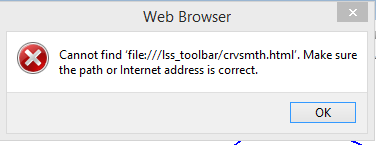
I get the attached error (and similar other errors with other buttons) when trying to use the Toolbar
Now if I could just get Thea to render it, my graphics life would be great!! 
Since, for some reason, I can't get symbolic links to work with SU 2014 plugin, components and materials folders, I need some alternative (at least for plugins). SketchUcation Bundles seem to be the answer (except there is no synchronization to one folder on, say, Dropbox).
I assume that Bundles puts each machine's plugins in the cloud, but only those plugins in the default folder [C:\Users\jamesb\AppData\Roaming\SketchUp\SketchUp 2014\SketchUp\Plugins]. To minimize the files on my drive (an SSD), I use Fredo6's Additional Plugin folder on Dropbox for most of my plugins, but many plugins/extensions don't work unless they are installed in the default folder.
I have three computers: work, home and laptop. Currently, each has a different bundle. How do I get all bundles loaded with the same plugins. If I'm on my home machine do I click on the Work machine's bundle icon for "autoinstall all plugins in the bundle" (after assuring that work machine has all the plugins that must be loaded in the default folder)?
If I add a new plugin to one computer is there a way to update the other computers for just that new plugin or do I have to reinstall all the plugins and extensions?
How do I tailor a bundle? I tried clicking on individual plugins in the bundle list to delete them, but that doesn't work.
@dave r said:
So you've got it sorted? That's good.
Why don't you just make a bundle of plugins using the SCF Plugin Store and use that to keep all your machines up to date?
Don't know how to do that - never had the occasion to learn.
@box said:
Bob, not mentioning that you were using a symbolic link would seem to be a rather crucial bit of info.
Your real issue here is not that your plugins aren't working but that the symbolic link isn't working.
Perhaps someone has a solution for that.
Since that is how I've always done it, it never occurred to me to mention it. Sorry.
@tt_su said:
Can you describe exactly how you set up the symbolic links?
The BugSplats disappeared when you removed the symlink?
I have always used a symbolic link for plugins, components, etc. to assure I have the same choices on all the machines I use. Doesn't work for SU 2014 on Win 8.
When I copied the actual plugin folder from Dropbox to SU it worked fine.
Bummer about symbolic links.
Thank you both for your help
@tt_su said:
BugSplats?
Did you submit those? If so, did you enter any description we can use to look it up? If you didn't, can you try again?
Yes, but I'll do it again.
Did it
I said this in the explanation
"Attempting to install extension into SU 2014 Pro on Win8"
Signed up and received this:
@unknownuser said:
Hello,
Thank you for subscribing to TM Trial.
We are very close to the release of our trial version. We will keep you updated and let you know as soon as it is available.
We are excited to provide you with information, tips and tricks, case studies and simplify your daily work with tailor made tools for architecture.
We promise to make it about you, to assist you with the ressources you need.
Please feel free to get in touch with us and let us know If there is anything we can do to help you with your Twinmotion experience.
TM Team
@dave r said:
Where did you put the plugins files? Is it under Users/Bob James/AppData/...
What happens if you install a plugin via the Extension Warehouse? Will it show up? Can you download the RBZ file for the Sketchucation Plugin Store and install it via Install Extension? Does it show up?
C:\Users\Robert\AppData\Roaming\SketchUp\SketchUp 2014\SketchUp\Plugins
Extension Warehouse installation attempt = Bugsplat
Preferences/Extensions/Install Extensions = Bugsplat


I had to redo my Win8 laptop and now it won't see any plugins except 3skeng. I've done everything in Tig's post and Rich's tutorial to set permissions and run as administrator, but still get no plugins (Which are the plugins I saved before redoing the laptop).
I tried loading an .rbz with Preferences, but SU immediately crashes.
Help 
Thank you mtriple. The file downloaded from the website just kept giving loading errors.
I display on an 80 inch display during meetings. There's even a plugin that makes the model area full screen
Super work, Rich, and will be very useful to me since I live on the Pacific coast.
Thank you not only for these, but for all the tireless effort you put in to make a great graphics environment for us all.
Downloaded V 2.0.2 but the toolbar has only the red icon (the blue one is "missing")
Thank you!
I've started a folder to house all of the potentially useful (to me) components I create for each project so I have them available for future use. I know I could have been doing this by hand all along, but now I have no excuse because you've made it so easy.
Thank you again
Unfortunately that's for an earlier driver version.
The big thing is that the new version does not even have the choices for Navigation Modes in Advanced Settings!! 