[REQ] un-select everything
-
Hi all,
I use ESC to exit components/groups i have no problem with that. I dont even need a function exit all, because its not that difficult to hit esc four times to exit from the nested group. And even i thing it helps me to be aware on witch layer in the nest am I.
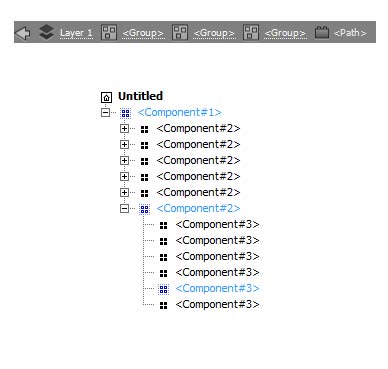
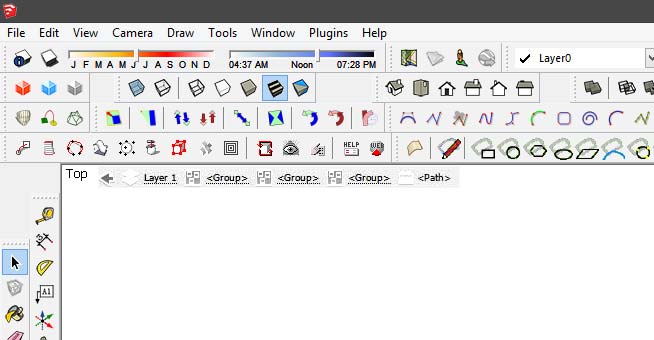
But still sometimes I loose track of things and i would like some visual clue. I know there is outliner and it serves this purpose well. But it gets messy sometimes and for good orientation takes a lot of my screen space. I would like something illustrator has. see attachment.
what do you think?T.
-
-
@unknownuser said:
@unknownuser said:
But it gets messy sometimes
Sure if all components are named "Component"!

Have you been looking at my models again Pilou?
-
Funny how people can be talking about the same thing and not notice.
@bob james said:
@jim said:
Paste this into a file with the .rb extension in your plugins folder.
> > UI.add_context_menu_handler {|menu|
> >   menu.add_item("Close All Contexts") {
> >     Sketchup.active_model.selection.clear
> >     while (Sketchup.active_model.close_active); end
> >   }
> > }
> >
Called it BackOut.rb, assigned a shortcut to it, added it to a key on my P.I. Engineering x-keys keyboard and now I can back out from within any group/component with one key. Sure beats pecking at the Escape key

Thank you very much
-
-
-
@unknownuser said:
Funny how people can be talking about the same thing and not notice.
massimo did notice.
@massimo said:
@krisidious said:
Esc does work and I use it often... But something to exit out of all groups and unselect everything back to the top of the model hierarchy would be nice.
This works like a charm.
That's what led me to turn Jim's code into backout.rb
-
@bob james said:
@unknownuser said:
Funny how people can be talking about the same thing and not notice.
massimo did notice.
@massimo said:
@krisidious said:
Esc does work and I use it often... But something to exit out of all groups and unselect everything back to the top of the model hierarchy would be nice.
This works like a charm.
That's what led me to turn Jim's code into backout.rb
-
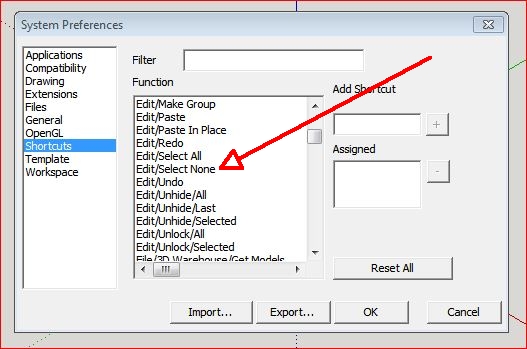
Perhaps I am misunderstanding the issue but in the shortcuts menu there is an option for 'deselect all' This doesn't 'back out' like the escape key but does exactly what it says.
I have it set as 'shift D'Baz
-
@baz said:
This doesn't 'back out' like the escape key
That's the whole point of this discussion. Deselecting something buried within a component/group still leaves you inside the group/component. Backout deselects and brings the cursor all the way out of the group/component leaving you free to select something else in your model.
By the way:,I can't find this:
@unknownuser said:
but in the shortcuts menu there is an option for 'deselect all'
-
-
Thanks:I was looking for 'deselect all'
@unknownuser said:
but in the shortcuts menu there is an option for 'deselect all'
-
@bob james said:
Thanks:I was looking for 'deselect all'
@unknownuser said:
but in the shortcuts menu there is an option for 'deselect all'
my bad

-
@gilles said:
@jeff hammond said:
are we talking about exiting groups or un-selecting selected items?
 i'll read back through the thread a little later.
Both.
what if you aren't editing inside a group (raw geometry) and you have some items selected? will ESC deselect those items? i've tried it on a macpro and a mbp now and it works on neither. for that, i have to use the 'select none' shortcut.
(though the way i usually do this when there is no blank space to click in is to select a new item which i can see then shift-select it in order to clear all selections.. just i bad habit i've developed over the years where i should probably be using the shift-cmmd-A shortcut) -
@jeff hammond said:
@gilles said:
@jeff hammond said:
are we talking about exiting groups or un-selecting selected items?
i'll read back through the thread a little later.Both.
what if you aren't editing inside a group (raw geometry) and you have some items selected? will ESC deselect those items? i've tried it on a macpro and a mbp now and it works on neither. for that, i have to use the 'select none' shortcut.
(though the way i usually do this when there is no blank space to click in is to select a new item which i can see then shift-select it in order to clear all selections.. just i bad habit i've developed over the years where i should probably be using the shift-cmmd-A shortcut)Yes this works, I' running Mountain lion Mac book pro SU V8.
As I said before ESC does not deselect with some tools when they are active.
-
@gilles said:
Yes this works, I' running Mountain lion Mac book pro SU V8.
As I said before ESC does not deselect with some tools when they are active.
well.. that's just strange (tried it in su8 too on lion and mavericks-- with various active tools).. i'm sure there's a reason behind the differing behaviors on our computers but i guess it's not important enough to figure out.
fwiw, i do use the ESC key often in sketchup but i use it as a cancel button while drawing (for instance, i use the line tool if i need to measure something but i ESC once i see the dimension in the measurement box.. or if i misplace the beginning click of a tool etc..)










Hello! It looks like you're interested in this conversation, but you don't have an account yet.
Getting fed up of having to scroll through the same posts each visit? When you register for an account, you'll always come back to exactly where you were before, and choose to be notified of new replies (either via email, or push notification). You'll also be able to save bookmarks and upvote posts to show your appreciation to other community members.
With your input, this post could be even better 💗
Register Login


Advertisement